Microsoft email authentication
 ChatGPT
 Claude
 Gemini
 Perplexity
 Grok
GrokIn brief
Microsoft email authentication can mean account sign-in, account security, or sender-domain authentication. Identify the task before taking action.
Microsoft email authentication can mean three different tasks: signing in to a Microsoft account, securing that account with an extra verification step, or checking how a domain authenticates the email it sends. Those tasks use different evidence and different support paths. Start by identifying which one you need: account access, judging a suspicious message, or assessing a sending domain.
At a glance
Quick takeaways
- Microsoft Support separates Microsoft account sign-in help from account-security help.
- A sign-in issue is an account-access task, not evidence about a message's sender domain.
- Two-step verification concerns account security and does not establish whether a particular email is legitimate.
- A suspicious message needs Microsoft phishing guidance or the relevant organization's security process.
- Sender-domain authentication is a separate email-security topic from account sign-in.
- A public domain check cannot authenticate a Microsoft account or prove that a specific message is genuine.
How Microsoft email authentication works as a search intent
The phrase "Microsoft email authentication" does not identify one documented Microsoft feature in the available support material. It can describe an account holder trying to log in, a user being asked for an additional verification step, or an administrator trying to understand a domain's email-security posture.
Microsoft groups account access under Signing in with Microsoft, including the support topic "How to sign in to a Microsoft account." That is the appropriate branch when the problem is access to an account, such as an inability to complete sign-in or a request to confirm account ownership.
Microsoft also lists account-security help, including "Use two-step verification with your Microsoft account." Two-step verification is therefore an account-security topic in Microsoft's support structure. It should not be treated as proof that an email message was sent by Microsoft or by another organization.
The third meaning is sender-domain authentication. This concerns the domain shown in an email's visible From address and the evidence used to assess mail sent under that domain. It is different from an employee or consumer signing in to a mailbox. For the broader distinction, see email authentication and what email authentication means.
When the answer changes
Use the task in front of you to choose the next action.
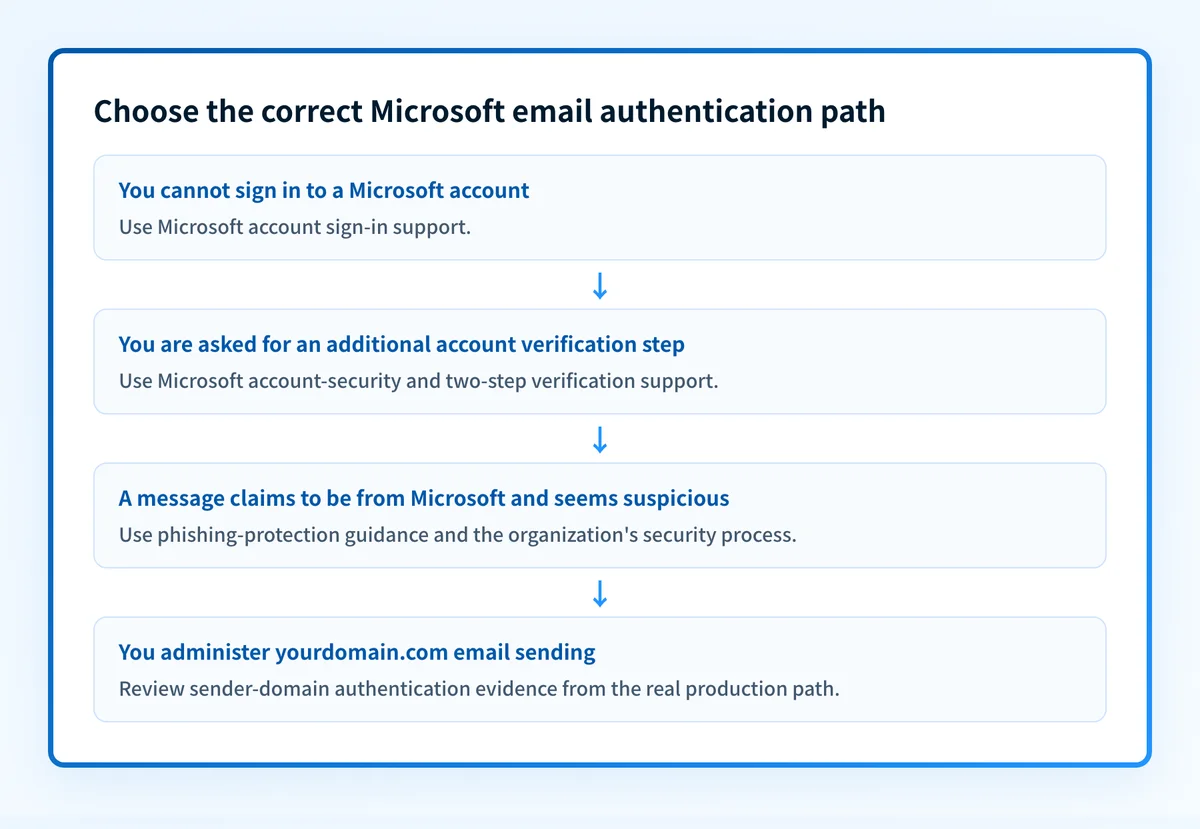
- If you cannot access a Microsoft account, use Microsoft's sign-in support. The relevant evidence is the account and the sign-in experience, not a public DNS result.
- If Microsoft asks for an extra verification step, use Microsoft's account-security guidance for two-step verification. Do not bypass a prompt based on an email alone.
- If an email claims to come from Microsoft and you doubt it, treat it as a possible phishing concern. Microsoft lists Protect yourself from phishing under its account-protection topics, but the available support material does not provide a message-verification procedure or header criteria.
- If you administer a domain that sends email through Microsoft services, keep the question separate from mailbox sign-in. You need current administrator documentation and evidence from the actual production sending path before changing domain settings.
Do not change DNS, mail-flow settings, or account-security controls because a login prompt or a suspicious message appears to point to one cause. Those are different problems and may require different owners.
The usable decision rule is: match the action to the evidence you have. An account prompt belongs with Microsoft account support. A suspicious message belongs with phishing guidance and your security team. A sender-domain question belongs with the domain's approved email-authentication process.
A worked decision rule
Use this evidence object before following a link, opening a ticket, or changing a setting:
Question: "What am I trying to authenticate?"
If the evidence is:
- A Microsoft sign-in screen or account-access problem
  Next step: Microsoft account sign-in support
- A request for an additional account verification step
  Next step: Microsoft account-security and two-step verification support
- A message claiming to be from Microsoft that seems suspicious
  Next step: Microsoft phishing-protection guidance or your security process
- A domain that sends organizational email through Microsoft services
  Next step: Review the domain's documented sender-authentication configuration
  and test the real production message path
This rule prevents a common category error: using a domain-security check to solve an account-access problem, or assuming that successful account authentication verifies a message's origin.
For domain work, record the exact sending domain, the application that sends mail, and a redacted sample from the real delivery path. A domain's public DNS state is only one layer of evidence. It does not prove that a production application is using the intended configuration, that a receiver accepted a message, or that future messages will reach the inbox.
Practical next step based on your evidence
If your immediate task is account access, go to Microsoft's support area for how to sign in to a Microsoft account. If the task is protecting the account, use the Microsoft Support topic for "Use two-step verification with your Microsoft account."
If the task is a message that may be fraudulent, use Microsoft's phishing-protection support and follow your organization's incident process. Avoid replying to the message, sharing a verification code, or entering credentials through a link in the message until the situation is resolved through a trusted path.
If you are responsible for a sending domain, first separate the domain question from the mailbox question. Then inspect your broader domain posture with the Email Security Score tool. For delivery failures involving Microsoft services, why Microsoft 365 blocks outbound emails is a more focused reading path than account sign-in help.
A domain check can help you inspect public email-security posture. It cannot authenticate a Microsoft account, validate a specific message claiming to be from Microsoft, prove the production sending path, or determine a receiver's private delivery decision.
Continue with the right email-authentication question
If you are trying to understand sender-domain authentication rather than Microsoft account access, continue with email authentication. That guide covers the broader concept without treating it as a substitute for Microsoft's account-support or phishing-help paths.
Evidence
Sources and further reading
Questions readers ask
Frequently asked questions
How do I authenticate my Microsoft email account?
Sign in through Microsoft's own account support, which covers signing in to a Microsoft account and setting up two-step verification. Type the support address into your browser rather than following a link in an email, then do whatever your account prompt actually asks for. That process is about account access, and it is separate from how your organization's domain authenticates the mail it sends.
How do I know if an email from Microsoft is real?
Do not try to judge it from the message itself. Open your Microsoft account directly in a browser and see whether the same notice appears there, and use Microsoft's phishing-protection support if it does not. Microsoft does not publish header criteria you can check on your own, so never enter a password or a verification code through a link in the email.
Why is Outlook asking me to authenticate?
Outlook shows that prompt when it needs you to prove access to the account again, and only the wording of your own prompt says why. Microsoft does not publish a list of causes for it, so read what it is asking for: a password, a second verification step, or permission to reconnect the account. Handle it through Microsoft account sign-in or two-step verification support, never through an email.
Why am I unable to authenticate my email?
That phrase covers several different problems, so name yours first. It may be a Microsoft account you cannot sign in to, an account-security step you have not finished, a suspicious message you are trying to verify, or a sending domain that is failing authentication checks. Each has a different owner and a different fix, so identify the evidence in front of you before changing any setting.
Does signing in to a Microsoft account authenticate an email message?
No, because signing in proves you can reach an account and nothing more. It does not confirm that a message you received is genuine, and it says nothing about how your organization's sending domain authenticates outgoing mail. Those are separate checks with separate evidence.
Check your domain against Microsoft’s sender requirements
Enter your domain.

Written by
Samuel ChenardCEO & Co-Founder, Palisade
Samuel Chenard is the CEO and co-founder of Palisade, agentic DMARC software for IT teams and MSPs, from one domain to thousands.
More from Samuel →