What is a good email deliverability rate?
 ChatGPT
 Claude
 Gemini
 Perplexity
 Grok
GrokIn brief
What is a good email deliverability rate? No universal percentage is reliable. Assess delivery, inbox placement, and provider results over time.
A good email deliverability rate is not one universal percentage. Judge performance by separating technical delivery from inbox placement, then comparing results by mailbox provider, message type, and time period. A rate that looks acceptable in an aggregate dashboard can still hide weak placement or a material change at one provider. The most useful benchmark is your own stable, segmented baseline and any change that needs investigation.
At a glance
Quick takeaways
- Delivery tracking and inbox placement are separate signals.
- No permitted primary source establishes one good or average email deliverability percentage.
- Compare results by mailbox provider instead of relying only on an account-wide total.
- Compare similar message types and periods before treating a change as meaningful.
- Domain authentication is a relevant sender-side diagnostic area, but it does not guarantee inbox placement.
- A public DNS or security check cannot reveal a receiver's private placement decision.
How email deliverability performance works
Email performance has more than one layer. A sending platform can track whether mail was delivered, while inbox placement asks where a receiving mailbox provider placed accepted mail. Litmus describes inbox placement, domain reputation, and engagement patterns as separate deliverability signals. Mailjet likewise presents delivery tracking and inbox landing as distinct parts of its email deliverability product page.
That distinction matters when someone asks for a good rate. An aggregate delivery result can answer one operational question: whether a platform reports messages as delivered. It cannot, by itself, show whether recipients saw those messages in the inbox, whether one mailbox provider produced different results, or whether a recent change affected a particular type of campaign.
For the underlying terminology, see email deliverability. This page answers how to interpret a result, rather than supplying a percentage that would imply comparable measurement across every sender and provider.
Mailbox-provider segmentation is also useful. Mailtrap describes showing key deliverability metrics for every mailbox provider. That product statement supports a practical operating rule: if provider-level views are available, inspect them before deciding an aggregate rate is good or bad.
When a good rate changes
The answer changes when the comparison changes. A delivery result from marketing mail may not be comparable to transactional mail. A result across all mailbox providers may not describe what happens at one provider. A current result may also be less useful than its direction against a stable baseline.
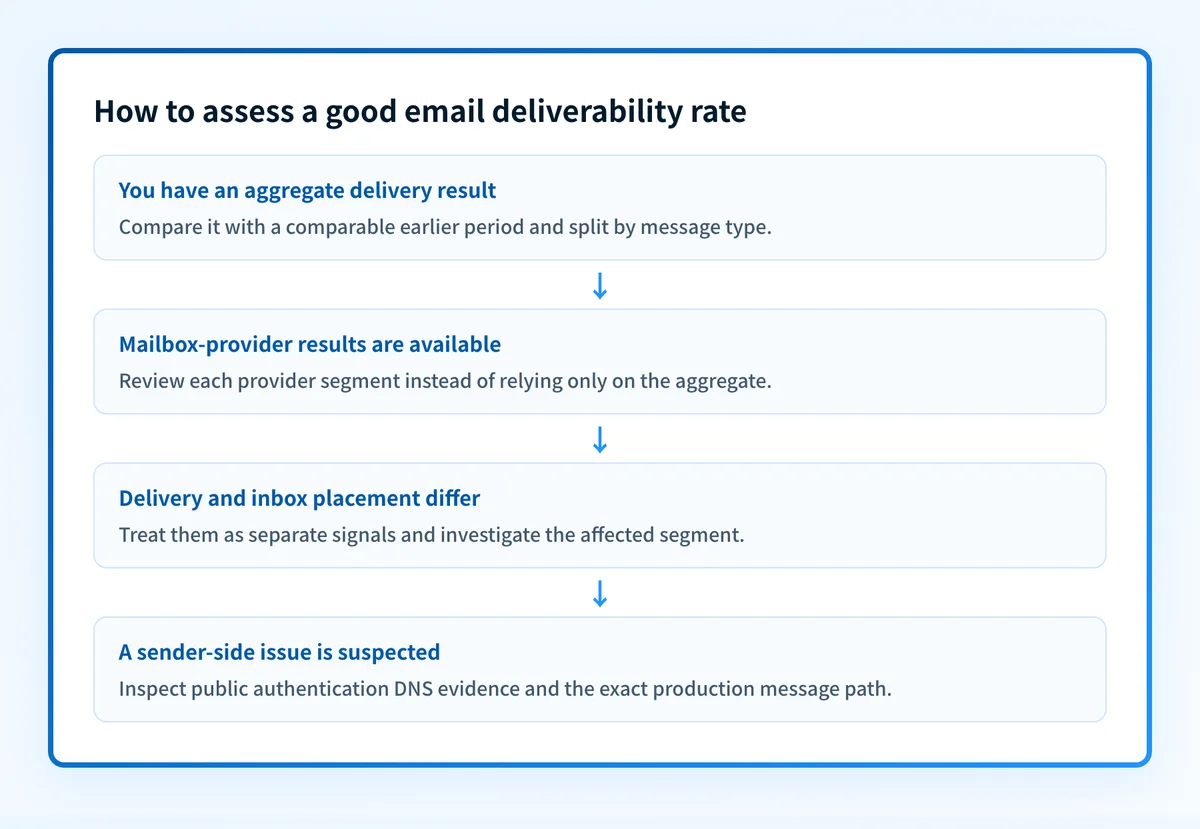
Use this decision rule:
- Treat delivery and inbox placement as separate measures when both are available.
- Compare the same kind of mail with an earlier, comparable period.
- Segment by mailbox provider where the sending platform provides that view.
- Investigate a material change in one segment before accepting an account-wide average as healthy.
- Review sender-side evidence, including domain authentication, when the change points to a sending-domain issue.
A receiver still makes its own delivery and placement decisions. Stronger authentication can support trustworthy mail handling, but it cannot guarantee delivery or inbox placement. Broader context is available in the email deliverability hub.
A worked deliverability-rate assessment
Suppose an email team sees a lower reported delivery result this week. The useful question is not "is this percentage above a universal benchmark?" Start by making the observation comparable.
Assessment period: Current week versus the previous comparable week
Message type: Product announcements only
Segments: Each available mailbox provider
Signals to compare:
- Reported delivery result
- Available inbox-placement result
- Domain reputation and engagement views, if available
- Published sender-authentication DNS evidence
Decision: Investigate any material segment-level change before judging the aggregate result
This is a decision format, not a formula. It avoids treating all sends as identical and keeps each evidence type in its proper scope.
For example, an unchanged account-wide figure does not settle the question if one mailbox-provider segment declines while another rises. Similarly, a strong inbox-placement result for one type of message does not prove the same result for a different sending path.
If the evidence points toward authentication, inspect the published DNS record separately from the delivered message path. A DMARC record lookup can show public DMARC DNS evidence. It cannot prove that a particular production message authenticated, that every legitimate sender aligns, or that a mailbox provider will place future messages in the inbox.
What to check next
Choose the next action based on the evidence you have:
- If you only have an aggregate delivery result, find a comparable prior period and split the available results by mailbox provider and message type.
- If you have inbox-placement information, compare it with delivery instead of treating either measure as a substitute for the other.
- If one provider or sending domain changes materially, review the sender-side signals available in your sending platform, including reputation and authentication-related evidence.
- If you need a foundation before interpreting the data, read email deliverability questions, answered.
- If delivery failures are the issue rather than placement, compare the result with what is a good email bounce rate?.
Inspect the sender-side security posture behind the result
When a rate changes and you need a starting point for sender-side investigation, inspect the sending domain's public email-security posture before assuming that one aggregate percentage explains the issue.
Inspect the email security score
A public domain check cannot measure inbox placement, prove a receiver's private reputation decision, monitor the production sending path, or guarantee future delivery. For ongoing DMARC work, Palisade's AI-first, agent-first DMARC software analyzes aggregate-report data, identifies authentication and alignment issues, and proposes next policy steps for human review.
Evidence
Sources and further reading
Questions readers ask
Frequently asked questions

Written by
Samuel ChenardCEO & Co-Founder, Palisade
Samuel Chenard is the CEO and co-founder of Palisade, AI-first DMARC software for IT teams and MSPs, from one domain to thousands.
More from Samuel →