Valimail BIMI checker: what you can verify
 ChatGPT
 Claude
 Gemini
 Perplexity
 Grok
GrokIn brief
Valimail BIMI checker guidance: confirm the available product scope, check public BIMI DNS evidence, and separate it from message and mailbox results.
A Valimail BIMI checker cannot be documented from Valimail's public product information alone. Valimail's homepage describes Monitor and Enforce in terms of DMARC visibility and enforcement, including "Get unlimited domain visibility, for free," but it does not identify a public BIMI checker or publish BIMI-specific result states. Confirm the current product scope first, then use a public BIMI lookup only for the DNS evidence it can actually inspect.
At a glance
Quick takeaways
- Valimail's public homepage describes Monitor and Enforce around DMARC visibility and enforcement, not a documented public BIMI checker.
- A public BIMI lookup can inspect published DNS evidence, but it cannot prove that a production sender used the intended path.
- A DNS result cannot prove that a mailbox provider displayed a brand indicator for a delivered message.
- Do not infer BIMI readiness from DMARC product visibility alone.
- A real delivered message, the relevant provider status, and later DMARC report data answer different questions from a public record check.
What this tool checks
A reader looking for a Valimail BIMI checker should first distinguish a vendor's DMARC products from a BIMI-specific public lookup. Valimail's public homepage positions Monitor and Enforce around domain visibility and DMARC enforcement. It does not provide enough published detail to establish that a public BIMI checker exists, what input it accepts, or which statuses it returns.
If the immediate task is to inspect public BIMI DNS evidence, use the Palisade BIMI checker. Treat the result as a point-in-time public lookup. It cannot see your sending-service configuration, private keys or certificates, a recipient mailbox's private decision, a delivered message's headers, or future mailbox display behavior.
That boundary matters when comparing tools and vendors. A public record can be present while the outbound application is not using the intended authenticated sending path. A delivered message can authenticate differently from what a DNS-only check suggests. A mailbox provider can also make display decisions that a public lookup cannot observe.
For background before testing, see what a VMC is. Keep the VMC question separate from the question of whether a public BIMI-related DNS record is visible.
How to run the check
1. Define the evidence you have
Start with the domain whose visible From address appears on the message or campaign you are investigating. Record whether you are trying to answer a DNS question, a sender-configuration question, a delivered-message question, or a mailbox-display question.
Do not use a domain-level visibility product as evidence that a BIMI configuration is present. The product category and the protocol evidence are different.
2. Confirm the Valimail product scope
Review Valimail's current public product information before relying on a Valimail-branded BIMI-checking workflow. The available public material describes Monitor and Enforce around DMARC, so it does not establish a BIMI checker URL, input form, result label, or repair threshold.
If your organization has a Valimail account, use its current product documentation or authenticated interface to determine whether a BIMI feature is available to your account. Do not infer a current interface label from an old image, a search result, or a third-party description.
3. Inspect the public DNS evidence
Submit the exact domain to the Palisade BIMI checker when you need a public DNS check. Save the domain, timestamp, and returned result so the same lookup can be repeated after a DNS change.
You can also preserve an independent public DNS observation with a command such as this:
dig +short TXT default._bimi.yourdomain.comThis command queries one example BIMI DNS owner. yourdomain.com is illustrative only. Do not publish or reuse another organization's record values, logo locations, certificate locations, or account-generated DNS targets.
4. Keep the tool result separate from message evidence
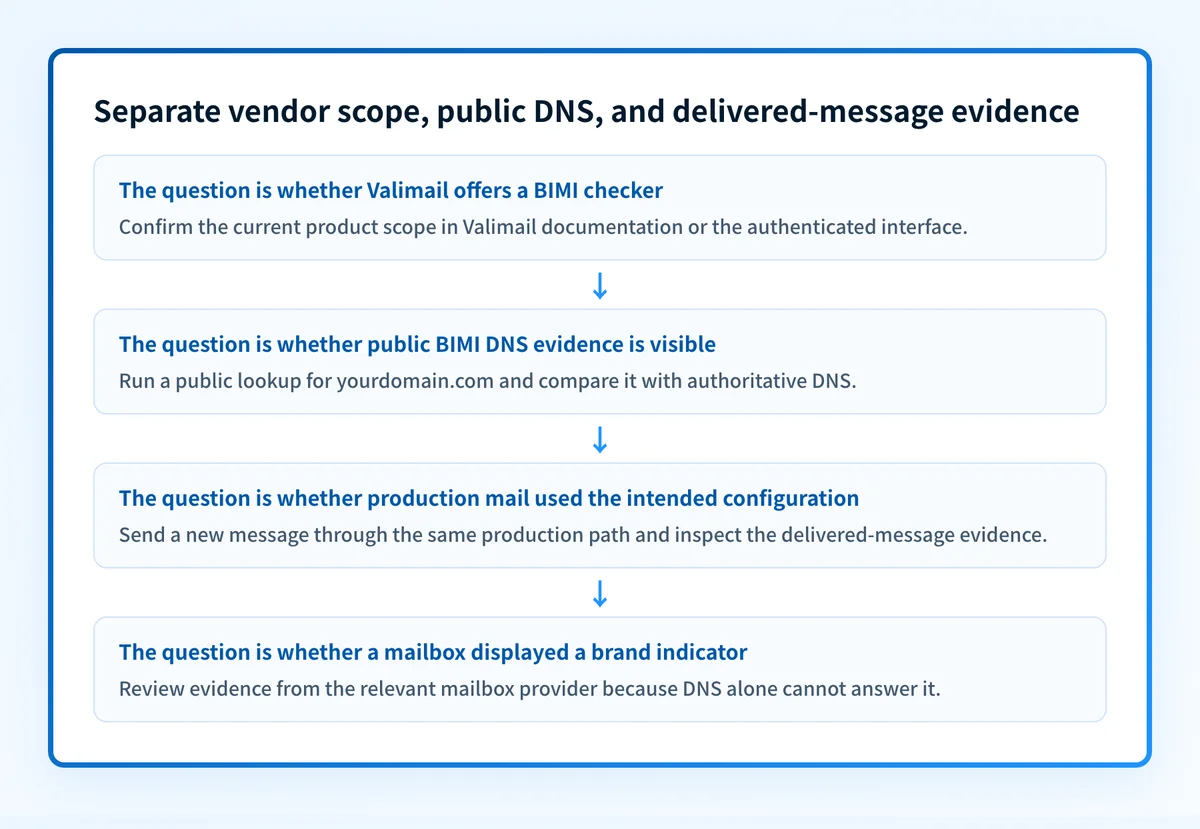
A public response is only the DNS layer. After any DNS result, send a new message through the same production application, sender identity, and recipient path that matter to the investigation. Inspect the raw message and the provider-side result available for that test path.
Then allow time for DMARC aggregate-report data to accumulate. Aggregate reports can help identify sending sources and authentication or alignment issues, but they do not replace the public DNS observation or a delivered-message check.
Do not remove or replace a published record because a single DNS lookup looks unexpected. Confirm the authoritative DNS answer, the intended vendor configuration, and the affected production sending path before changing mail-authentication settings.
How to interpret the results
The public material available for Valimail does not document BIMI-checker labels or result states. Do not assign Valimail-specific meanings such as pass, fail, ready, or verified to any result without current vendor documentation.
A Valimail page describes DMARC visibility or enforcement
This result answers a product-scope question, not a BIMI validation question. Valimail states that its Monitor offering provides domain visibility and that its products address DMARC visibility and enforcement. That can be relevant to DMARC operations, but it does not prove the presence, validity, or use of BIMI-related DNS configuration.
Use Valimail DMARC checker guidance when the evidence concerns a DMARC record or DMARC status. Keep that workflow separate from the BIMI task. For how Valimail's DMARC products compare with Palisade, see Valimail vs Palisade.
A public BIMI lookup returns DNS evidence
A returned DNS answer shows only what the queried public resolver observed for that owner at that time. Compare it with the authoritative DNS answer and the exact record generated for your own domain by the relevant provider or certificate workflow.
This result does not establish that the sending application is configured for the expected domain, that a recipient received a message through that path, or that a mailbox displayed a brand indicator.
A public BIMI lookup does not return the expected DNS evidence
First confirm the queried domain and owner name. Then compare the answer from a public resolver with the authoritative DNS zone and the configuration generated for your own domain. A missing public answer can result from an incorrect owner, an unpublished record, a DNS propagation issue, or a configuration mismatch. The available Valimail material does not document how a Valimail BIMI checker would classify any of those cases.
Move to the domain's DNS provider and the applicable sender or certificate workflow before deciding which condition applies.
A delivered message does not show the expected outcome
Do not use the public DNS result as a diagnosis of one delivered message. Inspect the raw source for the exact production path, then check the relevant mailbox-provider or sending-service status. The public lookup cannot reveal why that recipient handled one message in a particular way.
How to act on the result
Work through the evidence in order:
- Confirm whether the task is about Valimail's documented DMARC products or public BIMI DNS evidence.
- For a public DNS issue, compare the lookup result with the authoritative DNS zone and the record values generated for your own domain.
- For a sender-path issue, inspect a new message sent through the exact production application and identity under investigation.
- For a mailbox-display issue, use the recipient provider's available evidence. A public checker cannot expose a receiver's private policy decision.
- For a recurring multi-domain DMARC problem, keep DNS, sender, message, and aggregate-report findings separate until the source of the issue is clear.
How to retest
After the authoritative DNS answer changes, repeat the same public BIMI lookup with the same domain. Record the new timestamp and compare the returned DNS evidence with the earlier result.
Then send a new message through the same production path. Confirm the relevant sender and recipient evidence separately. After aggregate reports have accumulated, review whether the source and authentication or alignment evidence agree with the DNS and message observations.
A changed public DNS result does not prove that every sender is configured correctly, that all recipients will display a brand indicator, or that future messages will authenticate.
Check the public BIMI DNS evidence after confirming the scope
If you need to inspect the public BIMI-related DNS evidence for a domain, run it through Palisade's BIMI checker after confirming that the question is not actually about Valimail's DMARC visibility products.
The check can inspect public DNS at one point in time. It does not prove a production sending path, repair DNS, monitor future changes, or guarantee mailbox display or delivery. For an ongoing DMARC workflow, Palisade is DMARC software that analyzes aggregate-report data, identifies sending sources and authentication or alignment issues, and proposes prioritized remediation work for human review.
Evidence
Sources and further reading
Questions readers ask
Frequently asked questions
Does Valimail provide a public BIMI checker?
The current Valimail public homepage describes DMARC visibility and enforcement products. It does not identify a public BIMI checker, its URL, supported input, result states, or repair guidance. Confirm current availability in Valimail's documentation or authenticated product interface.
Can a public BIMI lookup prove that a mailbox will display a brand indicator?
No. A public lookup can inspect DNS evidence visible to the resolver. It cannot see a mailbox provider's private decision, the delivered-message path, or the future handling of a message.
Does a public BIMI DNS result prove that a sender is configured correctly?
No. The DNS result does not show whether a production application used the intended sender identity or configuration. Send a new message through the exact production path and inspect the resulting message and provider evidence.
Should a DMARC visibility product be treated as BIMI validation?
No. DMARC visibility and enforcement are different from a documented BIMI-checking workflow. Confirm the exact product feature and then collect the DNS, sender, message, and aggregate-report evidence relevant to the question.

Written by
Johanie DupontBrand & Ecommerce Email
Johanie Dupont works on brand and ecommerce email at Palisade: BIMI and verified marks, sender requirements, and getting marketing mail into the inbox.
More from Johanie →