MxToolbox email deliverability tool: read the report
 ChatGPT
 Claude
 Gemini
 Perplexity
 Grok
GrokIn brief
Send a test message to MxToolbox, open the email deliverability report, interpret its message-path evidence, choose the next check, and retest.

The MxToolbox Email Deliverability tool is useful when you need evidence from one sent message. Send a representative message to MxToolbox, retrieve its report, then use the reported delivery, relay, SPF, DKIM, and header evidence to choose one narrow next check. It does not prove inbox placement across mailbox providers or diagnose every cause of poor email deliverability.
At a glance
Quick takeaways
- MxToolbox's current workflow starts by sending a message to
ping@tools.mxtoolbox.com. - Use a test message from the same sending application and visible From domain as the path under investigation.
- A report establishes evidence for the submitted message and the time of the lookup, not every future message.
- Read Delivery Information before changing DNS or sender settings.
- Relay evidence points to a message-path investigation, while authentication evidence may justify a separate public DNS check.
- Retest with a new message sent through the same path after a supported repair.
Who this comparison is for
This guide is for an email administrator, deliverability specialist, or MSP technician who has a message path to inspect and needs to decide what the MxToolbox report can establish.
If the decision is whether another product should replace this or another MXToolbox job, use the MXToolbox alternatives comparison to match each evidence type to a tool.
The choice is between evidence types, not between brands. A submitted-message report can show information returned for that message. A public DNS lookup can show a published record. An MX lookup can show currently resolvable mail-routing records. A blocklist lookup can show a named provider's result for an IP address or domain. SMTP diagnostics require an observed connection to the mail service.
None of those checks proves that a production sending path will behave the same way later, or that a receiving mailbox provider will place a message in the inbox. For the broader concept and its factors, see what email deliverability means.
How the options were evaluated
The diagnostic options below were assessed against public first-party documentation checked on 2026-07-28. The criteria are:
- Input fit: whether the check needs a submitted message, a public domain, an MX hostname, an IP address, or an SMTP endpoint.
- Evidence scope: the specific fact the result can establish.
- Time model: whether the result is a point-in-time observation or evidence from a submitted message.
- Next action: the narrowest investigation the result supports.
- Boundary: what the result does not prove or control.
MxToolbox Email Deliverability tool
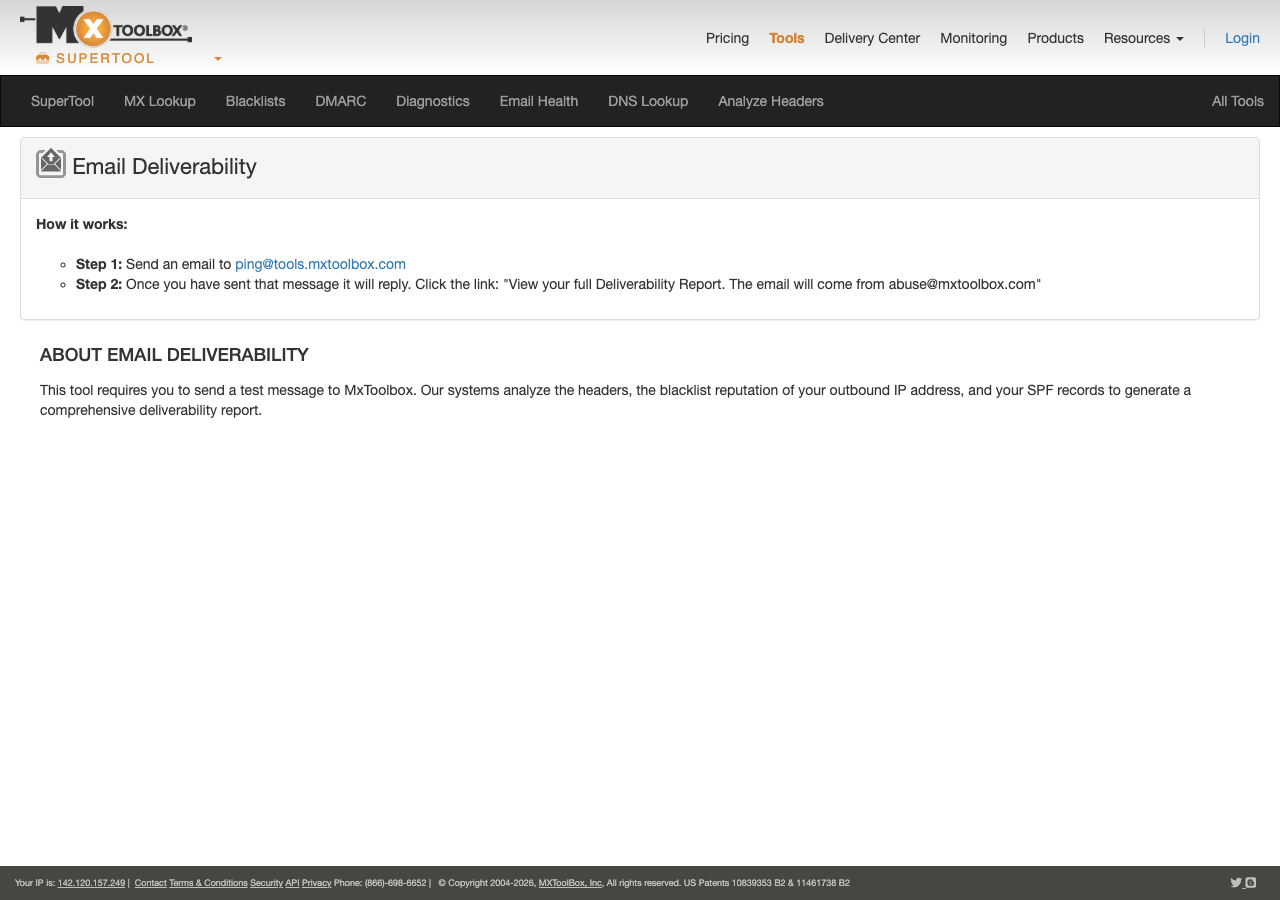
MxToolbox documents an Email Deliverability workflow that accepts a test message. Its Email Deliverability page instructs the sender to email ping@tools.mxtoolbox.com, then retrieve the report through the reply link or by entering the sender email address in the page's search control.
1. Send a representative test message
Send a new message through the same application, provider configuration, visible From domain, and authentication setup that you need to investigate. Do not substitute a message from a different system when the question concerns the production path.
Keep the sent copy. It gives you the message subject, sender identity, and sending context needed to confirm that the returned report belongs to the intended test.
2. Retrieve the report
Open the reply from MxToolbox and use the report link. If you need to retrieve an earlier result, use the email search method documented on the MxToolbox Email Deliverability page.
Confirm that the report corresponds to the message you sent before acting on it. An older report can describe an earlier configuration, DNS state, or sending path.
3. Preserve the evidence that drives the next action
Record the test context before making changes. This prevents a later record update or sender change from being credited to the wrong test.
Test date and time:
Sending application:
Visible From domain:
Report sender address and subject:
Reported failed, delayed, or warning fields:
Next evidence source:
Same-path retest date:- Best fit: Investigating one message sent through a known path.
- Relevant evidence: MxToolbox's Email Delivery Tools documentation describes Header Analyzed, Delivery Information, Relay Information, SPF/DKIM Information, Headers Found, and Received Header.
- Tradeoff: The report does not establish a receiver-wide inbox-placement result, future delivery behavior, or the state of an unobserved sending source.
Public DNS and MX diagnostics
A public DNS or MX diagnostic is the better fit when the remaining question is "what record can a public resolver see now?" It is not a replacement for the MxToolbox submitted-message report.
Use a public DNS result after the report points to a record question, such as a DMARC publication issue. The focused Palisade DMARC checker can inspect the public DMARC record for a domain. A public MX check can inspect the currently published mail-routing records.
Do not replace an SPF record, publish a DKIM record, or change a DMARC policy based only on a red status. First identify the sending application, the intended identity, and the authoritative DNS record that controls the path.
- Best fit: Confirming public DNS or MX publication after a report narrows the question.
- Relevant evidence: A public lookup can establish the answer returned for the queried domain or hostname at that time.
- Tradeoff: A public record does not prove the sending application used it, that a message was signed, or that a receiver accepted the message.
Blocklist and SMTP diagnostics
A blocklist lookup and an SMTP diagnostic answer different questions from the MxToolbox report.
A blocklist lookup is appropriate when the investigation has identified a sending IP address or domain and the next question concerns a named reputation data source. Palisade can run the domain and its mail server IPs through public blocklists in one pass. Record the exact input, provider, and lookup time. A clean result does not establish that every receiver considers the sender reputable, because mailbox providers can apply private reputation and filtering signals.
SMTP diagnostics are appropriate when the symptom is a connection, TLS, greeting, relay, or response-code problem. Those failures require observed server behavior, relevant mail-server logs, or a test against the affected endpoint. A public DNS record does not reproduce an SMTP transaction.
- Best fit: Investigating a named source reputation result or a mail-server interaction.
- Relevant evidence: A blocklist result applies to the named provider and exact queried input. SMTP evidence applies to the observed connection and response.
- Tradeoff: Neither result proves inbox placement, message authentication on every future message, or a receiver's private filtering decision.
Palisade for a separate public DMARC question
Palisade fits this workflow only when the MxToolbox report leaves a specific public DMARC publication question open. The Palisade DMARC checker gives a separate public record check that can complement the message-specific report.
- Best fit: Inspecting the currently published DMARC record after report evidence points to DMARC publication.
- Relevant evidence: The public DMARC record returned for the queried domain.
- Tradeoff: The checker cannot reproduce MxToolbox's submitted-message report, alter DNS, control a receiver, or guarantee inbox placement.
How to choose
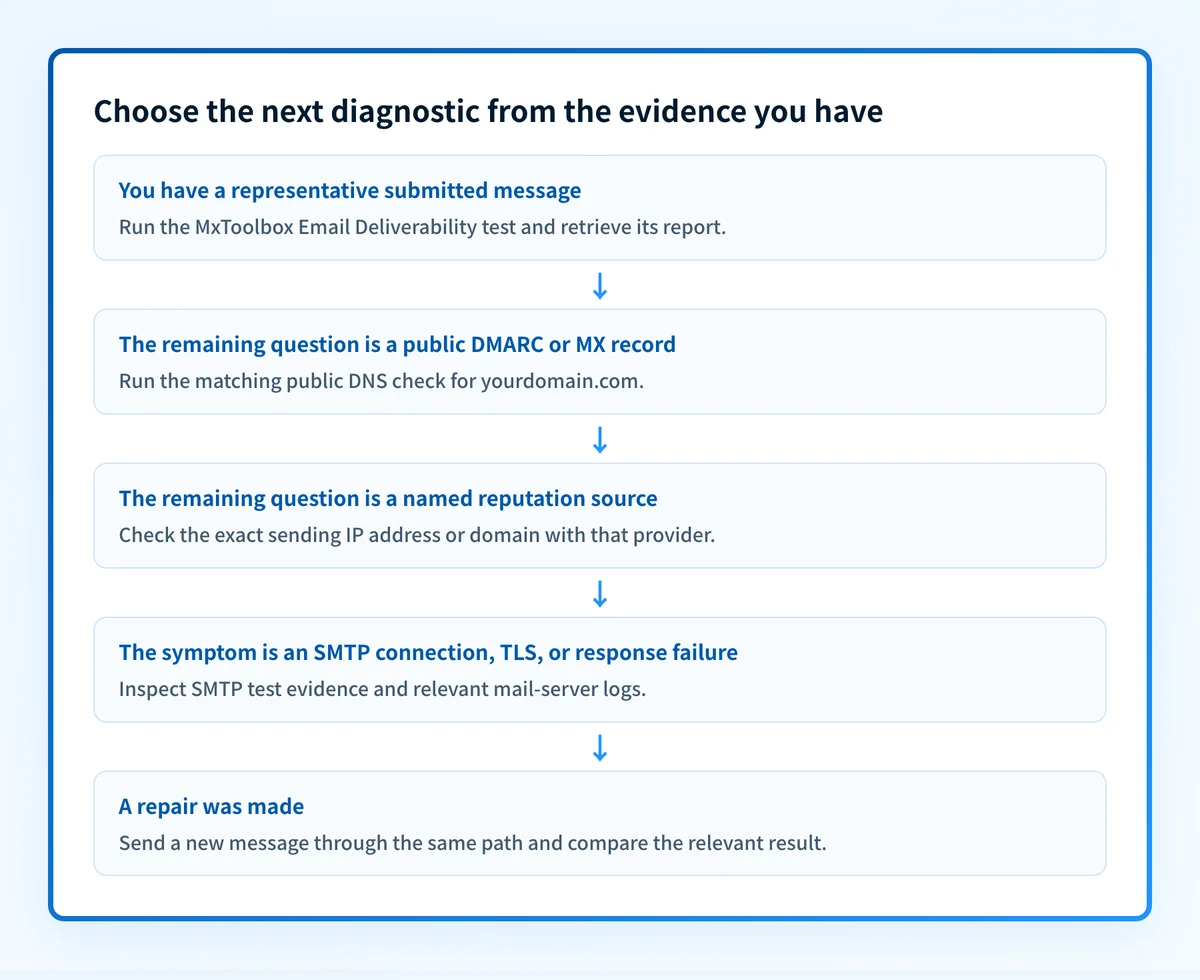
Choose MxToolbox first when you need a report about an actual submitted test message. Choose a public DNS or MX lookup when the remaining question is about a currently published record. Choose a blocklist lookup when the question names a particular reputation source and IP address or domain. Choose SMTP evidence when the failure concerns a server connection or response.
option: MxToolbox Email Deliverability tool
checked_on: 2026-07-28
best_fit: "A representative message sent through the path under investigation"
verified_evidence: "Header, delivery, relay, SPF, DKIM, and received-message report sections documented by MxToolbox"
open_question: "How a specific receiving mailbox provider will place future messages"
option: Public DMARC or MX lookup
checked_on: 2026-08-13
best_fit: "A question about a currently resolvable public record"
verified_evidence: "The record returned for the exact queried domain or hostname"
open_question: "Whether the production sender uses the record and whether a receiver accepts the message"
option: Blocklist or SMTP diagnostic
checked_on: 2026-08-13
best_fit: "A named reputation source or observed mail-server behavior"
verified_evidence: "The exact provider result or tested SMTP interaction"
open_question: "Inbox placement and receiver-private filtering decisions"
Use the report in this evidence order:
- Delivery Information: investigate an authentication result through the application configuration and the relevant public record.
- Relay Information: inspect the sending provider's logs or receiving system evidence before changing authentication policy.
- SPF and DKIM Information: identify the sender identity and the exact DNS record before proposing any DNS change.
- Headers Found and Received Header: confirm that the report represents the path you intended to test.
Authentication-Results field in a delivered message, treat it as an assertion from the system that added it. RFC 8601 explains that use of those authentication assertions depends on the trust relationship with the validating system.
Retest the same message path
After a supported repair, send a fresh message through the same application and visible From domain to ping@tools.mxtoolbox.com. Retrieve the new report, confirm that it describes the new message, and compare the field that prompted the repair.
When DNS was changed, confirm the intended value with authoritative DNS and at least one public resolver before interpreting the retest. Then check the sending application's own verification state and inspect a real delivered message from that same production path. Once DMARC aggregate reports have accumulated, use them to confirm which sources are actually sending and whether authentication or alignment issues remain.
Check a remaining public DMARC question
If the report leaves a DMARC publication question unresolved, check the public DMARC record with Palisade. This is useful after the report has narrowed the issue to public DNS evidence. It does not reproduce the submitted-message report, repair the sender configuration, monitor later changes, or guarantee inbox placement.
Evidence
Sources and further reading
Questions readers ask
Frequently asked questions
Does the MxToolbox Email Deliverability tool prove inbox placement?
No. The report provides evidence about the submitted message and MxToolbox's checks at that time. Inbox placement can vary by receiving provider, recipient, reputation, content, and later message-path conditions.
Can I retrieve a MxToolbox report without sending another message?
Yes. MxToolbox documents a sender-email search path for retrieving reports. Use a fresh message when verifying a recent sender or DNS change because an older report represents earlier evidence.
Should I change a DMARC policy after a failed report result?
No. First determine whether the problem concerns public DMARC publication, message alignment, or the sending application's identity. A failed result identifies a question to investigate. It does not authorize a policy change by itself.
Does a public DMARC lookup prove that the application signs mail correctly?
No. A public lookup shows the record that resolves for the queried domain. It does not prove that the sending application used the intended domain, generated a DKIM signature, or passed DMARC at a receiver.
Can a blocklist result explain every deliverability problem?
No. A result applies to the named provider's data for the queried input at that time. It does not expose every blocklist, mailbox-provider private reputation, recipient engagement signal, or inbox-placement outcome.

Written by
Taylor TabusaCo-Founder & Head of Business Development, Palisade
Taylor Tabusa is the co-founder and Head of Business Development at Palisade, helping managed service providers turn email security into a practical, valuable service.
More from Taylor →