Valimail DMARC checker: what you can verify
 ChatGPT
 Claude
 Gemini
 Perplexity
 Grok
GrokIn brief
Valimail DMARC checker options help review domain visibility, but confirm current results, message evidence, enforcement, and reporting separately.

Valimail offers a "Check My Domain" entry point, and its free Monitor account is described as providing unlimited domain visibility. Before treating a result as proof of DMARC protection or delivery, confirm what the current check actually evaluated, inspect a real delivered message, and review DMARC aggregate-report data. A public domain check is useful evidence, but it cannot show every production sending path or a receiver's private delivery decision.
At a glance
Quick takeaways
- Valimail presents a "Check My Domain" action on its website.
- Valimail describes Monitor as a free account with unlimited domain visibility.
- A public DMARC check and a delivered-message check answer different questions.
- A reported policy status does not prove that every sending service authenticates correctly.
- Treat monitoring visibility and DMARC enforcement as separate operational states.
- Do not change a DMARC policy based on one public lookup alone.
What this tool checks
Valimail's public site includes a Check My Domain action, but the available public material does not document the current checker URL, required inputs, result labels, fields, resolver behavior, or retest behavior. That means a reader should not assume that a specific screen label means a domain is protected, compliant, or safe.
Valimail describes its Monitor offering as "MONITOR (FREE)" and says users can "get unlimited domain visibility, for free." It also says Monitor identifies enforcement status across sending domains and turns raw IP data into DMARC reports. Those statements support a limited conclusion: Monitor is positioned for visibility into domains and DMARC reporting.
They do not establish that an individual public check can see every sender, validate a live message path, or explain why a particular mailbox provider accepted, filtered, or rejected a message.
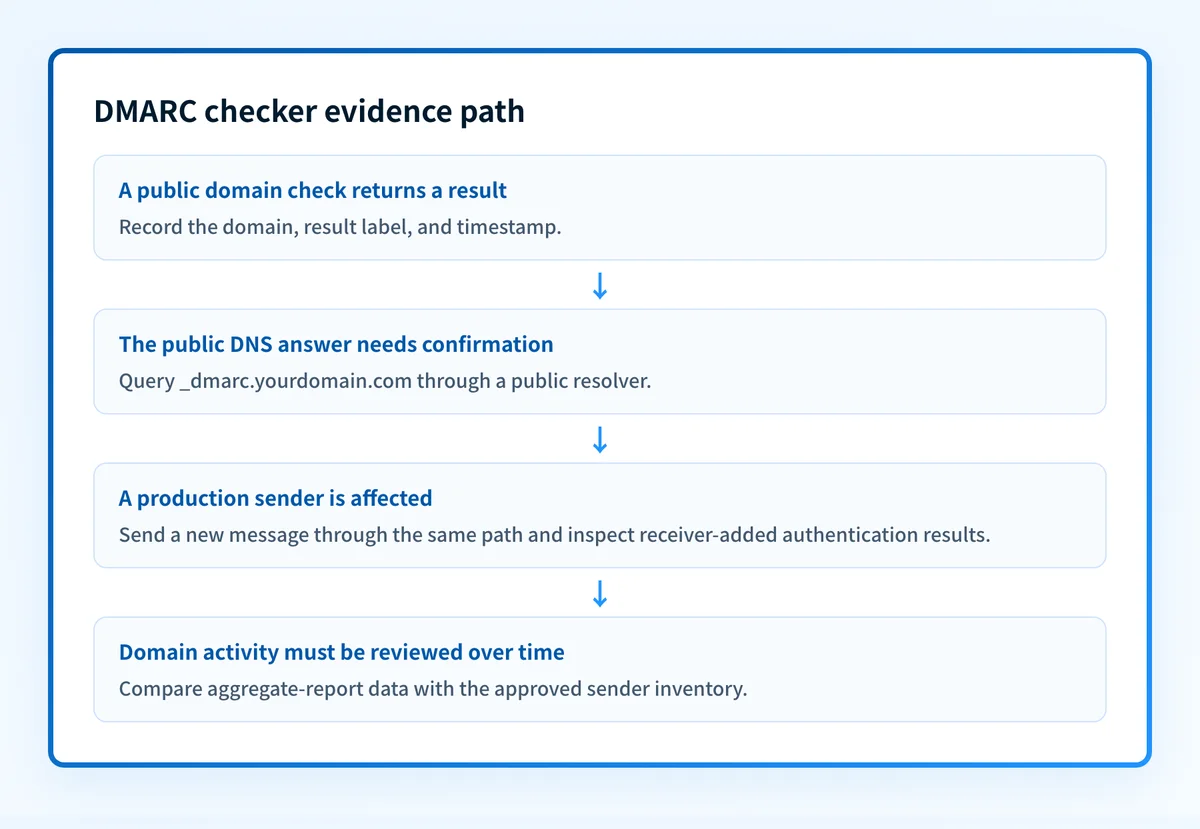
Use a DMARC checker only for the public DNS evidence it can inspect. A public record check does not prove the production sending path, message signing, continuous state, or why one receiver rejected one message.
How to run the check
1. Start with the exact domain used in the visible From address
Identify the domain after the @ in the visible From address of the mail you are investigating. Keep that domain separate from any return-path or signing domain until you have message-header evidence connecting them.
If the problem concerns a specific campaign, application, or vendor, record the sender name and the date of a real test message. A domain-wide result cannot identify the exact system that sent that message.
2. Use the published Valimail entry point
Open Valimail's website and select "Check My Domain." Record the domain entered, the date, and every result label shown by the current interface.
Do not infer the meaning of a label from a search result, a past screenshot, or a similarly named product. If the result does not explain its evaluation criteria, keep it as a vendor-interface observation rather than a protocol conclusion.
3. Independently query the public DMARC owner
A direct public DNS query creates a repeatable record of the answer returned at the time of the test. Replace the example domain with your own domain.
dig +short TXT _dmarc.yourdomain.comThis command retrieves a public DNS response. It does not confirm which service sent mail, whether a message passed authentication, or whether a mailbox provider delivered it.
4. Preserve the evidence needed for a retest
Save the domain name, timestamp, tool result, and DNS response. If the tool displays an error or no result, preserve that wording exactly. It may distinguish a tool-input issue from a DNS condition, but only the current interface documentation or result explanation can establish that distinction.
How to interpret the results
A domain-visibility or enforcement-status result
Valimail says Monitor provides detailed views into enforcement status across sending domains. Treat this as a visibility-oriented result unless the current interface explains the underlying evidence and scope.
A visibility result can identify a domain that needs closer review. It cannot, on its own, show that all services using the domain authenticate and align correctly. The next evidence should be a real delivered message and its receiver-added authentication results.
A DMARC report or source-inventory result
Valimail says Monitor can turn raw IP data into DMARC reports. A report can be useful for discovering sending sources that need investigation. It does not make a source authorized, correctly configured, or ready for enforcement by itself.
Compare each reported source with the systems your organization intends to send mail. Then obtain a test message from the exact source. Look for receiver-added authentication evidence and keep the message path separate from a public record lookup.
An unavailable, unclear, or undocumented checker result
When the interface does not document what a result means, do not turn that result into a claim that the domain is safe or protected. Confirm the published DNS record, then move to message evidence and aggregate reports.
This restraint matters when selecting tools. The Palisade comparison hub can help frame a vendor decision around the work you need done, such as domain visibility, sender inventory, remediation workflow, or policy readiness. It cannot replace the evidence required for your own domains. For Valimail specifically, see Valimail vs Palisade.
How to act on the result
Start with the narrowest problem the evidence actually shows.
- If the result points to a domain you do not recognize, identify the owner internally before changing DNS. An unfamiliar source may be a legitimate application, a retired sender, or an unauthorized service.
- If the public DNS response differs from the value your DNS provider shows, check the authoritative DNS configuration and allow for normal DNS propagation before retesting.
- If the public record appears present but mail still has a problem, collect a real message sent through the affected application and inspect the receiver's authentication results.
- If the result identifies a source but does not show message-level authentication, validate the source with a delivered message before deciding whether to repair sender configuration, DNS, or policy.
- If reports show known sources that are not ready for enforcement, resolve the individual authentication or alignment issues before proposing a policy change.
Do not move a DMARC policy to a stricter value because one lookup appears healthy. A policy change can affect mail sent by sources that were not included in that lookup.
Valimail separately describes Monitor's enforcement-status visibility and Enforce's authentication automation, policy decisions, and reporting capabilities for continuous DMARC enforcement. It is reasonable to treat visibility and enforcement as different operational needs. The available material does not establish a universal threshold for moving a domain to a stricter DMARC policy.
For a second vendor-oriented reading of what a checker can and cannot establish, see Proofpoint DMARC checker: what the compliance check actually includes. Keep the same standard: public results need confirmation with the exact sender and message path involved.
How to retest
Repeat the same Valimail path with the same domain after the relevant DNS or sender change. Record the new date and the full result state rather than relying on a remembered summary.
Run the same direct DNS lookup again:
dig +short TXT _dmarc.yourdomain.comThen send a new message through the same application, account, visible From domain, and recipient path that exposed the issue. Inspect the receiver-added authentication results in that delivered message. After DMARC reports accumulate, compare the reporting data with the sender inventory and the message test.
The expected change depends on what was repaired. A public DNS correction should change the public DNS answer. A sender-configuration correction should appear in a new message from that sender. A report-based source issue may need additional reporting data before its trend is clear.
Build a remediation workflow after the domain check
A one-time lookup can show the public state of a domain at a moment in time. It does not identify every production sender that later begins using the domain or determine whether a sender is ready for a DMARC policy change.
Palisade is agentic DMARC software for teams that need to work through DMARC aggregate-report data across domains. It can analyze aggregate-report data, identify sending sources and authentication or alignment issues, create prioritized remediation tickets, and propose when a domain appears ready for the next policy stage. A human reviews the evidence and applies any change.
Palisade does not autonomously change the DMARC policy, prove every future message will authenticate, or guarantee mailbox-provider delivery decisions.
Evidence
Sources and further reading
Questions readers ask
Frequently asked questions
Is Valimail safe?
Not enough verified public material is available here to make a safety conclusion about Valimail. A product's safety depends on factors such as its security controls, data handling, account configuration, and the scope of the service being used. Review current vendor security documentation and contractual materials before making that assessment.
How can I check my DMARC?
Use Valimail's published "Check My Domain" entry point or a public DMARC checker to inspect the domain evidence available to the tool. Then confirm the public result with a DNS query, a real delivered message from the affected sender, and DMARC aggregate-report data. A public lookup alone cannot prove the production message path.
Is Valimail free?
Yes, Valimail says its Monitor account is free and provides "unlimited domain visibility." That statement applies to Monitor and does not mean that every Valimail product or capability is free.
What does Valimail do?
Valimail describes Monitor as providing domain visibility and enforcement-status views, with DMARC reports derived from raw IP data. It describes Enforce as supporting authentication automation, policy decisions, and reporting and analytics for continuous DMARC enforcement.
Does a DMARC checker prove that all mail will pass DMARC?
No. A checker can inspect the public evidence available during that run. A delivered message from the exact sender is needed to show what authentication evidence a receiver recorded, and aggregate reports are needed to review sending activity over time.
Check the published Valimail DMARC record before changing policy
Enter your domain.

Written by
Taylor TabusaCo-Founder & Head of Business Development, Palisade
Taylor Tabusa is the co-founder and Head of Business Development at Palisade, helping managed service providers turn email security into a practical, valuable service.
More from Taylor →