SMTP header analyzer
 ChatGPT
 Claude
 Gemini
 Perplexity
 Grok
GrokIn brief
SMTP header analyzer workflow: paste raw email headers, interpret delivery, SPF, DKIM, and DMARC evidence, then retest the right layer today.

An SMTP header analyzer helps you turn a raw delivered message header into evidence about its delivery path, authentication results, and visible sender identities. Paste the complete header into Palisade's Email Header Analyzer, then separate what the header records from what still needs DNS, sender configuration, receiver, or DMARC-report evidence. A header can narrow an investigation. It cannot prove why a receiver delayed, rejected, or placed one message.
At a glance
Quick takeaways
- Palisade's Email Header Analyzer parses pasted raw email headers in the browser.
- The tool reads
Received,Authentication-Results, SPF, DKIM, DMARC, From, Return-Path, Message-ID, Reply-To, Date, and X-Mailer fields. - Hop 1 in the delivery-path view is the origin server, represented by the bottom
Received:header. - Authentication verdicts and From-to-Return-Path alignment are separate signals.
- A negative hop delay can mean two mail servers have different clocks, not that mail travelled backward.
- Header evidence must be trusted only within the infrastructure boundary that added it.
What this tool checks
The Palisade Email Header Analyzer accepts raw pasted RFC 5322 email headers. Parsing happens in your browser, so the pasted header is not uploaded by the tool. The parser unfolds continuation lines, stops at the first blank line, and therefore ignores any message body after the header section.
The analyzer reads the Received chain and extracts available sending and receiving servers, protocol, bracketed IP literal, timestamp, and time between hops. It also displays SPF, DKIM, and DMARC values found in Authentication-Results, along with identity fields such as From and Return-Path.
RFC 5322 defines Received: and Return-Path: as trace fields, while RFC 8601 defines the Authentication-Results header field. Those standards explain the shape of the evidence. They do not make every header equally trustworthy.
Use this tool with a complete raw header from the delivered message you are investigating. If you need help locating the fields first, read what an email header contains.
The analyzer cannot inspect the sending application, private DKIM key, mailbox-provider dashboard, mail logs, current DNS answer, or aggregate DMARC reports. It also cannot prove a production path remains unchanged after this one message. A parsed header is evidence from one message at one point in time.
How to run the check
1. Get the raw header from the delivered message
Open the original delivered message in the recipient mailbox and use its option to view the original or raw message source. Copy the header block, including all Received: and Authentication-Results: lines.
Do not paste customer content, attachments, credentials, private keys, or account tokens into an investigation ticket. Headers can contain recipient addresses, internal hostnames, IP addresses, and message identifiers. Redact information before sharing it outside the people authorized to investigate the message.
2. Paste only the header block
Open the Email Header Analyzer and paste the raw header into its text area. A complete paste begins with header fields such as Received:, From:, or Delivered-To:.
If the input is empty or does not contain recognizable fields, the tool returns:
No email headers found. Paste the raw headers — they start with lines like “Received:”, “From:”, or “Delivered-To:”.The blank line between headers and body is useful. The parser stops there, so you do not need to include the message content.
3. Preserve the message path for comparison
Record the sending application, visible From address, recipient mailbox, and approximate send time separately. These facts let you compare the parsed header with the exact path you intended to test.
For a current public DNS check after the header points to a hostname or routing question, query the relevant domain separately:
dig +short MX yourdomain.comThis is a public DNS observation, not a test of the delivered message. Use Palisade's DNS lookup when you need to inspect current public records alongside the historic header evidence.
How to interpret the results
Delivery path (Received chain)
The tool's “Delivery path (Received chain)” section renumbers hops so that hop 1 is the origin server, which is the bottom Received: header. This follows the practical direction of message travel: each receiving system adds its trace field above the prior entries.
RFC 5322 specifies that a Received: field contains tokens followed by a semicolon and date-time value. The analyzer uses the timestamp after the last semicolon when it is present.
Treat each hop as a claim recorded by the server that received the message. A hop can show that a message passed through a named system, but it does not independently prove the identity or configuration of every system below a trust boundary.
Do not treat a long interval between two Received: timestamps as proof of a delivery fault. The tool cannot calculate a hop delay when either timestamp is absent, and a negative value means the servers' clocks disagree.
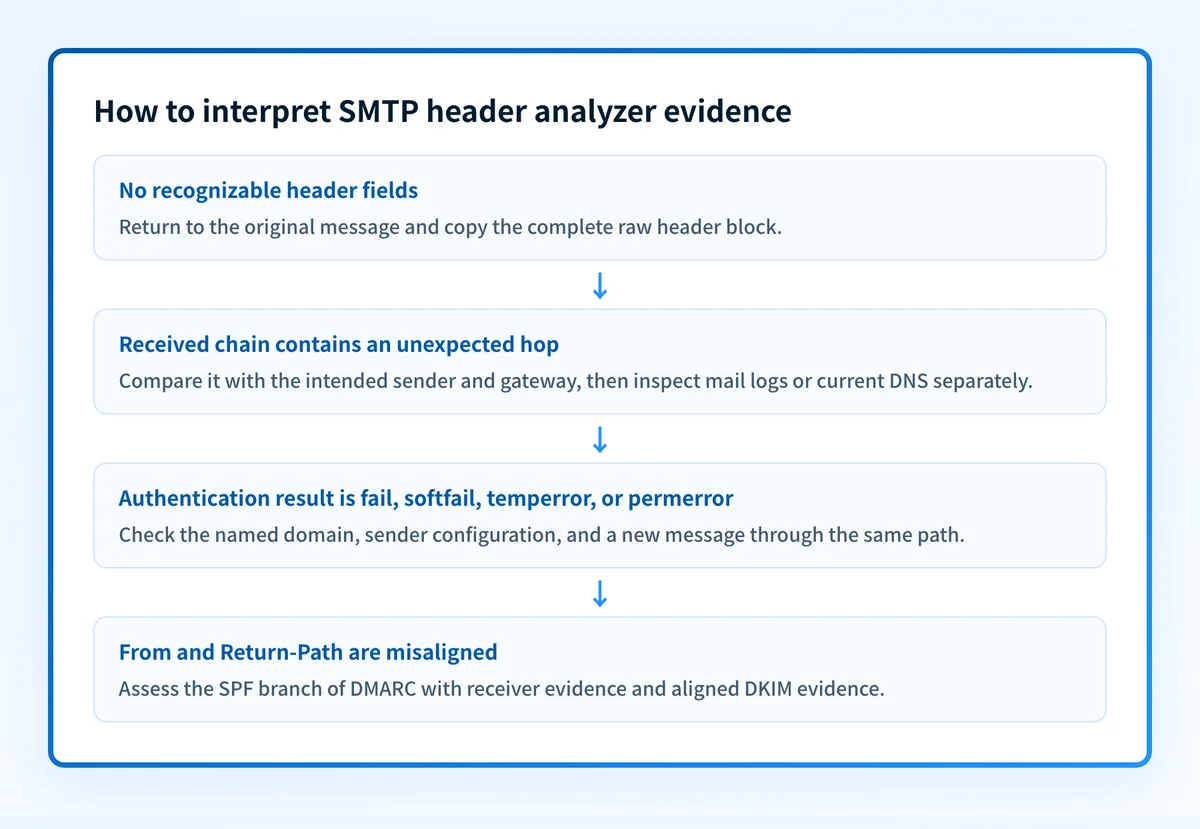
If the analyzer reports that the delivery path cannot be reconstructed, the pasted header has no Received: fields. Return to the original-message view and copy the complete header before diagnosing routing.
SPF, DKIM, and DMARC verdicts
The analyzer displays verdict rows using the values pass, fail, softfail, neutral, none, temperror, permerror, policy, bestguesspass, unknown, or “not found”.
For SPF and DKIM, RFC 8601 defines result values including pass, fail, neutral, temperror, and permerror. The authentication service that added the header is identified by the authserv-id, so read the result as that service's assessment, not as a universal verdict for every receiver.
A pass means the reporting authentication service recorded a successful result for that method. A fail, softfail, temperror, or permerror needs message-path and sender-side follow-up. temperror points to a temporary evaluation problem, while permerror indicates a permanent evaluation problem according to the method result. “Not found” means the tool did not find that result in the pasted headers. It does not prove the method was never evaluated elsewhere.
DMARC may appear in Authentication-Results, but RFC 8601 does not define a DMARC-specific result-value subsection. Keep the recorded DMARC result tied to the service that wrote it.
From vs Return-Path alignment
The “From vs Return-Path alignment” section compares the visible From domain with the Return-Path domain on its own scale: exact, relaxed, misaligned, or unknown.
This comparison helps explain the SPF side of DMARC because the tool states that DMARC only counts an SPF pass when the Return-Path domain aligns with the visible From domain. It does not replace a full DMARC evaluation. A message can still authenticate through aligned DKIM, and a header view does not show every organizational-domain or policy decision a receiver used.
For the distinction between the SMTP envelope sender and visible author address, use RFC 5321.MailFrom versus RFC 5322.From.
Missing identity fields
If the tool cannot find identity fields, it reports that none of From, Message-ID, or Reply-To were present. That is a signal to obtain the full original header, not a finding that a sending service is broken. RFC 5322 defines these fields separately, and different fields answer different questions about the message.
How to act on the result
Start with the narrowest evidence-backed action.
- If the
Receivedchain is missing, collect the complete original header again. Do not infer a routing failure from a partial export. - If a hop points to an unexpected system, compare it with the known sending application, gateway, and recipient path. Escalate to that system's mail logs or support record if you need to explain a delay.
- If SPF, DKIM, or DMARC shows a failure, inspect the exact domains shown beside the verdict. Then compare sender configuration and a newly delivered message through the same production path. The email authentication failure guide helps separate DNS, sender, message, and DMARC-report evidence.
- If the header suggests a current routing or host-configuration question, inspect the relevant DNS record separately. A DNS result today does not change or prove what a historical message used.
- If transport policy is the concern, distinguish header trace evidence from the TLS and policy controls described in email transport security.
How to retest
Send a fresh test message through the same application, sender identity, gateway, recipient mailbox, and route that produced the original evidence. Paste its raw header into the Email Header Analyzer and compare it with the prior run.
Expect only the corrected signal to change. For example, a sender-side authentication correction should change the relevant receiver-recorded authentication result in the new header. A DNS correction should also be checked against the authoritative DNS answer and a public resolver. When DMARC data accumulates, use aggregate reports to confirm whether the production sender population matches the single-message test.
Check the DNS evidence behind an unexpected route
If the header identifies a domain or MX-routing question, inspect its current public DNS records before escalating the routing path. Compare the lookup with the message's timestamp and Received: chain rather than treating either one as conclusive.
A DNS lookup cannot prove which server handled a past message, explain one receiver's private delivery decision, or monitor later changes.
For teams that need to move beyond isolated headers, Palisade is agentic DMARC software that analyzes aggregate-report data, identifies sending sources and authentication or alignment issues, and creates prioritized remediation tickets. It can propose the next DMARC policy step, while a human reviews the evidence and applies the change. It does not repair a single message's route or control a receiver's delivery decision.
Evidence
Sources and further reading
Questions readers ask
Frequently asked questions
Does an SMTP header analyzer show the full delivery path?
An SMTP header analyzer shows the full path only when the header you paste still has all its Received: fields. The analyzer rebuilds the chain from those lines and treats the bottom one as the origin hop. Missing fields, missing timestamps, and untrusted upstream lines all cut into what the path can prove.
Can a negative Received-hop delay mean mail travelled backward?
No, a negative delay just means the two servers' clocks disagree. It is not evidence that the message travelled backward, and the interval it produces does not identify what caused a delay.
Does an SPF pass mean DMARC passes?
No, an SPF pass is not enough on its own, because DMARC needs an authenticated identifier that aligns with the visible From domain. The analyzer compares the Return-Path and From domains to show you the SPF alignment question. The full DMARC answer also depends on the receiver's own evaluation and the rest of the authentication evidence.
Is Authentication-Results always trustworthy?
No, you cannot trust every line of it. RFC 8601 explains that Authentication-Results usually carries no integrity mechanism of its own, so anyone upstream can add a line. Trust only the results added by infrastructure you control or already trust, and ignore lines that could have been inserted before the message crossed that boundary.
Can a DNS lookup explain a historical email route?
No, a DNS lookup only shows today's public answer. Compare it with the dated message header by all means, but never treat the current DNS state as proof of the route an older message actually took.

Written by
Samuel ChenardCEO & Co-Founder, Palisade
Samuel Chenard is the CEO and co-founder of Palisade, agentic DMARC software for IT teams and MSPs, from one domain to thousands.
More from Samuel →