SMTP and POP3 difference: sending versus retrieving email
 ChatGPT
 Claude
 Gemini
 Perplexity
 Grok
GrokIn brief
SMTP and POP3 difference: SMTP sends and relays email, while POP3 retrieves messages from a server to a client mailbox.
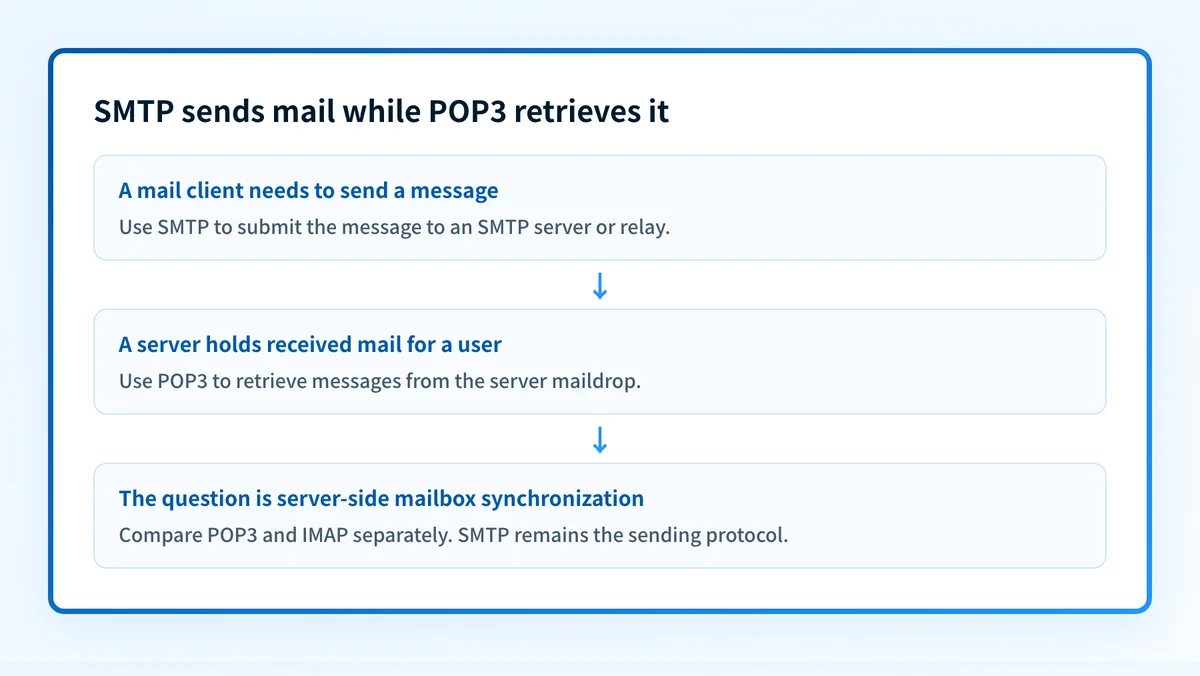
SMTP and POP3 do different jobs. SMTP sends or relays a message into the mail transport system, while POP3 lets a mail client retrieve messages that a server holds in a mailbox. They are complementary protocols, not alternatives: a person can send through SMTP and later retrieve received mail through POP3. SMTP is defined by RFC 5321; POP3 is defined by RFC 1939.
At a glance
Quick takeaways
- SMTP transfers email between a client, relay, and receiving mail server.
- POP3 retrieves messages from a server maildrop to a mail client.
- POP3 does not define how a client sends mail, and RFC 1939 delegates that job to SMTP.
- SMTP is a Standards Track protocol under RFC 5321, published in October 2008.
- POP3 is an Internet Standard, STD 53, under RFC 1939, published in May 1996.
- Choosing POP3 does not replace SMTP. The separate retrieval choice is POP3 versus IMAP.
Who is affected?
This distinction affects anyone configuring an email client, documenting a mail flow, or investigating why a message was sent successfully but is unavailable in a mailbox application. SMTP applies when a client or server submits, relays, or delivers a message. POP3 applies when a client accesses messages already held for that user on a server.
RFC 5321 states that SMTP's objective is "to transfer mail reliably and efficiently." It also says SMTP can transfer mail to another process on the same network or another network through a relay or gateway. That is transport behavior.
RFC 1939 says POP3 is intended to let a workstation dynamically access a maildrop on a server host. Usually, the workstation retrieves mail that the server is holding. POP3 is deliberately narrower than a full server-side mailbox management protocol. RFC 1939 says mail is normally downloaded and then deleted, although a client can use UIDL and avoid DELE for a limited form of retaining messages on the server.
A POP3 client may leave messages available for later download, but that does not change POP3 into a sending protocol. For the separate question of POP3 versus IMAP retrieval behavior, see Difference between IMAP and SMTP.
What are the requirements?
SMTP carries messages into the transport system
An SMTP client needs a message to transmit and establishes a two-way transmission channel to an SMTP server. SMTP may connect a sending client to a relay host, then relay the message onward toward its destination.
SMTP client -> SMTP server or relay -> receiving mail systemRFC 5321 calls SMTP a mail transport and delivery protocol, and also describes its role in mail submission. A mail client can therefore use SMTP when a person clicks Send, while mail servers use SMTP to relay the message between domains.
SMTP does not define how a user browses messages already stored in a mailbox. That is outside the transport step. If a message is accepted by an SMTP server but fails to arrive or is rejected later in the route, use the evidence in the relevant email delivery error guidance rather than assuming POP3 caused the problem.
POP3 retrieves messages from a server maildrop
A POP3 session begins after the server greeting. RFC 1939 defines an AUTHORIZATION state, a TRANSACTION state where the client requests actions from the server, and an UPDATE state after the client issues QUIT.
POP3 client -> POP3 server maildrop -> downloaded mailbox messages
AUTHORIZATION -> TRANSACTION -> UPDATE
POP3 is for retrieval after mail is already present on the server. It does not relay a new message to another domain and does not replace the SMTP submission path.
POP3 hands sending to SMTP
RFC 1939 makes the boundary explicit: "This memo does not specify how a client host enters mail into the transport system". Its example method says that when a user agent wants to enter a message into the transport system, it establishes an SMTP connection to its relay host and sends mail to it.
That design means POP3 and SMTP are not competing choices for one action. SMTP handles sending. POP3 handles retrieval. A mail application can support both because a user needs both directions of the mail workflow.
IMAP also does not send mail. RFC 9051, the current IMAP4rev2 specification that obsoletes RFC 3501, says IMAP4rev2 lets a client access and manipulate messages on a server but does not specify posting mail. It assigns posting to a mail submission protocol such as the one in RFC 6409.
Provider settings are implementation-specific
A provider's hostnames, ports, encryption requirements, and authentication settings are not universal SMTP or POP3 requirements. Use the provider's current documentation for those values.
For example, Gmail's POP and SMTP settings document pop.gmail.com with SSL on port 995 for incoming POP access. The same page documents smtp.gmail.com for outgoing SMTP, with authentication required and port 587 for TLS/STARTTLS. Those settings show both protocols in one provider's service, each used for its own direction.
Do not copy Gmail's server names or ports into another provider's configuration. A wrong submission host, port, or TLS setting can prevent mail from being sent.
Google separately states that Gmail will stop checking third-party accounts through its "Check mail from other accounts" POP feature for new users after the first quarter of 2026, with existing users supported until January 2027. That notice concerns Gmail fetching mail from another account. It does not say that POP access to Gmail at pop.gmail.com is ending.
When does the requirement take effect?
There is no new shared enforcement date for the SMTP and POP3 protocol roles. They are established Internet standards with different publication dates.
RFC 5321, "Simple Mail Transfer Protocol," was published in October 2008 as a Standards Track RFC. It obsoletes RFC 821, RFC 974, RFC 1869, and RFC 2821, and updates RFC 1123.
RFC 1939, "Post Office Protocol - Version 3," was published in May 1996 as Standards Track and is STD 53. It obsoletes RFC 1725.
RFC 9051, "Internet Message Access Protocol (IMAP) - Version 4rev2," was published in August 2021 as Standards Track and obsoletes RFC 3501. Its role matters only when evaluating retrieval options. It does not alter SMTP's responsibility for mail submission.
How do I implement the requirement?
1. Identify the direction of the task
Use SMTP settings when configuring message submission or diagnosing a relay path. Use POP3 settings when configuring a client to retrieve messages held in a mailbox.
Write down whether the observed problem is sending, receiving into the server mailbox, or downloading from that mailbox. Those are separate stages.
2. Obtain the provider's documented settings
Use the current documentation for the specific email provider. Record the incoming POP host and security requirements separately from the outgoing SMTP host, authentication requirement, and submission port.
Do not infer the SMTP configuration from the POP3 configuration, or vice versa. The protocols commonly use different endpoints because they do different work.
3. Configure transport security for the actual SMTP path
SMTP transport protection is separate from the choice between SMTP and POP3. Confirm the provider's documented TLS or STARTTLS requirement, then compare it with the mail client and relay configuration. See SSL vs TLS: what's the difference for email? for the distinction between these security terms.
4. Keep retrieval decisions separate
If the question is whether a mailbox should be downloaded through POP3 or synchronized through IMAP, do not treat SMTP as one of the competing retrieval options. SMTP remains necessary for sending. Evaluate POP3 and IMAP under their own retrieval requirements.
How do I validate compliance?
Validate each layer independently.
- DNS: Inspect the domain's public DNS context, including MX records where relevant. The DNS lookup tool can inspect published records, but it cannot identify whether a mail client uses POP3 or prove a provider accepted a message.
- Vendor: Check the provider's current account or client configuration status against its documented SMTP and POP3 settings.
- Message: Send a real test message through the exact production SMTP path. Inspect the delivered message headers and the provider's submission result. A configured outbound server is not proof that the message reached the recipient.
- Retrieval: Confirm that the intended POP3 client can retrieve the test message from the intended mailbox. If the client deletes messages after retrieval, confirm that behavior before deploying the setting broadly.
- DMARC: If the sending domain uses DMARC, review aggregate-report evidence after messages have accumulated. SMTP acceptance and POP3 retrieval do not prove DMARC alignment.
Check the security controls around the SMTP path
SMTP and POP3 describe direction and mailbox access. They do not by themselves prove that the SMTP connection uses the provider's required encryption settings.
Review the provider's current transport-security instructions and test a real message through the configured submission route. A public DNS inspection cannot prove the client negotiated TLS, repaired a mail-client setting, or guarantee how a receiver will handle a future message.
Evidence
Sources and further reading
Questions readers ask
Frequently asked questions
Are POP3 and SMTP the same?
No, they do opposite jobs. SMTP moves mail into and through the mail transport system, while POP3 fetches mail already sitting in a server maildrop. RFC 1939 does not define sending through POP3 at all, and describes using an SMTP connection to put mail into the transport system.
Does anyone still use POP3?
Yes, POP3 is still in service. It remains an Internet Standard, STD 53, and Gmail currently documents POP access through pop.gmail.com on port 995 with SSL. How widely it is used today is a separate question that neither source answers.
Should I use POP IMAP or SMTP?
The real choice is between POP3 and IMAP, because SMTP does a different job: it sends mail rather than retrieving it. You will end up using SMTP either way for outgoing messages. Pick between POP3 and IMAP based on how you want retrieval to behave and whether you need mail kept on the server.
Does Gmail use SMTP or POP?
Gmail uses both, for different directions of the same workflow. It documents SMTP for outgoing mail through smtp.gmail.com, and POP for incoming retrieval through pop.gmail.com.
Does POP3 always delete mail from the server?
No, deleting is the normal behavior rather than a fixed rule. RFC 1939 says mail is usually downloaded and then deleted, but a client can skip the DELE command and use UIDL to keep a limited copy on the server. Even then, POP3 lacks IMAP features such as server folders and polling an open connection for new mail.

Written by
Ian BussieresCTO & Co-Founder, Palisade
Ian Bussieres is the CTO and co-founder of Palisade, agentic DMARC software for IT teams and MSPs.
More from Ian →