Difference between IMAP and SMTP
 ChatGPT
 Claude
 Gemini
 Perplexity
 Grok
GrokIn brief
IMAP retrieves and manages mail stored on a server; SMTP transfers and submits outgoing mail between systems, per RFC 9051, RFC 5321, and RFC 6409.
IMAP and SMTP are both mail protocols, but they cover opposite ends of the mail path. IMAP4rev2 (RFC 9051) lets a mail client read, organize, and search messages that stay stored on a server. SMTP (RFC 5321) transfers and, through RFC 6409, also submits messages between mail systems. Neither protocol replaces the other; a typical mail client uses SMTP to send and IMAP to read and file the same messages.
At a glance
Quick takeaways
- SMTP (RFC 5321) transfers mail between servers and, via RFC 6409, also handles a client's outgoing message submission.
- IMAP4rev2 (RFC 9051) lets a client read, organize, and search mail that stays stored on the server; it explicitly does not define how mail is sent.
- Message submission uses port 587 under RFC 6409, a role separate from SMTP's original port 25 relay function.
- IMAP4rev2 listens on port 143 for a cleartext connection or port 993 for Implicit TLS, per RFC 9051.
- RFC 8314 recommends Implicit TLS for IMAP, POP, and SMTP submission, and asks providers to discourage, then deprecate, cleartext access.
- A working mail account typically needs both protocols configured at once: SMTP (or its submission variant) to send, IMAP to retrieve and manage.
Who is affected?
Anyone configuring a mail client, troubleshooting delivery, or building mail-handling software works with both protocols, because IMAP and SMTP cover different halves of the same mail path. IMAP4rev2, defined in RFC 9051, governs the connection between a mail client and the server where a mailbox lives: reading, organizing, flagging, and searching messages that remain on the server. SMTP, defined in RFC 5321, governs how a message moves from a sending client or server toward its destination, including relay through intermediary systems.
This article does not cover POP3, a separate protocol that downloads mail rather than synchronizing it in place; see SMTP vs IMAP vs POP3: what's the difference for that comparison. It also does not cover proprietary mail APIs, which can sit in front of either protocol without exposing it directly to a mail client.
Three roles recur across both protocols, defined in RFC 6409:
- A mail user agent (MUA) is the mail client a person uses to read and send mail.
- A mail submission agent (MSA) accepts outgoing messages from an MUA.
- A mail transfer agent (MTA) accepts messages from an MSA or another MTA and relays them onward.
What are the requirements?
What SMTP defines
RFC 5321 states SMTP's objective is "to transfer mail reliably and efficiently" (Section 1.1). An SMTP client with a message to send establishes a two-way transmission channel to an SMTP server (Section 2.1). That transfer can happen in a single connection or as "a series of hops through intermediary systems," and relaying mail across multiple networks is named as a core SMTP feature (Section 2.1).
SMTP (RFC 5321): mail transfer
- Client opens a two-way channel to a receiving server
- Transfer may cross multiple intermediary hops (relay)
- Objective: reliable, efficient mail transfer between servers
What IMAP4rev2 defines
RFC 9051 defines IMAP4rev2 as a protocol that lets a client "access and manipulate electronic mail messages on a server," treating remote mailboxes in a way "functionally equivalent to local folders" (Abstract). Its operations include creating, deleting, and renaming mailboxes, checking for new messages, removing messages, setting and clearing flags, searching, and fetching selected parts of a message.
The same RFC is explicit about what IMAP4rev2 does not do: it "does not specify a means of posting mail," leaving that to a mail submission protocol such as the one in RFC 6409 (Abstract, Section 1.3).
IMAP4rev2 (RFC 9051): mailbox access and management
- Create, delete, rename mailboxes
- Check for and remove messages
- Set and clear flags; search; fetch selected message parts
- Does not define how mail is sent
How message submission splits from relay
RFC 6409 "splits message submission from message relay." SMTP was originally defined as a transfer protocol between servers; RFC 6409 built a message submission role on the same protocol, so SMTP is now "widely used as a message submission protocol" as well (Abstract, Section 1). An MSA accepts messages from a user agent and relays them to an MTA; an MTA accepts messages from an MSA or another MTA and relays them onward (Section 2.1). Port 587 is reserved for message submission, and messages received on that port are defined to be submissions (Section 3.1).
Which ports and encryption modes apply
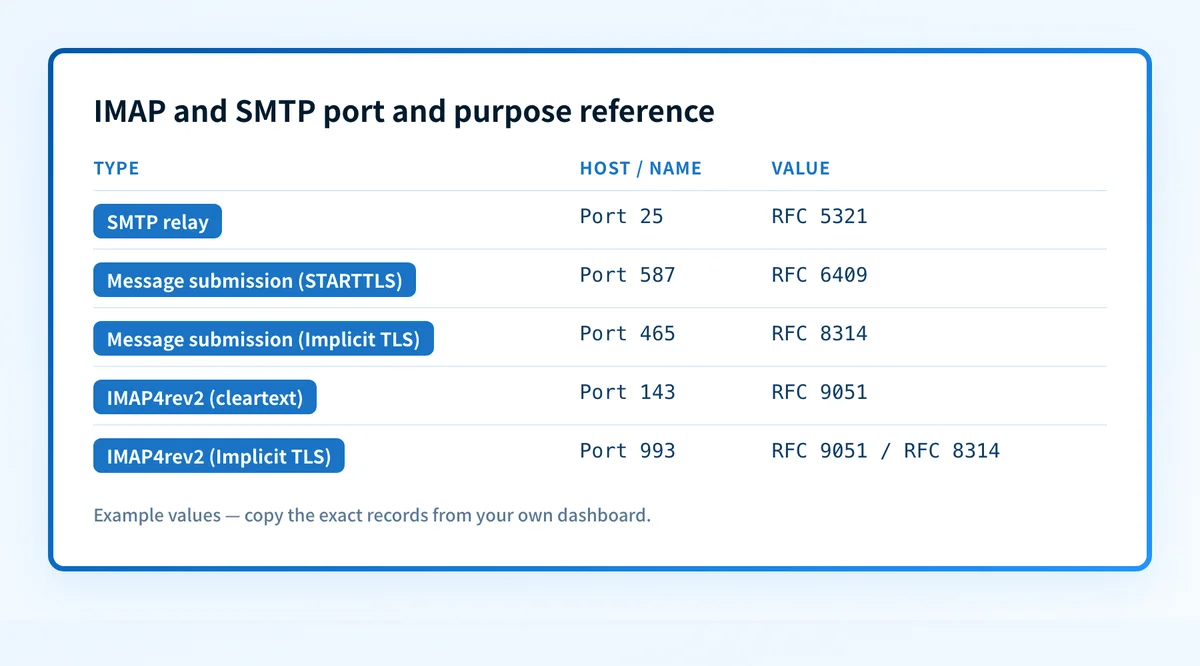
Current IETF guidance in RFC 8314 recommends Implicit TLS for POP, IMAP, and SMTP submission, and asks providers to discourage and then deprecate cleartext connections (Section 3). Under that guidance, the imaps service defaults to port 993 and the submissions service defaults to port 465, each starting a TLS handshake immediately on connect (Sections 3.2, 3.3).
When does the requirement take effect?
RFC 5321 (SMTP) was published in October 2008 and remains the current Standards Track specification for mail transfer.
RFC 9051 (IMAP4rev2) was published in August 2021. It is the current IMAP standard, succeeding the earlier IMAP4rev1 specification.
RFC 6409 (Message Submission for Mail) was published in November 2011 and defines the current split between message submission and message relay.
RFC 8314 was published in January 2018 and sets the current recommendation for Implicit TLS on IMAP, POP, and SMTP submission connections. It does not set a fixed deadline by which every provider must retire cleartext access; it directs providers to discourage, then deprecate, that access over time.
How do I implement the requirement?
1. Identify which half of the mail path the task touches
Reading, filing, flagging, or searching mail that already reached the server is an IMAP task. Sending, relaying, or diagnosing why a message never left the outbox is an SMTP, or SMTP submission, task. Treating the two as one problem often points a fix at the wrong connection.
2. Match the port and TLS mode to the protocol in use
Use port 993 for IMAP4rev2 over Implicit TLS, or port 143 only where a cleartext or STARTTLS connection is explicitly required. Use port 465 for message submission over Implicit TLS, or port 587 for submission that negotiates TLS with STARTTLS. Port 25 remains SMTP's server-to-server relay port and is not the port a mail client should use to submit outgoing mail.
3. Configure retrieval and sending as two separate connections
A mail client opens one IMAP connection to read and manage the mailbox, and a separate SMTP submission connection to send. Fixing one does not fix the other. A client that can read mail over IMAP but cannot send has a separate, unrelated submission-side problem.
4. Confirm exact hostnames and credentials with the provider's documentation
RFC 9051, RFC 5321, RFC 6409, and RFC 8314 define protocol behavior and default ports. None of them assigns a specific server hostname, authentication method, or account credential. That detail is the mail provider's decision, published in that provider's own account setup documentation.
How do I validate compliance?
Confirm each connection independently. For IMAP, connect on the expected port and confirm the TLS handshake completes before any mailbox command is issued. For SMTP submission, confirm the same on port 465 or 587, and confirm the server treats the connection as a submission rather than a relay.
A successful IMAP connection is not evidence that SMTP submission works, and the reverse is also true. The two use separate connections and separate failure points. When a message fails during transfer or relay rather than during submission, that failure shows up in delivery and bounce diagnostics rather than a mailbox-access problem; see the delivery errors troubleshooting hub for that separate failure path.
DNS plays a supporting role too: the MX record for a domain tells a sending SMTP server which host to connect to, and it can be checked with the DNS lookup tool. A correct MX record does not by itself prove that the receiving host accepts the connection on the expected port or completes the TLS handshake; it only identifies where the connection attempt should go.
See how these protocols fit into transport security
IMAP and SMTP define the mail-handling protocols themselves. The encryption and certificate behavior around those same connections belongs to transport security, a related but separate layer.
Read the email transport security guide
That guide covers the TLS and certificate layer around SMTP and IMAP connections. It does not replace testing the actual port and TLS handshake for a specific mail client.
---
Ready to ensure your mail infrastructure is secure and compliant? Start with Palisade with Palisade to monitor DMARC, SPF, and DKIM policies automatically.
Evidence
Sources and further reading
Questions readers ask
Frequently asked questions
How do I find my IMAP and SMTP?
This depends on the mail provider and account, not on the protocols themselves. Neither RFC 9051 nor RFC 5321 assigns a universal hostname; each provider publishes its own IMAP and SMTP submission server names and ports in that provider's account or help documentation. Use the port reference in this article to know what to expect once the provider's page names the host: port 993 for IMAP over Implicit TLS, and port 465 or 587 for submission.
Is the password for IMAP and SMTP the same?
Not defined by IMAP or SMTP. Neither protocol's RFC specifies how a server authenticates a client or whether IMAP and SMTP submission must share one credential. That choice belongs to the mail provider. Check the account's own setup documentation to confirm whether one password covers both connections or whether a separate one is required.
Is SMTP used anymore?
Yes. SMTP, as defined in RFC 5321, still transfers mail between servers. RFC 6409 also built the message submission variant of SMTP on top of the same protocol, splitting message submission from message relay so a mail client's outgoing connection and a server's relay connection are handled as related but distinct roles. That submission variant is what most mail clients use today to send outgoing messages.
Should I use IMAP or SMTP?
Not a choice between the two. IMAP4rev2 and SMTP handle different halves of the same mail flow: SMTP, and its message submission variant, sends and relays mail, while IMAP4rev2 reads and manages mail already stored on a server. RFC 9051 states directly that IMAP4rev2 does not define how mail is posted, so a mail client needs a submission connection for sending no matter how it is configured for retrieval. A typical account uses both protocols at once. For a broader walkthrough of what each protocol does, see SMTP vs POP3 vs IMAP: what each protocol does.
What ports do IMAP and SMTP use?
IMAP4rev2 listens on port 143 for a cleartext connection or port 993 for Implicit TLS, per RFC 9051. SMTP relay uses port 25, while message submission under RFC 6409 uses port 587, or port 465 when using Implicit TLS as described in RFC 8314.

Written by
Ian BussieresCTO & Co-Founder, Palisade
Ian Bussieres is the CTO and co-founder of Palisade, agentic DMARC software for IT teams and MSPs.
More from Ian →