Namecheap DKIM setup
 ChatGPT
 Claude
 Gemini
 Perplexity
 Grok
In brief
Namecheap DKIM setup: generate the Private Email record, publish its account-specific TXT value, and validate DNS and delivered mail with headers.
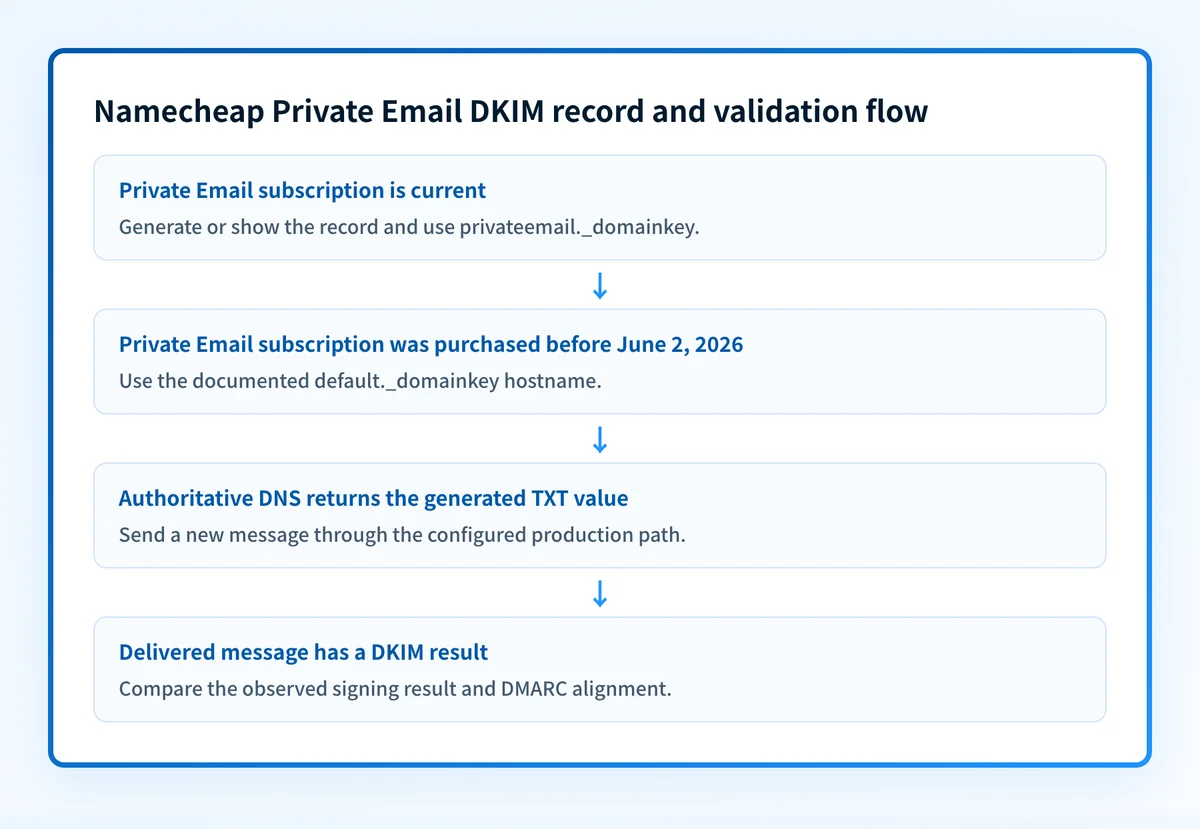
Namecheap DKIM setup for Private Email starts by generating the account-specific DKIM record, then publishing its TXT value at the hostname Namecheap gives you. For current Private Email subscriptions, Namecheap documents privateemail._domainkey as the host. Confirm the DNS record, then inspect a newly delivered message because a published DKIM record alone does not prove that production mail is being signed.
At a glance
Quick takeaways
- Each Namecheap Private Email subscription has its own DKIM record, so copy the selector and key from the correct account.
- Current Private Email setup uses the host
privateemail._domainkey; subscriptions purchased before June 2, 2026 usedefault._domainkey. - The DKIM value is a TXT record that begins with
v=DKIM1;k=rsa;p=MIIBIjANB.... - Your authoritative DNS provider determines where the TXT record must be published.
- Namecheap says a Private Email DKIM change normally takes 60 minutes to take effect.
- A DNS lookup confirms public publication, while a newly delivered message confirms the sending path is actually using DKIM.
Scope and prerequisites
This procedure covers two different Namecheap email paths:
- Namecheap Private Email, where you generate a Private Email DKIM record and publish it in the authoritative DNS zone.
- Namecheap shared hosting email, where cPanel Email Deliverability can show and, in limited cases, repair DKIM records.
You need access to the Namecheap Private Email subscription or cPanel account, access to the authoritative DNS zone, a test recipient mailbox, and permission to inspect its message headers. Record the visible From domain, the sender being configured, the DNS provider, and the person responsible for reversing a DNS change if the result is wrong.
Namecheap's Private Email DKIM instructions say each subscription has a unique record available after ordering. Treat that record as account-generated data. Do not copy a DKIM key, selector, or DNS value from another Namecheap account.
The rollback condition is clear: if the new record collides with an existing record at the same hostname, or a production-path test shows unexpected signing results, restore the previous DNS state and investigate before replacing an active record.
Do not delete an existing DKIM record merely to make room for a new one. This is general DKIM behavior described in RFC 6376, not a Namecheap rule: a receiver looks up the public key at the selector named in each message's signature, so another sender may use that selector, and removing it can cause signatures on mail already in transit to fail verification.
Choose the implementation approach
Choose the approach based on the email service and the DNS authority, not on where the domain was registered.
For Namecheap Private Email, generate or show the subscription's record, then publish the exact TXT hostname and value where the domain's authoritative nameservers are managed. Namecheap documents privateemail._domainkey for current subscriptions and default._domainkey for Private Email subscriptions purchased before June 2, 2026.
For mail sent from Namecheap shared hosting, use cPanel's Email Deliverability view to inspect the suggested DKIM record. Namecheap documents the path as cPanel, then Email, then Email Deliverability. This view covers DKIM, SPF, and DMARC DNS issues for the domains on that hosting account.
The DNS location needs care. Namecheap says BasicDNS configures the generated Private Email TXT record automatically, while another section of the same support article says Basic or Premium DNS records should be manually added in the Namecheap account. Inspect both the generated record and the live DNS zone instead of assuming BasicDNS published it.
Use these decision rules:
- If another provider's nameservers are authoritative, publish the record at that provider.
- If Namecheap Premium DNS controls the zone, publish or confirm the record in the Namecheap account.
- If Namecheap shared-hosting nameservers control DNS, cPanel may offer record repair or installation.
- If cPanel shows an external DNS setup, copy its suggested value to the actual authoritative DNS provider. Do not expect cPanel to change a zone it does not control.
How to configure Namecheap DKIM
1. Confirm the sending path and DNS authority
Confirm that the domain sends through Namecheap Private Email or Namecheap shared-hosting email. Then determine which nameservers answer authoritatively for the domain.
The DNS zone is the source of truth for the public DKIM record. Domain registration at Namecheap does not mean Namecheap controls DNS. If the domain uses third-party nameservers, the TXT record belongs in that third-party DNS service.
2. Generate or retrieve the Private Email DKIM record
For Private Email, follow Namecheap's documented account path: sign in, open Private Email, select Manage beside the domain, then select Generate under DKIM. Namecheap displays the confirmation message "DKIM has been generated" after generation.
If the record already exists, Namecheap documents this path: Private Email, select Manage beside the subscription, then select Show DKIM. Copy the hostname and complete TXT value together.
The current record host is privateemail._domainkey. If the Private Email subscription was purchased before June 2, 2026, Namecheap documents default._domainkey instead. Do not substitute one hostname for the other.
3. Publish the account-generated TXT record
Publish the exact record generated in the Namecheap account. The following is an illustrative shape only. Do not publish this example or reuse a key from another account.
privateemail._domainkey.yourdomain.com TXT "v=DKIM1;k=rsa;p=<Namecheap-account-generated-public-key>"Namecheap says the copied value begins with v=DKIM1;k=rsa;p=MIIBIjANB.... Enter the full account-generated value without brackets or quotes if your DNS interface expects only the value.
If the DNS interface has multiple value fields, Namecheap warns against placing only v=DKIM1; k=rsa; in one field and the remaining key in another. Fill the first field as far as it permits, then continue the remaining value in the next field.
Do not overwrite unrelated TXT records. A domain can have multiple TXT records, and a DKIM selector is separate from SPF and DMARC. Preserve existing selector records unless the responsible sender confirms that they are retired.
4. Use cPanel Email Deliverability for shared-hosting mail
For Namecheap shared hosting, open cPanel and go to Email then Email Deliverability. Namecheap says the table displays each domain and DNS issues affecting SPF, DKIM, and DMARC.
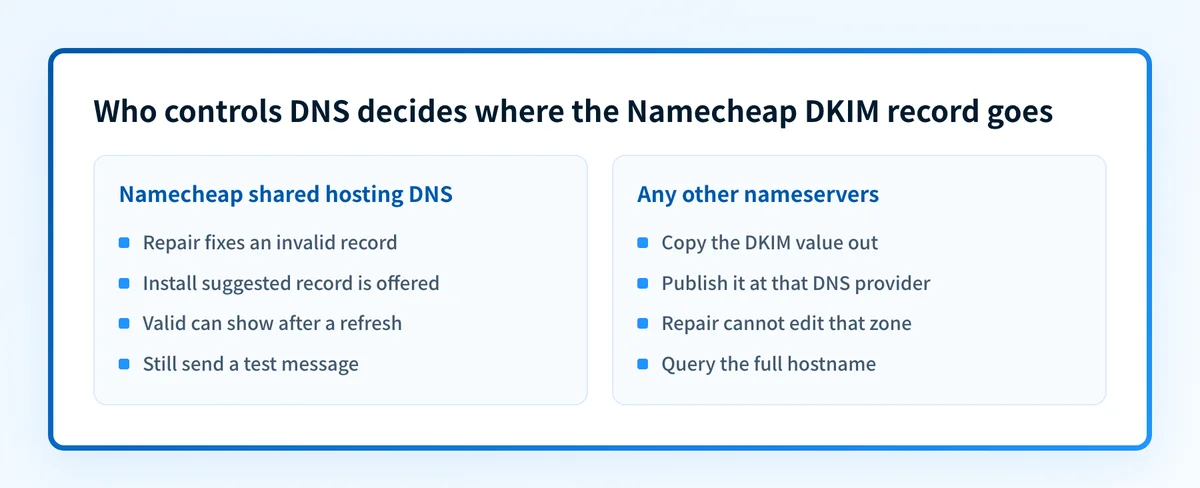
Select Manage to view configured DKIM, SPF, and DMARC values. Copy the DKIM value into external authoritative DNS when the zone is hosted elsewhere.
Namecheap documents Repair for invalid records only when Namecheap shared-hosting nameservers control the DNS. It can take up to five minutes, after which a refresh can show the status "Valid". The "Install the suggested record" option also applies only when the domain points to Namecheap Shared hosting nameservers.
Do not use Repair as evidence that a message is signed. It repairs or publishes DNS where cPanel has authority. It does not inspect every outbound mail path.
5. Wait for DNS publication and keep the generated value intact
Namecheap says a Private Email DKIM change normally takes 60 minutes to take effect. During that period, avoid regenerating the key or changing the host unless the account record and DNS answer clearly differ.
A long DKIM public key may appear as several quoted strings in DNS lookup output. That can be display formatting for one TXT record. Compare the reconstructed answer to the generated value before treating the split display as an error.
How to validate the setup
Validate Namecheap DKIM at four layers. Each answers a different question.
- DNS: Query the fully qualified hostname at an authoritative server, then confirm a public resolver sees the same TXT value. For current Private Email, Namecheap directs users to validate
privateemail._domainkey.domain.com. - Sender state: Confirm the Private Email account still displays the generated record, or confirm cPanel Email Deliverability shows the intended state for the domain.
- Delivered message: Send a new message through the exact mailbox or application path. Inspect the recipient's raw headers for a
DKIM-Signatureand its receiver-added authentication result. - DMARC reporting: Once aggregate reports accumulate, confirm the production source passes and aligns as intended. A valid DKIM signature only supports DMARC when its signing domain aligns with the visible From domain.
dig +short TXT privateemail._domainkey.yourdomain.comRFC 8601 defines the Authentication-Results header field used by receiving systems to report authentication status. Inspect the actual receiving system's result rather than assuming a DNS result means dkim=pass on mail. RFC 8601 also explains that these results are assessments made by the receiving system.
For the follow-on DMARC work, use the DMARC setup guide. DMARC policy rollout should start with monitoring, then move to quarantine and reject only when aggregate-report evidence supports the next step.
Troubleshooting
The Namecheap DKIM record does not resolve
Check the full hostname first. Current Private Email uses privateemail._domainkey, while subscriptions purchased before June 2, 2026 use default._domainkey.
Then check DNS authority. If third-party nameservers serve the domain, adding the record in a Namecheap screen will not publish it to the authoritative zone. Query the full hostname and compare the result to the record shown in Private Email or cPanel.
The TXT record exists but Namecheap or cPanel still shows a problem
Compare the complete value with the account-generated record. Check for an omitted key segment, an extra quote added as data, the wrong record type, or the host duplicated with the domain suffix.
For cPanel, confirm that Namecheap shared-hosting nameservers control DNS before relying on Repair or "Install the suggested record". Those controls cannot repair an external zone.
The DNS record resolves but a test message has no DKIM pass
A public TXT record does not prove Namecheap Private Email is signing the tested mail. Confirm that the message came from the exact Private Email mailbox or shared-hosting sender being configured, then inspect the raw headers.
The available Namecheap documentation does not specify the exact DKIM-Signature selector or signing domain used on delivered Private Email messages. Record the observed header values and compare them with the published selector. Do not infer a signing configuration from DNS alone.
The test message has DKIM but DMARC still fails
Compare the visible From domain with the d= domain in the DKIM signature. A DKIM signature can pass while failing DMARC alignment if those domains do not align.
Also check SPF and DMARC separately. The email authentication guide explains how these controls work together, but a DNS checker cannot determine a mailbox provider's private placement decision or guarantee future inbox placement.
Check the Namecheap DKIM record before testing mail
Inspect the published Namecheap selector after DNS has had time to update. The DKIM checker can show whether public DNS returns a DKIM record for the domain before you move to the delivered-message test.
Check the Namecheap DKIM record
A public DKIM check cannot confirm that Namecheap Private Email is applying the private key, that every production sender uses the record, or that a receiver will place a message in the inbox.
If Namecheap Private Email is one of several sending systems for the domain, a one-time DNS check also does not identify later alignment failures from other sources. Palisade is agentic DMARC software that analyzes DMARC aggregate-report data, identifies sending sources and authentication or alignment issues, and creates prioritized remediation tickets. It can propose a policy step for human review, but it does not autonomously change the DMARC policy or guarantee delivery.
Evidence
Sources and further reading
Questions readers ask
Frequently asked questions
Can I use default.domainkey for Namecheap Private Email?
Only for Private Email subscriptions purchased before June 2, 2026. Namecheap documents privateemail._domainkey for current Private Email setup and default._domainkey for subscriptions purchased before that date.
Does Namecheap automatically add the Private Email DKIM record?
Not always as a safe assumption. Namecheap's generation instructions say BasicDNS should configure the generated record automatically, but its copy-record instructions say Basic or Premium DNS records must be manually added in the Namecheap account. Inspect the generated record and the authoritative DNS answer before treating the record as published.
How long does Namecheap DKIM take to work?
Namecheap says Private Email DKIM changes normally take 60 minutes to take effect. DNS visibility does not replace a newly delivered-message test.
Can cPanel repair a Namecheap DKIM record?
Only when Namecheap Shared hosting nameservers control the domain DNS records. Namecheap says cPanel Email Deliverability can repair invalid records in that case, while domains using external DNS require you to copy the suggested record to the authoritative provider.
Does a published Namecheap DKIM record prove email delivery?
No. A published Namecheap DKIM record proves that public DNS can return a record. It does not prove that the tested sender signs mail, that DKIM aligns with the visible From domain, or that a receiving mailbox provider will place a message in the inbox.

Written by
Samuel ChenardCEO & Co-Founder, Palisade
Samuel Chenard is the CEO and co-founder of Palisade, agentic DMARC software for IT teams and MSPs, from one domain to thousands.
More from Samuel →