Google Postmaster domain and IP reputation dashboard
 ChatGPT
 Claude
 Gemini
 Perplexity
 Grok
GrokIn brief
Google Postmaster domain and IP reputation dashboards are legacy views being retired in v2. Learn what their ratings mean and what to check next.
The Google Postmaster domain and IP reputation dashboard refers to legacy Postmaster Tools views that rate the sending domains and IP addresses Google sees in mail sent to personal Gmail accounts. Google says the Domain Reputation and IP Reputation dashboards are being retired from Postmaster Tools v2, and its v2 API excludes those reputation reports. If a legacy view is still available to your account, treat it as a Gmail-specific signal, not a general measure of delivery everywhere. Google's Postmaster Tools deprecation notice explains the change.
At a glance
Quick takeaways
- Google's old Postmaster Tools interface includes separate Domain Reputation and IP Reputation dashboards.
- Google says those two reputation dashboards are being retired from Postmaster Tools v2.
- Legacy reputation data applies to mail sent to personal Gmail accounts, not every mailbox provider.
- The Domain Reputation dashboard attributes data to the exact domain used for DKIM or SPF authentication.
- Google describes reputation as a quality rating based on sending behavior for a domain or IP address.
- A public IP reputation lookup cannot reveal Google's private reputation decision or guarantee Gmail inbox placement.
How the legacy reputation dashboards work
Google's Postmaster Tools dashboard documentation describes IP Reputation as a quality rating for sending IP addresses and Domain Reputation as a quality rating for sending domains. Google says these views show reputation for domains and IP addresses that send DKIM-authenticated messages to Gmail accounts. If the sender does not use DKIM, Google uses SPF-authenticated messages for the display.
The legacy Domain Reputation dashboard has an important scope rule. Google says it only displays messages sent from the exact domain used during DKIM and SPF authentication. A visible From domain alone does not establish which domain will appear in that report.
This is why reputation work belongs inside a broader email deliverability investigation. A reputation state is one Gmail signal. It does not identify every source that sends as your domain, prove that a given message reached the inbox, or explain another receiver's filtering decision.
Google's older dashboard documentation lists four reputation ratings:
Badindicates a history of regularly sending a high volume of spam.Lowindicates a history of regularly sending a significant volume of spam.Mediumindicates mostly legitimate mail with occasional spam.Highindicates a history of very low spam rates and compliance with Gmail's sender guidelines.
When the answer changes
The practical answer depends on which version of Postmaster Tools your account can access.
If the account still exposes a legacy reputation view, read the domain and IP ratings separately. An IP rating concerns the sending address Google observed. A domain rating concerns the exact domain authenticated through DKIM or SPF. A poor result in one view does not, by itself, document the cause of a result in the other.
If the account uses Postmaster Tools v2 and the old reputation cards are unavailable, do not assume there is a replacement card with the same labels or meaning. Google's deprecation notice says new dashboards will provide more actionable information, but it does not document a direct replacement for the old Domain Reputation or IP Reputation dashboards. Use the dashboards and error evidence that are available in the account, then compare them with the sender's actual authentication and delivery data.
Google's email sender guidelines also make shared IP addresses a separate consideration. Activity from other senders on a shared IP can affect that IP's reputation. That warning does not mean a shared-IP customer can see or control every sender's behavior.
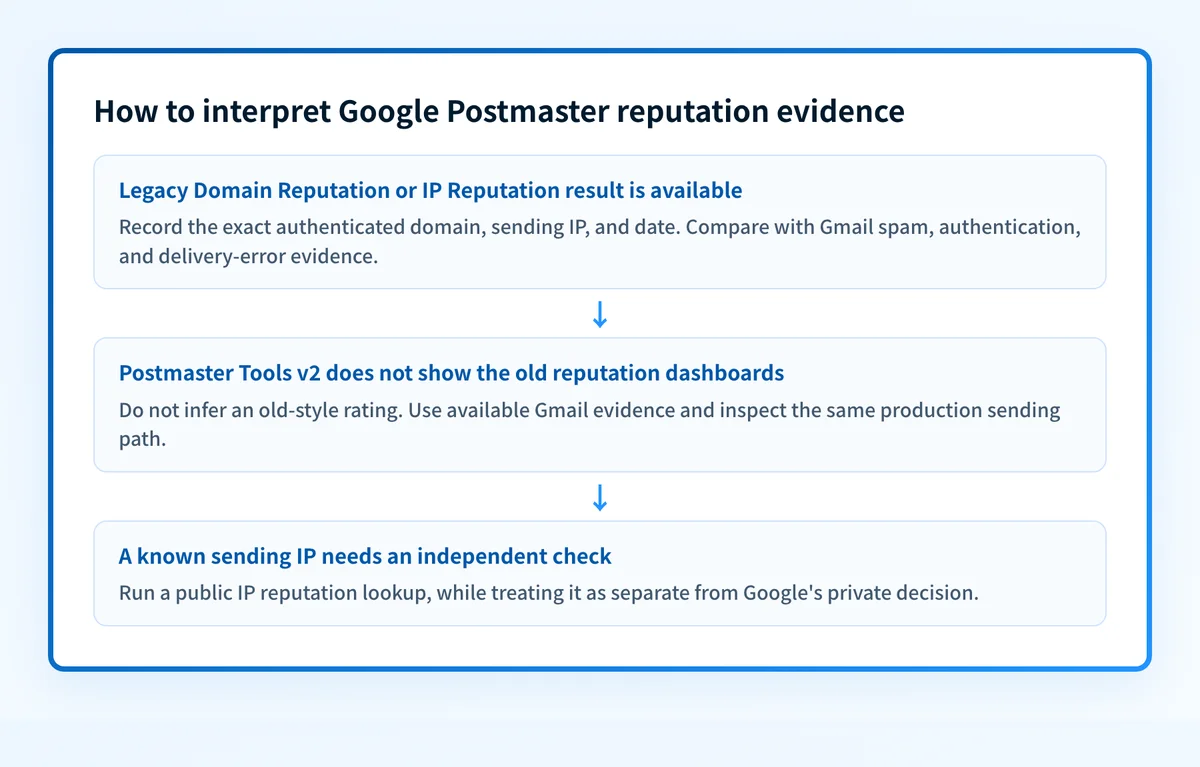
A practical decision rule for a reputation result
Start with the evidence Google actually reports, then collect evidence from the same sending path. This rule avoids treating a dashboard color as a root-cause diagnosis.
Illustrative decision rule
If a legacy Domain Reputation or IP Reputation result is available:
  Record the date, the exact authenticated domain, and the sending IP.
  Compare the result with the Spam Rate, Authentication, and Delivery Errors views.
  Inspect a delivered message from the same production sender.
If the old reputation views are unavailable in Postmaster Tools v2:
  Do not infer an old-style reputation rating.
  Use available Gmail dashboards, delivery errors, and message authentication evidence.
  Check public IP signals separately when the sending IP is known.
For a delivered message, inspect the receiver-added Authentication-Results header rather than relying on an ESP setup screen. RFC 8601 defines that header field for reporting message authentication results. A passing DKIM or SPF result can help establish what Google associates with the traffic, but it does not prove a high reputation state.
When the problem concerns the domain identity rather than the infrastructure address, review the distinction in what is a domain reputation. When the issue is broader sender trust, email sender reputation covers the surrounding concept without treating any one provider dashboard as universal.
What to check after a reputation result
Use the evidence you have:
- If you have access to legacy Postmaster Tools, compare the displayed reputation with Google’s Spam Rate, Authentication, and Delivery Errors data for the same period.
- If you have a Gmail delivery error, preserve the exact error and inspect a message from the affected production path. Google documents low sending IP and low sending domain reputation as separate delivery-error categories in its Postmaster Tools dashboard guidance.
- If you know the sending IP, check public signals for that address separately, and check the domain against public blocklists as well. This can help identify an external blocklist issue, but it cannot reproduce Google's private reputation calculation.
- If the mail uses a third-party sender, identify the authenticated domain and actual sending IP before changing DNS or routing traffic. Google’s documentation does not make a vendor setup screen proof of the production sending path.
Check the public reputation signals for the sending IP
When a legacy Google IP rating is unavailable, or when you need a second source of evidence for a known sending address, inspect that IP before deciding whether the issue is isolated to Gmail.
A public IP check cannot show Google’s current reputation rating, prove why Gmail filtered one message, or guarantee future Gmail placement.
If aggregate reports show several legitimate sources using the same domain, the ongoing work is identifying which paths pass aligned authentication and which need remediation. Palisade autonomously analyzes DMARC aggregate-report data, identifies authentication or alignment issues, and creates prioritized remediation tickets. It does not change Google’s reputation decision or guarantee delivery.
Evidence
Sources and further reading
Questions readers ask
Frequently asked questions
Are Google Postmaster domain and IP reputation dashboards still available?
The two dashboards still appear for accounts on the legacy Postmaster Tools interface, but Google is retiring both from Postmaster Tools v2. Availability therefore depends on which interface version your account uses. The v2 API leaves the reputation reports out as well.
Does a high Google reputation rating guarantee Gmail inbox placement?
No, a high rating makes inbox delivery more likely rather than certain. Google says senders with a high reputation are more likely to have mail delivered to the Gmail inbox instead of spam. That describes a pattern across traffic, not a promise for one message, recipient, or future send.
Does Google domain reputation use the visible From domain?
Google reports on the exact domain used during DKIM or SPF authentication, which matches the visible From domain only when that same domain authenticates the mail. If a third-party service signs with its own domain, that service's domain is what appears in the dashboard. Confirm which domain actually authenticates before you read the rating as a verdict on your brand domain.
Why is there no reputation data in Postmaster Tools?
Google says dashboard data is not real time and may omit data on days with low outgoing email volume. Missing data does not prove that the sender has a positive reputation or that Gmail has no data.
Can an IP blocklist lookup replace Google Postmaster Tools?
No, because a blocklist lookup reads public signals while Postmaster Tools reports what Google itself observed. A public lookup can show whether a known sending IP appears on a list. It cannot show Google’s private rating, your account-level Postmaster data, or the placement decision for one Gmail message.

Written by
Johanie DupontBrand & Ecommerce Email
Johanie Dupont works on brand and ecommerce email at Palisade: BIMI and verified marks, sender requirements, and getting marketing mail into the inbox.
More from Johanie →