Google email warmup: what it is and what Google does not define
 ChatGPT
 Claude
 Gemini
 Perplexity
 Grok
GrokIn brief
Google email warmup is an industry practice, not a Google-published process. Separate vendor claims from authentication and deliverability checks.
Google email warmup usually means gradually establishing a new sending mailbox's activity before using it for larger campaigns. It is an industry practice promoted by warmup vendors, not a Google Workspace process defined in the available Google material. Google Workspace provides Gmail and custom business email, but its public product page does not prescribe a warmup schedule, duration, volume, or tool. Check authentication and delivery evidence separately before treating warmup activity as meaningful.
At a glance
Quick takeaways
- Google Workspace includes Gmail and custom business email for an organization's domain.
- The available Google Workspace material does not define a Gmail or Google Workspace warmup procedure.
- Warmup providers describe automated message exchanges, opens, replies, and gradual ramps as features of their own products.
- Vendor claims do not prove that Google rewards warmup-network engagement or that inbox placement will improve.
- SPF, DKIM, and DMARC need their own technical checks because a warmup service cannot establish that messages authenticate correctly.
- A public diagnostic can inspect current DNS-related security posture, but it cannot predict Gmail placement.
How Google email warmup works in practice
Google Workspace describes Gmail as custom business email, including addresses such as you@your-company.com. That confirms the product context, but it does not create a Google-defined warmup workflow.
In industry usage, a warmup service connects to a mailbox and creates controlled email activity. For example, Mailwarm describes automated warm-up emails that are opened, marked important, and replied to. Warmup Inbox says its service can connect an inbox through OAuth into Gmail, Outlook, or SMTP, then exchange automated messages through its network. These are vendor descriptions of their services.
The missing link is important: those product descriptions do not establish that Gmail treats the generated activity as a positive reputation signal. They also do not prove that a mailbox will reach an inbox, remain out of spam, or perform well after the service stops.
Email delivery has more than one input. A legitimate business message still needs valid authentication, a sending path that uses the intended domain, and evidence from real delivered mail. See email deliverability for the broader distinction between successful delivery and inbox placement.
When the answer changes
The answer changes based on the question being asked.
If the question is, "What warmup volume does Google require?", there is no supported answer in the available Google Workspace material. Do not substitute a vendor's suggested schedule for a Google requirement.
If the question is, "Can a warmup service send automated messages through a connected inbox?", some vendors say yes. Mailwarm describes automated warm-up emails and engagement actions. Warmup Inbox recommends a gradual ramp and states that its own full ramp takes 14 to 21 days minimum. That is a vendor recommendation, not a verified Google rule.
If the question is, "Does this domain technically authenticate?", warmup activity is the wrong evidence. Authentication requires DNS and message-level checks. AI email warmup has the same boundary: automation can describe or create activity, but it cannot prove a receiver's private inbox decision.
Use this decision rule:
- If you need to know what Google requires, rely on current Google documentation that states the requirement.
- If you need to assess a vendor's warmup feature, read that vendor's current product terms and setup guidance.
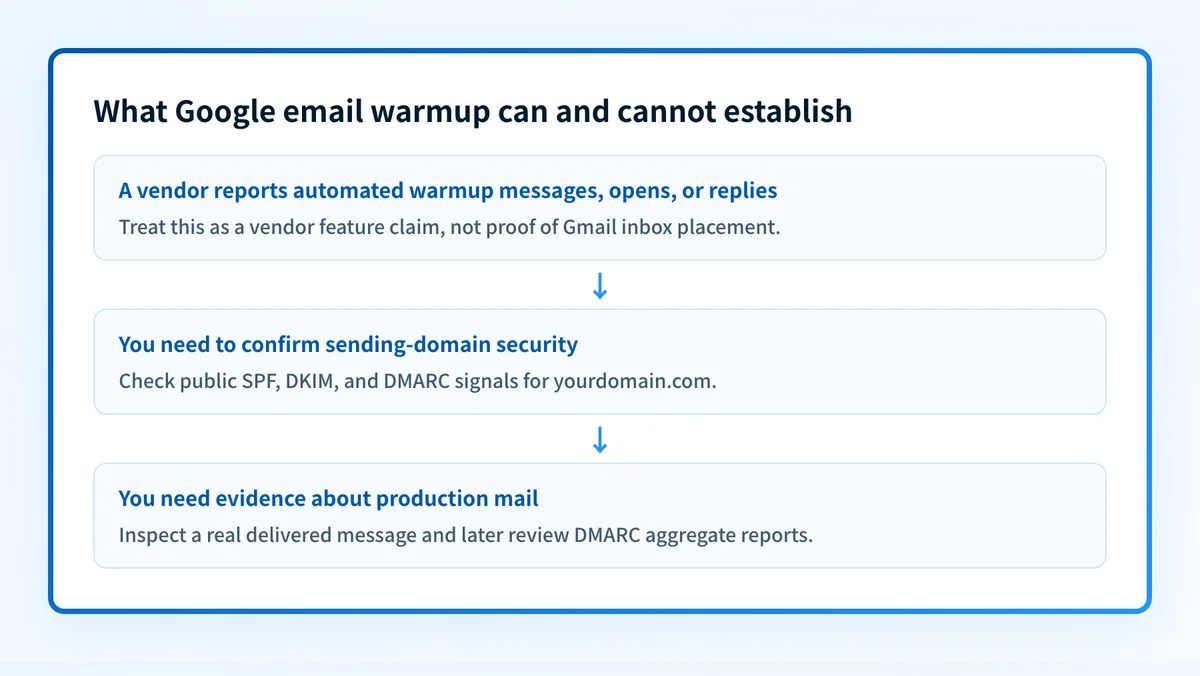
- If you need to assess your domain's sending posture, inspect SPF, DKIM, DMARC, and a real delivered message from the production path.
- If you need to know why Gmail placed one message in spam or inbox, use message evidence and the relevant Google account or administrator signals. A warmup dashboard cannot establish that cause.
A worked example: what a warmup claim can and cannot show
Consider a new Google Workspace mailbox that will send legitimate business mail from yourdomain.com.
Mailbox: sales@yourdomain.com
Vendor claim: Automated warm-up emails are exchanged and receive opens or replies.
Technical evidence still needed:
- SPF or DKIM pass for a real message from sales@yourdomain.com
- Alignment with the visible From domain, yourdomain.com
- A valid DMARC policy record for yourdomain.com
- Delivery and placement evidence from the actual production sending path
The first line describes the mailbox. The vendor claim describes what the service says it does. Neither establishes the four technical results beneath it.
A real production validation has separate layers:
- DNS: confirm the published authentication records through authoritative DNS and at least one public resolver.
- Vendor: confirm the sending application reports that its domain authentication setup is complete.
- Message: send a real message through the same application and inspect its authentication results.
- DMARC: review aggregate-report data after reports accumulate to identify sources and alignment issues.
Authentication-Results fields that report authentication evaluation. RFC 8601 defines the Authentication-Results header field, including results for methods such as SPF and DKIM. A passing result supports an authentication finding for that message. It does not guarantee future Gmail inbox placement.
For a warmup product that advertises a free feature, keep the claim narrow. Woodpecker advertises "Free warm-up" and says it "Automatically builds your sender reputation". The available material does not establish feature eligibility, limits, setup requirements, or an independently verified reputation outcome.
Check the sending domain before relying on warmup
Start with the evidence you control. Check the domain's published email-security posture, then compare it with a real message sent by the application that will handle production mail. The Palisade Email Security Score can inspect public DNS-related signals for a domain. For a broader operating view, use the email deliverability hub.
A good score or a published record is only a starting point. It does not prove the connected Google Workspace mailbox is using the intended DKIM signing path, that every sender aligns, or that Gmail will place a future message in the inbox.
If aggregate reports reveal unknown senders, authentication failures, or alignment issues across domains, Palisade is agentic DMARC software that analyzes DMARC aggregate-report data, identifies sending sources and issues, and creates prioritized remediation tickets. It can propose a next policy step when the evidence supports it, while your team reviews the evidence and applies any DNS change.
Palisade does not control Gmail's private placement decisions, guarantee delivery, or prove that every future message will authenticate.
Evidence
Sources and further reading
Questions readers ask
Frequently asked questions
How do I warm up a Gmail account?
Start by confirming the domain authenticates, because Google does not publish a warmup procedure for Gmail or Google Workspace. Check that SPF and DKIM pass and align for the address you will send from, then send real mail through the production path and read the headers. Warmup vendors will hand you a schedule, but that schedule is theirs, not Google's.
Does email warm up actually work?
Vendors say it does, but Google publishes no rule that rewards warmup activity, so nobody can show the practice itself improves Gmail placement. Mailwarm, Warmup Inbox, and Woodpecker each describe automated exchanges, opens, and replies inside their own networks. That activity is not evidence that Gmail reads it as a positive signal for your mailbox.
How can I warm up email for free?
Woodpecker advertises a free warm-up feature, which is the only free option named on this page. It does not publish the eligibility rules, limits, setup steps, or whether the feature stays free after a trial, so read its current terms before you connect a mailbox. Raising your own sending volume gradually costs nothing and needs no tool at all.
What is the best email warm up tool?
There is no best one, because no independent comparison of these products exists and none of them control Gmail's placement decision. Mailwarm, Warmup Inbox, and Woodpecker each describe their own features, which tells you what they do but not how they rank against each other. Choose on the connection method they document, the access they need, and what you can verify from your own delivered mail.
Does a warmup service fix SPF, DKIM, or DMARC?
No, because those are DNS and message-level settings that a warmup service never touches. Its message activity cannot make an SPF or DKIM result align with your visible From domain, and it cannot publish a DMARC record for you. Check those separately with a DNS lookup and the headers of a real delivered message.

Written by
Johanie DupontBrand & Ecommerce Email
Johanie Dupont works on brand and ecommerce email at Palisade: BIMI and verified marks, sender requirements, and getting marketing mail into the inbox.
More from Johanie →