Email sender reputation
 ChatGPT
 Claude
 Gemini
 Perplexity
 Grok
GrokIn brief
Email sender reputation is how mailbox providers may assess a sending IP address or domain as reputable or spam-related. Learn how to investigate it.

Email sender reputation is an assessment of a sender's standing that is commonly associated with a sending IP address or domain. In practical terms, it asks whether mailbox providers may view that sender as reputable or as a spammer. It is one diagnostic signal in email delivery work, not a universal score or a complete explanation for why one message reached, missed, or was filtered by a recipient.
At a glance
Quick takeaways
- Email sender reputation can be assessed for a sending IP address or domain.
- A reputation result reflects an assessment, not a universal mailbox-provider verdict.
- Blocklist status is a separate diagnostic signal from sender reputation.
- A public IP or domain check cannot reveal every production sending path.
- One reputation result does not prove inbox placement, future delivery, or a receiver's private decision.
- Delivery investigations need to keep sender reputation separate from authentication, message, and recipient-side evidence.
How email sender reputation works
Sender Score describes sender reputation as something to monitor and provides an IP lookup, framing the question as whether mailbox providers view a sender as reputable or as a spammer. That wording is useful because it keeps the subject narrow: sender reputation concerns how a sender is assessed, rather than a guarantee about the outcome of every message.
The relevant sender identity may be an IP address or a domain. An IP address is the network address used by the sending system. A domain is the name associated with the sender's mail identity. A sender can use more than one of either, so a result for one IP or one domain may leave other production paths unexamined.
Sender reputation also belongs within a broader email deliverability investigation. Delivery outcomes can involve the recipient's own filtering and handling decisions. A reputation assessment can help frame one part of the investigation, but it does not disclose a mailbox provider's private rules or show why a specific recipient received a specific result.
Do not turn a reputation label into a protocol result. Reputation is distinct from evidence that a message authenticated, such as the message's own Authentication-Results header. It is also distinct from a DNS lookup that confirms a record is publicly published. Those checks answer different questions.
How sender reputation works in email marketing
Sender reputation in email marketing is the same assessment applied to a bulk-sending program, and the same separation of evidence streams applies to it. Sender Score presents its reputation score, blocklist lookups, and bounce lookups as distinct tools, which is a useful reminder that a campaign problem has more than one evidence stream. A marketing program also produces one stream a transactional sender rarely has in volume: bounce messages from a single send. Preserve those bounces with the receiving domain, timestamp, and sending IP, and read them alongside the reputation result rather than in place of it. A reputation assessment can tell a team that its email marketing program needs review. It cannot show why one campaign was filtered. A warmup activity does not establish how mailbox providers will handle future campaigns either; what AI email warmup can and cannot prove covers that separately.
When the answer changes
The answer changes with the evidence you have and the scope of the sending path you are investigating.
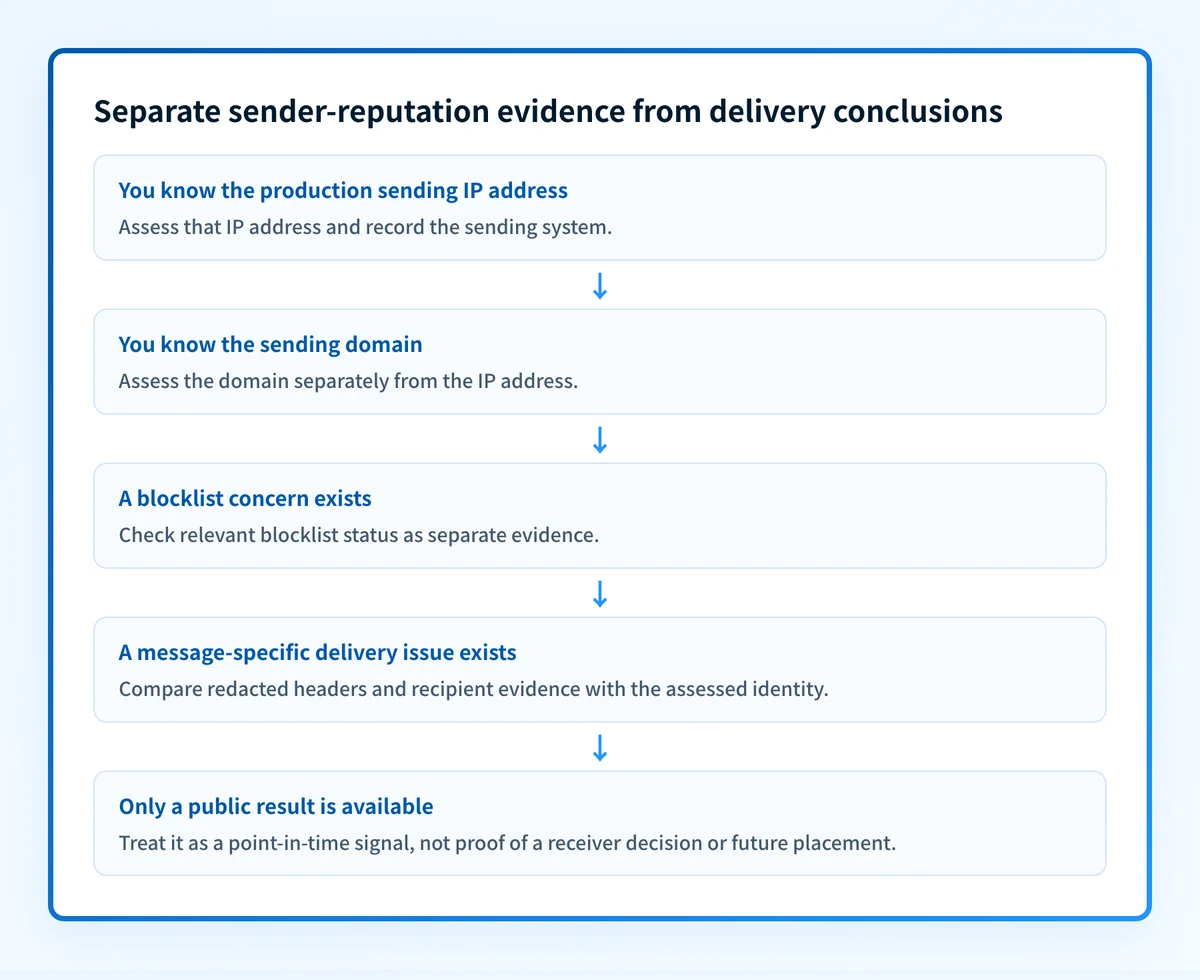
Use this decision rule:
- If you know the sending IP address, assess that IP address and record which production system uses it.
- If you know the visible sending domain, assess the domain separately. For a domain-focused explanation, see how to check and improve email domain reputation.
- If you have a suspected blocklist issue, check blocklist status as a separate evidence stream.
- If you have a delivered or rejected message, preserve the redacted headers and compare them with the IP or domain result.
- If you only have a public result, treat it as a point-in-time observation. It does not prove the full sending path, a receiver's private decision, or future placement.
A mailbox provider may reach a conclusion that is not visible through a public checker. For that reason, avoid claims such as "a clear blocklist result means the sender has a good reputation" or "a reputation result explains every delivery problem." The available evidence does not support either statement.
When a delivery problem includes an unauthenticated-sender notice, reputation is not enough to diagnose it. Follow the message-specific evidence and the provider's stated condition. For example, Gmail's blocked sender is unauthenticated message points to an authentication problem that requires its own investigation.
Worked example: separating the evidence
Assume an operations team notices that mail from news.yourdomain.com is receiving poor delivery feedback. The team knows the outbound platform's sending IP address but does not know whether the issue is reputation, a blocklist entry, message authentication, or a receiver-specific decision.
The first pass should keep the evidence separate:
Sender identity under review
Domain: news.yourdomain.com
Sending IP: 192.0.2.25
Evidence to collect
- **First:** IP or domain reputation-assessment result
- **Second:** relevant IP blocklist result
- **Third:** redacted headers from a message sent through this exact path
- **Fourth:** recipient-side error or delivery evidence, if available
Decision
Do not explain the delivery outcome from only one result.
The IP address above is illustrative. Do not publish a customer IP address, recipient address, or unredacted headers in a public ticket.
The IP address and domain assessment establish the identity being investigated. A separate blocklist check can reveal whether that IP appears on a relevant list. Message headers can establish which path was actually used for the message in question. A recipient-side error, where available, may identify a condition that public diagnostics cannot see.
The team should not change sending practices merely because one public result looks concerning or reassuring. First establish whether the result applies to the IP or domain that sent the affected mail. Then compare it with the message evidence.
This is also why an MX-based blacklist result needs careful interpretation. MXToolbox describes its check as examining MX-record IP addresses against DNS-based blacklists. An MX record identifies mail-receiving infrastructure. It may not be the outbound IP address used for the sender under investigation.
Practical next steps for a sender-reputation concern
Start with the most direct evidence available.
- If you have a sending IP address, use a reputation-assessment service for that IP and document the lookup time.
- If you have the sending domain but no confirmed outbound IP, investigate the domain's role separately and identify the system that actually sends the affected mail.
- If a blocklist is suspected, check its status independently and record the specific IP reviewed.
- If a message was delivered, filtered, deferred, or rejected, retain redacted headers and any recipient error. They are evidence about the real mail path.
- If you are reviewing delivery more broadly, use the email deliverability learning hub to separate reputation work from authentication, policy, and recipient-side issues.
Inspect the sender's public email-security posture
If you are collecting initial evidence for a sending domain, open Palisade's Email Security Score alongside the IP or domain reputation and blocklist checks. Use the results to identify what needs closer investigation, then compare them with evidence from the actual production message path.
Inspect the Email Security Score
A public diagnostic cannot prove a mailbox provider's private reputation decision, repair a sending issue, monitor every sender continuously, or guarantee inbox placement. For teams that need to review DMARC aggregate-report data across domains, Palisade is agentic DMARC software that identifies sending sources and authentication or alignment issues, then creates prioritized remediation tickets. It does not change DMARC policy or control a receiver's reputation decision.
Evidence
Sources and further reading
Questions readers ask
Frequently asked questions
Is email sender reputation the same as domain reputation?
No. Domain reputation is a domain-focused assessment, while email sender reputation can be discussed in relation to either a sending domain or a sending IP address. A result for one identity does not automatically establish a result for the other.
Is a blocklist result the same as sender reputation?
No. Blocklist status is a distinct diagnostic signal. Check it alongside an IP or domain reputation assessment, then compare both results with the real message path before drawing a conclusion.
Can a public reputation check explain why one email went to spam?
No. A public result does not reveal a mailbox provider's private handling decision or prove why one specific message was filtered. Message headers, recipient-side evidence, and the actual sending path are needed for that investigation.
Does a clear blocklist check guarantee inbox placement?
No. A clear blocklist result only addresses the list check performed for the identity reviewed. It does not guarantee delivery or inbox placement at any mailbox provider.
Should I assess the sending IP address or the domain?
Yes, assess the identity you can confirm for the affected mail. If you know the outbound IP address, assess that IP. If the concern is tied to a domain, assess the domain separately. When possible, collect both types of evidence and verify which path sent the message.
Can I check sender reputation with only an IP address?
Yes. Sender Score's lookup takes an IP address as its input. Record which production system uses that address, because a sender can use more than one, and a result for a single IP leaves the other sending paths unexamined.
Should bounces be investigated separately from reputation?
Yes. A bounce is evidence from one specific delivery attempt, while a reputation result is a point-in-time assessment of a sender identity. Preserve the bounce message, receiving domain, timestamp, and sending IP, then compare them with the reputation and blocklist results.
Can sender reputation prove inbox placement for a campaign?
No. A sender reputation result is a point-in-time assessment of a sender identity, not a prediction. It does not prove that a mailbox provider accepted any message, and it does not guarantee inbox placement for the next campaign sent from the same IP address or domain.

Written by
Dominic LandryDeliverability & DNS
Dominic Landry works on email deliverability and DNS configuration at Palisade, from SPF and DKIM records through to DMARC enforcement.
More from Dominic →