Generate DKIM keys
 ChatGPT
 Claude
 Gemini
 Perplexity
 Grok
GrokIn brief
Generate DKIM keys by creating a key pair in your sending system, keeping the private key there, and publishing its public key in DNS for receiver.
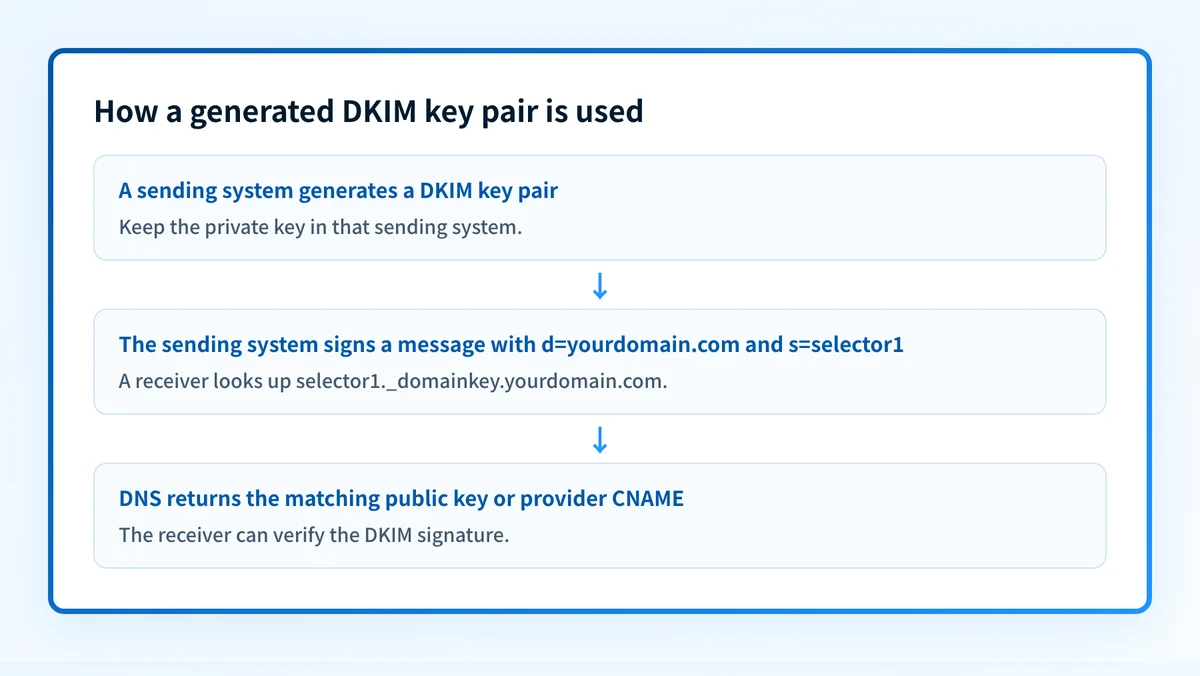
Generate DKIM keys by creating a public-private key pair in the email system that will sign your mail. Keep the private key in that system and publish the matching public key where receivers can retrieve it through DNS. The provider or signing software determines the exact generation method and DNS record shape, so do not reuse another organization's selector, public key, or CNAME target.
At a glance
Quick takeaways
- A DKIM key pair has a private signing key and a public verification key.
- The sending system uses the private key to add a DKIM signature to each message.
- Receiving systems retrieve the public key from DNS to verify that signature.
- A selector identifies which public key a receiver should look up for a message.
- A public DNS record does not prove that the production sender is signing mail correctly.
- Microsoft 365 uses provider-generated CNAME records for custom-domain DKIM, not a customer-created TXT public-key record.
How DKIM key generation works
DKIM associates a signing domain with a cryptographic signature in an email header. A receiver retrieves the corresponding public key from the signing domain and uses it to check the signature. The protocol does not encrypt the message, and a successful DKIM verification does not require a receiver to accept or place the message in the inbox.
The key pair has separate jobs:
- The private key stays with the signer. It creates the signature before mail leaves that sender's administrative domain.
- The public key is published for receivers. It lets a verifier test the signature without receiving the private key.
- The selector is a label that helps the verifier choose the right public key. It is carried in the DKIM signature's
s=tag. - The signing domain is carried in the DKIM signature's
d=tag. Together,s=andd=identify the DNS location used for the key lookup.
<selector>._domainkey.<signing-domain>For example, a signature with s=selector1 and d=yourdomain.com leads a verifier to the public-key location selector1._domainkey.yourdomain.com. RFC 6376 specifies this selector and domain-based lookup model. For the broader role of DKIM beside SPF and DMARC, see email authentication.
When the generation method changes
The protocol describes how receivers find and use a public key. It does not require every sender provider to expose the same key-generation control or DNS record type.
Use this decision rule:
- If your sending provider supplies DKIM values in its setup screen, use the provider's generated values and its documented record type.
- If you operate the signing software yourself, generate the pair in that signing system and publish only its public key at the selector location it uses. Where the software expects you to supply a key rather than make one, the DKIM record generator builds a 2048-bit pair in the browser and gives you both halves.
- If a provider supplies CNAME records, publish those CNAME records rather than converting them into a TXT record.
- If multiple systems send mail with the same visible From domain, verify each system's DKIM setup separately. A valid record for one selector does not prove that another sender signs with an aligned domain.
Do not publish, email, or paste a private key into DNS. A receiver needs the public key only. If the private key may have been exposed, follow the signing provider's replacement or rotation process. For the operational lifecycle after deployment, see how often to rotate DKIM keys.
Worked example: a public DKIM key location
This is an illustrative DNS record shape for a system that publishes its own public key as TXT. It is not a value to publish.
Record type: TXT
Host: selector1._domainkey.yourdomain.com
Value: v=DKIM1; k=rsa; p=<base64-encoded-public-key>
Do not publish this example or substitute a key from another domain. Generate the real selector and public-key value in the system that signs your mail.
In this example:
selector1is a selector chosen or generated by the signing system._domainkeyis the DKIM DNS namespace.yourdomain.comis the signing domain.v=DKIM1identifies the key-record version.k=rsaidentifies the key type in this example.p=contains the public-key data. An emptyp=value has revocation semantics under RFC 6376, so do not use an empty value in a live record.
selector1._domainkey and selector2._domainkey, each pointing to a Microsoft-generated target. Microsoft documents that the exact target includes an account-specific dynamic value. Copy the values from your own Microsoft 365 setup, not from a public example.
What to check after generating the keys
Start with the evidence you have.
If you have the provider's setup values, publish the required DNS records exactly as supplied. Then check authoritative DNS and at least one public resolver. A public lookup can confirm that the selector record resolves, but it cannot show whether the provider has started signing the messages that matter.
If you have a delivered message, inspect its raw headers for a DKIM-Signature header and the receiver-added authentication result. Compare the d= signing domain and s= selector with the DNS record you published. A message can carry more than one DKIM signature, so identify the one relevant to the visible From domain and your expected sending path.
If you only have a domain and selector, use the DKIM record checker to inspect the public record. This can help catch a missing selector, an incorrect DNS hostname, or a record that does not resolve publicly. It does not prove that a production message is signed, that a receiver accepted the signature, or that future mail will continue to authenticate.
After mail has been flowing, check the sender provider's DKIM status and a real message from the exact production path. Then use DMARC aggregate reports to see whether important sources are producing aligned DKIM passes. DKIM keys in Salesforce covers the separate provider-specific workflow for Salesforce.
Continue with the email-authentication checks
A DKIM key record is one part of the sending path. Review email authentication to place the DKIM result beside SPF and DMARC before changing a domain's policy.
An overview cannot prove that a particular provider generated the right key, that DNS has propagated everywhere, or that a real production message has a passing DKIM signature.
Evidence
Sources and further reading
Questions readers ask
Frequently asked questions
How do I create a DKIM key in Microsoft?
Microsoft 365 creates the key pairs when DKIM is enabled for a custom domain. Microsoft keeps the private keys inaccessible and instructs you to publish two CNAME records that point to its DKIM infrastructure. Get the exact CNAME targets from your Microsoft 365 tenant because part of each target is account-generated.
What is an example of a DKIM key?
A DKIM public-key record can have a TXT shape such as v=DKIM1; k=rsa; p= at selector._domainkey.yourdomain.com. The selector and p= value must come from your own signing system. Do not copy a public key, selector, or CNAME target from another organization.
How do I set up DKIM for my domain?
Set up DKIM in the system that sends your mail, publish the provider's required public-key record or CNAME record in DNS, then send a real message and inspect its DKIM result. The precise setup depends on the sending provider, so follow that provider's current documentation for its generated values and activation process.
What is the DKIM key?
A DKIM key is one half of a cryptographic key pair used for email signing or verification. The private key signs mail in the sending system. The public key is published in DNS so receivers can verify signatures made with the matching private key.
Can a DKIM DNS lookup prove that email is signed?
No. A DKIM DNS lookup can show that a public selector record resolves. It cannot prove that the exact production sender is using the matching private key, that the delivered message has the expected d= and s= values, or that a receiver verified the signature.

Written by
Samuel ChenardCEO & Co-Founder, Palisade
Samuel Chenard is the CEO and co-founder of Palisade, agentic DMARC software for IT teams and MSPs, from one domain to thousands.
More from Samuel →