DKIM fail with domain
 ChatGPT
 Claude
 Gemini
 Perplexity
 Grok
GrokIn brief
DKIM fail with domain is not a complete diagnosis. Collect the trusted message result and selector evidence, then repair and retest the same path.
DKIM fail with domain is an incomplete diagnosis, not a repair instruction. It may refer to a failed delivered-message result, a sender's domain configuration, or a DNS key lookup, but the phrase does not identify which. Preserve the trusted result from the received message and the sending-domain details first. Then change only the component that the evidence identifies and retest through the same production path.
At a glance
Quick takeaways
DKIM fail with domaindoes not identify a specific DKIM failure mode.- A received message's trusted authentication result is stronger evidence than a screenshot or a generic status label.
- Keep the sending domain, selector, sender, route, and test time together in the incident record.
- Do not replace DNS values or sender settings until the failing layer is known.
- A public DKIM lookup can inspect published DNS, but it cannot prove that a sender signed a delivered message.
- DKIM is one part of email authentication, so a DKIM result alone does not settle every DMARC question.
What does the failure mean?
The observable symptom is the literal phrase:
DKIM fail with domainThat text does not state where it came from, whether it was added by a receiving system, or which domain it refers to. It is therefore insufficient to identify a DNS issue, a sender configuration issue, a signature issue, or a DMARC alignment issue.
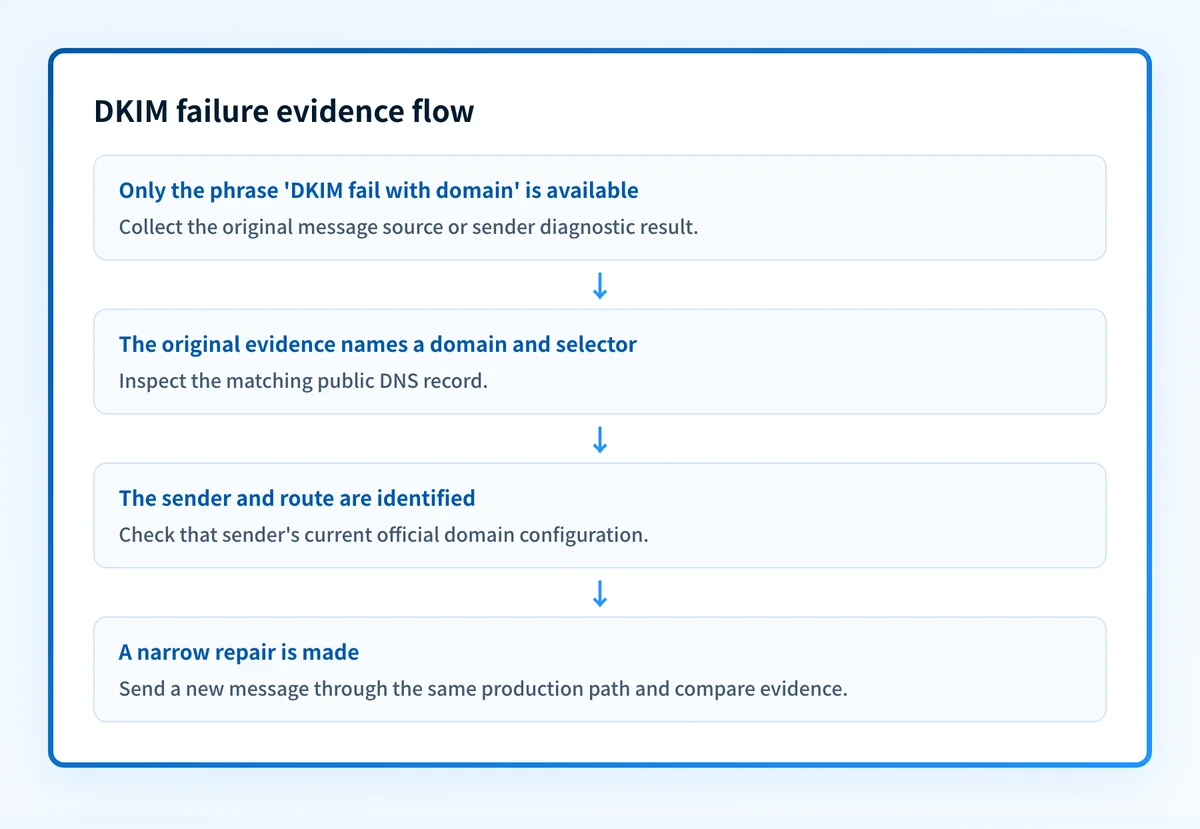
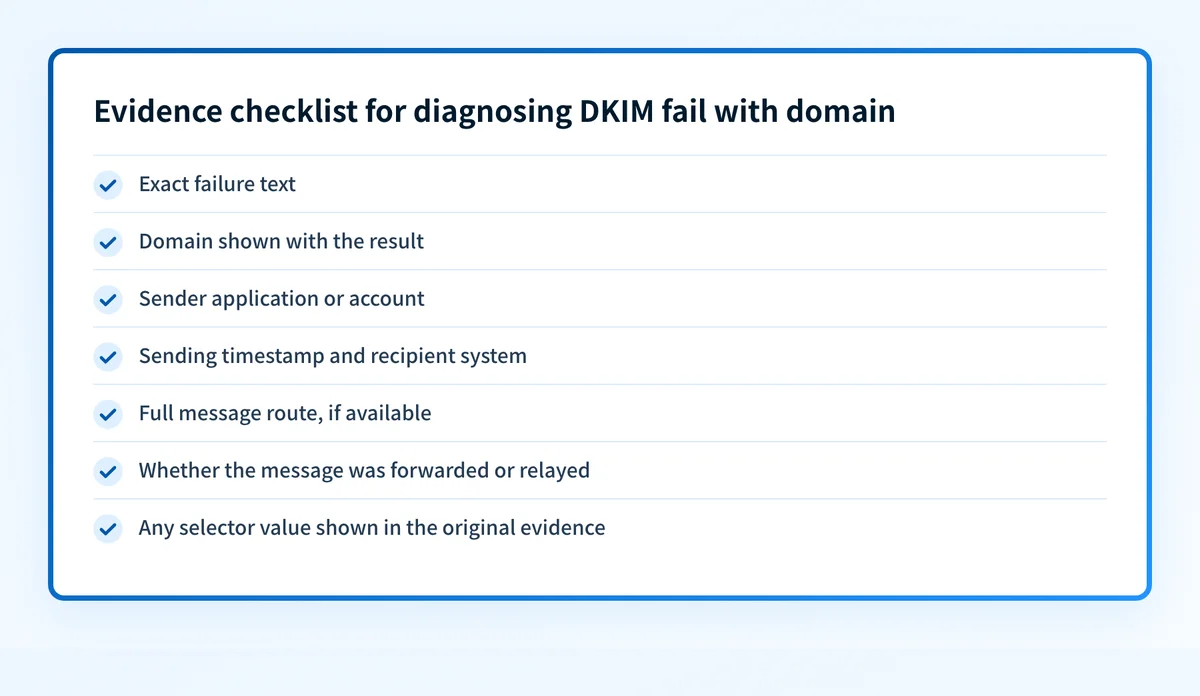
Before changing a record or enabling a setting, collect the original message source from the receiving mailbox or the sender's official diagnostic view. Record the exact failure text, the domain shown with it, the sending application, the sending time, and the recipient system. If the phrase came from a ticket or copied alert, trace it back to the original evidence.
Use the DKIM learning hub for background on the protocol and operational terminology. For this failure, the immediate task is narrower: establish whether the phrase describes a real delivered message, a published DNS record, or a sender-side setup status.
What usually causes it?
The phrase was copied without the original message evidence
A ticket subject, notification summary, or chat message can omit the details needed to diagnose a DKIM result. Without the complete trusted result and the message path, a specific cause remains unknown.
Treat this as an evidence gap, not as proof that the DNS record is wrong. Ask for the complete original source or the sender's documented status page before changing any configuration.
The domain in the phrase is unclear
A message can involve more than one domain. The visible From address, the sender account, and a DNS record under investigation may not be the same value. The phrase does not say which one failed.
Write down the exact domain as displayed in the original evidence. Do not infer it from a company name, a website domain, or a mailbox address that was not shown with the failure.
The sender or route has not been identified
A domain can send mail through more than one application or provider. One route may be under investigation while another is unaffected. The phrase does not identify the application, relay, campaign platform, or recipient that produced it.
Start with the failed message's source and map the route used for that message. A configuration change made for a different sender can create a new failure without repairing the original one.
A DNS lookup is being treated as delivered-message proof
A public lookup can be useful when the available evidence identifies a domain and selector. It can help inspect what is publicly visible for that DNS name. It cannot show whether the exact sender used that selector, whether a message was signed, or how one recipient evaluated a delivered message.
This distinction matters when an operator sees a public result that appears normal while the production message still fails. The two checks answer different questions.
DKIM and DMARC are being combined before either result is established
DKIM and DMARC are related email-authentication concerns, but the phrase alone does not establish a combined failure. If the message evidence later shows that DKIM passed, investigate the separate domain relationship relevant to DMARC with the DMARC alignment guide. Do not describe that as a DKIM repair unless the original evidence supports it.
How do I diagnose the failure?
1. Preserve the original failure context
Save the original message source or the original sender diagnostic output. Keep a redacted working copy for tickets and retain the unredacted original only where your organization permits it.
Capture these fields without filling gaps from memory:
- Exact failure text
- Domain shown with the result
- Sender application or account
- Sending timestamp and recipient system
- Full message route, if available
- Whether the message was forwarded or relayed
- Any selector value shown in the original evidence
2. Identify the domain that the evidence actually names
Compare the domain in the failure evidence with the visible From domain and the domain configured in the sending application. Record differences rather than assuming they are equivalent.
If the sender's account settings show generated DKIM DNS values, use the provider's current official documentation and the values generated for that account. Do not substitute an example selector, another account's DNS target, or a value copied from an unrelated domain.
Changing a DKIM DNS record before identifying the sender and exact domain can interrupt mail for an otherwise working route. Keep the previous value and an approved rollback path before any DNS change.
3. Separate DNS evidence from message evidence
When the original evidence includes a domain and selector, use the DKIM checker to inspect the public DNS side of the investigation. Record the lookup time and the exact input used.
A DNS check is useful only for the named lookup target. It does not prove that the production sender used that record, that the sender applied a signature, that the receiving system trusted a result, or that future messages will pass.
Keep the DNS result alongside the received-message evidence. Do not replace one with the other.
4. Confirm the sender's current status
Use the sending provider's official account documentation and status view for the exact sender account. Check whether its displayed domain or selector matches the evidence from the failed message.
If the sender account is not known, stop before changing sender-side settings. Identify the application that sent the failed message first. This may require a mail administrator, campaign owner, or the team that operates the outbound service.
5. Compare one controlled same-path test
After the evidence identifies the likely affected route, send a new test through the same application, domain configuration, recipient type, and relay path. Do not treat a test from another provider or an unrelated mailbox as confirmation.
Record the new message source and compare it with the original evidence. The result should answer one bounded question: did the same path produce the same observable failure after the specific repair?
How do I fix it?
Repair the sender configuration only when it is the identified layer
If the sender's official status identifies a domain configuration problem for the same account and route, use that provider's current instructions and the account-generated DNS values. This changes sender authentication configuration.
Do not publish, reuse, or adapt generated selectors, CNAME targets, public-key values, or tokens from another account. Those values are account-specific.
Repair DNS only when the named lookup target is the issue
If the investigation identifies a public DNS issue for the same domain and selector, correct only that record through the authoritative DNS provider. Preserve the prior value and confirm the exact target before saving.
A DNS change affects published authentication material. It does not prove that the sender has begun using the corrected configuration, and it does not explain a recipient's private delivery decision.
For DNS-management context, the GoDaddy DKIM record guide can help when GoDaddy is the authoritative DNS provider. Use the sender's official setup instructions for the actual values.
Repair the sending path only when the failing application is known
If the original evidence points to one sender or relay, make the smallest approved change in that route. Keep unrelated sending applications unchanged until they have their own evidence.
Do not loosen a DMARC policy as a DKIM repair. A DMARC policy change affects requested enforcement. It does not establish a missing DKIM fact or correct an unknown sender configuration.
Escalate an unresolved receiver decision with the original evidence
If public DNS and sender configuration appear consistent but the same recipient still reports the failure, retain the original message source and escalate through the relevant sender or recipient support channel. The receiver's own evidence is needed to explain its decision.
Do not claim that a public lookup proves why an individual recipient rejected or filtered one message.
How do I validate the repair?
Repeat the test through the exact application and route that produced DKIM fail with domain. Check the result in four separate places where applicable:
- DNS: confirm the intended record through the authoritative DNS provider and a public lookup.
- Vendor: confirm the sending provider's current domain or authentication status for the same account.
- Message: inspect a newly delivered message from the same production path.
- DMARC: after data accumulates, review aggregate-report evidence for the sending source and domain.
Check the public DKIM evidence for this domain
If your original evidence identifies a domain and selector, inspect the published record before changing it.
A public DKIM check cannot inspect private keys, prove that the sending application signed the message, monitor every production route, or explain why one recipient reported this failure.
If the DNS record is present but your team needs to track which production sources still show authentication or alignment issues over time, Start with Palisade. Palisade analyzes DMARC aggregate-report data, identifies sending sources and authentication or alignment issues, and creates prioritized remediation tickets. A human reviews the evidence and applies any change.
Evidence
Sources and further reading
Questions readers ask
Frequently asked questions
How to fix a DKIM failure?
Repair the one layer your evidence names, then resend through the same sending path. If the sending platform reports a domain or DKIM setup problem, publish the DNS values it generated for that account. If the published record for the named selector is missing or wrong, correct that single record at the authoritative DNS provider. Get the domain, sender, route, and selector from the original message result before you change anything.
How to enable DKIM for your domain?
Generate DKIM keys inside the platform that sends your mail, publish the DNS record it gives you at the selector it names, then turn signing on and send a test message. Follow that provider's current documentation for the exact steps. Use only the values generated for your own account, because selectors, DNS targets, keys, and tokens are account-specific and cannot be copied from another domain.
What does it mean if an email fails DKIM?
A DKIM failure means the receiving system could not verify the message's signature against the public key published in DNS for the signing domain and selector. It can follow from a missing or wrong DNS record, a message the sender never signed, or a change made to the message while it was relayed or forwarded. The phrase DKIM fail with domain does not say which of those happened, so read the trusted result in the received message.
How to fix DKIM and DMARC?
Fix the DKIM problem on the affected sending path first, then check whether the signing domain aligns with the visible From domain for DMARC. Those are two separate repairs, and each needs its own evidence from a delivered message. Never loosen a DMARC policy in place of a DKIM fix, because that hides the failure instead of correcting it.
Can a DKIM checker prove that my email will pass DKIM?
No, a DKIM checker cannot prove that, because it only reads the public DNS record for the domain and selector you type in. It cannot see the private key, confirm that your application signs the messages it sends, or predict how a recipient will judge the next one. Pair the lookup with a real delivered message from the same production path.

Written by
Samuel ChenardCEO & Co-Founder, Palisade
Samuel Chenard is the CEO and co-founder of Palisade, agentic DMARC software for IT teams and MSPs, from one domain to thousands.
More from Samuel →