Provider deliverability · Microsoft 365 / Exchange Online
Why is Microsoft blocking my automated emails?

By Samuel Chenard · CEO & Co-Founder, Palisade · Reviewed September 19, 2026
Microsoft blocks automated mail (scanners, CRMs, monitoring alerts) when the app or device fails SPF and DKIM alignment for your domain, when it uses a submission method the tenant no longer accepts such as Direct Send or Basic-auth SMTP, when it trips Exchange Online throttling, or when its sending IP is on Microsoft's blocked senders list. Unauthenticated app mail is filtered as anonymous internet traffic.
The 30-second check
Start with the record behind most of these blocks. When the platform or device IP was never added to the domain's SPF record, the Office 365 mail filter sees mail claiming to be your domain from an address it has no reason to trust. The free SPF checker shows exactly what your record authorizes right now.
Check your domain now
Enter your sending domain and the check runs instantly on the next page. Free, no signup.
Why Microsoft blocks your automated email
| Likely cause | What's happening |
|---|---|
| The app or device isn't in your SPF record, or DKIM doesn't align | The classic third-party sender problem. Your CRM, ticketing system, or copier sends as yourdomain.com, but its IPs aren't in your SPF record and its DKIM signature (if any) signs the vendor's domain instead of yours. Exchange Online Protection scores that mail as unauthenticated, and Microsoft's own device-sending doc tells you to publish SPF, DKIM, and DMARC for exactly this reason (checked 2026-07-17). |
| The device uses Direct Send and the tenant now rejects it | Direct Send (unauthenticated port-25 delivery to your MX endpoint) was the default trick for scanners and LOB apps for a decade. Microsoft shipped a tenant switch, RejectDirectSend, that refuses it outright with a 550 5.7.68 bounce, and Microsoft's device doc now says most customers don't need Direct Send and that it is working on disabling it by default. If IT hardened the tenant, your scanner's mail stopped that day. |
| Direct Send mail is filtered like anonymous internet traffic | Even where Direct Send still works, Microsoft's doc is explicit: messages are treated just like anonymous email from the internet, with all scanning and protections applied. So your alert mail competes with spam on equal terms, lands in Junk or quarantine, and mail addressed to anyone outside your tenant is rejected outright, because Direct Send only delivers to your own Microsoft 365 recipients. |
| SMTP AUTH is disabled, or Basic authentication is on its way out | SMTP AUTH is disabled by default for organizations created after January 2020, and Microsoft disabled it in every tenant where it wasn't being used. On top of that, Basic authentication (plain username and password) for SMTP AUTH is scheduled for retirement: Microsoft's updated timeline disables it by default for existing tenants at the end of December 2026. Devices that can't do OAuth or TLS 1.2+ fail to submit at all. |
| You hit Exchange Online's throttling limits | Authenticated client submission is capped at 10,000 recipients per day and 30 messages per minute per mailbox (per Microsoft's device-sending doc). A monitoring system having a bad night can burn through 30 messages a minute in seconds, and everything after that defers or fails. SMTP relay via connector has higher but still 'reasonable' limits enforced by Microsoft's outbound protections. |
| Connector requirements aren't met: dynamic IPs and third-party hosts | SMTP relay connectors authenticate by TLS certificate or static public IP. Microsoft states dynamic IP addresses aren't supported or allowed, and that you can't use SMTP relay to send from a third-party hosted service such as Azure. An app on a cloud VM or a device behind a changing IP silently stops matching the connector and gets treated as an unknown internet sender. |
| Your sending IP is on Microsoft's blocked senders list | If the app sends from its own infrastructure and that IP picked up a bad reputation (or inherited one from a shared range), Exchange Online refuses the connection with codes in the 5.7.606 to 5.7.649 range. This is an IP-reputation block, not a content verdict, and it has its own self-service removal path at sender.office.com. |
Confirm the pattern in Microsoft 365's own sender data
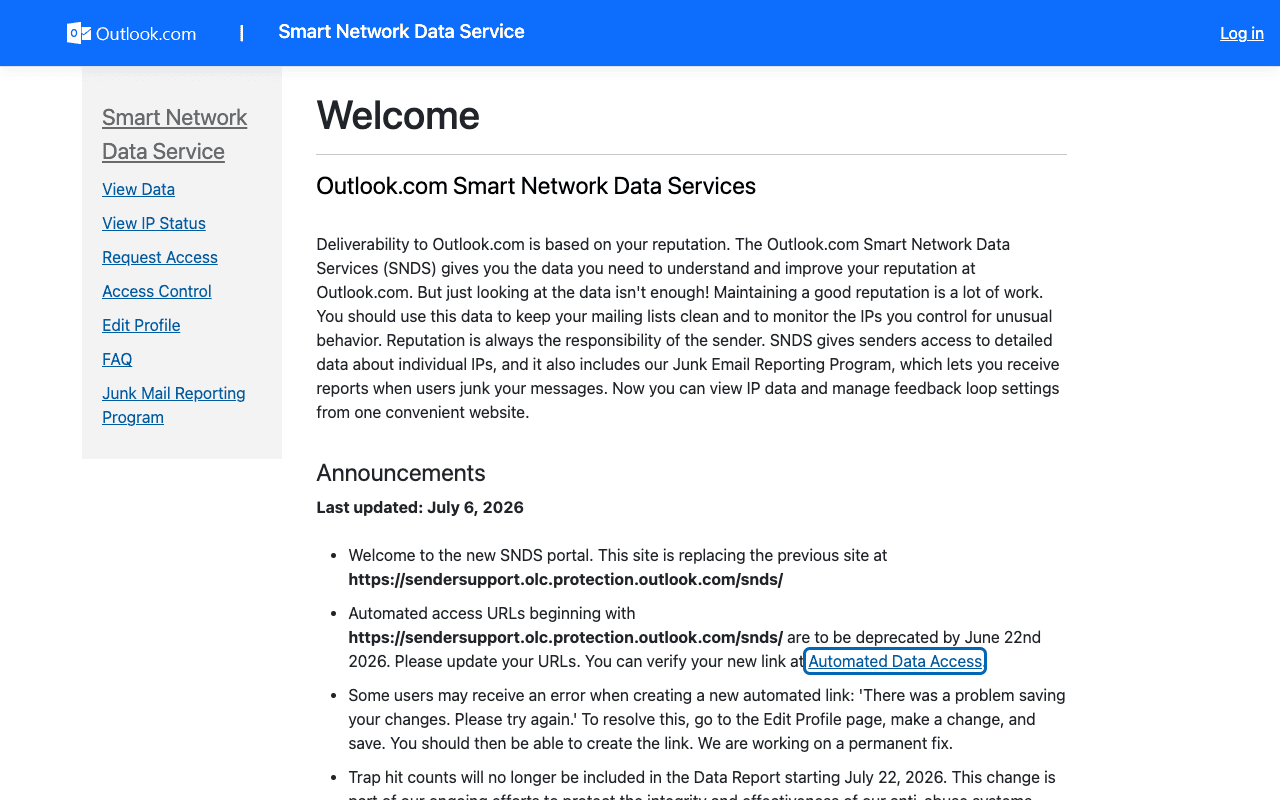
Microsoft 365 publishes its own sender data separately from your DNS. Use it to confirm the provider-side symptom after you have checked the public authentication records below.
Check the public signals before changing settings
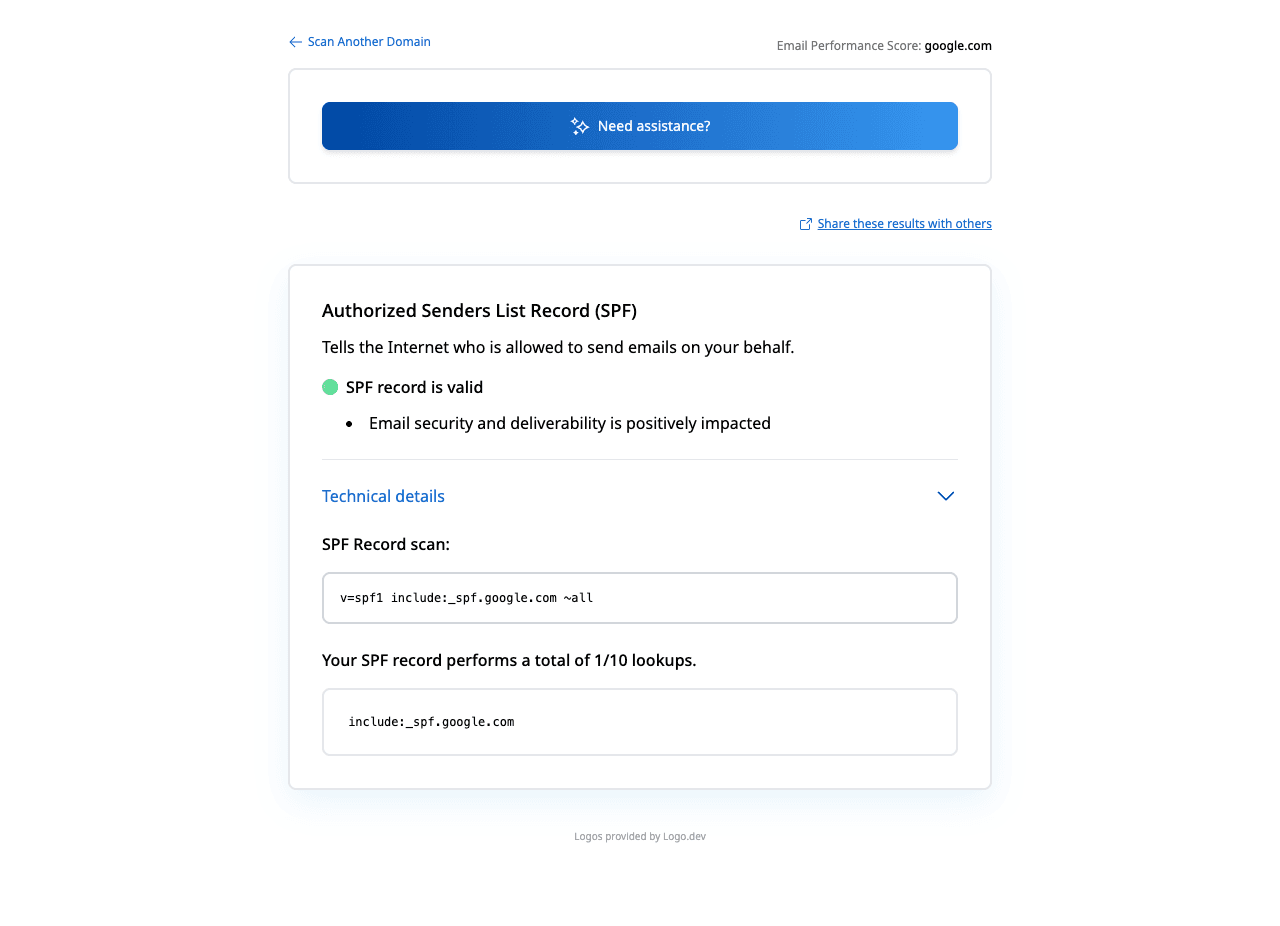
The free check above gives you a fast public baseline for how Microsoft 365 sees your mail. It does not replace the provider's private reputation or placement data, but it tells you whether the problem is visible from outside before you edit a sending platform.
How to fix it, step by step
Run the SPF check on your sending domain
Use the free checker above, or open the SPF checker page directly. It shows every IP and include your record currently authorizes, so you can see in seconds whether the CRM, scanner subnet, or monitoring host that's bouncing is actually in there. Check the DNS lookup count too; SPF breaks past 10 lookups.
Put each mail source on the right Microsoft method
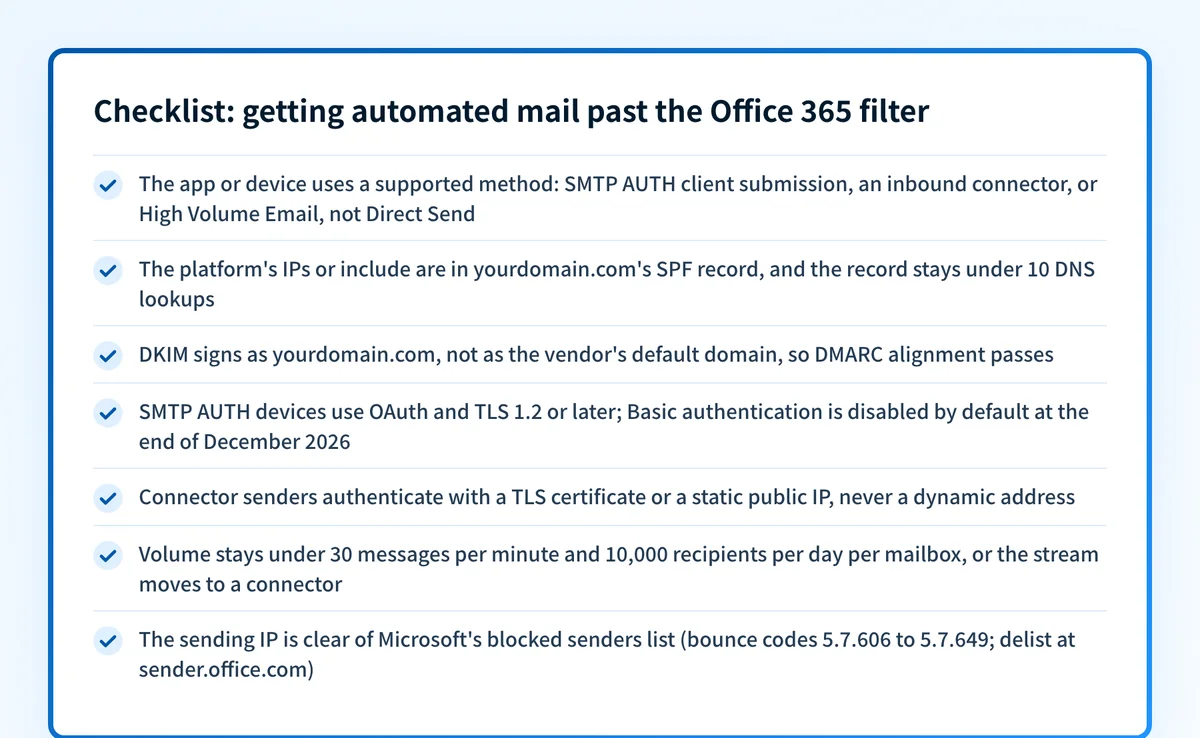
Microsoft documents four: SMTP AUTH client submission (smtp.office365.com, port 587, TLS 1.2+, a licensed mailbox, sends anywhere), SMTP relay via an inbound connector (certificate or static IP, no mailbox needed, higher limits), Direct Send (internal recipients only, fully filtered), and High Volume Email for internal bulk. Match the method to what the device can do; don't leave a capable app on Direct Send.
Authenticate every third-party platform as your domain
Add the vendor's documented include or IP range to your SPF record, then enable custom-domain DKIM signing at the vendor so the signature says yourdomain.com, not the vendor's default. Verify with the SPF checker and the DKIM checker. Alignment with your From domain is what makes DMARC pass and what stops the filter treating the mail as spoofed.
Clear 550 5.7.68 with a connector, not a workaround
If bounces cite 550 5.7.68, the tenant has RejectDirectSend enabled. Don't ask IT to turn it back off; that switch exists because attackers abused Direct Send to spoof internal mail. Instead, create an inbound connector that attributes the device's certificate or static IP to your organization, or move the device to authenticated submission.
Migrate devices off Basic authentication before the deadline
Microsoft's updated timeline disables Basic auth for SMTP AUTH by default for existing tenants at the end of December 2026, with new tenants not getting it by default. Move each device or app to OAuth-based SMTP AUTH where supported; where it isn't, Microsoft points to High Volume Email for internal mail or Azure Communication Services for external.
Size for the limits, re-test, and keep DMARC reports flowing
Keep client-submission senders under 30 messages per minute and 10,000 recipients per day per mailbox, or move heavy streams to a connector. Then send a test through each repaired path, confirm spf=pass, dkim=pass, and dmarc=pass in the received headers, and monitor DMARC aggregate reports so the next unauthenticated app shows up in a report instead of a bounce.
Related free tools: DKIM checker · DMARC checker · Microsoft compliance check · IP reputation · Blocklist checker
If you send in volume: Microsoft 365's published rules
If your automated mail also goes to consumer Outlook.com addresses (outlook.com, hotmail.com, live.com), Microsoft's May 5, 2025 sender requirements apply: domains sending more than 5,000 messages a day there must pass SPF, DKIM, and a published DMARC policy of at least p=none with alignment. Microsoft's documented rejection for non-compliance is "550 5.7.515 Access denied, sending domain <domain> does not meet the required authentication level." (per Microsoft's postmaster site and support documentation, checked 2026-07-17). Transactional volume counts the same as marketing volume, so a busy notification stream can cross the threshold on its own.
Check your app or device's standing with Microsoft 365
- Anti-spam IP delist portal
Microsoft's self-service removal for IPs blocked from sending into Microsoft 365 (bounce codes 5.7.606 to 5.7.649). Removal can take 24 hours or longer; for 5.7.511 blocks, Microsoft says to forward the NDR to delist@microsoft.com instead.
- Smart Network Data Services (SNDS)
Microsoft's own view of your sending IP space: filter results, complaint rates, and trap hits. Register the static IPs your apps and devices send from.
- Outlook.com postmaster site
Microsoft's sender documentation hub. Relevant when your automated mail also targets consumer Outlook.com addresses, which have their own May 2025 authentication requirements.
Bounce codes you may be seeing
A block from Microsoft 365 surfaces as a specific SMTP code. Some lists below also carry codes returned by the systems receiving your mail; each line names its issuer. Match yours below; where a code has a full guide, it is linked.
- 550 5.7.68 (TenantInboundAttribution; Direct Send not allowed for this organization from unauthorized sources): the recipient tenant enabled Microsoft's RejectDirectSend setting
- 5.7.60 (Client doesn't have permissions to send as this sender): the SMTP AUTH mailbox lacks Send As permission for the From address the app uses
- 5.7.606 to 5.7.649: your sending IP is on Microsoft's blocked senders list; self-service removal at sender.office.com
- 550 5.7.511 (Access denied, banned sender): the block the self-service portal does not cover; Microsoft says to forward the NDR to delist@microsoft.com Full guide →
- 550 5.7.515: an automated stream to consumer Outlook.com addresses crossed 5,000 a day without full SPF, DKIM, and DMARC
- 550 5.7.1: the catch-all access-denied family, seen when relay permissions or connector attribution fail Full guide →
The real root cause: unenforced authentication
Strip away the plumbing (ports, connectors, auth methods) and every cause above is the same question: can Microsoft prove this message legitimately represents your domain? Direct Send died as a default because unauthenticated mail claiming to be you is indistinguishable from spoofing; that's also why the Office 365 mail filter quarantines your own scanner's output. The durable fix is to make the proof automatic: SPF covering every legitimate app and platform, DKIM signing aligned to your From domain, and DMARC enforced at p=reject so mail that can't prove itself is refused everywhere, by policy, instead of case by case. Monitoring the DMARC reports shows you which automated sender breaks next; enforcement is what keeps the fixed ones fixed.
DMARC software that does the work
Palisade's AI agent takes domains all the way to enforcement: hosted SPF, DKIM, DMARC, and MTA-STS records on paid plans, DMARC reports monitored continuously, and every policy step drafted for your approval on the way to p=reject. The full product is open for a 15-day trial, and nothing is charged until it ends.
15-day full-product trial. Nothing is charged until it ends.
Fixing this across every client domain
Automated senders are where multi-tenant deliverability goes to die: every client fleet has scan-to-email copiers, a legacy CRM, an RMM alert stream, and none of them were authenticated by whoever set them up. Each Microsoft policy change (RejectDirectSend, the Basic auth retirement) breaks them tenant by tenant, on Microsoft's schedule, not yours. Palisade turns that into one workflow: it hosts and manages SPF, DKIM, DMARC, and MTA-STS records for every client domain, surfaces each unauthenticated app in the DMARC reports before Microsoft starts bouncing it, and carries every domain to p=reject, with your team approving each step. Alerts land in ConnectWise, HaloPSA, or Autotask through native PSA integrations, pricing is per client domain with rates that improve as the portfolio grows, and your own MSP domain is a free NFR domain to prove it on first.
Questions readers ask
Frequently asked questions
Why did my scan-to-email printer stop working with Office 365?
What's the difference between SMTP AUTH, Direct Send, and SMTP relay in Microsoft 365?
What is error 550 5.7.68 in Microsoft 365?
Does the Office 365 mail filter scan internal automated emails?
What are the sending limits for automated email in Microsoft 365?
Can my app keep using Basic authentication for SMTP in Microsoft 365?
How do I get my application's IP unblocked by Microsoft 365?
Why does Microsoft 365 reject my CRM's emails sent from our own domain?
Sources and last verified
Every claim about Microsoft 365 on this page links to the source it came from, each with the date it was last checked. Provider policies change; if a detail looks off, the linked source is authoritative.
- The four documented methods for device/app sending (client SMTP submission, SMTP relay, Direct Send, High Volume Email), their ports, TLS 1.2+ requirement, smtp.office365.com endpoint, client-submission limits of 10,000 recipients/day and 30 messages/minute, SMTP AUTH disabled by default for orgs created after January 2020, Direct Send restricted to internal recipients and treated 'just like anonymous email from the internet', dynamic IPs not supported for connectors, no SMTP relay from third-party hosted services, the 5.7.60 Send As failure text, and the note that most customers don't need Direct Send and Microsoft is working to disable it by defaultlearn.microsoft.com · checked 2026-07-17
- RejectDirectSend organization setting and the verbatim 550 5.7.68 rejection: 'TenantInboundAttribution; Direct Send not allowed for this organization from unauthorized sources'; remediation is an inbound/partner connector that attributes the sourcetechcommunity.microsoft.com · checked 2026-07-17
- Basic authentication is disabled in all tenants for legacy protocols; Microsoft also disabled SMTP AUTH in all tenants where it wasn't being used; Basic auth for SMTP AUTH is announced for retirement with the current timeline in the updated announcementlearn.microsoft.com · checked 2026-07-17
- Updated SMTP AUTH Basic authentication retirement timeline: disabled by default for existing tenants at end of December 2026, unavailable by default for new tenants after that, final removal date to be announced in the second half of 2027; recommended alternatives include OAuth, High Volume Email, and Azure Communication Servicestechcommunity.microsoft.com · checked 2026-07-17
- Bounce codes 5.7.606-649 indicate the sending IP is on Microsoft's blocked senders list with self-service removal at sender.office.com (up to 24 hours or longer); 5.7.511 blocks are handled by forwarding the NDR to delist@microsoft.comlearn.microsoft.com · checked 2026-07-17
- Since May 5, 2025 Microsoft requires domains sending over 5,000 messages a day to consumer Outlook.com addresses to pass SPF, DKIM, and DMARC (at least p=none, passing with alignment)substrate.office.com · checked 2026-07-17
- Verbatim 550 5.7.515 rejection text: 'Access denied, sending domain <domain> does not meet the required authentication level.'support.microsoft.com · checked 2026-07-17
- SNDS is Microsoft's free service showing filter results, complaint rates, and trap hits for registered sending IPsaka.ms · checked 2026-07-17
Related guides
550 5.7.511550 5.7.1550 5.7.509421 4.7.0include:10-DNS-lookup limitadkim / aspfselector