Skip to Main Content
AI assistant compatibility
  • ChatGPT
  • Claude
  • Grok
  • Copilot

Best DMARC software for AI agents

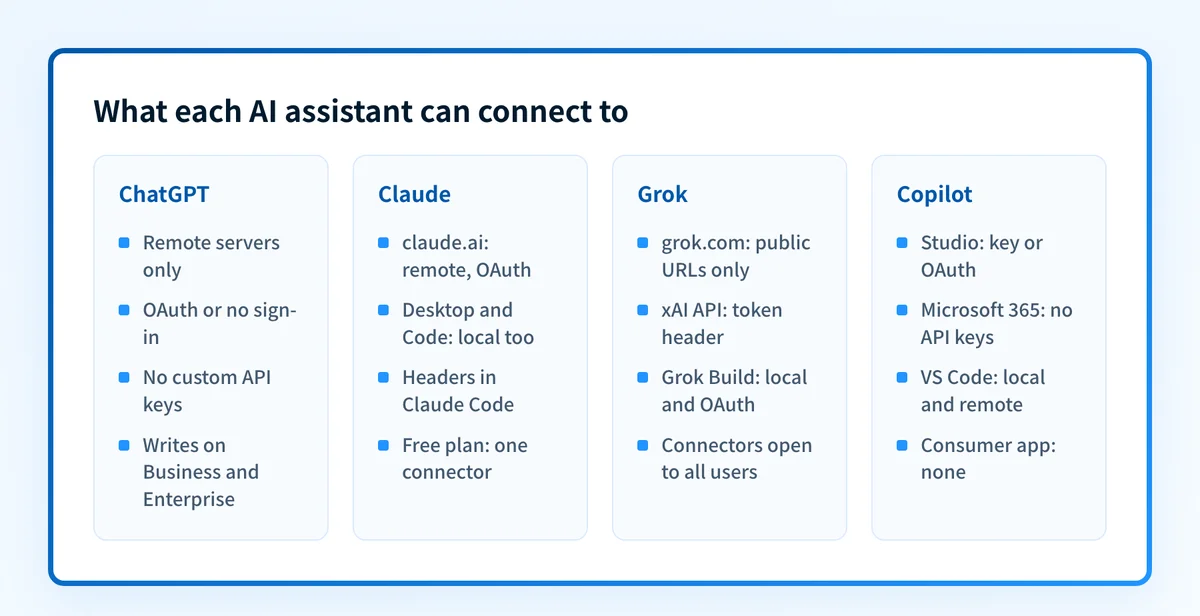
The best DMARC software for an AI agent is a tool your assistant's own connector can reach. PowerDMARC's docs name all four assistants below, behind an Enterprise or MSP plan; DMARCwise names three; Palisade is documented for Claude and Microsoft 365 Copilot and has a read-only ChatGPT plugin. Every tool here has an MCP server, but ChatGPT and claude.ai connect only to remote servers and prefer OAuth; Microsoft 365 Copilot's MCP plugins do not accept API keys; Grok's consumer app rejects local servers. Below, each tool is checked twice: what its vendor documents, and what each assistant's own docs say it can reach.

Samuel ChenardBy Samuel Chenard, CEO & Co-Founder, PalisadePublished 28 Oct 2026
Palisade
What ChatGPT, Claude, Grok and Microsoft Copilot each accept from an MCP server: remote or local, and which sign-in methods
Palisade
Top-ranked option
Palisade rubric score
86/100

Full rubric · 8/8 dimensions established

Palisade rubric: tied rank #7 of 67 current providers
Score calculation: 69 ÷ 80 × 100 = 86.25, rounded to 86/100
Palisade’s 8-dimension rubric
Compared
14 vendors
Best fit
Teams that want one DMARC agent across Claude, Microsoft 365 Copilot and ChatGPT
Why it leads
Documented for Claude and Microsoft 365 Copilot, with a read-only ChatGPT plugin; records at your DNS provider are published only after approval in the Palisade app.

Palisade's IT-team plans start at $19 a month, sized by email volume. Start with a 15-day full-product trial; nothing is charged until it ends.

Feature comparison

The shortlist at a glance

DMARC MCP servers compared on whether ChatGPT, Claude, Grok and Copilot can connect to each one.

DMARC MCP servers compared on whether ChatGPT, Claude, Grok and Copilot can connect to each one.
PlatformChatGPTClaudeGrokCopilot
PalisadeYes: Plugin, read-onlyYes: DocumentedPartial: CompatibleYes: Documented
PowerDMARCYes: DocumentedYes: DocumentedYes: DocumentedYes: Documented
DMARCwiseYes: DocumentedYes: DocumentedPartial: CompatibleYes: Documented
AuthwrightYes: NamedYes: DocumentedPartial: CompatiblePartial: Compatible
DMARKOFFYes: DocumentedYes: DocumentedPartial: CompatiblePartial: Compatible
DMARCEyeYes: DocumentedYes: DocumentedPartial: CompatiblePartial: Compatible
CloudflareYes: NamedYes: DocumentedPartial: CompatiblePartial: Compatible
Red Sift OnDMARCPartial: CompatibleYes: NamedPartial: CompatiblePartial: Compatible
DMARC ExaminerPartial: CompatibleYes: DocumentedPartial: CompatiblePartial: Compatible
SupedPartial: CompatibleYes: DocumentedPartial: CompatiblePartial: Compatible
DMARC ReportNo: Not directlyYes: DocumentedPartial: CompatiblePartial: Compatible
DmarcDkim.comPartial: CompatibleYes: DocumentedPartial: CompatiblePartial: Compatible
Report URINo: Not yetYes: DocumentedPartial: CompatiblePartial: Compatible
Parse DMARCNot disclosed by vendorYes: DocumentedPartial: CompatiblePartial: Compatible

Want to compare the workflow yourself? Start a 15-day full-product trial of Palisade.

Strong / published Partial / quote Documented no—Not disclosed by vendor
Methodology

How we compared the field

One method, applied to every vendor

Each row is one of the 14 DMARC MCP servers on our MCP server roundup. Transport, sign-in, write scope and cost come from the same vendor-sourced records that page uses.Source

For each assistant we read the assistant's own documentation on 28 October 2026: OpenAI's help center and Apps SDK, Anthropic's connector and Claude Code docs, xAI's Grok connector, Grok Build and API docs, and Microsoft's Copilot Studio, Microsoft 365 Copilot and VS Code docs.Source 1, Source 2, Source 3, Source 4

Then we read each vendor's MCP docs for the assistants it names. A cell says Documented or Named when the vendor's own page names that assistant; Compatible when the vendor does not, but its documented transport and sign-in match what the assistant accepts; Not yet or Not directly when either side's docs rule it out; Not disclosed by vendor when the vendor's docs do not describe a route the assistant accepts.

Compatible means the documentation on both sides lines up. We did not sign up for each product and connect each assistant, so treat it as a strong lead rather than a tested result.

Copilot covers Microsoft Copilot Studio, Microsoft 365 Copilot and GitHub Copilot in VS Code. The consumer Microsoft Copilot app is left out: Microsoft lists only fixed connectors for it, with no custom MCP servers.Source

Grok covers grok.com connectors, the xAI API and the Grok Build CLI. ChatGPT means the ChatGPT apps; OpenAI's Codex CLI is noted where a vendor documents it.

Palisade is listed first because this is Palisade's roundup. The rest are ordered by how many of the four assistants their own docs name, then by the MCP roundup's order.

Where a vendor does not publish something, this page says so rather than inferring it.

Evaluation criteria

  • ChatGPT. Whether ChatGPT can add the server as a custom connector.
  • Claude. Whether claude.ai, Claude Desktop or Claude Code can connect.
  • Grok. Whether grok.com connectors, the xAI API or Grok Build can connect.
  • Copilot. Whether Copilot Studio, Microsoft 365 Copilot or GitHub Copilot can connect.
Head to head

Palisade and PowerDMARC, visually compared

The first two options in this roundup are shown in the same screenshot-led format used throughout our comparisons. Product images provide interface context; the linked facts establish plan access and product scope.

First two options

How Palisade and PowerDMARC differ in this roundup.

DMARC MCP servers compared on whether ChatGPT, Claude, Grok and Copilot can connect to each one.

Palisade

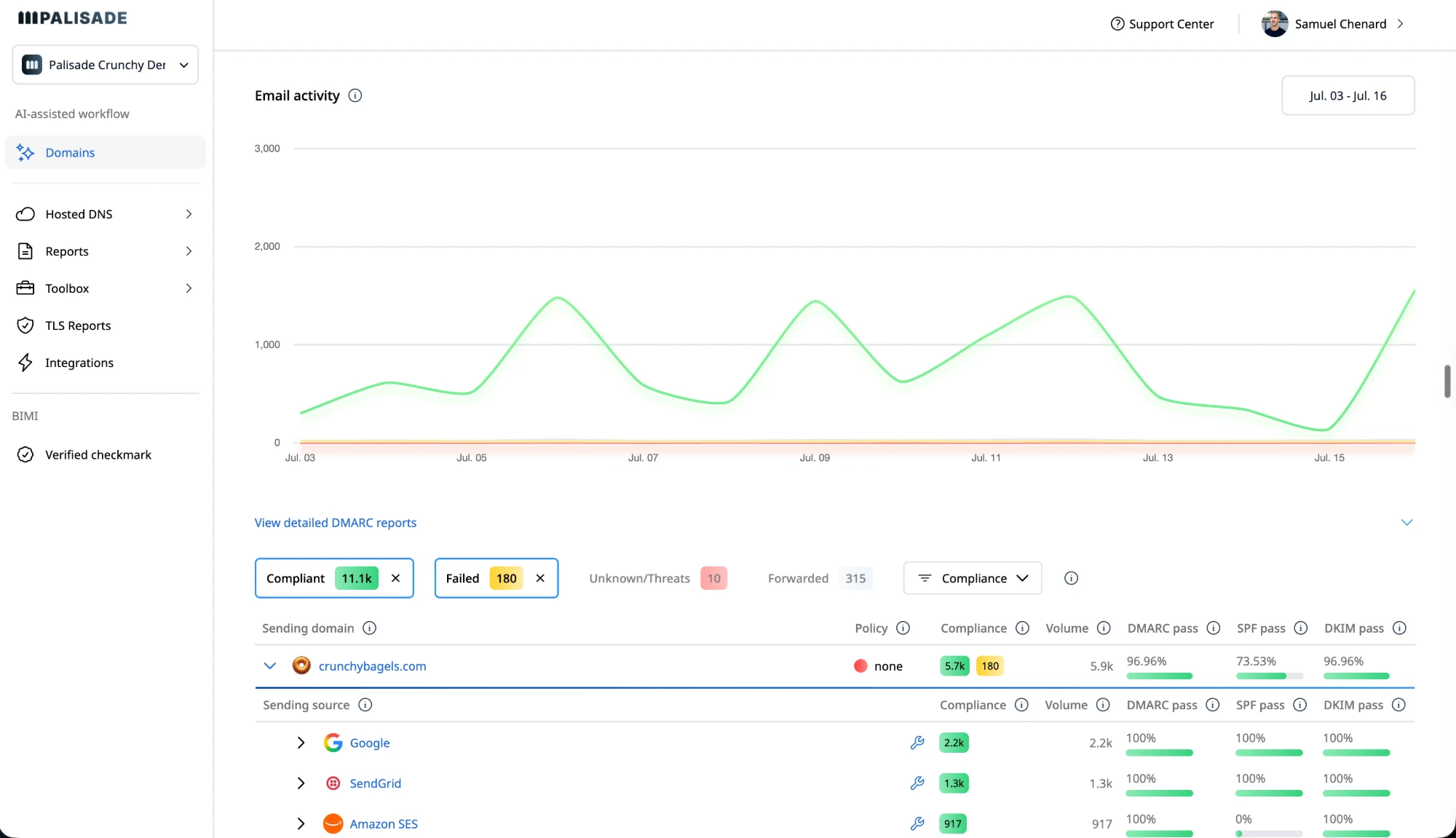
Palisade domains dashboard with email activity chart and DMARC compliance report
Palisade product screenshot · Vendor source, checked 2026-07-17
  • chatgpt: A ChatGPT plugin you add from ChatGPT's Plugins page. Palisade supports ChatGPT through a custom MCP connection to https://api.palisade.email/mcp/directory for read-only monitoring and diagnosis. This connection requires an account with exactly one active Palisade organization. Palisade is not yet listed in the OpenAI app directory; directory availability is separate from ChatGPT support.
  • claude: Steps for claude.ai custom connectors and a Claude Code command, both through Palisade's public OAuth client.
  • grok: Not documented by Palisade. Grok Build runs stdio servers, the route Palisade's npm bridge already uses for Codex, Cursor and Windsurf.

PowerDMARC

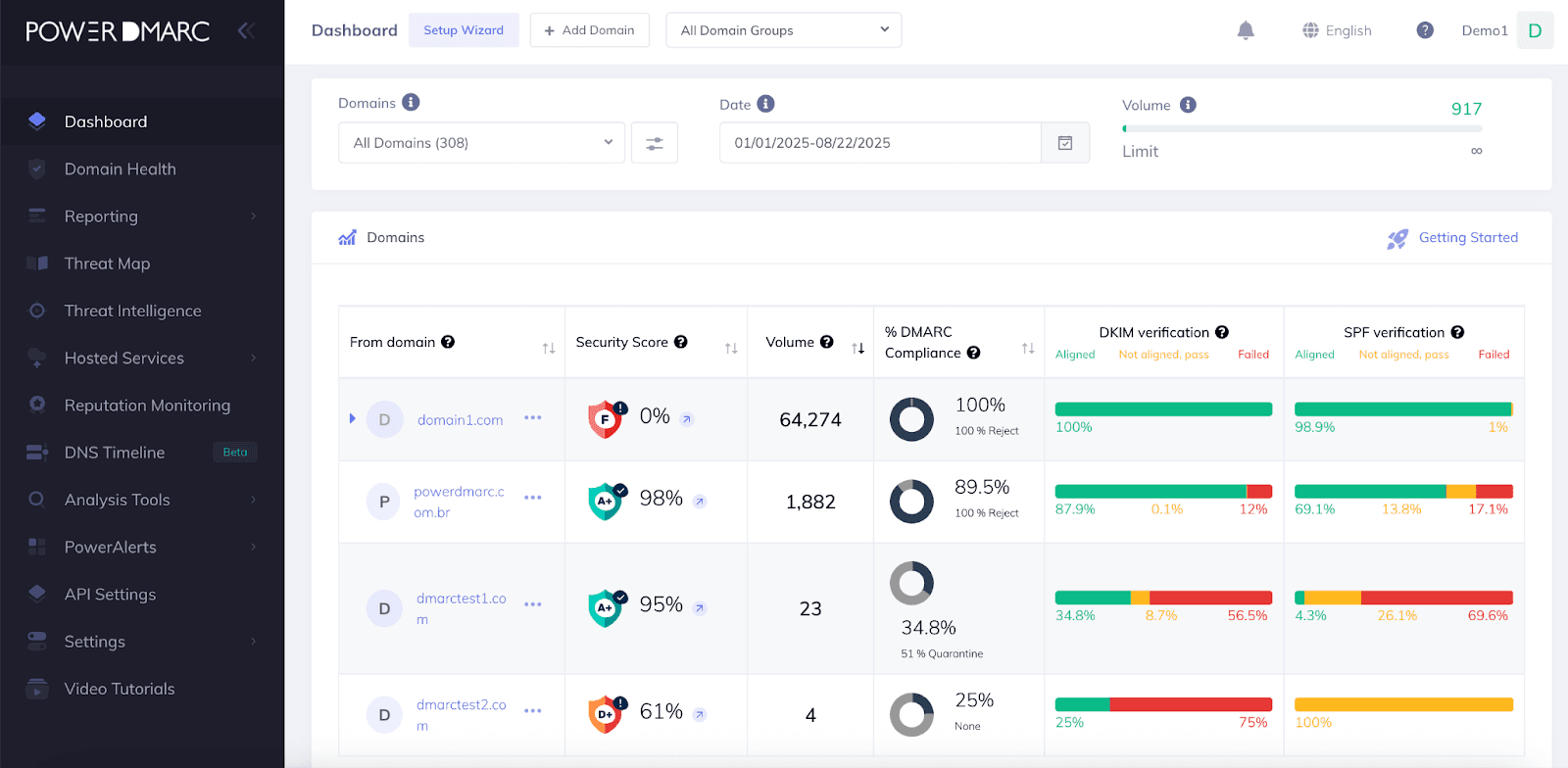
PowerDMARC main dashboard: dark left nav (Dashboard, Threat Map, PowerAlerts), domain table with per-domain security-score badges, volume, DMARC compliance donuts, and DKIM/SPF verification bars across 308 domains.
PowerDMARC product screenshot · Vendor source, checked 2026-07-17
  • chatgpt: Setup for ChatGPT web and desktop through a PowerDMARC plugin.
  • claude: Custom connector steps for Claude Desktop and claude.ai, plus a Claude Code command.
  • grok: The only vendor here with Grok setup: a Grok Desktop config file, which xAI's own docs do not describe. grok.com connectors, Grok Build and the xAI API are not covered.
The field

The best DMARC software for AI agents, by assistant

01

Palisade

Our platformFrom $19/mo; 15-day trial

Documented for Claude and Microsoft 365 Copilot, with a read-only ChatGPT plugin; records at your DNS provider are published only after approval in the Palisade app.

Palisade publishes setup for claude.ai, Claude Code, Codex CLI, Cursor, Windsurf, a read-only ChatGPT plugin and a tenant-installed Microsoft 365 Copilot agent. The assistant reads reports, tickets and DNS evidence and returns the exact records to publish. It can adjust the DMARC and SPF records Palisade hosts, but no MCP tool writes at your DNS provider; approved records are published from the Palisade app.

Best for

Teams that want one DMARC agent across Claude, Microsoft 365 Copilot and ChatGPT

Key features

  • Microsoft 365 Copilot agent, installed by your tenant admin
  • One public OAuth client, with PKCE and no secret
  • npm stdio bridge for Codex, Cursor and Windsurf
  • Read-only ChatGPT plugin for monitoring and diagnosis
  • MCP included on every plan

ChatGPT

A ChatGPT plugin you add from ChatGPT's Plugins page. Palisade supports ChatGPT through a custom MCP connection to https://api.palisade.email/mcp/directory for read-only monitoring and diagnosis. This connection requires an account with exactly one active Palisade organization. Palisade is not yet listed in the OpenAI app directory; directory availability is separate from ChatGPT support.

Claude

Steps for claude.ai custom connectors and a Claude Code command, both through Palisade's public OAuth client.

Grok

Not documented by Palisade. Grok Build runs stdio servers, the route Palisade's npm bridge already uses for Codex, Cursor and Windsurf.

Copilot

A Microsoft 365 Copilot agent your tenant admin installs; it is not in the public Agent Store, and access follows your Copilot licensing.

Transport

Streamable HTTP, plus a published npm bridge for stdio-only clients

Auth

MCP requires OAuth through Palisade's public connector client (ryKtuiPypMeYMoL1Cmhxtz6BYrEYQbLV), using PKCE with no client secret. Sign in and select your organization. API keys and self-registered OAuth clients are not accepted on the MCP endpoint; API keys remain available for the REST API.

Choose Palisade if Your people are split across Claude and Microsoft 365 Copilot, with the ChatGPT plugin for read-only checks, and you want records at your DNS provider published only after a person approves them.


02

PowerDMARC

MCP on quote-priced Enterprise and Partner plans

Names more assistants than any other vendor here, Grok included, behind an Enterprise or MSP plan gate.

PowerDMARC's MCP page has a client picker with setup for Claude, ChatGPT, GitHub Copilot in VS Code, Microsoft Copilot Studio, Gemini CLI and Grok Desktop. The same page's FAQ names only Claude Desktop and Cursor as officially supported, so confirm your client before you buy.

Best for

Enterprise and MSP accounts that need the widest list of named clients

Key features

  • Setup listed for about 15 clients, Grok Desktop among them
  • Copilot Studio guide using a bearer token header
  • Token or OAuth connection modes
  • MCP sold on paid Enterprise and multi-tenant MSP tiers

ChatGPT

Setup for ChatGPT web and desktop through a PowerDMARC plugin.

Claude

Custom connector steps for Claude Desktop and claude.ai, plus a Claude Code command.

Grok

The only vendor here with Grok setup: a Grok Desktop config file, which xAI's own docs do not describe. grok.com connectors, Grok Build and the xAI API are not covered.

Copilot

Guides for Microsoft Copilot Studio (bearer token header) and GitHub Copilot agent mode in VS Code. Microsoft 365 Copilot is not covered.

Transport

Vendor-hosted MCP service; copy the generated connection URL from the PowerDMARC dashboard.

Source checked 2026-10-13 ↗

Auth

MCP tokens expose selectable data and module permissions plus a separate read-only toggle. Separately, the OEM API documents action-level token scopes.

Source checked 2026-08-30 ↗

Choose PowerDMARC if You are already on an Enterprise or MSP plan and want one server that names Copilot Studio and Grok as well as Claude and ChatGPT.

03

DMARCwise

From €15/mo billed yearly (€20 monthly); Free plan has no MCP

Clear, keyless setup for ChatGPT, Claude, Codex and Copilot Studio, all over OAuth.

DMARCwise documents setup for ChatGPT (directory app and manual), Claude Desktop, Claude Code, Codex CLI and Microsoft Copilot Studio. It supports both Client ID Metadata Documents and dynamic client registration, the registration methods OpenAI's docs list first for ChatGPT.

Best for

Teams on ChatGPT, Claude or Copilot Studio that want plain OAuth

Key features

  • ChatGPT plugin directory listing plus manual Streamable HTTP setup
  • Copilot Studio setup with OAuth dynamic discovery
  • Supports CIMD and dynamic client registration
  • Writes limited to DMARCwise's hosted DMARC record

ChatGPT

Installable from the ChatGPT plugin directory, or added manually over Streamable HTTP.

Claude

Claude Desktop custom connector steps and a Claude Code command.

Grok

Not named. A remote OAuth server over Streamable HTTP, which grok.com custom connectors and Grok Build both accept.

Copilot

Microsoft Copilot Studio setup using OAuth 2.0 dynamic discovery. GitHub Copilot and Microsoft 365 Copilot are not named.

Transport

Remote, stateless Streamable HTTP at mcp.dmarcwise.io/mcp; no local package is published.

Source checked 2026-10-14 ↗

Auth

OAuth, with no API key to create. Owners, Admins and Members can grant read and write, Viewers read only, and admins can revoke connections.

Source checked 2026-10-14 ↗

Choose DMARCwise if You want one OAuth server that your ChatGPT, Claude and Copilot Studio users can each add without an API key.

04

Authwright

$0/mo Free; Pro $29/mo

First-class in Claude, named for ChatGPT, and one of two servers here, with Cloudflare, that write records at your DNS provider.

Authwright lists Claude Desktop and Claude Code as first-class, and Cursor, Windsurf and Continue as supported; it names ChatGPT compatibility on every tier without setup steps. Sign-in is OAuth 2.1 through Microsoft Entra ID, plus a workspace bridge token.

Best for

Claude and Cursor users who want the assistant to write DNS

Key features

  • Claude Desktop and Claude Code marked first-class
  • Writes DNS at five registrars, with a diff first
  • OAuth 2.1 with PKCE via Entra ID, plus a bridge token
  • MCP included on the Free plan

ChatGPT

Lists ChatGPT MCP compatibility on every tier; no ChatGPT setup steps are published.

Claude

Claude Desktop and Claude Code are marked first-class.

Grok

Not named. Remote OAuth over Streamable HTTP, which Grok Build accepts; its bridge token also fits a header.

Copilot

Not named as Copilot. A VS Code bridge token is mentioned, and VS Code runs MCP tools in GitHub Copilot agent mode.

Transport

Authwright documents streamable HTTP MCP transport.

Source checked 2026-10-14 ↗

Auth

The MCP endpoint is documented behind OAuth 2.1 with PKCE through Microsoft Entra ID; setup also creates a workspace-scoped bridge token.

Source checked 2026-10-14 ↗

Choose Authwright if You work in Claude and want the assistant itself to publish records at GoDaddy, Namecheap, Cloudflare, Porkbun or Route 53.

05

DMARKOFF

From $10 per domain/mo ($8.33 billed annually); 14-day trial

Clear ChatGPT steps by plan, with the catch that every client signs in with a DMARKOFF API key.

DMARKOFF documents claude.ai, Claude Desktop, Claude Code, Cursor and ChatGPT, and says which ChatGPT plans get full MCP. Its OAuth flow uses your API key as the client secret, so the key is in play whichever client you pick.

Best for

ChatGPT Business and Enterprise workspaces

Key features

  • ChatGPT steps for Business, Enterprise and Edu, with Plus and Pro limits stated
  • API key as OAuth client secret or Bearer header
  • Listed in the official MCP registry
  • Two write tools: add_domain and set_source_decision

ChatGPT

Developer Mode steps for ChatGPT Business, Enterprise and Edu; Plus and Pro are described as limited to search and fetch.

Claude

Steps for claude.ai custom connectors, Claude Desktop and Claude Code.

Grok

Not named. Takes a Bearer header, which the xAI API and Grok Build both send.

Copilot

Not named. Copilot Studio and VS Code both accept an API key header; Microsoft 365 Copilot plugins do not.

Transport

Remote Streamable HTTP at mcp.dmarkoff.com/mcp

Source checked 2026-10-14 ↗

Auth

OAuth 2.1 with your DMARKOFF API key as the client secret, or the key as a Bearer header

Source checked 2026-10-14 ↗

Choose DMARKOFF if Your team works in ChatGPT Business or Enterprise and is comfortable handing an API key to each connection.

06

DMARCEye

Free plan; Scale from $4 per domain/mo billed annually

Short, clear ChatGPT and Claude guides on a read-only server, priced per domain.

DMARCEye's docs index has two client pages, ChatGPT and Claude, and its agency page says any MCP-compatible assistant works. The server is read-only apart from emailing the signed-in user.

Best for

Agencies that live in ChatGPT and Claude

Key features

  • Setup pages for ChatGPT and Claude
  • OAuth through the DMARCEye sign-in
  • Agency sub-account isolation carries into MCP
  • Read-only: it cannot change DNS or DMARC policy

ChatGPT

A ChatGPT setup page. DMARCEye says Plus or Pro; OpenAI limits full custom MCP to Business, Enterprise and Edu, with Pro read and fetch only.

Claude

A claude.ai custom connector page.

Grok

Not named. A remote OAuth server, which grok.com custom connectors and Grok Build accept.

Copilot

Not named. Remote OAuth fits Copilot Studio and VS Code.

Transport

Remote, at app.dmarceye.com/mcp; the docs do not name the transport.

Source checked 2026-10-14 ↗

Auth

OAuth through the DMARCEye sign-in; roles and Agency sub-account isolation carry into MCP.

Source checked 2026-10-14 ↗

Choose DMARCEye if You need a read-only connection for Claude and ChatGPT users, check your ChatGPT plan first, and do not need Copilot or Grok steps.

07

Cloudflare

DMARC Management on every plan, including Free

A general Cloudflare API server rather than a DMARC product, documented for Claude and coding agents.

Cloudflare's MCP docs name Claude and Windsurf for OAuth sign-in, and its skills plugin installs in Claude Code and Cursor. The server reaches the whole Cloudflare API, DNS records included, within the permissions you grant.

Best for

Domains already on Cloudflare DNS

Key features

  • Whole Cloudflare API, DNS included
  • OAuth or an API token as a Bearer header
  • DMARC Management free for apex domains on Cloudflare DNS
  • Not a DMARC reporting product

ChatGPT

No ChatGPT setup steps, but the repo includes a ChatGPT app submission file and handles ChatGPT scope errors.

Claude

Named for OAuth sign-in in Claude, with a Claude Code plugin.

Grok

Not named. OAuth or a Bearer token fit the xAI API and Grok Build.

Copilot

Not named. OAuth or a token header fit Copilot Studio and VS Code.

Transport

Remote Streamable HTTP at mcp.cloudflare.com/mcp; no local package.

Source checked 2026-10-14 ↗

Auth

OAuth with the permissions you select, or a user or account API token sent as a Bearer header.

Source checked 2026-10-14 ↗

Choose Cloudflare if Your domains are on Cloudflare DNS and you want the assistant to edit records there, with reporting from a separate tool.

08

Red Sift OnDMARC

Express from $9/mo billed annually; MCP plan not stated

A remote OAuth server that names Claude Desktop, Cursor and VS Code as examples, with no per-client steps.

Red Sift's MCP overview lists Claude Desktop, Cursor and VS Code as example clients and gives one connection pattern for all of them. ChatGPT, Grok and Copilot are not named.

Best for

Red Sift customers already working in Claude

Key features

  • Regional hosts in the EU and US
  • OAuth with your Red Sift sign-in
  • Writes limited to Red Sift-hosted DMARC and SPF
  • No per-client setup pages

ChatGPT

Not named. A remote OAuth server, the kind ChatGPT connects to.

Claude

Claude Desktop is named as an example client.

Grok

Not named. Remote OAuth fits grok.com custom connectors and Grok Build.

Copilot

VS Code is named as an example, and VS Code runs MCP tools in GitHub Copilot agent mode.

Transport

Remote only, at regional hosts mcp.redsift.cloud, mcp.eu.redsift.cloud and mcp.us.redsift.cloud; the docs do not name the transport.

Source checked 2026-10-14 ↗

Auth

OAuth with your Red Sift sign-in; the server finds the products and instances your account can reach. Its OAuth metadata offers one scope, *, rather than separate read and write scopes.

Source checked 2026-10-14 ↗

Choose Red Sift OnDMARC if You already run OnDMARC and your team uses Claude, Cursor or VS Code.

09

DMARC Examiner

Free tier; paid from $2.99/mo

Remote or local, OAuth, and free to connect, with setup written for Claude and Cursor only.

DMARC Examiner documents Claude Desktop, Claude Code and Cursor, and ships an npm stdio bridge for clients without remote HTTP support. ChatGPT, Grok and Copilot are not named.

Best for

Claude and Cursor users on a free account

Key features

  • Streamable HTTP plus an npm stdio bridge
  • OAuth with scoped grants
  • Works on the free account
  • Listed in the official MCP registry

ChatGPT

Not named. A remote OAuth server over Streamable HTTP, the kind ChatGPT connects to.

Claude

Setup for Claude Desktop and Claude Code.

Grok

Not named. Grok Build runs stdio servers like its npm bridge and remote OAuth servers.

Copilot

Not named. VS Code accepts its remote server or its stdio bridge.

Transport

Streamable HTTP at mcp.dmarc-examiner.com/mcp, plus the @dmarc-examiner/mcp npm stdio bridge

Source checked 2026-10-14 ↗

Auth

OAuth with scoped grants; the sign-in opens on the first tool call that touches account data

Source checked 2026-10-14 ↗

Choose DMARC Examiner if You want to try an assistant on one domain for free, in Claude or Cursor.

10

Suped

Free plan; Business from $19/mo billed annually; MCP plan not stated

Documents Claude only, though its server explicitly accepts requests from chatgpt.com.

Suped's MCP docs have one client section, Claude custom connectors, and say no client ID or API key is needed because it supports dynamic client registration. Its error list names https://chatgpt.com as an allowed web origin.

Best for

Suped customers working in Claude

Key features

  • Claude custom connector steps
  • Dynamic client registration, no API key
  • Read plus create_domain and create_organization
  • Rejects browser origins other than Suped and chatgpt.com

ChatGPT

No ChatGPT steps, but the server allows the https://chatgpt.com origin and supports dynamic client registration.

Claude

A Claude custom connector section.

Grok

Not named. A remote OAuth server with dynamic registration, which grok.com connectors and Grok Build accept; neither is tested by Suped.

Copilot

Not named. VS Code connects without a browser origin and supports OAuth.

Transport

Remote, stateless Streamable HTTP at suped.com/api/mcp; no local package is published.

Source checked 2026-10-14 ↗

Auth

OAuth with PKCE and one scope, suped:write, that covers reading and creating; access follows organization and MSP roles. REST API keys do not work for MCP.

Source checked 2026-10-14 ↗

Choose Suped if You run Suped and your team works in Claude.

11

DMARC Report

Free Core plan; MCP from Shield at $75/mo

A local stdio package for Claude and Cursor; chat apps that only reach remote servers cannot use it directly.

DMARC Report's server runs on your machine through npx or Docker with an API token in an environment variable. Its README covers Claude Desktop and Claude Code, and its AI page adds Cursor.

Best for

Claude Desktop and Claude Code users happy to run a local server

Key features

  • Local stdio via npx or Docker
  • API token in an environment variable
  • Read-only, plus record-text helpers
  • MCP from the Shield plan up

ChatGPT

Local stdio only. ChatGPT connects to remote servers; reaching a local one needs OpenAI's Secure MCP Tunnel.

Claude

README sections for Claude Desktop and Claude Code.

Grok

Not named. Grok Build runs local stdio servers; grok.com rejects local URLs.

Copilot

Not named. VS Code runs local stdio servers with environment variables.

Transport

Local stdio only, run through npx or Docker; there is no hosted endpoint.

Source checked 2026-10-14 ↗

Auth

An API token from your DMARC Report profile, set as an environment variable; no OAuth, and the token reaches whatever the account can.

Source checked 2026-10-14 ↗

Choose DMARC Report if You run Claude Desktop or Claude Code locally and do not need ChatGPT or grok.com.

12

DmarcDkim.com

Free lookup tools; account data from Pro

Written for coding agents: one-line setup for Claude Code, Codex and VS Code, with the steps behind a sign-in.

DmarcDkim.com says it has ready-made setup for Claude Code, Codex, Cursor, VS Code and OpenCode; the per-client steps are behind a sign-in. Interactive clients sign in with OAuth, and scripts can use an API key.

Best for

Developers in Claude Code, Codex, Cursor or VS Code

Key features

  • Setup for Claude Code, Codex, Cursor, VS Code and OpenCode
  • OAuth for people, API keys for scripts
  • Free lookup tools with a sign-in
  • Read-only: it does not modify DNS

ChatGPT

Not named for ChatGPT (Codex is). The server signs in interactive clients with OAuth.

Claude

Names Claude; only Claude Code has ready-made setup.

Grok

Not named. OAuth or an API key header both fit Grok Build.

Copilot

VS Code setup is documented, and VS Code runs MCP tools in GitHub Copilot agent mode.

Transport

Not stated publicly: setup instructions for each client sit behind a sign-in

Source checked 2026-10-14 ↗

Auth

OAuth for interactive clients, API keys for scripts and CI

Source checked 2026-10-14 ↗

Choose DmarcDkim.com if Your DMARC work happens inside a coding agent rather than a chat app.

13

Report URI

No free plan; MCP from Business at $164.99/mo billed annually

Six documented coding clients, and an honest note that ChatGPT cannot connect yet.

Report URI documents Claude Code, Claude Desktop, Cursor, VS Code, Gemini CLI and Codex CLI. Its MCP server takes your REST API key as a Bearer token, and its docs say ChatGPT custom connectors expect OAuth, so Codex CLI is the OpenAI route for now.

Best for

Developers who also monitor CSP and other reports

Key features

  • Configs for six clients, Gemini CLI included
  • API key as a Bearer token, no OAuth
  • Read-only tools
  • MCP on Business plans and the 30-day trial

ChatGPT

Report URI's docs say ChatGPT custom connectors expect OAuth, which its key-based server does not offer.

Claude

Configs for Claude Code and Claude Desktop.

Grok

Not named. A Bearer token fits the xAI API and Grok Build.

Copilot

VS Code config is documented, and VS Code runs MCP tools in GitHub Copilot agent mode.

Transport

Remote, at mcp.report-uri.com over HTTP with JSON-RPC; no local package is published.

Source checked 2026-10-14 ↗

Auth

The same API key as the REST API, sent as a Bearer token; personal or team keys, with no OAuth and no per-tool scopes.

Source checked 2026-10-14 ↗

Choose Report URI if You already use Report URI for CSP or other reporting and work in a coding agent.

14

Parse DMARC

Free to self-host (Apache-2.0)

Open source, self-hosted, and documented for Claude Desktop and Cursor over stdio.

Parse DMARC's MCP docs share one stdio snippet for Claude Desktop, Cursor and other stdio clients. Its HTTP mode can check bearer tokens against your own identity provider, but no hosted endpoint or chat-app setup is described.

Best for

Self-hosters who want reports to stay on their own box

Key features

  • stdio or Streamable HTTP from one binary
  • Optional OAuth2 bearer checks on HTTP
  • Nine read-only tools
  • Free to self-host

ChatGPT

Not named. ChatGPT needs a public endpoint and an OAuth sign-in it can complete; the docs describe neither for ChatGPT.

Claude

A stdio snippet for Claude Desktop.

Grok

Not named. Grok Build runs local stdio servers.

Copilot

Not named. VS Code runs local stdio servers.

Transport

stdio, or HTTP with SSE for remote clients, from the same binary

Source checked 2026-10-14 ↗

Auth

None on stdio; over HTTP, optional OAuth2 bearer tokens checked as JWTs or by token introspection

Source checked 2026-10-14 ↗

Choose Parse DMARC if You want DMARC data an assistant can read without sending it to a vendor.

Palisade

Still choosing from this shortlist? See what changes with Palisade.

Audit any domain free, no card needed. A card starts the 15-day trial.

The agent does the heavy lifting

Sources identified, SPF and DKIM fixes drafted, each policy step proposed. You approve; nothing ships on its own.

Connect your AI with MCP

  • ChatGPT
  • Claude
  • Codex
  • Cursor
  • Windsurf
  • Microsoft 365 Copilot

42 tools over MCP, so your assistant reads your domains and works the queue.

Connect your DNS manager directly

  • GoDaddy
  • Cloudflare
  • Namecheap
  • Amazon Route 53

One-time sign-in supports 64 providers without retaining credentials. Optional account connections support Cloudflare, GoDaddy and Route 53. You approve every change.

“We evaluated many DMARC providers before choosing Palisade. The quality of their product, the responsiveness and friendliness of their team and their rapid progress on their product roadmap made it a no-brainer for us to move forward.”
Read the case study

What Palisade customers say

Read customer stories

5.0 out of 5 on G2Trusted by over 10,000 domains

Pick a customer

“Palisade made it so easy for us to get our blue verified checkmark and achieve our BIMI compliance”

Max LeRoy

Max LeRoy

VP Product, Politico

Read case study
Evidence

Sources and further reading

Source checks run through 2026-10-28; every entry keeps its individual check date.

Questions

Frequently asked questions

Which DMARC software works with ChatGPT?

PowerDMARC, DMARCwise, DMARKOFF, DMARCEye and Palisade publish ChatGPT setup, and Authwright and Cloudflare name ChatGPT without steps. ChatGPT connects only to remote servers and does not take a custom API key, so key-only servers such as Report URI's say ChatGPT cannot connect yet. Full read and write custom connectors are on ChatGPT Business and Enterprise/Edu; OpenAI lists Pro as read and fetch only. Palisade's ChatGPT plugin is read-only and not yet listed in OpenAI's directory. Source (2026-10-28) Source 2 (2026-10-28) Source 3 (2026-10-28)

Which DMARC software works with Claude?

All 14 on this page. claude.ai custom connectors reach remote servers with OAuth or no sign-in (header sign-in is a beta for a limited set of organizations), and are open on every plan, with one custom connector on Free. Claude Desktop and Claude Code also run local stdio servers, which is how DMARC Report and Parse DMARC connect. Source (2026-10-28) Source 2 (2026-10-28) Source 3 (2026-10-28)

Can Grok connect to DMARC software?

Yes, through any of three routes: custom connectors on grok.com (public URLs only; on Business and Enterprise an admin adds them first), the xAI API's remote MCP tools (Streamable HTTP or SSE with an authorization token), and the Grok Build CLI, which also runs local stdio servers and opens a browser for OAuth. Among DMARC vendors only PowerDMARC publishes Grok setup, for a Grok Desktop config file that xAI's own docs do not describe. For the rest, the Grok column shows where the documented connection types match. Source (2026-10-28) Source 2 (2026-10-28) Source 3 (2026-10-28) Source 4 (2026-10-28)

Which DMARC software works with Microsoft Copilot?

It depends on which Copilot. Copilot Studio takes Streamable HTTP servers with no sign-in, an API key or OAuth; PowerDMARC and DMARCwise document it. Microsoft 365 Copilot's MCP plugins take OAuth or Entra sign-in but not API keys; Palisade offers a Microsoft 365 Copilot agent your tenant admin installs. GitHub Copilot in VS Code runs local and remote servers; PowerDMARC documents it. The consumer Copilot app has no custom MCP servers. Source (2026-10-28) Source 2 (2026-10-28) Source 3 (2026-10-28) Source 4 (2026-10-28)

Is GPTBot an AI agent that uses DMARC tools?

No. GPTBot is OpenAI's crawler for training data; blocking it in robots.txt says your content should not be used for training. It does not call tools or MCP servers. When a ChatGPT user connects a DMARC tool, ChatGPT itself calls that tool's MCP server. Source (2026-10-28)

Does an AI agent connected to DMARC software change my DNS on its own?

Only if the server has a tool that writes DNS and you let it run. Only Authwright and Cloudflare have MCP tools that write at your DNS provider. Palisade, DMARCwise and Red Sift can change records they host for you; Palisade publishes records at your own DNS provider only from its app, after you approve them. ChatGPT can also ask for confirmation before a connector's write actions. Source (2026-10-28)

What makes a DMARC MCP server work with the most AI assistants?

A remote Streamable HTTP endpoint with OAuth sign-in. Every assistant surface on this page accepts that combination, though on the xAI API you supply the token yourself. API-key-only servers miss ChatGPT and Microsoft 365 Copilot's MCP plugins, and local stdio servers cannot reach ChatGPT or grok.com without a tunnel. Source (2026-10-28) Source 2 (2026-10-28) Source 3 (2026-10-28) Source 4 (2026-10-28)

How is this list ranked?

This is Palisade's roundup, so Palisade appears first and we are transparent about that. The other vendors are ordered by how many of the four assistants their own docs name. Each cell carries its source and the date we checked it. The page covers which assistants can connect to each DMARC tool, not which tools use AI inside the product.

Ready to test the shortlist instead of just reading it?

Start a 15-day Palisade trial and see how an agent-led workflow fits the criteria in this shortlist.

Audit any domain free, no card needed. A card starts the 15-day trial.