
Splunk TA-DMARC add-on vs Palisade in 2026
Splunk TA-DMARC is an archived MIT add-on that ingests DMARC aggregate reports into a Splunk deployment. Palisade is agentic: its agent investigates senders, drafts SPF and DKIM fixes, and proposes each policy step toward p=reject for your approval.
Our verdict: Pick Splunk TA-DMARC if you want an open-source, self-hosted input layer that brings DMARC XML reports into Splunk and maps them to the Authentication data model, and you have a Splunk operator who owns the surrounding workflow. Pick Palisade if you want a hosted DMARC service whose agent investigates senders, drafts authentication changes, and carries domains toward p=reject with your approval at each step.
 Samuel Chenard · CEO & Co-Founder, PalisadeSource checks through 2026-10-14
15-day full-product trial. Nothing is charged until it ends.
 ChatGPT
 Claude
 Gemini
 Perplexity
 Grok
Grok Splunk TA-DMARC add-on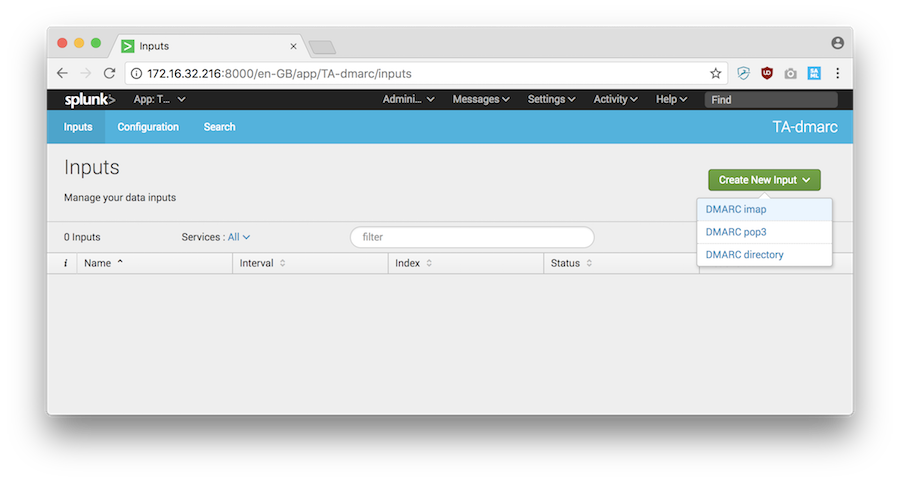
 Palisade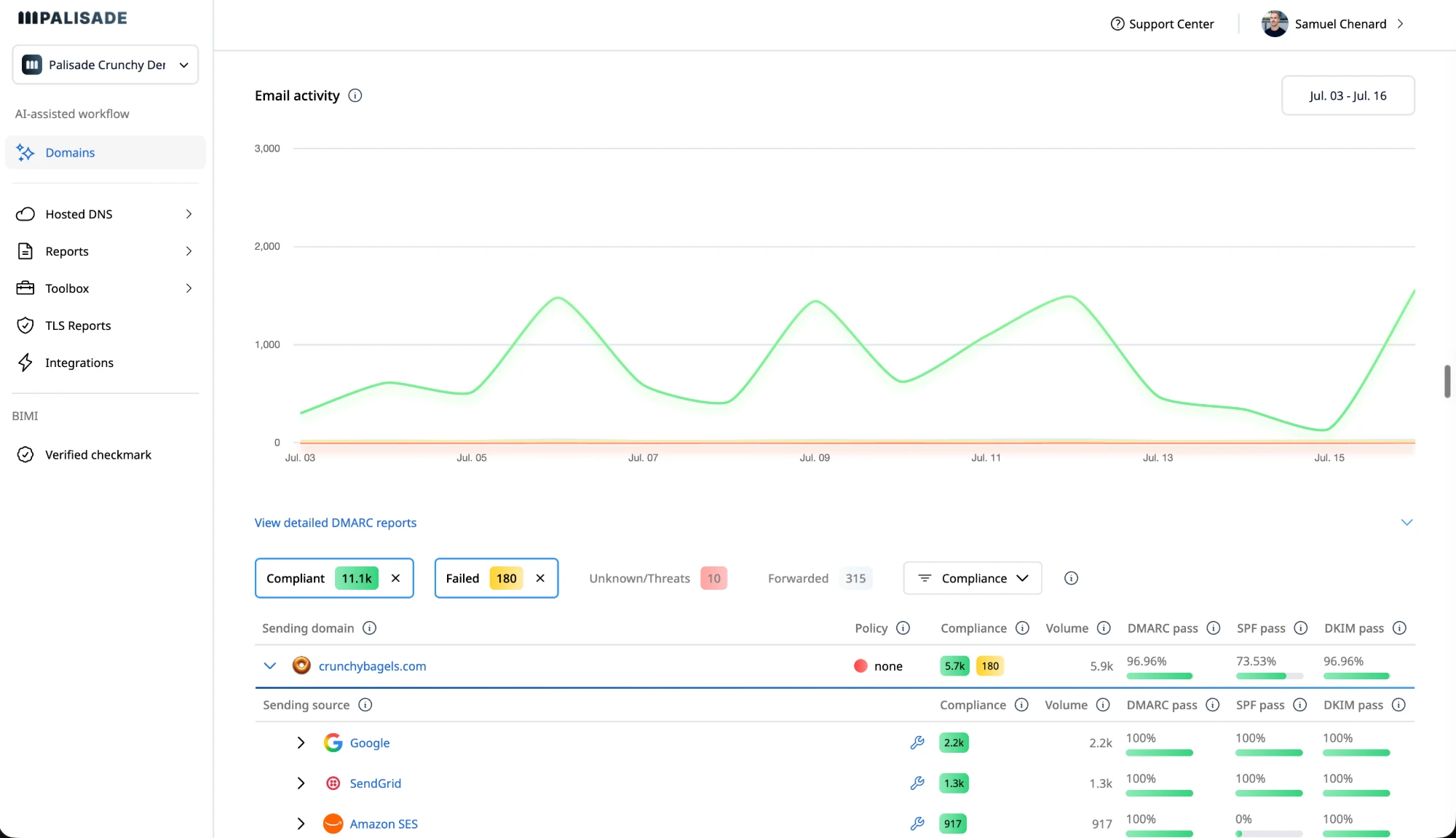
Provisional · 5/8 dimensions established
Average of established dimensions; may change as remaining dimensions are verified.
Full rubric · 8/8 dimensions established
Palisade's IT-team plans start at $19 a month, sized by email volume. Start with a 15-day full-product trial; nothing is charged until it ends.
Which one is right for you?
Best for Teams already operating Splunk and owning the workflow
Best for MSPs and IT teams responsible for multiple domains
- You already operate Splunk Enterprise or Splunk Cloud and want DMARC aggregate events inside the same search and security environment.
- You want to own the mailbox or directory input, Splunk deployment, storage, dashboards, and downstream searches yourself.
- You can accept an archived project with no vendor support commitment, no published DMARC add-on price, and no advertised MSP control plane.
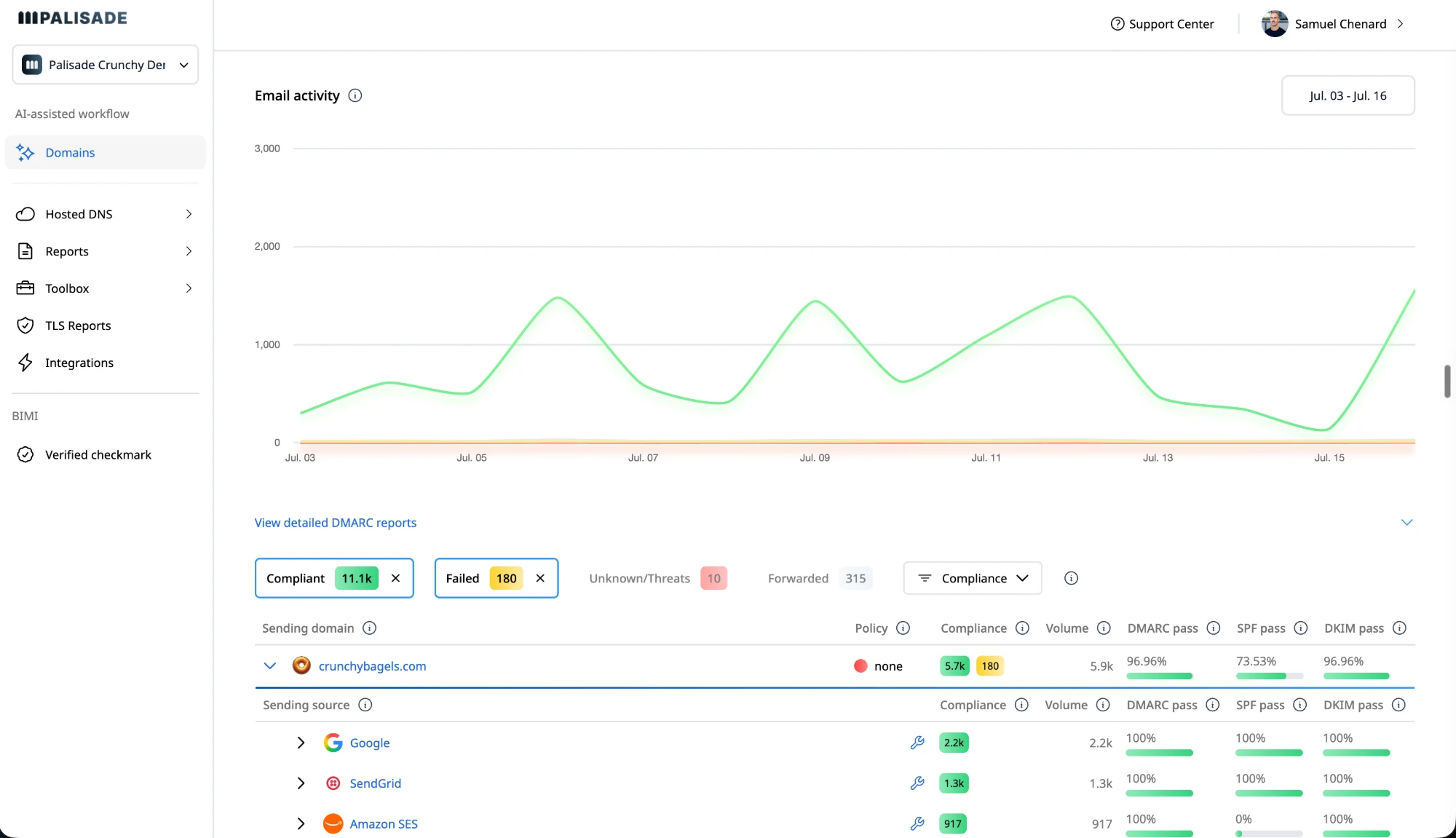
- You want an AI agent to investigate every sender, draft SPF and DKIM fixes, and propose each policy step toward p=reject instead of stopping at report ingestion.
- You want hosted SPF, DKIM, DMARC, BIMI, and MTA-STS records, with Smart DNS Deployment through your DNS provider.
- You manage internal or client domains and want multi-tenant operations, native ConnectWise, HaloPSA, or Autotask integrations, and pricing that matches your domain portfolio.
IT-team plans start at $19 a month, sized by email volume. Start with a 15-day full-product trial; nothing is charged until it ends.
Where the day-to-day work actually differs
| Feature | Splunk TA-DMARC add-on | Palisade |
|---|---|---|
| Report collection and analysis | ||
| DMARC aggregate report ingestion and monitoringWhether DMARC aggregate reports are collected and available for review.The repository describes TA-dmarc as an add-on for ingesting DMARC XML aggregate reports into Splunk, while the Splunkbase listing repeats the IMAP, POP3, and local-directory collection model (checked 2026-08-26). Source (2026-08-26) Source 2 (2026-08-26) | IMAP, POP3, or folder | Agent analyzes reports |
| Source, receiver, policy, SPF, DKIM, and disposition fieldsWhether reports retain the fields needed to diagnose authentication results.The README documents fields mapped from DMARC XML, including source IP, destination, header-from domain, published policy, disposition, SPF result, and DKIM result (checked 2026-08-26). Source (2026-08-26) | Mapped XML fields | Agent analyzes results |
| IMAP, POP3, and local-directory inputsWhether reports can be collected through mail protocols or local folders.TA-dmarc documents IMAP inputs with basic or OAuth2 authentication, POP inputs with basic authentication, and directory inputs for offline environments (checked 2026-08-26). Source (2026-08-26) | Three input methods | Not offered |
| Structured JSON output with legacy key=value compatibilityWhether parsed reports support structured JSON and a legacy output format.The README says JSON is the default output for structured aggregate reports and that key=value remains available for compatibility, with some newer validation enhancements unavailable in that format (checked 2026-08-26). Source (2026-08-26) | JSON with legacy output | Not offered |
| Splunk ecosystem | ||
| CIM Authentication mapping for Splunk Enterprise Security searchesWhether DMARC events map to Splunk's Authentication data model.TA-dmarc maps relevant aggregate-report fields to the Splunk CIM Authentication data model and documents use in Splunk Enterprise Security dashboards and tstats searches (checked 2026-08-26). Source (2026-08-26) Source 2 (2026-08-26) | CIM Authentication mapping | Not offered |
| Enforcement and DNS | ||
| AI agent that investigates senders, drafts authentication fixes, and proposes policy steps toward p=rejectWhether sender fixes and DMARC policy steps are prepared for review.TA-dmarc describes data collection, parsing, enrichment, and CIM mapping, but does not advertise an AI enforcement agent or a workflow that drafts SPF/DKIM changes (checked 2026-08-26). Source (2026-08-26) | —Not advertised | Agent drafts and proposes |
| Hosted DMARC, SPF, DKIM, BIMI, and MTA-STS recordsWhether authentication and transport records are hosted for the domain.The add-on documentation describes collecting reports from a mailbox or directory and sending events into Splunk; hosted authentication or transport records are not advertised (checked 2026-08-26). Source (2026-08-26) Source 2 (2026-08-26) | —Not advertised | Hosted managed DNS |
| SPF flattening and lookup-limit managementWhether SPF includes are consolidated to stay within DNS lookup limits.The public TA-dmarc materials describe SPF result fields and DKIM validation, but do not advertise SPF flattening or lookup-limit management (checked 2026-08-26). Source (2026-08-26) | —Not advertised | Hosted SPF flattening |
| MSP operations | ||
| Native ConnectWise, HaloPSA, and Autotask integrationsWhether tickets and client work can connect to PSA systems.The public project documents Splunk deployment roles, mailbox and directory inputs, and CIM mapping, but does not advertise ConnectWise, HaloPSA, or Autotask integrations (checked 2026-08-26). Source (2026-08-26) Source 2 (2026-08-26) | —Not advertised | Native PSA integrations |
| Portfolio-oriented multi-tenant client management and white-label reportingWhether one team can manage separate client domains and branded reports.The public materials describe one Splunk add-on and its input and search-time roles, but do not advertise client workspaces, tenant isolation, white-label reporting, or an MSP operating workflow (checked 2026-08-26). Source (2026-08-26) Source 2 (2026-08-26) | —Not advertised | Client workspaces and reports |
| Service model and lifecycle | ||
| Vendor-managed report retention and hosted storageWhether the vendor stores DMARC reports for a defined retention period.The README describes Splunk KVstore checkpointing and event indexing but does not publish a vendor-managed report-retention period or hosted storage tier (checked 2026-08-26). Source (2026-08-26) | —Not advertised | Unlimited IT/MSP; Enterprise customSource |
| Published commercial subscription, support plan, or SLA for the add-onWhether a commercial plan states its support terms and service commitment.Splunkbase lists the add-on under an MIT license and labels it Archived Add-on; the maintainer's README says the open-source project provides no support and does not advertise a subscription, paid support plan, or SLA (checked 2026-08-26). Source (2026-08-26) Source 2 (2026-08-26) | No published plan | Published plans and SLA |
| AI and automation access | ||
| Documented REST API for Splunk search dataWhether a customer can build against a published REST API to query Splunk data.Splunk documents REST endpoints for search jobs and results, including API-driven export. This is a Splunk platform API rather than a TA-DMARC-specific API. For Splunk Cloud, REST access must be enabled and is unavailable on free trial accounts (checked 2026-08-27). Source (2026-08-27) Source 2 (2026-08-27) | REST API documented | REST API published |
| MCP server for connecting AI assistants to Splunk dataWhether an AI assistant can reach the platform data that the add-on feeds into.Splunk publishes a generally available MCP Server that connects AI assistants, agents, and other intelligent systems to Splunk data. Its setup requires REST API access and token authentication, and the server is installed on a Splunk Search Head or Search Head Cluster (checked 2026-08-27). Source (2026-08-27) Source 2 (2026-08-27) | MCP server published | MCP server published |
| Advertised AI assistance for searching and investigating Splunk dataWhether the vendor advertises AI work inside the platform that hosts the add-on.Splunk advertises its AI Assistant as a generative app that finds data in a tenant, writes and optimizes SPL, validates results by running searches, and troubleshoots ingestion and configuration issues. The documentation does not advertise it as a TA-DMARC-specific sender or DNS-remediation workflow (checked 2026-08-27). Source (2026-08-27) | AI Assistant published | Agent drafts fixes |
| Search-data export and forwarding outside dashboardsWhether data can leave the platform through documented programmatic or scheduled methods.Splunk documents data forwarding plus CLI, SDK, and REST export methods. Its export guidance says SDK and REST options suit higher-volume scheduled exports and lists raw events, CSV, JSON, and XML as output formats (checked 2026-08-27). Source (2026-08-27) Source 2 (2026-08-27) | API and SDK exports | REST API published |
Want to compare the workflow yourself? Start a 15-day full-product trial of Palisade.
Palisade vs Splunk TA-DMARC add-on: score evidence and limitations
Both products are scored on the same eight dimensions the comparison hub uses, so the figures here are the figures there. Four are derived from vendor facts that each carry a source and a checked date. Four are editorial, marked as such below, and each states its reasoning and its source.
Each dimension is out of 10 and the total is the raw sum out of 80, rescaled to 100 — the raw figure is printed beside it so the conversion is checkable rather than a black box. Scored on what each vendor publishes, not on how the product feels in use. Unknown scoring dimensions are shown as Not established; provisional scores average only established dimensions and show coverage. They may change as remaining dimensions are verified. Current ranks include full and provisional scores; equal displayed scores share a rank. Historical assessments are separate. Editorial dimensions last reviewed 2026-10-15.
Provisional · 5/8 dimensions established
Average of established dimensions; may change as remaining dimensions are verified.
Full rubric · 8/8 dimensions established
How reachable the vendor's DMARC data is from your own software and AI tools. Two paths count, an API and an MCP server, and each only if it reaches DMARC data (domains, records, reports or sending sources). A path is open when it is documented and included from the cheapest paid plan; gated when it needs a higher tier, an add-on, a sales call or a request, or the vendor does not say which plans include it. 10 = both open. 9 = one open, one gated. 8 = both gated. 7 = one open, the other absent. 6 = one gated, the other absent. 5 = access claimed in marketing only, with no docs or plan listing. 4 = reachable only through a self-hosted tool's own interface or a host platform's API, such as parsedmarc's library or Splunk's REST API; a dashboard over a database you run yourself does not count. 3 = no API or MCP server reaches DMARC data.
TA-dmarc ingests DMARC report data into Splunk. Splunk documents REST search for indexed data; this is access through the host platform’s API, the published rubric’s four-point category, rather than a separately documented add-on API. Source (2026-08-28) Source (2026-10-14)
Palisade publishes a REST API and a remote MCP server on every plan, making the same domain data and remediation workflows available to connected software. Source (2026-08-30)
How much of the report analysis is done for you. 10 = the platform turns raw report data into a prioritised, actionable queue on its own.
Mailbox collection, archive handling, XML validation, source enrichment, checkpointing, and CIM normalization automate ingestion before analysis in Splunk. Source (2026-08-28)
Report data is analysed into a prioritised list of sender, SPF, DKIM and DMARC issues, so nobody reads raw XML. Source (2026-08-30)
How much of the work the vendor's own software does. 10 = it identifies the sending sources, drafts the SPF and DKIM fixes each one needs, and proposes the next policy step. 6 = it applies the records for you, but a person decides what to fix and when to advance. 3 = it reports, and every change is yours to make. A vendor whose team does the work rather than its software scores here on the software alone.
TA-DMARC processes reports into Splunk; who performs all authentication and policy changes remains unestablished. Source (2026-08-28)
The agent investigates each sender, drafts the SPF and DKIM changes it needs, and proposes the next policy step; a human approves before deployment. Source (2026-08-30)
10 = full pricing published. 6 = some tiers published, rest quote-gated. 3 = quote only.
The public open-source TA-dmarc add-on can be installed on a compatible Splunk deployment; Splunk and infrastructure costs are separate. Source (2026-08-28)
Self-service IT-team prices are published by email volume from $19/month; MSP pricing is portfolio-based per client domain, and Enterprise pricing is custom. Source (2026-08-30)
10 = hosts the records for you. 6 = partial or add-on. 3 = you manage your own DNS.
No: the add-on ingests and indexes reports and does not host or change DMARC, SPF, DKIM, BIMI, or MTA-STS records. Source (2026-08-28)
Yes: hosted DMARC, SPF, DKIM, BIMI & MTA-STS Source (2026-08-30)
10 = a genuine free plan. 6 = time-limited trial only. 3 = no free access.
The add-on is publicly available, but it depends on separately operated Splunk software and infrastructure. Source (2026-08-28)
No free plan: a 15-day full-product trial; nothing is charged until the trial ends Source (2026-09-25)
10 = a real MSP program with multi-tenant management. 6 = partial. 3 = none.
The repository describes a community open-source add-on without project support; commercial MSP or reseller program availability is unverified. Source (2026-08-28)
Yes: MSP-first, multi-tenant with native PSA integrations Source (2026-08-30)
How much work it takes to get a domain from p=none to p=reject. 10 = the platform (or the vendor's team) gets you there without manual DNS edits.
the documented add-on ingests reports; record hosting, DNS changes, and policy guidance are unresolved outside that documented scope. Source (2026-08-28)
The DMARC Agent detects when a domain's authentication and alignment are ready for the next policy stage and proposes the move, but a human still approves and applies it, so it is not fully hands-off. Source (2026-08-30)
Where Palisade and Splunk TA-DMARC add-on actually differ
Each argument keeps the product screens, sourced comparison points, and supporting analysis together.
Report ingestion vs enforcement
TA-DMARC's report pipeline stops at Splunk events
TA-DMARC is a data-ingestion layer for a Splunk deployment. Its README describes a modular input that reads DMARC XML aggregate reports, parses the structured data, adds fields such as DNS resolution and XSD validation results, and sends the resulting events into Splunk. The project says its design leaves the data intact and leaves aggregation and visualization to other Splunk apps. That is real parity for collecting and searching DMARC evidence. Source (2026-08-26) Source 2 (2026-08-26)
Splunk TA-DMARC add-on
A relevant product screenshot was not available in the reviewed evidence.
Palisade
A relevant product screenshot was not available in the reviewed evidence.
- AI agent that investigates senders, drafts authentication fixes, and proposes policy steps toward p=reject: Agent drafts and proposes
- Hosted DMARC, SPF, DKIM, BIMI, and MTA-STS records: Hosted managed DNS
- SPF flattening and lookup-limit management: Hosted SPF flattening
The next operational step remains outside the add-on. The public materials do not advertise sender investigation, SPF or DKIM record drafting, or a policy workflow that prepares a domain for p=reject. Palisade starts with the same report evidence and carries that work further: its agent investigates every sender, drafts authentication fixes, and proposes each policy step, with approval required before anything ships. Source (2026-08-26)
Input flexibility vs operator ownership
IMAP, POP3, or a folder: three inputs, one operator-owned mailbox
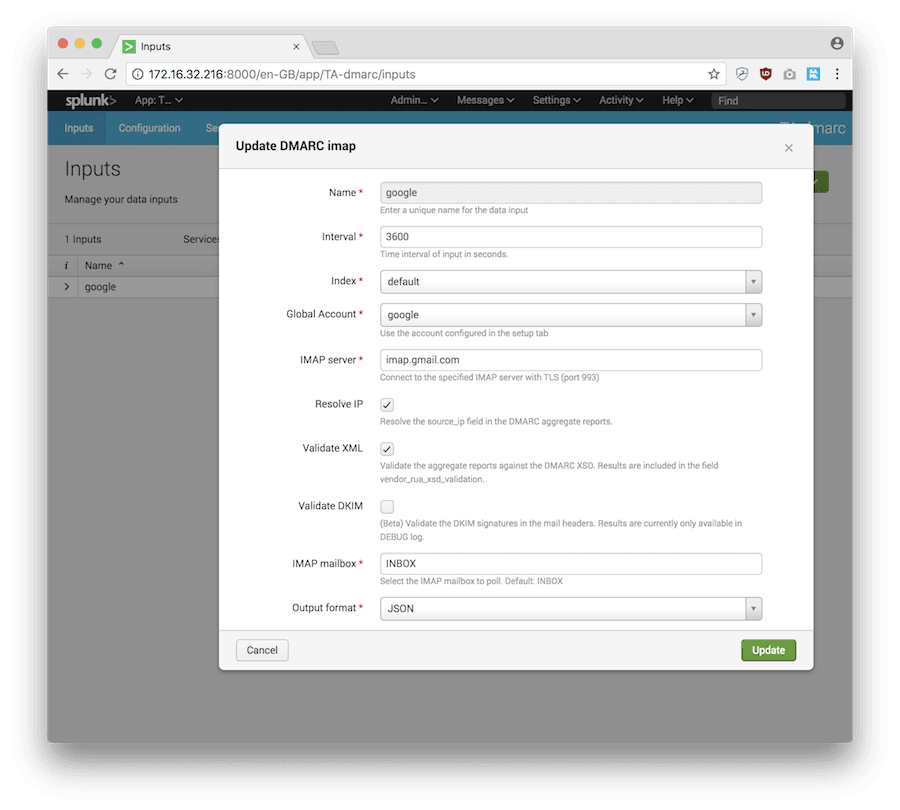
The add-on gives a Splunk operator several ways to bring reports in. IMAP supports basic or OAuth2 authentication, POP3 supports basic authentication, and a directory input handles offline environments where another process deposits the report attachments. The configuration also covers polling intervals, Splunk indexes, mailbox folders, XML validation, DKIM validation, IP resolution, and JSON or key=value output. TA-DMARC does not modify, move, or delete messages on the IMAP server. It records processed messages in Splunk KVstore instead. Source (2026-08-26)
Splunk TA-DMARC add-on
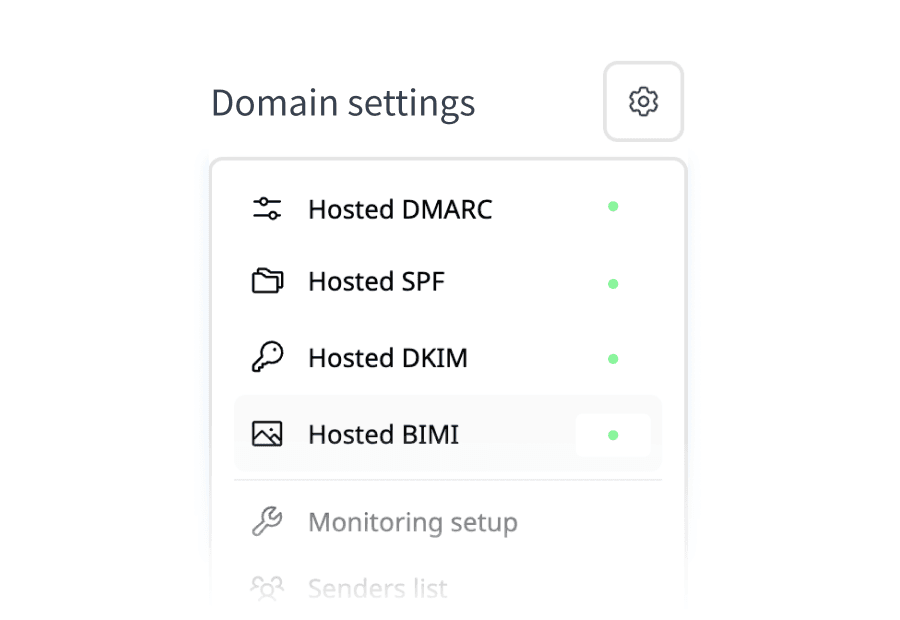
Palisade
- DMARC aggregate report ingestion and monitoring: Agent analyzes reports
- Source, receiver, policy, SPF, DKIM, and disposition fields: Agent analyzes results
- IMAP, POP3, and local-directory inputs: Not offered
That flexibility suits a team that already has mailbox administration and Splunk ownership in place. It also means the team owns the credentials, network path, polling health, index capacity, checkpoint state, and response when ingestion stops. Palisade shifts the work to a hosted domain workflow, where the agent can use the report evidence to identify legitimate senders and prepare the authentication changes that an operator reviews. Source (2026-08-26)
Security context vs DNS remediation
CIM mapping gives Splunk Enterprise Security context, not DNS remediation
TA-DMARC's strongest Splunk-specific feature is normalization. Its README maps aggregate-report fields into the CIM Authentication data model, including the source IP, destination domain, header-from domain, policy disposition, SPF and DKIM results, and a DMARC application value. The project says that mapping lets the results appear in relevant Splunk Enterprise Security dashboards and supports accelerated tstats searches. If your SOC already works in Splunk, keeping the DMARC evidence in that search environment is a genuine reason to consider the add-on. Source (2026-08-26) Source 2 (2026-08-26)
Splunk TA-DMARC add-on
A relevant product screenshot was not available in the reviewed evidence.
Palisade
- CIM Authentication mapping for Splunk Enterprise Security searches: Not offered
CIM context is not the same as an authentication control plane. The documentation describes event fields, searches, and dashboards, but does not advertise hosted DNS, SPF flattening, PSA ticket flow, or client-domain management. Palisade evaluates the same sender and alignment evidence, then drafts the next SPF or DKIM change and proposes the next policy step. The person still approves the change, but the agent carries more of the investigation and preparation than a Splunk dashboard does. Source (2026-08-26)
Self-managed code vs vendor support
An archived MIT add-on changes the maintenance calculation
The add-on's lifecycle matters. Splunkbase lists MIT licensing, default version 4.1.1 dated October 21, 2022, and an Archived Add-on support classification. The repository was archived in April 2023, and its README states that the project has no warranty and provides no support, while retaining a public issue tracker. Inspectable source code does not create a vendor support commitment. Source (2026-08-26) Source 2 (2026-08-26)
Splunk TA-DMARC add-on
A relevant product screenshot was not available in the reviewed evidence.
Palisade
- Vendor-managed report retention and hosted storage: Unlimited IT/MSP; Enterprise customSource
- Published commercial subscription, support plan, or SLA for the add-on: Published plans and SLA
For a single Splunk team with the right engineering skills, that tradeoff may be acceptable. An MSP operating many customer domains should assess whether its deployment needs additional work for separate report routing, domain inventory, client reporting, ticket creation, DNS changes, upgrades, and incident ownership. Palisade packages that operating layer as a hosted service, with portfolio-based MSP pricing and an agent that prepares reviewed authentication work. The practical decision is whether your team wants to extend Splunk around the add-on or use a purpose-built service for domain enforcement operations. Source (2026-08-26) Source 2 (2026-08-26)
Dashboard access vs programmatic access
TA-DMARC can use Splunk's REST API and MCP Server, not a TA-DMARC-specific control plane
TA-DMARC is an archived Splunk add-on that ingests DMARC aggregate reports into the Splunk platform, so its current programmatic-access story is at the platform layer rather than through a separate add-on API. Splunk documents REST endpoints for running searches and exporting their results. On Splunk Cloud, a customer must enable REST access and free trial accounts cannot use it. Splunk also publishes a generally available MCP Server that lets AI assistants and agents access Splunk data resources and run searches. Its documented setup requires REST API access and token authentication. Source (2026-08-27) Source 2 (2026-08-27) Source 3 (2026-08-27) Source 4 (2026-08-27) Source 5 (2026-08-27)
Splunk TA-DMARC add-on
A relevant product screenshot was not available in the reviewed evidence.
Palisade
A relevant product screenshot was not available in the reviewed evidence.
- Documented REST API for Splunk search data: REST API published
- MCP server for connecting AI assistants to Splunk data: MCP server published
- Advertised AI assistance for searching and investigating Splunk data: Agent drafts fixes
Splunk also advertises an AI Assistant that can find tenant data, write and optimize SPL, validate results by running searches, and troubleshoot ingestion and configuration issues. Palisade publishes an MCP server and a REST API too. Its agent investigates senders, drafts SPF and DKIM fixes, and proposes each policy step. A human approves before anything ships. Source (2026-08-27)
Reachable from your own AI tools
Palisade's MCP server exposes 42 tools over OAuth, so the assistant your team already uses can read domains, pull the exact records to publish and work the task queue. These are the clients the connection guide walks through.
- ChatGPT
- Claude
- Codex
- Cursor
- Windsurf
- Any MCP client





Still deciding between Splunk TA-DMARC add-on and Palisade? See what changes with Palisade.
15-day full-product trial. Nothing is charged until it ends.


 Microsoft 365
 Zoho Mail

The agent does the heavy lifting
Sources identified, SPF and DKIM fixes drafted, each policy step proposed. You approve; nothing ships on its own.
Connect your AI with MCP
42 tools over MCP, so your assistant reads your domains and works the queue.
Connect your DNS manager directly


One-time sign-in supports 64 providers without retaining credentials. Optional account connections support Cloudflare, GoDaddy and Route 53. You approve every change.
“We evaluated many DMARC providers before choosing Palisade. The quality of their product, the responsiveness and friendliness of their team and their rapid progress on their product roadmap made it a no-brainer for us to move forward.”
Splunk TA-DMARC pricing: the add-on is free under MIT, but Splunk is still your platform
Splunk TA-DMARC is published as an archived MIT add-on, not as a hosted DMARC subscription. The Splunkbase listing identifies the license and download path, while the maintainer's README explains the self-hosted installation and configuration. Neither publishes a TA-DMARC plan, trial, per-domain fee, or message-volume rate. Splunk's separate platform pricing page describes quote-based Splunk Cloud and Enterprise models, but it does not publish a TA-DMARC-specific price.
What you'd actually pay
The same five buyer sizes on every comparison, so a shape carries from one page to the next.
1 domain, up to 1,000 emails a month
MIT covers the self-hosted add-on only
2 set-up domains, up to 100K emails a month
MIT covers the self-hosted add-on only
10 set-up domains, up to 1M emails a month
MIT covers the self-hosted add-on only
20 set-up domains, up to 2.5M emails a month
MIT covers the self-hosted add-on only
Client domains under management, any volume
MIT covers the self-hosted add-on only
Palisade’s figures are derived from its published tiers. Splunk TA-DMARC add-on pricing or licensing source reference: vendor source citation date 2026-08-28. Plans and prices may have changed since.
How Splunk TA-DMARC add-on prices
- Splunkbase lists the add-on as MIT-licensed and labels it Archived Add-on. It does not publish a paid add-on tier, support rate, trial, domain allowance, message allowance, or SLA (checked 2026-08-26).
- Splunk's general pricing page says Splunk Cloud Platform and Splunk Enterprise use activity-based, ingest, or workload pricing and directs buyers to request a quote. Those are Splunk platform terms, not a published price for TA-DMARC itself (checked 2026-08-26).
- The add-on's license line is not the same as a $0 operating cost. The team still supplies a Splunk deployment, a report mailbox or directory, storage, credentials, monitoring, backups, and the people who maintain the input and act on findings.
- The Splunkbase listing shows version 4.1.1 dated October 21, 2022 and marks the app archived. That is a published lifecycle signal, not proof that a particular deployment cannot run (checked 2026-08-26).
How Palisade prices
- Palisade publishes flat monthly IT-team plans sized by email volume from $19/month. Paid IT tiers cap set-up domains at 2, 3, 6, 10, or 20 by tier; adding domains is free and unlimited.
- Palisade's MSP model is priced per client domain, with a rate that improves as your portfolio grows and a minimum of 5 client domains. Client email volume is not metered, and your own MSP domain is included as a free Not-For-Resale license.
- Palisade is hosted, so the service covers the report and DNS surface instead of asking your team to assemble Splunk inputs, indexes, searches, dashboards, and maintenance. Its agent investigates senders, drafts fixes, and proposes policy steps while your team approves each change.
- Palisade offers a 15-day full-product trial. IT-team and MSP plans keep unlimited report history (Enterprise retention follows custom terms).
Splunk TA-DMARC add-on source reference: primary reference citation date 2026-08-26.Palisade source reference: the public pricing page citation date 2026-08-30.Plans and prices may have changed since.
Start a 15-day full-product trial of Palisade. Nothing is charged until it ends.
What each one covers, and where it stops
Published facts only, read from each vendor's own material. Neither column describes a hands-on trial, because we have not run one.
Splunk TA-DMARC is an archived MIT add-on for Splunk deployments that ingests DMARC XML aggregate reports, parses and enriches their data, and sends resulting events to Splunk. It serves teams already operating Splunk Enterprise or Splunk Cloud that want DMARC evidence in their existing search and security environment rather than a separate hosted DMARC subscription.
The add-on is built for operators who can configure the report mailbox or directory, Splunk roles, indexes, searches, dashboards, storage, and maintenance. It supports IMAP, POP3, and directory inputs, maps aggregate-report fields to the CIM Authentication data model, and leaves aggregation and visualization to other Splunk apps.
Palisade is built around an agent that does the DMARC work rather than reporting on it. It identifies every sending source, drafts the SPF and DKIM changes each one needs, and proposes the next policy step when the evidence supports it.
The agent investigates every sender, drafts every fix, and proposes each policy step, you approve before anything ships.
- Collects DMARC aggregate reports through IMAP, POP3, or a local folder
- Maps source, receiver, policy, SPF, DKIM, and disposition fields from DMARC XML
- Provides structured JSON output with legacy key=value compatibility
- Maps events to the CIM Authentication data model for Splunk Enterprise Security searches
- Runs on Splunk, which publishes a REST API for search data
- The agent investigates senders and drafts the fix, so the work arrives prepared rather than as a list of findings
- Hosted SPF, DKIM and DMARC records, so an approved change can be carried out rather than handed off
- Portfolio workflow for MSPs, with ConnectWise, HaloPSA and Autotask integrations and a free NFR domain
- An MCP server and a REST API, so the same data and workflow are reachable from the AI tools a team already uses
- Does not advertise an AI agent that investigates senders, drafts authentication fixes, and proposes policy steps toward p=reject
- Does not advertise hosted DMARC, SPF, DKIM, BIMI, or MTA-STS records
- Does not advertise SPF flattening or lookup-limit management
- Does not advertise native ConnectWise, HaloPSA, or Autotask integrations
- Does not advertise portfolio-oriented multi-tenant client management or white-label reporting
- Every policy change waits for a human approval, by design: nothing ships on the agent's own authority
- MSP pricing is portfolio-based per client domain, with a minimum of 5 client domains
- Plans are sized by monthly email volume, so a low-domain, high-volume sender lands on a higher tier than domain count alone suggests
- License fee
- $0 published under MIT
- Hosting model
- Self-hosted
- Listing status
- Archived Add-on
- Latest version
- 4.1.1 (October 21, 2022)
- Domain allowance
- Not published
- Starts at
- IT plans from $19/mo by email volume; 15-day trial
- Trial
- 15 days, full product
- MSP model
- Portfolio-based per client domain; minimum of 5 client domains
What Palisade customers say
5.0 out of 5 on G2Trusted by over 10,000 domains
“Palisade made it so easy for us to get our blue verified checkmark and achieve our BIMI compliance”


Sources and further reading
Source checks run through 2026-10-14; every entry keeps its individual check date.
- TA-DMARC on Splunkbase
Checked 2026-08-28
- TA-DMARC project repository
Checked 2026-10-14
- TA-dmarc README and configuration documentation
Checked 2026-08-26
- Splunk public pricing page
Checked 2026-08-26
- Splunk supported add-ons and CIM documentation
Checked 2026-08-26
- Splunk REST API export documentation
Checked 2026-08-27
- Splunk Cloud REST API access requirements
Checked 2026-08-27
- Splunk MCP Server documentation
Checked 2026-08-27
- Splunk MCP Server setup documentation
Checked 2026-08-27
- Splunk AI Assistant documentation
Checked 2026-08-27
- Splunk search-result export methods
Checked 2026-08-27
- Splunk REST API search endpoint reference
Checked 2026-08-27
- Splunk MCP Server app listing
Checked 2026-08-27
- Splunk AI Assistant app listing
Checked 2026-08-27
- Splunk AI Assistant installation documentation
Checked 2026-08-27
- Splunk Enterprise AI capabilities
Checked 2026-08-27
- Splunk AI Assistant in Security product page
Checked 2026-08-27
- Splunk Enterprise Security AI Assistant overview
Checked 2026-08-27
- Source
Checked 2026-08-28
- Source
Checked 2026-10-13
Palisade vs Splunk TA-DMARC add-on: FAQ
What is Splunk TA-DMARC?
Splunk TA-DMARC is an add-on for ingesting DMARC XML aggregate reports into Splunk. The project documents IMAP, POP3, and local-directory inputs, report parsing, enrichment, JSON output, and mapping to the Splunk CIM Authentication data model. Splunkbase currently lists it as an archived MIT add-on.
Does Splunk TA-DMARC enforce DMARC or change DNS?
No. Its public documentation describes collecting and parsing reports, adding fields, and sending events into Splunk. It does not advertise hosted DNS records, an AI enforcement agent, or a workflow that drafts SPF and DKIM changes. Those actions remain part of your own operational process.
How much does Splunk TA-DMARC cost?
The add-on is listed under the MIT license, and no TA-DMARC subscription or add-on price is published. Splunk's platform still has its own commercial pricing, which Splunk describes through quote-based Cloud and Enterprise models. Budget separately for the Splunk platform, storage, report mailbox, maintenance, and operator time.
Does Splunk TA-DMARC support Splunk Enterprise Security?
Yes, its README says DMARC aggregate fields are mapped to the Splunk CIM Authentication data model so the results can be used in relevant Splunk Enterprise Security dashboards and tstats searches. Confirm the add-on and CIM versions against your deployment because the public add-on is archived.
Can an MSP use Splunk TA-DMARC for multiple clients?
The public materials document Splunk deployment roles, mailbox and directory inputs, report fields, and CIM mapping. They do not advertise client workspaces, tenant isolation, white-label reporting, PSA integrations, or per-client billing. An MSP could build those layers around Splunk, but they are not published as part of this add-on.
Is Splunk TA-DMARC still supported?
Splunkbase marks TA-DMARC archived and classifies support as Archived Add-on. Its default version is 4.1.1 dated October 21, 2022; the maintainer README explicitly says no support is provided. Verify the code and maintenance arrangement for the deployment or fork you intend to operate.
Can I run Splunk TA-DMARC and Palisade at the same time?
Yes. DMARC reporting supports multiple reporting destinations, so you can compare both workflows during an overlap period. Keep DNS policy changes coordinated, compare sender and alignment findings, and retire the old input only after you have validated the new process for the domains you intend to manage.
Switching from Splunk TA-DMARC add-on takes three steps
- 1
Inventory the Splunk inputs and checkpoints
List the report mailbox or directory inputs, Splunk indexes, CIM dependencies, and domains currently represented before you change the reporting destination.
- 2
Route aggregate reports to both workflows
Use the same DMARC reporting window to compare the add-on's Splunk events with Palisade's domain and sender findings before retiring the existing input.
- 3
Move approved DNS work deliberately
Keep the responsible DNS owner in the approval loop, then validate SPF, DKIM, and DMARC results in delivered mail and aggregate reports before decommissioning the old Splunk workflow.
15-day full-product trial. Nothing is charged until it ends.
Source citations on this page run through 2026-10-14; individual claims retain their dates and evidence limitations. Spotted something out of date? Tell us and we'll fix it.