
KDmarc vs Palisade in 2026
KDmarc is now presented by Threatcop as TDMARC, a dashboard-led product for DMARC reporting, email-authentication controls, and anti-spoofing work. Palisade takes a different operating approach: its AI agent investigates senders, drafts the fixes, and proposes each policy step for your approval.
Our verdict: Pick Palisade if you want an agent to carry the investigation and remediation work through enforcement. Pick KDmarc if Threatcop's dashboard controls, source reporting, and security-tool portfolio match the way your team prefers to operate.
 Samuel Chenard · CEO & Co-Founder, PalisadeSource checks through 2026-10-14
15-day full-product trial. Nothing is charged until it ends.
 ChatGPT
 Claude
 Gemini
 Perplexity
 Grok
Grok KDmarc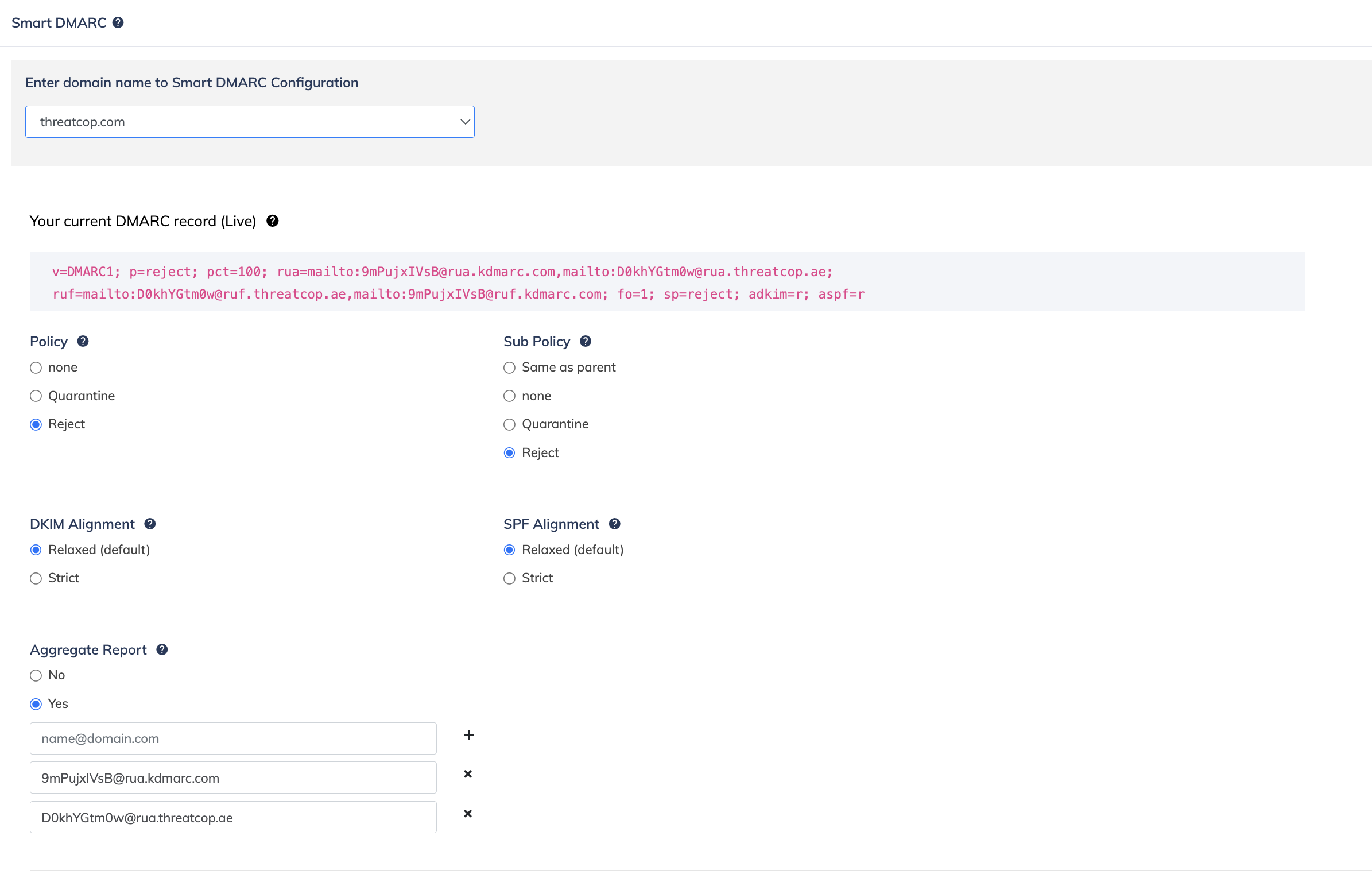
 Palisade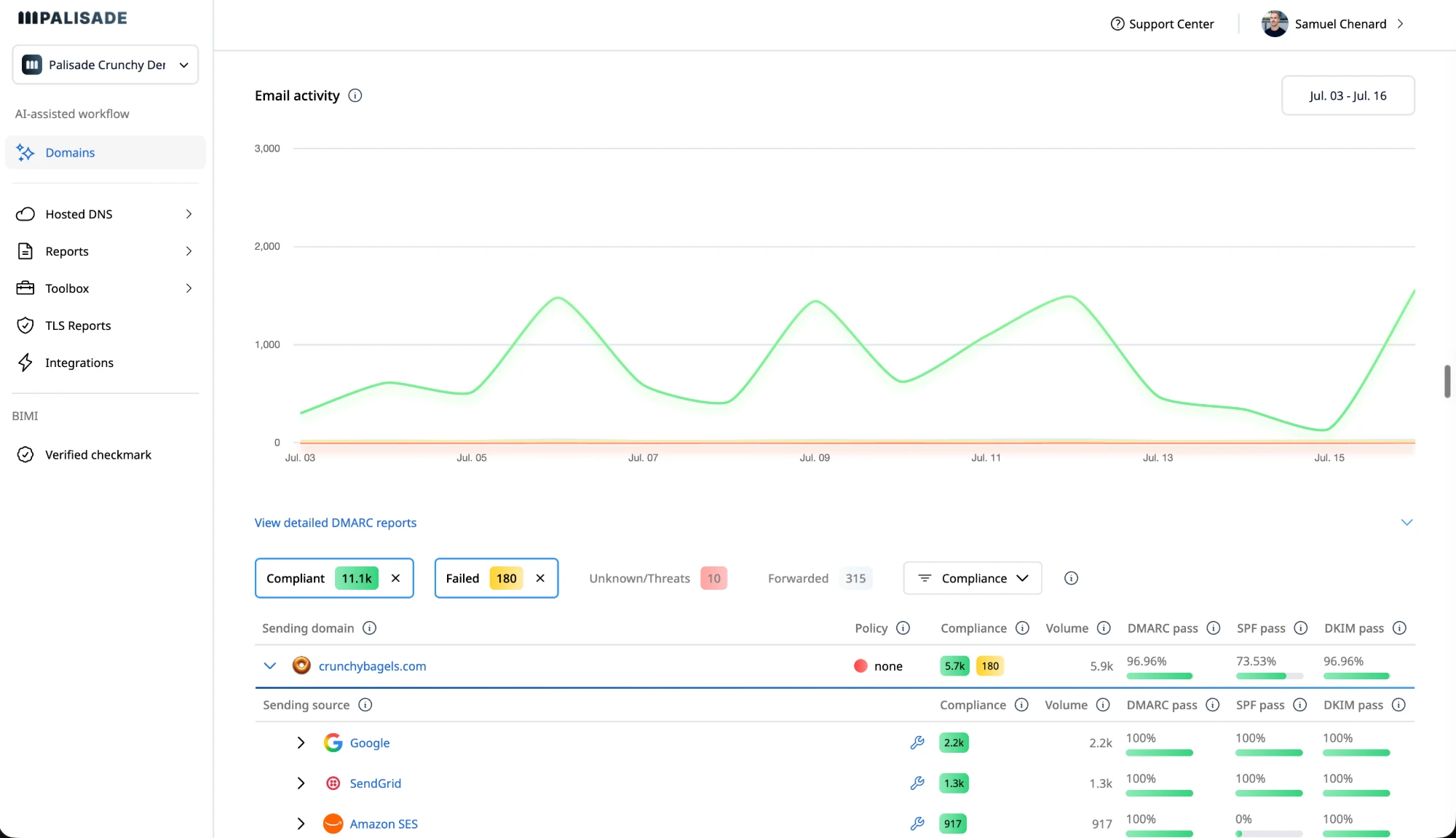
Provisional · 6/8 dimensions established
Average of established dimensions; may change as remaining dimensions are verified.
Full rubric · 8/8 dimensions established
Palisade's IT-team plans start at $19 a month, sized by email volume. Start with a 15-day full-product trial; nothing is charged until it ends.
Which one is right for you?
Best for Teams that prefer to own DNS and sender decisions
Best for MSPs and IT teams responsible for multiple domains
- You want a dashboard with source, receiver, forwarder, compliance, and threat views for outbound email.
- Your team prefers to use Smart SPF and Smart DMARC controls while keeping the DNS and sender-by-sender decisions in its own workflow.
- A seven-day, no-card freemium trial and the wider Threatcop security portfolio fit your evaluation process.
- You want an AI agent to investigate sending sources, draft SPF and DKIM fixes, and propose each policy step for approval.
- You need the same agentic workflow to scale across internal domains or an MSP client portfolio.
- You want published IT-team rates, free unlimited domain adding, and MSP pricing that is not metered by client email volume.
IT-team plans start at $19 a month, sized by email volume. Start with a 15-day full-product trial; nothing is charged until it ends.
Where the day-to-day work actually differs
| Feature | KDmarc | Palisade |
|---|---|---|
| Monitoring and reporting | ||
| DMARC aggregate reporting and outbound email-channel analyticsWhether reports show authentication results and outbound email activity.Both; TDMARC reports volume, SPF/DKIM/DMARC results, delivery failures, sources, receivers, forwarders, and geography | Detailed channel analytics | Agent analyzes reports |
| Source-level visibility into legitimate senders and threat sourcesWhether the service identifies known senders and suspicious sending sources.Both; TDMARC's dashboard and source-analysis guidance distinguish ESPs, unknown sources, and threat activity | Source analysis and guidance | Agent investigates senders |
| Scheduled email alerts and customized threat summariesWhether scheduled messages summarize authentication activity and threats.TDMARC's feature sheet lists daily or weekly scheduled reports and outbound threat monitoring | Daily or weekly reports | Agent flags new tickets |
| Authentication controls | ||
| Dashboard controls for SPF, DKIM alignment, and DMARC policyWhether operators can manage SPF, DKIM alignment, and DMARC policy settings.Both provide authentication configuration; TDMARC documents Smart SPF and Smart DMARC controls | Dashboard policy controls | Agent drafts proposed changes |
| Smart BIMI plus MTA-STS and TLS reportingWhether the service supports BIMI, MTA-STS, and TLS reporting.TDMARC names Smart BIMI and MTA-STS/TLS Reporting on its product page and feature sheet | BIMI and TLS reports | Hosted MTA-STS; TLS-RPT reporting |
| AI agent that investigates senders, drafts fixes, and proposes each enforcement stepWhether an agent investigates senders, drafts fixes, and prepares policy steps for approval.TDMARC advertises dashboard controls and guided policy progression, not an AI enforcement agent (checked 2026-08-26) Source (2026-08-26) | No agent advertised | Agent drafts and proposes |
| Approved DNS changes deployed through the connected providerWhether an approved DNS change is written through a connected provider rather than published by hand.TDMARC's setup guidance requires the customer to update the SPF TXT and DMARC CNAME records in DNS (checked 2026-08-26) Source (2026-08-26) | Manual DNS updates | Approved DNS deployment |
| Operations and integrations | ||
| Native ConnectWise, HaloPSA, and Autotask integrationsWhether named PSA platforms connect to client-domain workflows.Threatcop's current TDMARC product and integration documentation do not advertise these PSA integrations (checked 2026-08-26) Source (2026-08-26) | —Not advertised | Native PSA integrations |
| Public API for managing domainsWhether other systems can manage domains through a public API.Both publish API access; TDMARC's public API documentation includes list, detail, create, and delete domain endpoints | Domain API endpoints | API on every plan |
| IAM, SSO, two-factor authentication, and domain groupsWhether teams can manage user access, authentication, and domain grouping.TDMARC's first-party feature sheet lists these administration controls | Access controls and groups | Roles and domain groups |
| Commercial terms | ||
| Published self-serve rates and plan limitsWhether buyers can review rates and plan limits before contacting sales.Threatcop's current pricing page lists TDMARC but asks prospects to request a quote; it publishes no rates or plan table (checked 2026-08-26) Source (2026-08-26) | Quote required | Published plans and rates |
| AI and automation access | ||
| Documented REST API for domain and source dataWhether software can retrieve and update data through a published API reference.TDMARC publishes GET, POST, and DELETE endpoints for domains and a PATCH endpoint for source classification. The docs say to generate the Authorization token in dashboard settings; they do not state which plan includes API access (checked 2026-08-27). Source (2026-08-27) Source 2 (2026-08-27) | Documented token API | REST API published |
| MCP server for connecting AI assistants to domain dataWhether an AI assistant can reach the product's data directly.TDMARC's public developer index lists domain, classification, forensic-report, and partner API pages. It does not advertise an MCP server or an AI-assistant integration (checked 2026-08-27). Source (2026-08-27) | —No MCP server listed | MCP server published |
| Advertised AI assistance for TDMARC authentication workWhether the vendor advertises AI that investigates senders or prepares authentication changes.TDMARC's product page advertises Smart SPF, Smart DMARC, customized threat summaries, MTA-STS and TLS reporting, and Smart BIMI. It does not advertise an AI or machine-learning feature for TDMARC (checked 2026-08-27). Source (2026-08-27) | —No AI feature listed | Agent drafts work |
| Forensic and classification data outside the dashboardWhether product data can be retrieved programmatically without using the dashboard.TDMARC publishes authenticated GET endpoints for source-classification data and a domain's forensic reports. Its complete public developer index does not advertise scheduled exports, webhooks, or a data feed (checked 2026-08-27). Source (2026-08-27) Source 2 (2026-08-27) Source 3 (2026-08-27) | GET report endpoints | Aggregate reports only |
| Product identity | ||
| Current product name on the public product pageWhich name buyers see when they evaluate the current DMARC product.Threatcop's current product page and terms call the product Threatcop DMARC (TDMARC). Palisade's website and documentation use the Palisade name (checked 2026-08-28). Source (2026-08-28) Source 2 (2026-08-28) Source 3 (2026-08-28) Source 4 (2026-08-28) | Threatcop DMARC (TDMARC) | Palisade |
| Direct account creation under the current product nameWhether a buyer can start from a live product-branded registration page.Threatcop's public registration page is branded TDMARC and creates a TDMARC account. Palisade's website links its Get started action to the Palisade signup page (checked 2026-08-28). Source (2026-08-28) Source 2 (2026-08-28) Source 3 (2026-08-28) | TDMARC registration | Palisade signup |
| One product name across marketing and developer documentationWhether buyers can use the same name across product, registration, and API research.Threatcop does not advertise one product name across its public surfaces: the product and registration pages use Threatcop DMARC or TDMARC, while the developer index is titled KDMARC and documents api.kdmarc.com endpoints. Palisade's website and documentation use the Palisade name, including for its developer portal (checked 2026-08-28). Source (2026-08-28) Source 2 (2026-08-28) Source 3 (2026-08-28) Source 4 (2026-08-28) Source 5 (2026-08-28) Source 6 (2026-08-28) Source 7 (2026-08-28) | KDmarc remains in API docs | Palisade throughout |
Want to compare the workflow yourself? Start a 15-day full-product trial of Palisade.
Palisade vs KDmarc: score evidence and limitations
Both products are scored on the same eight dimensions the comparison hub uses, so the figures here are the figures there. Four are derived from vendor facts that each carry a source and a checked date. Four are editorial, marked as such below, and each states its reasoning and its source.
Each dimension is out of 10 and the total is the raw sum out of 80, rescaled to 100 — the raw figure is printed beside it so the conversion is checkable rather than a black box. Scored on what each vendor publishes, not on how the product feels in use. Unknown scoring dimensions are shown as Not established; provisional scores average only established dimensions and show coverage. They may change as remaining dimensions are verified. Current ranks include full and provisional scores; equal displayed scores share a rank. Historical assessments are separate. Editorial dimensions last reviewed 2026-10-15.
Provisional · 6/8 dimensions established
Average of established dimensions; may change as remaining dimensions are verified.
Full rubric · 8/8 dimensions established
How reachable the vendor's DMARC data is from your own software and AI tools. Two paths count, an API and an MCP server, and each only if it reaches DMARC data (domains, records, reports or sending sources). A path is open when it is documented and included from the cheapest paid plan; gated when it needs a higher tier, an add-on, a sales call or a request, or the vendor does not say which plans include it. 10 = both open. 9 = one open, one gated. 8 = both gated. 7 = one open, the other absent. 6 = one gated, the other absent. 5 = access claimed in marketing only, with no docs or plan listing. 4 = reachable only through a self-hosted tool's own interface or a host platform's API, such as parsedmarc's library or Splunk's REST API; a dashboard over a database you run yourself does not count. 3 = no API or MCP server reaches DMARC data.
Legacy KDMARC domain API documentation is visible; current TDMARC API entitlement and MCP availability remain unverified. Source (2026-10-14)
Palisade publishes a REST API and a remote MCP server on every plan, making the same domain data and remediation workflows available to connected software. Source (2026-08-30)
How much of the report analysis is done for you. 10 = the platform turns raw report data into a prioritised, actionable queue on its own.
TDMARC advertises automated alerts and daily/weekly reports. Its legacy API and classification surface indicate report automation; specific automatic prioritization and PSA workflow integrations are not established by the reviewed material. Source (2026-10-13) Source (2026-08-28)
Report data is analysed into a prioritised list of sender, SPF, DKIM and DMARC issues, so nobody reads raw XML. Source (2026-08-30)
How much of the work the vendor's own software does. 10 = it identifies the sending sources, drafts the SPF and DKIM fixes each one needs, and proposes the next policy step. 6 = it applies the records for you, but a person decides what to fix and when to advance. 3 = it reports, and every change is yours to make. A vendor whose team does the work rather than its software scores here on the software alone.
The legacy API exposes domain operations; the current remediation workflow is not established by its developer root. Source (2026-08-28)
The agent investigates each sender, drafts the SPF and DKIM changes it needs, and proposes the next policy step; a human approves before deployment. Source (2026-08-30)
10 = full pricing published. 6 = some tiers published, rest quote-gated. 3 = quote only.
Threatcop's current TDMARC pricing page requests quotes and publishes no numeric rate or plan-limit table. Source (2026-10-13)
Self-service IT-team prices are published by email volume from $19/month; MSP pricing is portfolio-based per client domain, and Enterprise pricing is custom. Source (2026-08-30)
10 = hosts the records for you. 6 = partial or add-on. 3 = you manage your own DNS.
Smart DMARC uses a customer-published CNAME to enable dashboard policy management. Smart SPF lets operators manage SPF records in the tool after initial DNS setup. DKIM records still need customer DNS publication; broader hosted-record entitlements are not established. Source (2026-10-13)
Yes: hosted DMARC, SPF, DKIM, BIMI & MTA-STS Source (2026-08-30)
10 = a genuine free plan. 6 = time-limited trial only. 3 = no free access.
A current seven-day freemium trial is advertised with no credit card required. Its domain, message-volume and retention limits are not published on the registration page; an ongoing free plan is not established. Source (2026-10-13)
No free plan: a 15-day full-product trial; nothing is charged until the trial ends Source (2026-09-25)
10 = a real MSP program with multi-tenant management. 6 = partial. 3 = none.
Partial legacy evidence: public Partners API documentation describes registered partner accounts creating customers and adding domains. Current MSP console, tenant isolation, support and commercial terms are not established by that API. Source (2026-10-13)
Yes: MSP-first, multi-tenant with native PSA integrations Source (2026-08-30)
How much work it takes to get a domain from p=none to p=reject. 10 = the platform (or the vendor's team) gets you there without manual DNS edits.
Current first-party guidance covers source identification, vendor SPF/DKIM configuration, source testing and higher-policy progression. Smart DMARC manages settings through a customer-published CNAME; operators still perform source cleanup and customer DNS setup. Source (2026-10-13)
The DMARC Agent detects when a domain's authentication and alignment are ready for the next policy stage and proposes the move, but a human still approves and applies it, so it is not fully hands-off. Source (2026-08-30)
Where Palisade and KDmarc actually differ
Each argument keeps the product screens, sourced comparison points, and supporting analysis together.
Search label vs current product name
KDmarc is now Threatcop DMARC (TDMARC)
KDmarc's current product identity needs one clarification before a buying comparison: the public product pages now call it Threatcop DMARC, or TDMARC. Threatcop describes it as an anti-spoofing and email-authentication solution for securing outbound email, improving visibility into email channels, and monitoring multiple domains. The product page also names Smart SPF, Smart DMARC, Smart BIMI, customized threat summaries, and MTA-STS and TLS reporting. Source (2026-08-26)
KDmarc
A relevant product screenshot was not available in the reviewed evidence.
Palisade
A relevant product screenshot was not available in the reviewed evidence.
That makes TDMARC a real commercial DMARC product, not a record lookup or an open-source report viewer. Threatcop's terms identify TDMARC as a product for email authentication and domain security, while the public sign-up flow still uses the TDMARC name. This page keeps the requested KDmarc label so the route matches the comparison search, but evaluates the current Threatcop product that a buyer will encounter. Source (2026-08-26) Source 2 (2026-08-26)
Dashboard controls vs agent-led execution
Dashboard controls versus an agent-led enforcement loop
TDMARC's documented operating path is dashboard-led. Smart DMARC gives the operator controls for the domain policy, sub-policy, SPF alignment, DKIM alignment, aggregate-report recipients, forensic-report recipients, and policy percentage. The help article explains that TDMARC supplies a CNAME, which the customer adds to DNS, and that the dashboard can then be used to change those settings. Smart SPF follows a similar pattern: replace the existing SPF record with the supplied Smart SPF record, then manage the included sources from the TDMARC dashboard. Source (2026-08-26) Source 2 (2026-08-26)
KDmarc
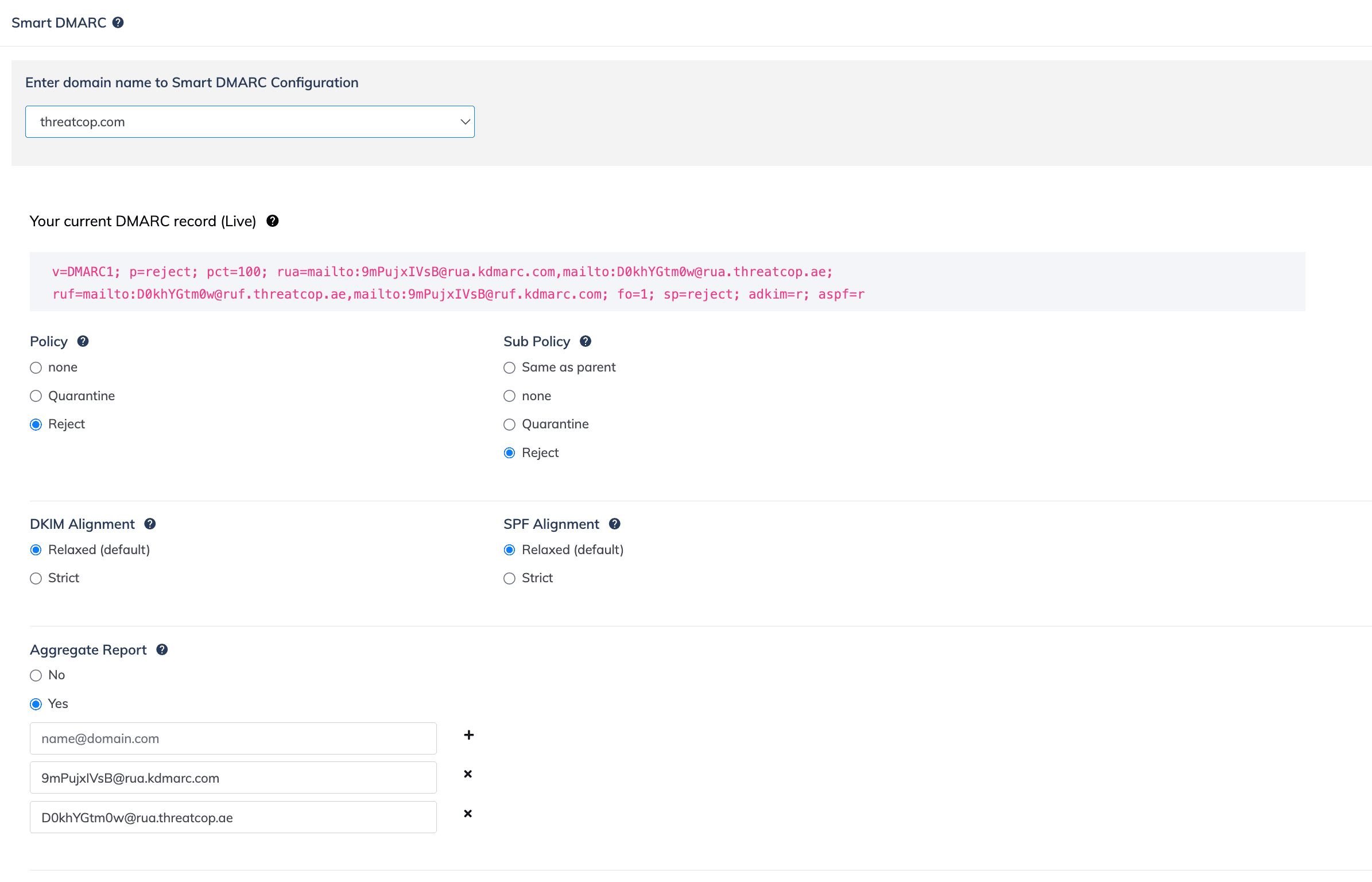
- Dashboard controls for SPF, DKIM alignment, and DMARC policy: Dashboard policy controls
- Smart BIMI plus MTA-STS and TLS reporting: BIMI and TLS reports
- AI agent that investigates senders, drafts fixes, and proposes each enforcement step: No agent advertisedSource
Palisade
A relevant product screenshot was not available in the reviewed evidence.
- Dashboard controls for SPF, DKIM alignment, and DMARC policy: Agent drafts proposed changes
- Smart BIMI plus MTA-STS and TLS reporting: Hosted MTA-STS; TLS-RPT reporting
- AI agent that investigates senders, drafts fixes, and proposes each enforcement step: Agent drafts and proposes
TDMARC also publishes a sensible policy progression: start at p=none, identify legitimate sources and correct SPF/DKIM alignment, move to p=quarantine, and then transition to p=reject once the domain is ready. That is genuine parity on guided enforcement. The narrower difference is who performs the investigation and drafting. TDMARC's pages describe controls and guidance; they do not advertise an AI agent that investigates each sender and prepares every fix. Palisade's agent does that operational work and leaves the customer with a review before anything ships. Source (2026-08-26)
Reporting depth vs manual investigation
Reporting detail for teams investigating outbound mail
TDMARC's dashboard is built to turn aggregate reports into several views of the same outbound stream. Its documentation lists seven-day, 14-day, one-month, and custom reporting windows, with email volume, SPF/DKIM/DMARC pass percentages, delivery failures, IP counts, top threat sources, email-service-provider breakdowns, geography, and separate pass/fail graphs. The feature sheet adds reporting by sender, receiver, forwarder, geography, and compliance. Source (2026-08-26) Source 2 (2026-08-26)
KDmarc
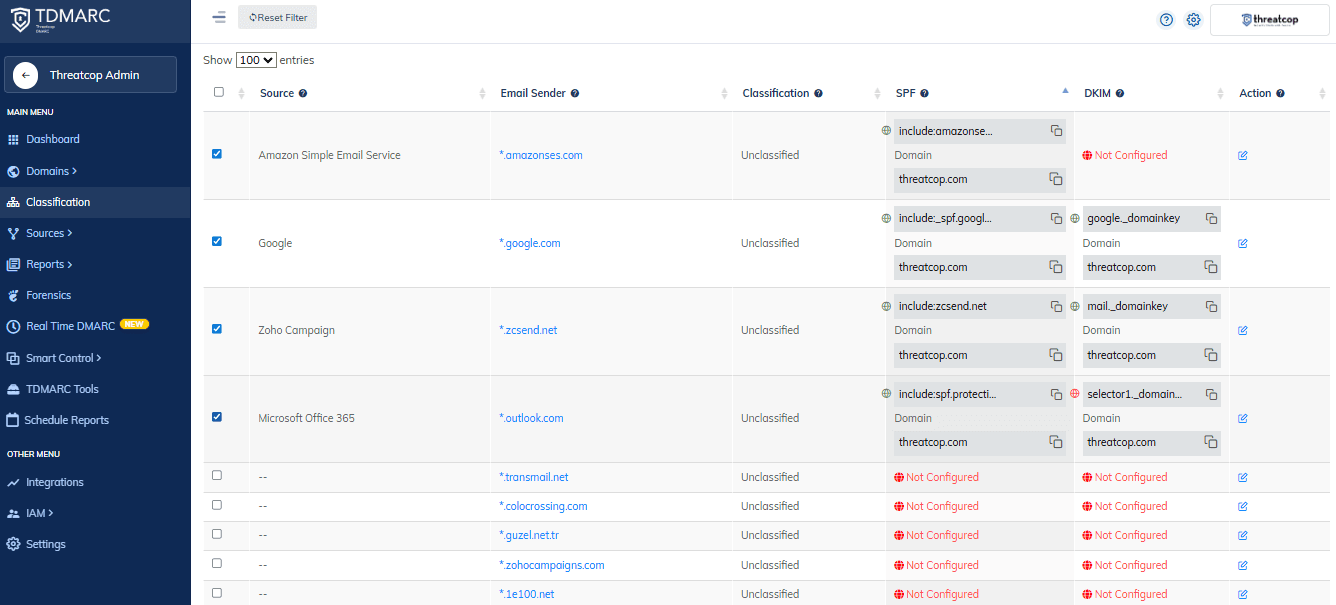
- DMARC aggregate reporting and outbound email-channel analytics: Detailed channel analytics
- Source-level visibility into legitimate senders and threat sources: Source analysis and guidance
- Scheduled email alerts and customized threat summaries: Daily or weekly reports
Palisade
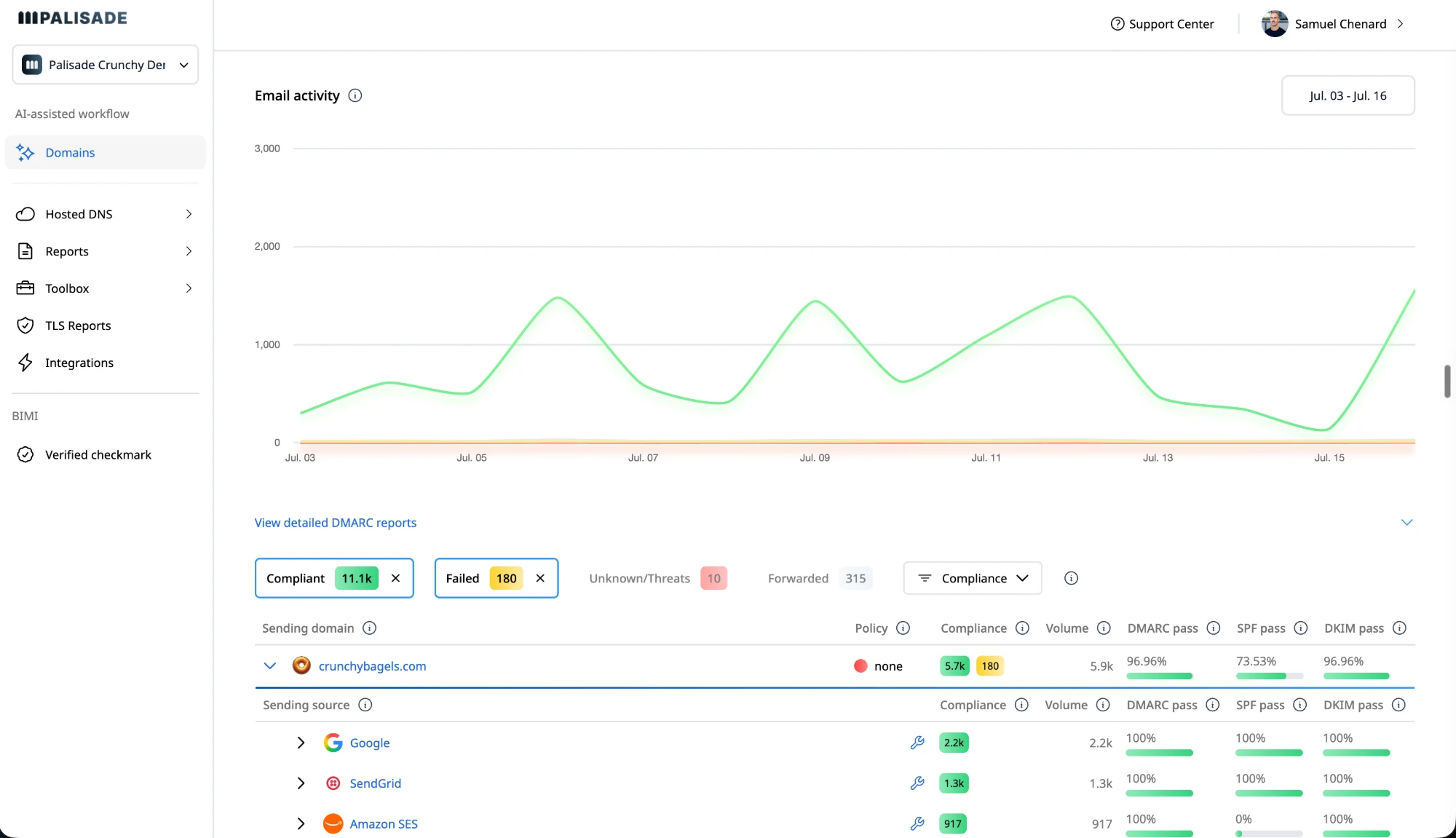
- DMARC aggregate reporting and outbound email-channel analytics: Agent analyzes reports
- Source-level visibility into legitimate senders and threat sources: Agent investigates senders
- Scheduled email alerts and customized threat summaries: Agent flags new tickets
The source-analysis guidance is practical but operator-dependent. TDMARC tells the user to identify legitimate ESPs, obtain the SPF and DKIM records from those vendors, add SPF through Smart SPF when that feature is enabled, and place DKIM records directly in DNS. It also points users to an email-assessment tool for testing a source. That fits a team that wants detailed evidence and is prepared to own the vendor-by-vendor cleanup. Palisade's agent is designed to reduce that handwork by investigating sources, drafting the next fix, and prioritising the review queue. Source (2026-08-26)
Platform administration vs MSP workflow
Integrations, administration, and portfolio fit
TDMARC's public feature sheet lists unlimited users, domains, and domain groups, plus IAM, SSO, two-factor authentication, a technical point of contact, DNS-record monitoring, subdomain discovery, blacklist-IP status, lookalike-domain status, threat-intelligence details, and scheduled email reports. Its public developer documentation also exposes domain list, detail, create, and delete endpoints authenticated with a token generated from dashboard settings. Those are useful building blocks for a security or infrastructure team that wants to keep ownership of the workflow. Source (2026-08-26) Source 2 (2026-08-26)
KDmarc
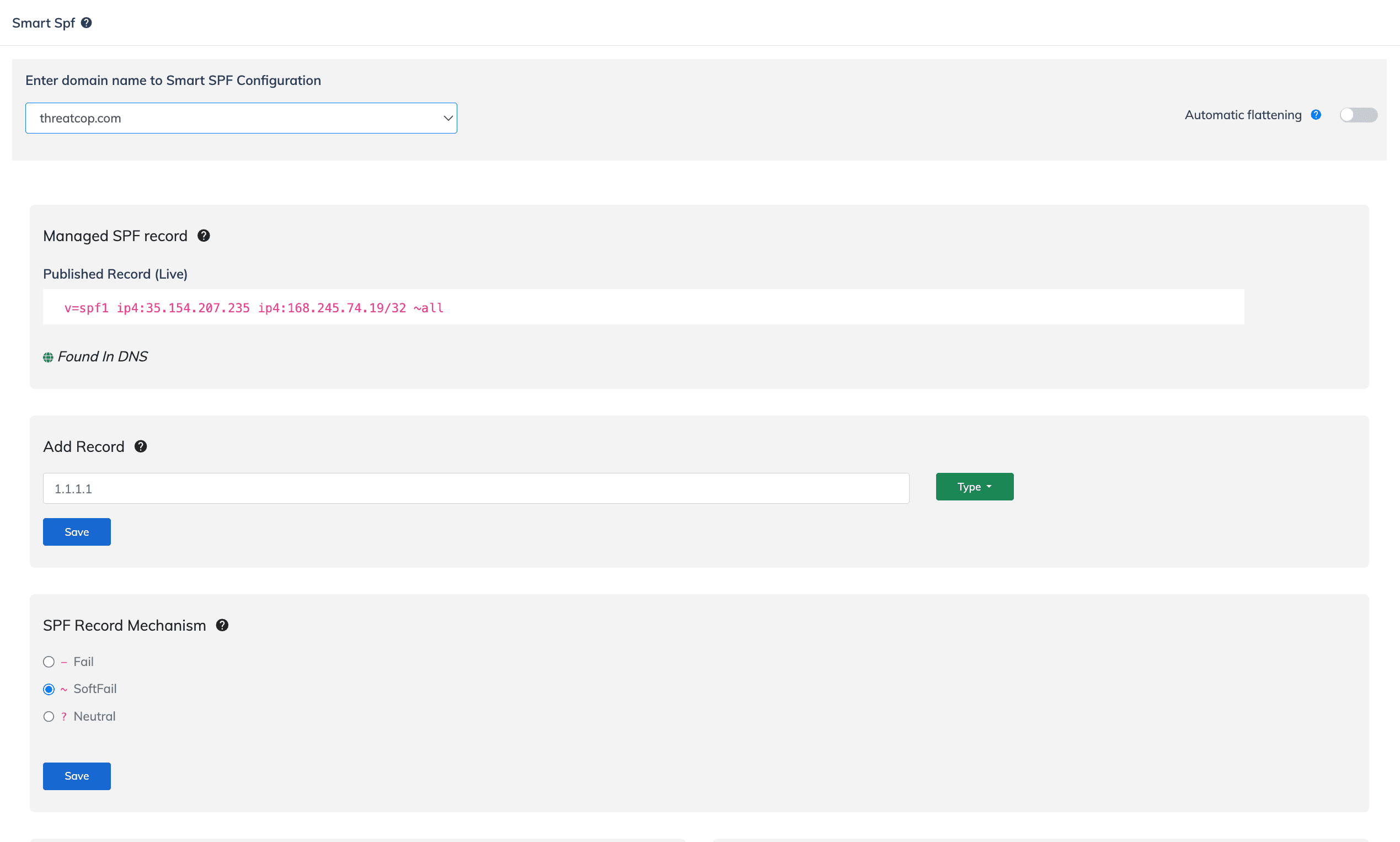
- Native ConnectWise, HaloPSA, and Autotask integrations: Not advertisedSource
- Public API for managing domains: Domain API endpoints
- IAM, SSO, two-factor authentication, and domain groups: Access controls and groups
Palisade
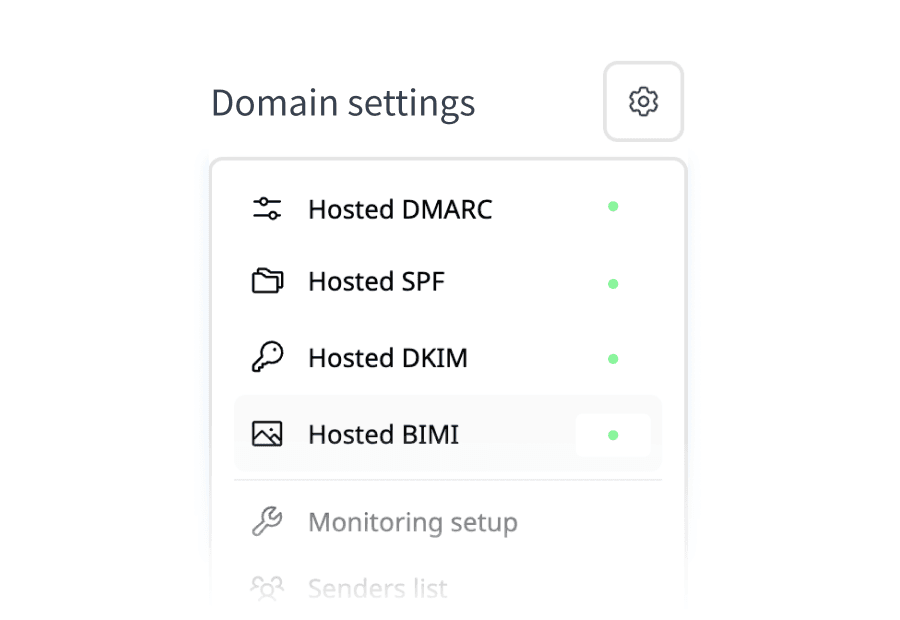
- Native ConnectWise, HaloPSA, and Autotask integrations: Native PSA integrations
- Public API for managing domains: API on every plan
- IAM, SSO, two-factor authentication, and domain groups: Roles and domain groups
The integrations documentation I found is for Threatcop Admin's directory layer, where the current knowledge base documents Google Workspace and lists integrations such as Microsoft Azure, SSO, JumpCloud, and Darwinbox. It is not a TDMARC PSA-integration page, and the current TDMARC product and pricing pages do not advertise native ConnectWise, HaloPSA, or Autotask connectors. MSPs should confirm the exact tenant, ticketing, and white-label workflow in a sales conversation rather than infer it from the wider Threatcop platform. Source (2026-08-26) Source 2 (2026-08-26)
Native PSA integrations
Palisade imports client domains straight from these three. KDmarc's own coverage is stated above, from their site.
- ConnectWise PSA
- Autotask
- HaloPSA


Dashboard access vs programmatic access
TDMARC API access and MCP availability
TDMARC publishes a REST-style API with GET, POST, DELETE, and PATCH endpoints for domains, source classification, and forensic reports. Its docs say the Authorization token comes from dashboard settings, but do not state plan availability. The public developer index does not advertise an MCP server, AI-assistant integration, scheduled export, webhook, or data feed. TDMARC's product page advertises Smart SPF, Smart DMARC, customized threat summaries, MTA-STS and TLS reporting, and Smart BIMI, but no AI or machine-learning feature for TDMARC (checked 2026-08-27). Source (2026-08-27) Source 2 (2026-08-27) Source 3 (2026-08-27) Source 4 (2026-08-27) Source 5 (2026-08-27)
KDmarc
A relevant product screenshot was not available in the reviewed evidence.
Palisade
A relevant product screenshot was not available in the reviewed evidence.
- Documented REST API for domain and source data: REST API published
- MCP server for connecting AI assistants to domain data: MCP server published
- Advertised AI assistance for TDMARC authentication work: Agent drafts work
Palisade publishes an MCP server and a REST API. Its agent investigates senders, drafts SPF and DKIM fixes, and proposes each policy step. A human approves before anything ships.
Reachable from your own AI tools
Palisade's MCP server exposes 42 tools over OAuth, so the assistant your team already uses can read domains, pull the exact records to publish and work the task queue. These are the clients the connection guide walks through.
- ChatGPT
- Claude
- Codex
- Cursor
- Windsurf
- Any MCP client





Still deciding between KDmarc and Palisade? See what changes with Palisade.
15-day full-product trial. Nothing is charged until it ends.


 Microsoft 365
 Zoho Mail

The agent does the heavy lifting
Sources identified, SPF and DKIM fixes drafted, each policy step proposed. You approve; nothing ships on its own.
Connect your AI with MCP
42 tools over MCP, so your assistant reads your domains and works the queue.
Connect your DNS manager directly


One-time sign-in supports 64 providers without retaining credentials. Optional account connections support Cloudflare, GoDaddy and Route 53. You approve every change.
“We evaluated many DMARC providers before choosing Palisade. The quality of their product, the responsiveness and friendliness of their team and their rapid progress on their product roadmap made it a no-brainer for us to move forward.”
KDmarc pricing explained (and how Palisade compares)
The product is currently marketed by Threatcop as TDMARC. Threatcop's pricing page lists TDMARC among its products and directs prospects to request a quote; it does not publish a current rate card or plan table. The separate registration page advertises a seven-day freemium trial with no credit card required.
What you'd actually pay
The same five buyer sizes on every comparison, so a shape carries from one page to the next.
1 domain, up to 1,000 emails a month
2 set-up domains, up to 100K emails a month
10 set-up domains, up to 1M emails a month
20 set-up domains, up to 2.5M emails a month
Client domains under management, any volume
Palisade’s figures are derived from its published tiers. KDmarc pricing or licensing source reference: vendor source citation date 2026-08-28. Plans and prices may have changed since.
How KDmarc prices
- The current pricing page is quote-led. It does not show the older Basic, Standard, Platinum, Enterprise, or Custom figures that may appear in historical third-party or older Threatcop material.
- The seven-day trial and no-card language come from the current TDMARC registration page, not from the pricing page. The registration page does not spell out the trial's domain, volume, or retention limits.
How Palisade prices
- IT-team plans publish flat monthly rates of $19, $29, $59, $99, and $249, with 20% off for annual billing. Current setup-domain caps are 2, 3, 6, 10, and 20 by tier; adding domains remains free and unlimited.
- MSPs pay per client domain, with a rate that improves as the portfolio grows and a minimum of 5 client domains. The MSP's own domain is included as a free Not-For-Resale license, and client-domain pricing is not metered by email volume.
- Palisade's full-product trial lasts 15 days, and its API access is available on every plan.
KDmarc source reference: primary reference citation date 2026-08-26.KDmarc source reference: additional source reference citation date 2026-10-13.Palisade source reference: the public pricing page citation date 2026-08-30.Plans and prices may have changed since.
Start a 15-day full-product trial of Palisade. Nothing is charged until it ends.
What each one covers, and where it stops
Published facts only, read from each vendor's own material. Neither column describes a hands-on trial, because we have not run one.
Threatcop markets KDmarc as TDMARC, a dashboard-led product for DMARC reporting, email-authentication controls, and anti-spoofing work. It gives operators Smart SPF, Smart DMARC, Smart BIMI, MTA-STS and TLS reporting, plus reporting views for email volume, authentication results, delivery failures, sending sources, and geography across multiple domains.
TDMARC suits security and infrastructure teams that want to keep DNS, sender, and policy decisions in their own workflow. Its dashboard provides reporting views and authentication controls, while its token API documents domain, source-classification, and forensic-report endpoints. The product has quote-led pricing and a seven-day freemium trial without a credit card.
Palisade is built around an agent that does the DMARC work rather than reporting on it. It identifies every sending source, drafts the SPF and DKIM changes each one needs, and proposes the next policy step when the evidence supports it.
The agent investigates every sender, drafts every fix, and proposes each policy step, you approve before anything ships.
- Provides detailed channel analytics for authentication results, delivery failures, sources, receivers, forwarders, and geography
- Provides source analysis and guidance for ESPs, unknown sources, and threat activity
- Provides dashboard policy controls through Smart SPF and Smart DMARC
- Provides Smart BIMI plus MTA-STS and TLS reporting
- Provides token-authenticated API endpoints for domains, source classification, and forensic reports
- The agent investigates senders and drafts the fix, so the work arrives prepared rather than as a list of findings
- Hosted SPF, DKIM and DMARC records, so an approved change can be carried out rather than handed off
- Portfolio workflow for MSPs, with ConnectWise, HaloPSA and Autotask integrations and a free NFR domain
- An MCP server and a REST API, so the same data and workflow are reachable from the AI tools a team already uses
- Does not advertise an AI agent that investigates senders, drafts fixes, and proposes each enforcement step
- Does not advertise DNS deployment without an operator publishing the provided records
- Does not advertise named ConnectWise, HaloPSA, or Autotask integrations
- Does not publish self-serve rates or plan limits
- Does not advertise an MCP server for AI assistants
- Every policy change waits for a human approval, by design: nothing ships on the agent's own authority
- MSP pricing is portfolio-based per client domain, with a minimum of 5 client domains
- Plans are sized by monthly email volume, so a low-domain, high-volume sender lands on a higher tier than domain count alone suggests
- Starts at
- Contact sales; current rate not published
- Free trial
- Seven days, no credit card required
- Trial limits
- Domain, volume, and retention limits not published
- MSP model
- Not published at 25 domains
- Starts at
- IT plans from $19/mo by email volume; 15-day trial
- Trial
- 15 days, full product
- MSP model
- Portfolio-based per client domain; minimum of 5 client domains
What Palisade customers say
5.0 out of 5 on G2Trusted by over 10,000 domains
“Palisade made it so easy for us to get our blue verified checkmark and achieve our BIMI compliance”


Sources and further reading
Source checks run through 2026-10-14; every entry keeps its individual check date.
- Threatcop DMARC product page: AI-feature review
Checked 2026-10-13
- Threatcop pricing page: current quote-only commercial path
Checked 2026-10-13
- TDMARC registration: seven-day freemium trial and no-card sign-up
Checked 2026-10-13
- TDMARC Smart DMARC help article: CNAME and policy controls
Checked 2026-08-26
- TDMARC dashboard help article: reporting windows and analytics
Checked 2026-08-26
- TDMARC setup guide
Checked 2026-10-13
- TDMARC feature sheet: reporting, administration, and threat detection
Checked 2026-08-26
- KDMARC API documentation
Checked 2026-10-14
- Threatcop Admin integration knowledge base
Checked 2026-08-26
- Threatcop homepage: product-level AI-feature review
Checked 2026-08-27
- TDMARC domain API reference
Checked 2026-08-28
- TDMARC source-classification API reference
Checked 2026-08-27
- TDMARC forensic-report API reference
Checked 2026-10-13
- TDMARC partner API reference
Checked 2026-10-13
- TDMARC public developer documentation index
Checked 2026-08-28
- TDMARC product knowledge-base index
Checked 2026-08-27
- TDMARC source-analysis guide
Checked 2026-08-27
- Kratikal current website
Checked 2026-08-28
- KDMARC current third-party profile
Checked 2026-08-28
- KDMARC current pricing directory
Checked 2026-08-28
- Source
Checked 2026-08-28
- Source
Checked 2026-08-28
- Source
Checked 2026-08-28
- Source
Checked 2026-08-28
- Source
Checked 2026-08-28
- Source
Checked 2026-08-30
- Source
Checked 2026-08-26
- Source
Checked 2026-08-26
- Source
Checked 2026-08-26
Palisade vs KDmarc: FAQ
What is KDmarc called now?
The current Threatcop product pages call it Threatcop DMARC, or TDMARC. The public registration page is on tdmarc.threatcop.com, while older KDmarc documentation and the public API documentation still use the KDmarc name. This comparison uses KDmarc for the requested route and TDMARC when describing the current product surfaces.
What is the main difference between KDmarc and Palisade?
TDMARC is dashboard-led: it provides reporting, Smart SPF, Smart DMARC, Smart BIMI, and guided policy progression. Palisade is agentic: its agent investigates sending sources, drafts authentication fixes, and proposes policy steps for your approval. The decision is whether you want a detailed control surface for your team or an agent to carry more of the investigation and drafting work.
Does KDmarc automatically change DNS records?
TDMARC's setup guide tells customers to add the supplied SPF TXT and DMARC CNAME records to their DNS. Smart DMARC then exposes policy and alignment controls from the dashboard. Palisade offers one-time provider-window deployment without retaining credentials, and optional account connections using encrypted tokens or an AWS role. Both methods require approval before publishing email records.
What does KDmarc report on?
TDMARC documents email volume, SPF/DKIM/DMARC authentication results, delivery failures, source IPs, top threat sources, ESPs, geography, and reporting views by sender, receiver, forwarder, and compliance. It supports seven-day, 14-day, one-month, and custom dashboard windows according to its help documentation.
Does KDmarc have PSA integrations for MSPs?
The current first-party material checked for this page does not advertise native ConnectWise, HaloPSA, or Autotask integrations for TDMARC. Threatcop does document directory integrations in Threatcop Admin, including Google Workspace and Microsoft Azure-related workflows. Confirm the exact MSP and ticketing workflow with Threatcop before treating those broader integrations as TDMARC features.
How much does KDmarc cost?
Threatcop's current pricing page lists TDMARC but publishes no rates or plan table; it asks prospects to request a quote. The registration page advertises a seven-day freemium trial with no credit card required, but it does not publish the trial's domain, volume, or retention limits. Palisade publishes IT-team rates from $19 per month and quotes MSP pricing per client domain, with a minimum of 5 client domains.
Can I try KDmarc without a credit card?
Yes, the current TDMARC registration page says the account is a seven-day freemium trial and no credit card is required. That page does not specify every trial limit, so confirm the included domains, volume, and retention before using it as a production comparison.
How do I switch from KDmarc to Palisade?
Add the same domains to Palisade, keep both report recipients active during an overlap, and compare the source inventory. Once the new path is confirmed, approve Palisade's drafted DNS changes through your provider connection and remove the old TDMARC records on your schedule. DMARC reporting supports multiple recipients during the transition.
Switching from KDmarc takes three steps
- 1
Import the same domains into Palisade
Bring your KDmarc/TDMARC domains into Palisade in bulk, then let the agent build a sender inventory from the reports you already receive.
- 2
Run both reporting paths in parallel
DMARC reporting supports multiple recipients, so Palisade and TDMARC can receive the same aggregate reports while your team compares source classifications and next-step recommendations.
- 3
Move approved records on your schedule
Review Palisade's drafted SPF, DKIM, and DMARC changes, approve the connection to your DNS provider, and retire the TDMARC records only after the new reporting path is confirmed.
15-day full-product trial. Nothing is charged until it ends.
Source citations on this page run through 2026-10-14; individual claims retain their dates and evidence limitations. Spotted something out of date? Tell us and we'll fix it.