Zoho DMARC setup
 ChatGPT
 Claude
 Gemini
 Perplexity
 Grok
In brief
Zoho DMARC setup: publish a monitoring policy after SPF and DKIM, use Zoho Mail DMARC Reports, then phase safely to quarantine or reject now.
Zoho DMARC setup starts after SPF and DKIM are configured for the domain that sends through Zoho Mail. Publish a monitoring policy in your domain's DNS, then use Zoho Mail's documented Admin Reports > DMARC Reports area to review received reports before moving from p=none to p=quarantine and finally p=reject. The reporting mailbox is chosen by the domain owner, not generated by Zoho.
At a glance
Quick takeaways
- Zoho requires SPF records and DKIM keys before you publish a DMARC policy.
- Start with
p=noneso you can review authentication results without applying a quarantine or rejection policy. - Zoho documents the rollout sequence as none, then quarantine, then reject.
- Third-party services that send for your domain can fail DMARC if their SPF or DKIM does not align with the visible From domain.
- Zoho Mail's DMARC Reports section is under Admin Reports and analyzes reports received by email.
- A published DMARC record and a green status indicator do not prove that a production message passes DMARC.
What should I check before configuring Zoho Mail?
Confirm that Zoho Mail is in scope for the domain and sending path you are protecting. This workflow covers mail sent through Zoho Mail. It does not configure every other platform that can use the same visible From domain, such as a marketing service, CRM, support desk, or transactional sender.
Zoho's DMARC policy documentation says SPF records and DKIM keys must be configured before a DMARC policy is published. Review the domain's actual senders first. For vendor-neutral context on SPF, DKIM, alignment, and sender inventory, see vendor email authentication guidance.
If Zoho Campaigns sends mail for the same domain, its authentication setup is separate. Use the Zoho Campaigns SPF and DKIM guide for that product rather than treating a Zoho Mail policy as proof that Campaigns is authenticated.
You need access to the authoritative DNS zone and a mailbox selected to receive aggregate DMARC reports. Keep a redacted record of the DNS change, the reporting mailbox, the domain in scope, and each production sender you expect to see in reports.
Copy DNS values from the account and domain you are configuring. Do not publish selectors, targets, tokens, or hostnames from another account or from an online example.
Which setup method should I use?
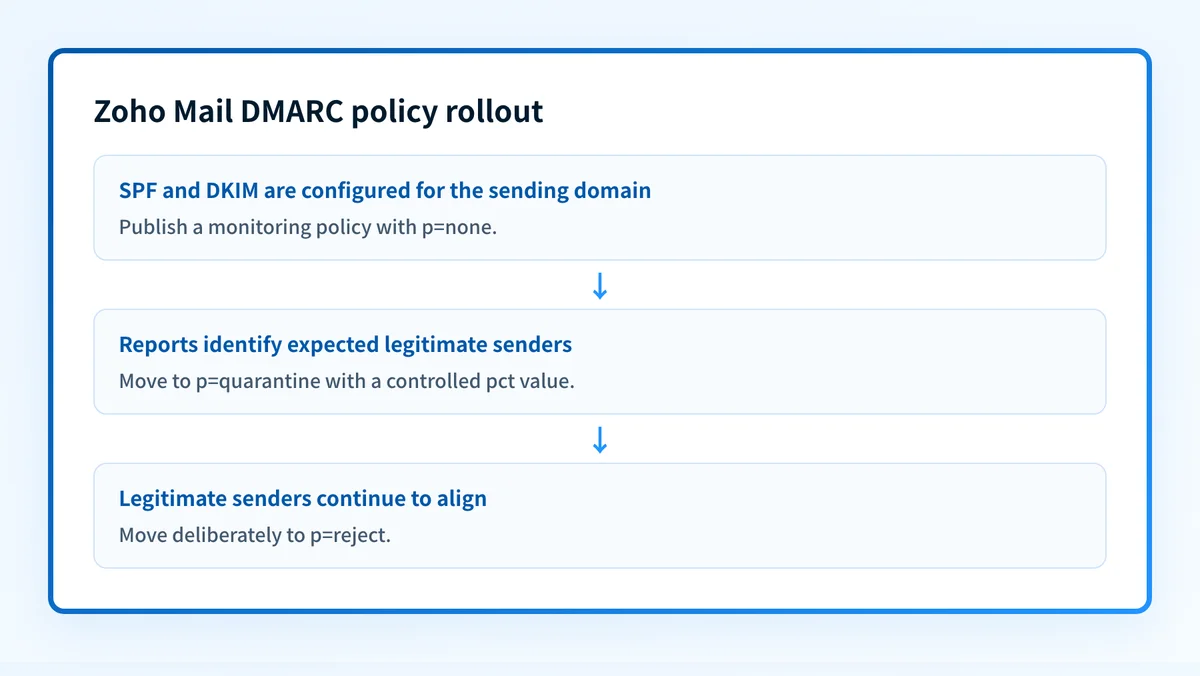
Use a phased DMARC policy rollout. Zoho recommends moving from p=none to p=quarantine and finally to p=reject. Start at p=none when you still need to identify legitimate services that send as the domain. This policy monitors DMARC results without applying enforcement.
Use p=quarantine only after reports show that legitimate Zoho Mail and third-party traffic authenticate as expected. Zoho states that messages failing DMARC authentication are sent to quarantine under this policy. Use p=reject after the same review supports rejecting unauthenticated mail.
For quarantine and reject rollouts, Zoho documents pct as the percentage of mail to which the policy applies. Increase the percentage gradually while reviewing reports. Do not use a dedicated-IP decision as a substitute for authentication evidence. A dedicated IP does not establish SPF or DKIM alignment.
How do I configure SPF and DKIM for Zoho Mail?
1. Confirm the domain and sending paths
Identify the visible From domain used by Zoho Mail and list every service that also sends as that domain. Zoho warns that third-party services can appear unauthenticated and may be rejected by a DMARC policy unless they are authorized through DKIM headers or SMTP infrastructure with authorized DKIM keys and SPF records.
Do not move to enforcement until the list includes the production routes that matter. A message sent by an employee through Zoho Mail can have a different authentication path from a newsletter, invoice, or support notification.
2. Verify SPF and DKIM before publishing DMARC
Confirm that the SPF and DKIM configuration for Zoho Mail is already complete. Zoho's DMARC policy guidance makes these prerequisites explicit.
DMARC checks whether the SPF-record and DKIM-signature domains align with the domain shown in the From header. A passing SPF or DKIM result for an unrelated domain does not satisfy DMARC alignment for your visible From domain.
3. Publish a monitoring policy in DNS
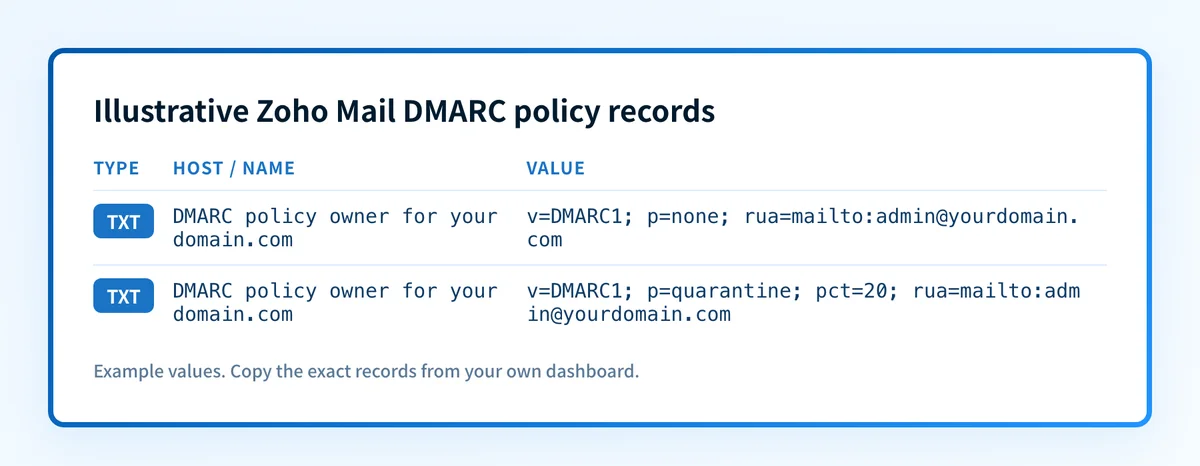
Create the DMARC TXT policy in the authoritative DNS zone for the domain. Zoho's documented example below shows the structure of a monitoring policy. The reporting mailbox is illustrative only and must be replaced with a mailbox selected by the domain owner.
Record type: TXT
Host: Use the DMARC policy owner required by your DNS provider for the domain being configured.
Value (illustrative only):
v=DMARC1; p=none; rua=mailto:admin@yourdomain.comDo not publish this example unchanged. Use a reporting mailbox controlled by your organization, and confirm the final DNS owner name in your provider's interface before saving.
Some DNS providers append the zone name automatically. If you paste a fully qualified name into a field that appends the domain, the resulting owner can contain the domain twice. Check the final owner name after saving.
Do not create a second DMARC policy at the same DNS owner. If a policy already exists, review and update that policy through your approved change process rather than publishing a duplicate record.
4. Allow the monitoring policy to collect evidence
Zoho states that under p=none, mail is delivered as usual regardless of DMARC pass or fail. Treat this as a monitoring period, not confirmation that the configuration is complete.
Review reports for Zoho Mail traffic and for every third-party source that uses the same From domain. Investigate an unexpected source before moving to enforcement. Removing a source from a report without confirming its business owner can interrupt legitimate mail.
5. Move through quarantine and reject deliberately
After monitoring supports the change, publish a p=quarantine policy. Zoho documents this example for a partial rollout:
v=DMARC1; p=quarantine; pct=20; rua=mailto:admin@yourdomain.comIncrease pct only while the reports continue to show expected authentication for legitimate traffic. When the evidence supports it, move to p=reject. Zoho says a reject policy rejects messages that fail DMARC authentication.
How does this setup affect DMARC?
Zoho Mail
Zoho Mail contributes to DMARC when SPF or DKIM passes and the authenticated domain aligns with the visible From domain. Zoho describes alignment as checking whether the SPF-record and DKIM-signature domains align with the domain in the From header.
A third-party sender can pass its own authentication while still failing DMARC for your domain if its authenticated domain does not align. This is why the sender inventory and monitoring stage matter before enforcement. For a public check of the published policy, use Palisade's DMARC checker. A DNS check cannot identify every production sender, prove a receiver's private decision, or predict future inbox placement.
How do I validate the setup?
Check public DNS
Query the published DMARC policy through the authoritative DNS service and at least one public resolver. Compare the returned policy with the approved change record, including the policy action, percentage, and reporting mailbox.
A public lookup confirms what DNS returns at that time. It does not prove that Zoho Mail is signing messages or that every sender using the domain is authorized.
Check the vendor status in Zoho Mail
Open the DMARC Reports section in Zoho Mail Admin Reports. Zoho documents this area for analyzing DMARC reports received by email. Confirm that reports are arriving at the mailbox selected in the policy and that the report view contains data for the domain in scope.
The Zoho report view is vendor-layer evidence. It shows that reports received by email can be analyzed in Zoho Mail. It is not a substitute for inspecting a newly delivered message from the production path.
Inspect a delivered message
Send a new message through the exact Zoho Mail production path to a mailbox where you can inspect raw headers. Check the receiver-added Authentication-Results field for SPF, DKIM, and DMARC results. RFC 8601 defines Authentication-Results and its trust boundary.
Compare the visible From domain with the SPF and DKIM domains reported in the delivered message. Keep a redacted header sample with the change record. Do not rely on a message sent before the DNS policy was published.
Review DMARC reports over time
Review aggregate DMARC reports after data accumulates. Separate expected Zoho Mail traffic from third-party platforms and unknown sources. Before each policy increase, confirm that known legitimate senders pass through SPF or DKIM with the required alignment.
DMARC reports can reveal observed traffic after it is sent. They do not guarantee that every future sender or receiver will behave the same way.
Troubleshooting
Zoho Mail traffic is missing from DMARC reports
Confirm that the domain in the published policy matches the visible From domain used by the test message. Then inspect a delivered message from the Zoho Mail path and compare its authentication results with the policy domain.
A missing report entry does not establish that Zoho Mail is unauthenticated. It can also reflect report timing or a test message sent through a different path.
A third-party sender fails after quarantine begins
Zoho warns that a service sending on behalf of your domain can appear unauthenticated and may be rejected under the domain's DMARC policy unless its DKIM headers or SMTP infrastructure use authorized DKIM keys and SPF records.
Identify the service from the report and inspect a message from that exact path. Confirm its SPF and DKIM domains before changing the DMARC policy. Do not add an authorization record based only on a service name in a report.
The DNS policy appears duplicated or absent
Check the final DNS owner name in the provider interface and through a public lookup. A DNS provider that appends the zone name can produce a duplicated domain when given a fully qualified value. If an existing DMARC policy is present, update it through the approved change rather than adding another record.
SPF or DKIM passes but DMARC fails
Compare the SPF and DKIM authenticated domains with the visible From domain. Zoho states that DMARC alignment depends on those domains aligning with the From header domain. A passing result alone does not establish alignment.
Reports show unexpected sending sources
Keep the policy at p=none or the current approved rollout percentage while you identify the source. Determine whether the source is a legitimate platform, an unauthorized sender, or a reporting artifact before moving to a stricter policy.
Check the published Zoho Mail DMARC policy
After publishing the monitoring policy, use the DMARC checker to inspect the public DNS record and compare it with the policy approved for the Zoho Mail domain. This helps catch a missing record, an unexpected policy value, or a DNS owner-name mistake before you advance enforcement.
Start with Palisade when you need to analyze aggregate-report data across the domain's Zoho Mail and third-party sending sources. Palisade analyzes DMARC aggregate-report data, identifies authentication and alignment issues, and creates prioritized remediation tickets. A human reviews the evidence and applies any DNS or DMARC policy change.
A public DMARC lookup does not monitor later DNS drift, identify every active production sender, or control a receiver's delivery decision.
Evidence
Sources and further reading
Questions readers ask
Frequently asked questions
Does Zoho Mail require SPF and DKIM before DMARC?
Yes. Zoho states that SPF records and DKIM keys must be configured before publishing a DMARC policy for the domain.
Should a Zoho Mail DMARC policy start with p=reject?
No. Zoho recommends a phased rollout from p=none to p=quarantine and finally to p=reject. Start with monitoring so you can identify legitimate senders before enforcement affects failing mail.
Can Zoho Mail DMARC Reports prove every message passes DMARC?
No. Zoho Mail's DMARC Reports area analyzes DMARC reports received by email. Review a delivered message from the exact production path as separate evidence of current authentication results.
Can a third-party sender fail Zoho Mail DMARC?
Yes. Zoho warns that a third-party service can appear unauthenticated and may be rejected when it sends for your domain without authorized SPF records or DKIM keys that support alignment.
Does p=none reject failed mail?
No. Zoho says mail is delivered as usual under p=none regardless of DMARC pass or fail. The policy is used for monitoring before quarantine or reject enforcement.
Does a published DMARC record guarantee inbox placement?
No. A published record confirms the public DNS policy at the time of the lookup. It does not guarantee receiver acceptance, inbox placement, or future authentication results.

Written by
Samuel ChenardCEO & Co-Founder, Palisade
Samuel Chenard is the CEO and co-founder of Palisade, agentic DMARC software for IT teams and MSPs, from one domain to thousands.
More from Samuel →