What is an IP address? IPv4 vs IPv6 explained simply
 ChatGPT
 Claude
 Gemini
 Perplexity
 Grok
GrokIn brief
What is an IP address? Learn how IPv4 and IPv6 identify network destinations, how DNS uses them, and what they mean for email sending online.
An IP address is a numeric address used by Internet Protocol to identify a source or destination for network traffic. IPv4 uses a 32-bit address, commonly written as four decimal values. IPv6 uses a 128-bit address, written in hexadecimal groups. Both let networks route packets toward a destination, but an IP address alone does not identify the person using a device or prove that an email sender is authorized.
At a glance
Quick takeaways
- An IP address identifies a network interface or destination for Internet Protocol traffic.
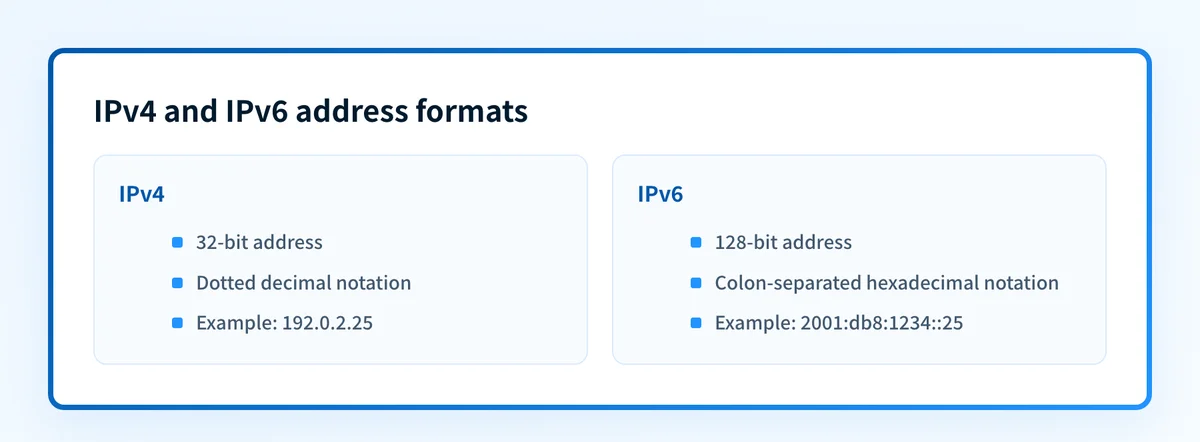
- IPv4 addresses are 32 bits and are usually written in dotted-decimal form.
- IPv6 addresses are 128 bits and use colon-separated hexadecimal groups.
- DNS can map a domain name to IPv4 and IPv6 addresses through A and AAAA records.
- A public IP address is routable on the Internet, while private IPv4 addresses are reserved for internal networks.
- In email, an IP address is one input to SPF evaluation and receiver reputation decisions.
Who is affected?
Anyone who connects a device, service, mail server, or application to an IP network uses IP addressing. The address may belong directly to the device, to a network interface, or to a gateway that forwards traffic for many internal devices.
For a public website or mail service, DNS tells clients which IP address to contact. An A record returns an IPv4 address and an AAAA record returns an IPv6 address. The wider email authentication learning center explains how DNS records also publish authentication controls for email domains.
Private IPv4 addresses have a narrower scope. RFC 1918 reserves these address blocks for private internets:
10.0.0.0/8
172.16.0.0/12
192.168.0.0/16
A private address is not globally unique or intended for public Internet routing. A gateway can translate internal traffic to a public address, but that does not make the private address publicly reachable.
What are the requirements?
IPv4 uses a 32-bit address
The original Internet Protocol specification defines IPv4 addresses as four octets, which total 32 bits. RFC 791 describes Internet Protocol as moving datagrams between sources and destinations identified by fixed-length addresses.
A familiar IPv4 presentation uses four decimal octets separated by periods:
192.0.2.25This is an illustrative documentation address, not an address to publish or use for a production service. IPv4 routers use the address in a packet header to make forwarding decisions. The address identifies where the packet should go on the network. It does not provide encryption, reliable delivery, or proof that a sender is trustworthy.
IPv6 uses a 128-bit address
IPv6 is the current Internet Protocol Version 6 specification. It defines a 128-bit address format, much larger than IPv4's 32-bit space.
IPv6 text notation uses hexadecimal values separated by colons. Consecutive zero groups can be compressed once with ::.
2001:db8:1234::25This is also an illustrative documentation address. RFC 4291 defines IPv6 addressing architecture and text representation. IPv6 is not a different form of DNS or email authentication. It is an Internet Protocol version with a different address length and packet format.
DNS maps names to IP addresses
A domain name is a name, while an IP address is a network destination. DNS supplies the mapping between them. An A record contains an IPv4 address. An AAAA record contains an IPv6 address.
yourdomain.com.       IN A     192.0.2.25
yourdomain.com.       IN AAAA  2001:db8:1234::25
These are structural examples only. Do not publish another organization's production addresses as values for your domain. DNS records describe where a client can attempt a connection. They do not prove that the destination application is healthy, accepts the intended protocol, or is configured to send email for the domain.
Email authentication uses the sending path, not only a published address
An email receiver can evaluate the IP address that connected to it against the sender's SPF policy. SPF is an authorization mechanism for the SMTP client IP address and the envelope sender domain. A matching address can support an SPF pass, but IP authorization is not the same as a successful DMARC result. DMARC also evaluates identifier alignment and can rely on DKIM.
An IP address can also influence a receiver's reputation assessment. That assessment is private to the receiver and can change with traffic patterns. Publishing a correct A, AAAA, or SPF-related DNS record does not prove inbox placement or future acceptance. You can also use Palisade's DMARC checker to review a domain's DMARC record.
When does the requirement take effect?
There is no single operative compliance date for using an IP address. IPv4 is specified by RFC 791, published in September 1981. IPv6 is specified by RFC 8200, published in July 2017. RFC 8200 obsoletes RFC 2460.
The need to use IPv4, IPv6, or both depends on the network and service you operate. A DNS provider, hosting platform, mailbox provider, or network operator may set its own implementation requirements. Those provider-specific requirements are separate from the IP standards.
For email, the practical requirement is to verify the exact production path. A sending platform may use IPv4, IPv6, or both. Do not assume that a public website address is also the address used to deliver the domain's email.
How do I implement the requirement?
1. Identify the service that needs an address
Decide whether the address is for a website, an API, a mail transfer system, or an internal device. The correct address depends on the service's network interface and hosting design.
For an email sender, obtain the real outbound sending-path details from the sending platform or inspect a delivered message's headers. A domain's web-server address is usually not enough evidence.
2. Publish the required DNS record type
Publish an A record when the service needs an IPv4 destination. Publish an AAAA record when it needs an IPv6 destination. Use the exact address assigned by the hosting or network provider.
If a provider gives a hostname rather than an IP address, follow its documented CNAME or MX instructions instead of substituting an A record. The record type must match the service's documented configuration.
3. Add email authorization separately
If the service sends email for your domain, configure its SPF and DKIM settings according to its documented sending setup. Do not treat an A or AAAA record as email authorization.
A sender that changes outbound IPs may use an SPF include: mechanism rather than asking you to list individual addresses. Use the provider-generated value. Do not copy an example address from this article into an SPF record.
4. Test both address families when you publish both
If the service has A and AAAA records, test a connection over IPv4 and IPv6. A service can be reachable over one protocol version while failing over the other.
Do not remove an existing A or AAAA record until you know which production clients and services use it. A DNS change can interrupt web, API, or mail-related connectivity even when another address still responds.
How do I validate compliance?
Start with DNS. Look up the domain's A and AAAA records through authoritative DNS and a public resolver. Palisade's DNS lookup tool can inspect published DNS answers for a domain.
Next, confirm the vendor layer. Check the hosting, network, or email platform's current status for the exact service and assigned address. A public DNS result only shows the record available to resolvers. It does not show whether the vendor has activated the service.
For a sending domain, inspect a real delivered message from the production path. Its raw headers show the connecting path and authentication results. Then review DMARC aggregate reports once they have accumulated. This separates a published record from evidence that the intended mail stream is using it.
A DNS lookup cannot prove the production sending path, a receiver's private reputation decision, continuous service health, or future inbox placement.
Check the published addresses for your domain
If you need to confirm whether a domain currently publishes IPv4 or IPv6 destinations, inspect its A and AAAA records before changing DNS. Compare the result with the address assignment from your hosting or sending provider.
For teams that need to move from a one-time check to ongoing DMARC work, Palisade is DMARC software that analyzes aggregate-report data, identifies sending sources and authentication or alignment issues, and proposes the next policy step for human review. It does not change the DMARC policy, control a receiver's reputation decision, or guarantee delivery.
For a provider-specific implementation of these authentication checks, see What is an impersonation attack and how can you stop it?.
Evidence
Sources and further reading
Questions readers ask
Frequently asked questions
Is an IP address the same as a domain name?
No. An IP address identifies a network destination, while a domain name is a human-readable name. DNS can map the domain name to an IPv4 address, an IPv6 address, or both.
Can a domain have both an IPv4 and IPv6 address?
Yes. A domain can publish an A record for IPv4 and an AAAA record for IPv6. Clients and networks decide which available address family they can use.
Are private IP addresses visible on the public Internet?
No. RFC 1918 private IPv4 ranges are intended for private networks and are not globally routable. A gateway may translate internal traffic to a public address for Internet access.
Is IPv6 replacing IPv4 immediately?
No. IPv6 has a larger address space and is defined by the current IPv6 specification, but IPv4 remains in use. Many services operate with both IPv4 and IPv6.

Written by
Samuel ChenardCEO & Co-Founder, Palisade
Samuel Chenard is the CEO and co-founder of Palisade, agentic DMARC software for IT teams and MSPs, from one domain to thousands.
More from Samuel →