ThreatDown browser phishing protection
 ChatGPT
 Claude
 Gemini
 Perplexity
 Grok
GrokIn brief
ThreatDown browser phishing protection is listed in its pre-delivery layer. See how it differs from email security and DNS filtering for domain owners.
ThreatDown browser phishing protection is listed as "Browser Protection" within ThreatDown's pre-delivery protection layer. ThreatDown separately lists Email Security and DNS Filtering in its prevention layer. That distinction matters: the public platform page supports treating browser protection as one part of a layered defense, but it does not establish a specific phishing-page detection method, browser requirement, configuration path, or blocking action.
At a glance
Quick takeaways
- ThreatDown lists Browser Protection in its pre-delivery protection layer.
- ThreatDown lists Email Security and DNS Filtering separately in its prevention layer.
- Browser-related protection and email-security controls address different points in a phishing event.
- A product-layer label does not prove how a particular phishing URL, browser session, or endpoint will be handled.
- Confirming an email domain's public security posture requires separate evidence from the browser or endpoint.
- For broader context on attacks that impersonate people and brands, visit the Palisade threats hub.
How ThreatDown places browser protection in its security model
ThreatDown's platform page describes a platform that includes endpoint detection and response, identity threat detection and response, vulnerability and patch management, and email security. It says these capabilities are backed by 24/7 MDR in a single lightweight agent and managed from a single console.
The same page organizes protection into named layers. Its prevention layer includes the following published items:
- Email Security
- DNS Filtering
- Vulnerability Assessment
- Application Block
- Patch Management
- Firewall Management
- Web Protection
- Application Behavior
- Browser Protection
- Exploit Mitigation
- Protocol Hardening
- Device Protection
- Application Hardening
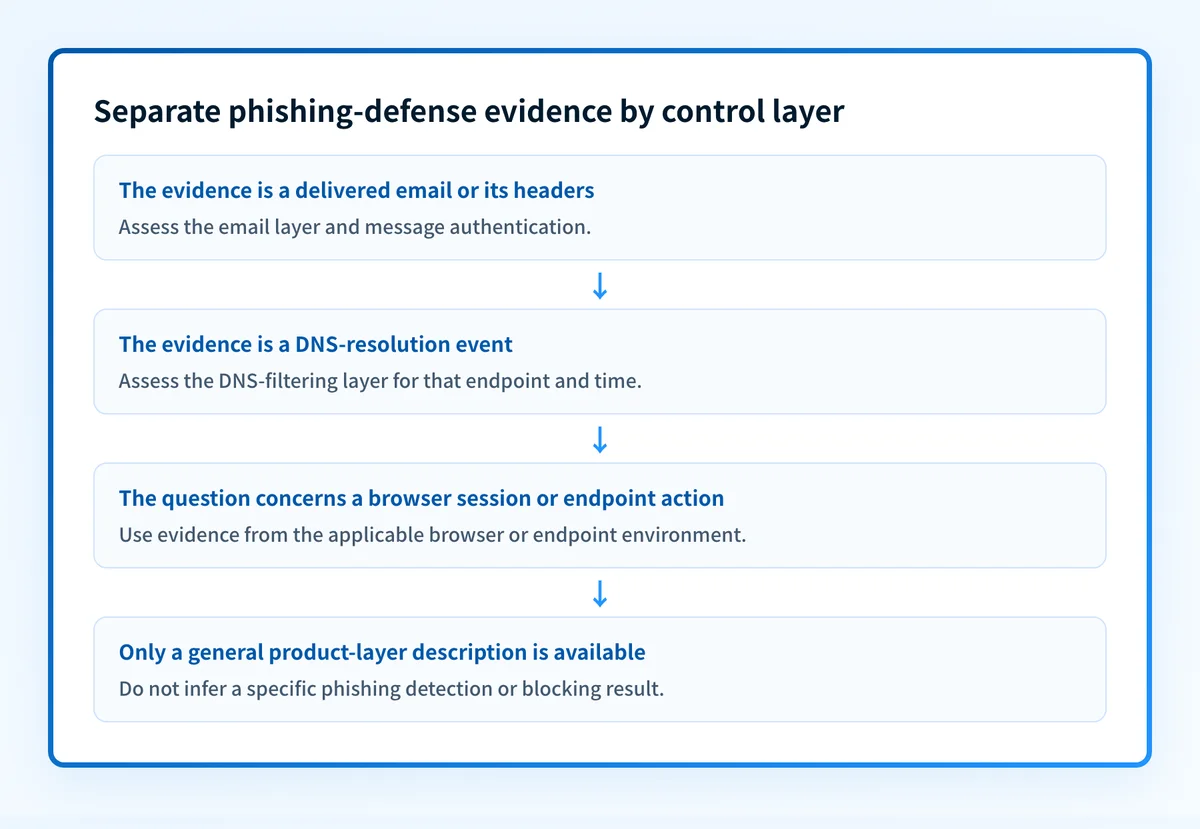
That is relevant to phishing because a phishing attempt can cross several stages. A message might reach an inbox, persuade a recipient to open a link, and then lead to a web destination. Controls that act at email delivery, DNS resolution, browser use, and endpoint execution can have different evidence, owners, and limits. For a broader explanation of phishing itself, see anti-phishing software for business.
When the answer changes
The answer changes when the question is about a specific action rather than ThreatDown's published product model.
Use this decision rule:
- If the question is whether ThreatDown publicly places Browser Protection in a browser-related pre-delivery layer, the answer is yes, based on ThreatDown's platform page.
- If the question is whether ThreatDown Browser Protection blocks, warns on, detects, or remediates a particular phishing page, the public platform page alone does not answer it.
- If the question is whether an email was filtered before delivery, look for evidence from the email-security layer, such as the relevant mail system's message logs, policy result, or delivered-message headers.
- If the question is whether DNS filtering affected access to a destination, use DNS-filtering evidence from the applicable product and the actual endpoint path.
- If the question is whether a user could open a specific URL in a browser, use product documentation or evidence from the affected environment. A general product-layer description is not proof of that event.
Do not treat a public web check as proof of endpoint behavior. A URL reputation result can help assess a URL at one point in time, but it does not prove that a particular endpoint policy inspected it, that a browser was protected, or that a user could not reach it.
Worked example: separating the evidence by layer
Consider an employee who receives a message that asks them to sign in to a web service. The message contains a link to https://signin.yourdomain.com.example.
The following evidence object keeps the questions separate:
Event: A recipient received a message containing a sign-in link.
Email-layer evidence:
- Delivered message headers
- Mail gateway or email-security policy result
- Authentication results for the message
DNS-layer evidence:
- Resolver or DNS-filtering event for the destination
- The endpoint and time of the lookup
Browser or endpoint-layer evidence:
- Product documentation for the applicable control
- A policy result, alert, or event from the affected environment
Conclusion:
A result at one layer does not prove the result at another layer.
The message headers can show whether a delivered message authenticated and which systems handled it. RFC 8601 defines the Authentication-Results header field, which reports authentication assessments made by a receiving system. Those results are evidence about message authentication, not evidence that a browser control later permitted or blocked a web page.
Likewise, an email-security decision can show what happened while the message was processed, but it does not describe an endpoint's browser-related protection. A browser or endpoint event needs evidence from that environment. The separate labels on ThreatDown's platform page are the reason to avoid combining those conclusions.
Practical next step: inspect the layer you can observe
Start with the evidence you have.
If you have a suspicious email, preserve the delivered message and inspect its full headers. Compare the visible From domain, return path, links, and Authentication-Results fields. If the message used your organization's domain, review the sending path and authentication evidence before drawing conclusions about a browser control.
If your task is to assess the domain's public email-security posture, use Palisade's Email Security Score tool. It can support a public DNS and domain posture review. It is not a ThreatDown diagnostic, does not inspect a ThreatDown policy, and cannot prove what happened in an employee's browser session.
If you are evaluating a phishing defense program, keep a record of the layer, observed event, timestamp, affected endpoint, and evidence source. This makes it possible to distinguish a mail-delivery issue from a DNS-resolution issue or a browser and endpoint issue. For email-focused controls and terminology, see Palisade's email security guide.
Do not disable an email, DNS, or endpoint protection policy based only on a general product description. Confirm the affected control and its event evidence first.
Review email-security exposure separately
ThreatDown's public page places Email Security, DNS Filtering, and Browser Protection in different named layers. If the open question is whether your domains have a public email-authentication gap, assess that email layer directly rather than inferring it from a browser-protection label.
Explore email security guidance
An email-security review cannot prove that ThreatDown Browser Protection detected or blocked a URL, inspect a private endpoint policy, or predict a receiver's handling of future messages.
Evidence
Sources and further reading
Questions readers ask
Frequently asked questions
Is ThreatDown Browser Protection the same as ThreatDown Email Security?
No. ThreatDown's public platform page lists Browser Protection in its pre-delivery layer and Email Security in its prevention layer. The page presents them as separately named capabilities.
Does ThreatDown's public page confirm that Browser Protection blocks phishing sites?
No. The page confirms that ThreatDown lists Browser Protection in its pre-delivery layer, but it does not document a specific phishing-page detection or blocking behavior.
Can a message header prove what happened in a browser?
No. A delivered message header can provide evidence about message handling and authentication. It does not prove that a browser-related or endpoint control inspected, allowed, warned on, or blocked a later web destination.
Can a public email-security check validate ThreatDown Browser Protection?
No. A public email-security check can assess public domain and DNS signals. It does not inspect ThreatDown configuration, endpoint events, browser activity, or private policy decisions.
Does browser protection replace email authentication?
No. Browser-related protection and email authentication apply to different evidence and stages. Email authentication helps receivers assess authorized use of a visible From domain, while browser-related protection is a separately described layer in ThreatDown's model.

Written by
Ian BussieresCTO & Co-Founder, Palisade
Ian Bussieres is the CTO and co-founder of Palisade, agentic DMARC software for IT teams and MSPs.
More from Ian →