How to check your SPF lookup count and fix a permerror
 ChatGPT
 Claude
 Gemini
 Perplexity
 Grok
In brief
SPF lookup count: check your domain's total, interpret the result against RFC 7208's 10-lookup limit, and flatten the record to fix a permerror.

The SPF lookup count is the number of DNS queries a receiving server makes while evaluating your domain's SPF record. RFC 7208 Section 10.1 sets the ceiling at 10; a count above that returns a PermError, and SPF fails for the message. Enter your domain in the Palisade SPF checker to see the current count, trace which mechanisms are consuming lookups, and identify what to remove or flatten before the limit causes authentication failures.
At a glance
Quick takeaways
- RFC 7208 caps SPF DNS lookups at 10 per evaluation; exceeding the limit returns a
PermErrorand SPF fails for that message. - Mechanisms that count toward the limit:
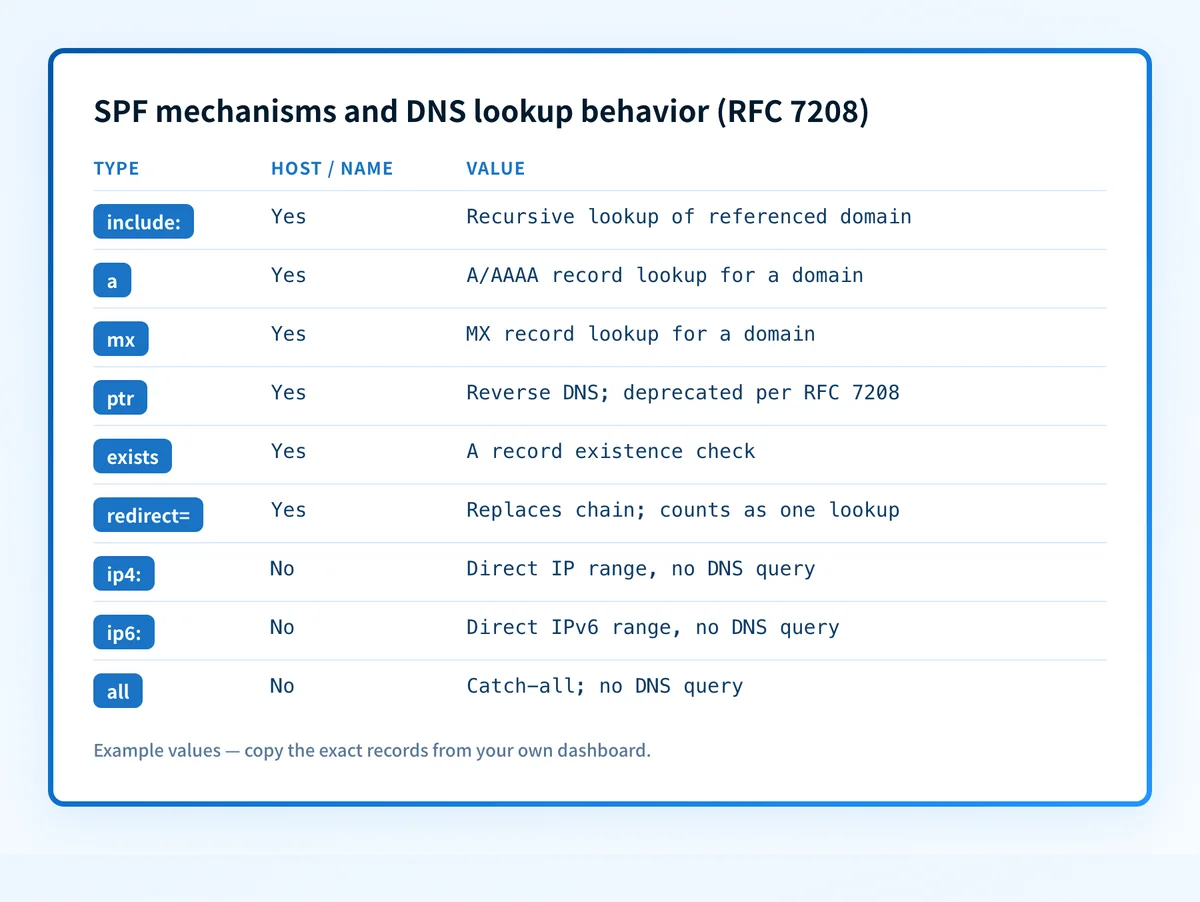
include:,a,mx,ptr,exists, andredirect=. - Mechanisms that do not count:
ip4:,ip6:, andall. - The Palisade SPF checker traces every
include:chain and returns the total lookup count for a domain. - A count of 8 or 9 is a risk even if technically valid; ESP includes can push you over without any change to your own record.
- SPF flattening replaces
include:chains with directip4:andip6:ranges, which do not trigger DNS queries.
What this tool checks
The Palisade SPF checker accepts a domain, fetches the published SPF TXT record, and recursively traces every include: chain. It counts each DNS lookup triggered during that trace and returns the total. If the record contains syntax errors or unresolvable includes, those appear alongside the count.
This article is a spoke of the SPF authentication hub, focused on the lookup-count sub-problem. For the full email authentication picture including DKIM and DMARC, see the email authentication guide.
What the tool cannot see: it checks the DNS record published right now. It cannot observe messages in transit, reveal which sender is currently failing SPF at a specific receiver, or tell you whether a receiving server stopped evaluating at lookup 10 for a past message. For that evidence, check delivered-message headers or DMARC aggregate reports after the fix is applied.
How to run the check
1. Find the sending domain
The domain to check is the one in your visible From address: yourdomain.com, not a subdomain unless your SPF record lives there. If you manage several sending domains, check each one separately.
2. Submit the domain to the SPF checker
Open the Palisade SPF checker and enter the domain. The tool fetches the TXT record, traces every nested include:, and displays the total DNS lookup count.
You can verify the raw record independently before or after running the tool:
dig +short TXT yourdomain.com | grep "v=spf1"For a targeted query on a common SPF-specific subdomain record:
dig +short TXT _spf.yourdomain.comReplace yourdomain.com with the actual sending domain.
3. Record the count
Note the total returned. The RFC 7208 ceiling is 10. Any number at or approaching that value warrants a review of the include chain.
How to interpret the results
Before reading the count, it helps to know which mechanisms produce it. The table below summarizes which SPF mechanisms trigger a DNS lookup during evaluation per RFC 7208 Sections 5 and 10.1.
Count under 10: within the limit
The domain is within the RFC 7208 ceiling. A count of 7 or fewer leaves reasonable headroom. A count of 8 or 9 is technically compliant but fragile. ESP vendors update their own SPF records (the domains your include: entries point to), and each change affects your effective lookup count without touching your own DNS record. Plan to flatten before adding any new sender.
Count at exactly 10: at the boundary
A count of exactly 10 is the last valid count under RFC 7208 Section 10.1. Any mechanism addition, whether in your own record or inside a referenced include: target you do not control, triggers a PermError on the next evaluation. Treat a count of 10 the same as a count over 10 and flatten now.
Count above 10: PermError
A count above 10 means every SPF evaluation for the domain returns PermError. RFC 7208 Section 10.1 defines this as a permanent error: the SPF check fails for every message from that domain until the record is corrected. Under a DMARC policy of quarantine or reject, those messages are at risk.
How to act on the result
If your count is at or above 10, work through the following steps in order.
1. Identify the deepest include chains
The SPF checker's trace shows which include: entries cascade into further lookups. Entries like include:_spf.google.com or include:spf.protection.outlook.com resolve into additional DNS lookups for each nested reference. Count the per-chain contribution before deciding what to change.
2. Remove includes for senders you no longer use
Each removed include: saves at least one lookup, often more if the referenced domain has its own nested includes. This is the lowest-risk change because it removes something from the record rather than transforming it.
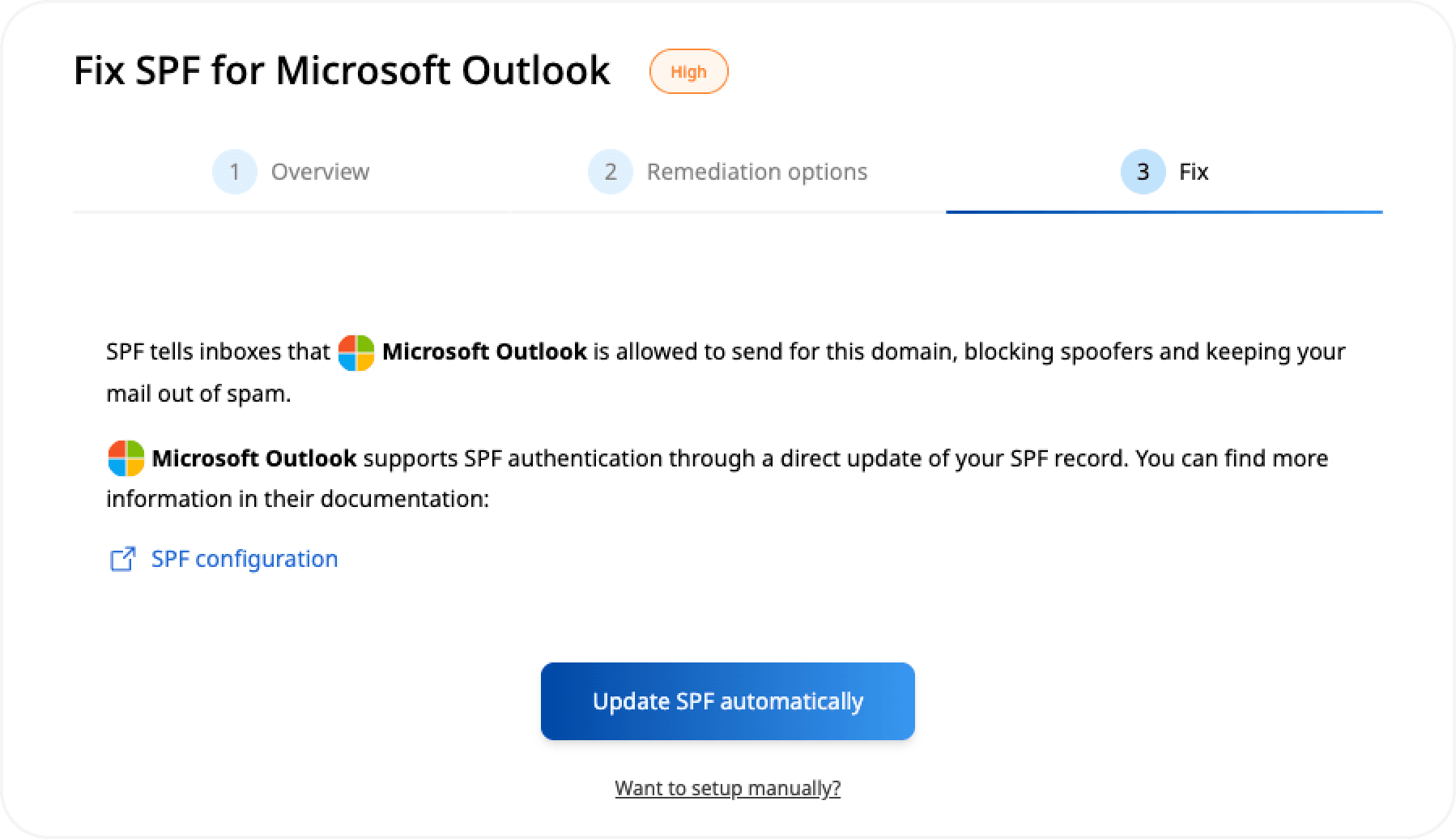
3. Flatten the remaining includes
SPF flattening replaces an include: directive with the actual ip4: and ip6: address ranges the included domain resolves to. Because RFC 7208 Section 5 defines ip4: and ip6: as simple IP-range matches requiring no DNS query, they consume none of the 10-lookup budget.
# Before flattening — 3 include: entries, each consuming at least 1 lookup
v=spf1 include:_spf.example.com include:mail.example.net include:spf.example.org ~all

# After flattening — ip4: ranges replace the include: entries, 0 lookups consumed
v=spf1 ip4:203.0.113.0/24 ip4:198.51.100.0/24 ip4:192.0.2.0/24 ~all
The values above are illustrative only. Use the IP ranges your ESP publishes for its actual sending infrastructure; do not copy these example addresses.
The tradeoff is maintenance: a flattened record does not update automatically when the ESP changes its IP ranges. Check the ESP's current published SPF record periodically and refresh your ip4: entries accordingly. Palisade's SPF Flattening Service handles this maintenance automatically if you manage multiple domains.
Warning: If your DMARC policy is alreadyquarantineorrejectand your SPF count exceeds 10, every inbound SPF check for that domain is failing now. Resolve the flattening before tightening DMARC policy further.
4. Consider a dedicated subdomain for high-volume senders
If a single domain sends through five or more external services, routing some flows through a dedicated subdomain (mail.yourdomain.com) gives that stream its own SPF record and its own independent 10-lookup budget.
Investigate this with your coding agent
The Palisade SPF checker displays a labeled result state for each count range. If you are building an internal runbook or need to match your tooling to the checker's exact threshold constants and warning strings, a coding agent can extract those details read-only from the source.
Agent handoff
Copy the prepared prompt
Give this to a coding agent that can inspect the relevant repository or configuration source of truth.
Problem: The Palisade SPF checker displays result state labels and threshold-triggered messages based on the DNS lookup count, but those exact strings and threshold constants are not documented publicly.
Evidence: Domain name and lookup count returned by the tool (redact the actual domain). The checker is served from /tools/spf.
Repository scope: src/app/tools/spf/page.tsx and the upstream API route (likely src/app/api/check-spf/ or equivalent); any shared result-state type definitions imported by the page.
Constraints: Inspect before editing. Do not apply changes until I approve the proposed diff. Read-only extraction only; no mutations to the UI, API route, or shared types.
Requested output: Every UI label string for each lookup-count state (safe, near-limit, at-limit, over-limit or equivalent); the numeric threshold constants that trigger each state; and any verbatim threshold-triggered warning messages shown to the user.
Verification: Compare extracted strings against what the tool renders in a browser at /tools/spf for a domain with a known lookup count.
Stop if: Credentials, private data, production mutation, or missing source files are required.
Human approval required: Review the proposed diff and verification plan before allowing changes. Do not paste secrets, private keys, API tokens, unredacted headers, or customer data.
How to retest
After publishing the updated SPF record, wait for DNS propagation. Most resolvers pick up a new TXT record within minutes; allow up to one hour to be safe. Then run the domain through the Palisade SPF checker again.
Confirm:
- The total lookup count is below 10.
- The record syntax is valid and no unresolvable includes remain.
- The
include:entries you kept are still resolving correctly.
dig +short TXT yourdomain.com | grep "v=spf1"The tool checks DNS only. After confirming the count in DNS, send a real message through your production sending path and read the Authentication-Results header in the delivered message. The SPF result should show pass. That header is the only evidence the production mail path, not just the DNS record, is working correctly.
Track new senders before they push your SPF count back over 10
A flattened record is correct today. When an ESP rotates its IP ranges or a new sending tool gets added to the stack, the count drifts back toward the limit without any change to your own DNS record. The Palisade SPF checker confirms the current published count, but it does not watch for new sources appearing in your DMARC aggregate report data or alert when alignment failures start accumulating.
Palisade analyzes DMARC aggregate report data, identifies sending sources that fail SPF alignment, and creates prioritized remediation tickets so your team can act before an authentication failure affects delivery. It proposes the next policy step based on what the data shows; a human reviews and applies the change. Palisade does not change your SPF record or DNS automatically.
The SPF checker validates the current DNS record. It does not monitor for IP changes in include: chains, alert when new senders appear in aggregate report data, or reveal why a specific receiver rejected a message.
Evidence
Sources and further reading
Questions readers ask
Frequently asked questions
What counts as an SPF lookup?
Each DNS query triggered during SPF evaluation counts as one lookup toward the limit. Per RFC 7208 Section 10.1, the mechanisms that trigger lookups are include:, a, mx, ptr, exists, and the redirect= modifier. The ip4:, ip6:, and all mechanisms perform no DNS query and do not count. Nested include: chains multiply the effect: an include: target that itself contains two more include: entries contributes at least three lookups to the total.
What is the lookup limit for SPF?
The limit is 10 DNS lookups per SPF evaluation. RFC 7208 Section 10.1 requires that SPF implementations return a PermError when this count is exceeded during evaluation. A PermError is a permanent error: the SPF check fails for that message, and under a DMARC quarantine or reject policy, the message is quarantined or rejected.
How do I check the SPF lookup count for a domain?
Enter the domain in the Palisade SPF checker. The tool fetches the published TXT record, traces every include: chain recursively, and returns the total lookup count. You can also query the raw record with dig +short TXT yourdomain.com to see the record as published, but a manual count requires following every nested include by hand, which is error-prone for deeply nested chains.
What is the workaround for the SPF lookup limit?
The standard fix is SPF flattening: replacing include: directives with the explicit ip4: and ip6: address ranges they resolve to. Those mechanisms perform no DNS queries and consume none of the 10-lookup budget per RFC 7208 Section 5. Remove unused include: entries first, then flatten the ones that remain. The tradeoff is maintenance: a flattened record does not update automatically when an ESP changes its IP ranges. If you send from many services, routing some flows through a dedicated subdomain gives each stream its own independent 10-lookup budget.

Written by
Samuel ChenardCEO & Co-Founder, Palisade
Samuel Chenard is the CEO and co-founder of Palisade, agentic DMARC software for IT teams and MSPs, from one domain to thousands.
More from Samuel →