Set up DMARC for Klaviyo
 ChatGPT
 Claude
 Gemini
 Perplexity
 Grok
In brief
Setup DMARC for Klaviyo by configuring a branded sending domain, publishing account-generated DNS records, and validating aligned SPF or DKIM.
Set up DMARC for Klaviyo by configuring a Klaviyo branded sending domain, publishing the DNS records generated for that account, and confirming that SPF or DKIM aligns with the visible From Address domain. Klaviyo documents branded-domain routing changes under "Settings Domains"; use the account's current branded-domain workflow to generate records because each domain's values are account-specific.
At a glance
Quick takeaways
- Klaviyo calls its custom sending configuration a branded sending domain, also known as a dedicated sending domain.
- Marketing, Transactional, and Service traffic can each use a separate branded sending domain and DNS record set.
- Dynamic routing delegates only the selected sending subdomain through NS records.
- Klaviyo says you do not need to add Klaviyo to the root domain's SPF record.
- DMARC requires an aligned SPF or DKIM identity, not only a passing authentication result.
- A verified vendor domain does not prove a real production message passes DMARC.
What should I check before configuring Klaviyo?
Confirm which Klaviyo sending path is in scope before changing DNS. Klaviyo supports separate branded sending domains for Marketing, Transactional, and Service traffic, and each traffic type can have its own active domain and generated records. A domain that fixes a marketing campaign does not automatically configure transactional mail.
Choose a unique, unused sending subdomain under the registered brand domain. Klaviyo lists send as a common choice, but the selected subdomain must be available for this purpose. For broader planning across every sender that uses the brand, see ESP setup guides.
You need access to:
- The Klaviyo account that sends the traffic in scope.
- The authoritative DNS zone for the brand domain.
- A mailbox that can receive a new test message and expose raw message headers.
- The DMARC aggregate reports for the brand domain, once reports have accumulated.
- The change process for any existing subdomain records.
Copy DNS values from the account and domain you are configuring. Do not publish selectors, targets, tokens, or hostnames from another account or from an online example.
If another platform already uses the intended subdomain, stop before adding records. Reusing a subdomain can disrupt the existing sender or create conflicting DNS data.
Which setup method should I use?
Use Dynamic routing when the DNS provider supports NS records. Klaviyo generates NS records that delegate the selected sending subdomain to Klaviyo, then Klaviyo manages records below that subdomain. According to Klaviyo's branded sending domain documentation, this delegation affects the sending subdomain only. It does not delegate the root domain or unrelated subdomains.
Use Static routing when the DNS provider cannot publish the required NS records. Static routing uses account-generated CNAME records instead, and is the option for DNS providers that do not support NS records.
Do not choose a method based on example record values. Open the branded-domain setup in the account, select the traffic type and sending subdomain, then copy the generated records exactly.
If an existing branded domain uses Static routing and must move to Dynamic routing, the change is more disruptive: the Static configuration is removed and a Dynamic one is created, verified, and activated in its place. Check Klaviyo's current help article for the exact steps before you start, and plan the change for a quiet sending period.
How do I configure SPF and DKIM for Klaviyo?
1. Open the branded-domain workflow
Open the Klaviyo account that owns the sending traffic, then use the branded sending domain workflow for the applicable Marketing, Transactional, or Service path. Klaviyo's documentation points to Settings > Domains for managing an existing branded domain. Confirm the labels in your account before selecting a domain or generating records.
Check the selected root domain and traffic type carefully. Klaviyo allows separate branded sending domains by traffic type, so an apparently correct configuration can still apply to the wrong mail stream.
2. Select an unused sending subdomain
Choose a sending subdomain under the brand's registered root domain. For example, a brand using yourdomain.com might select send.yourdomain.com, provided no other service already owns that subdomain.
Do not use the root domain as an assumption about the branded-domain configuration. Klaviyo's branded-domain workflow creates the records required for the selected subdomain and routing method.
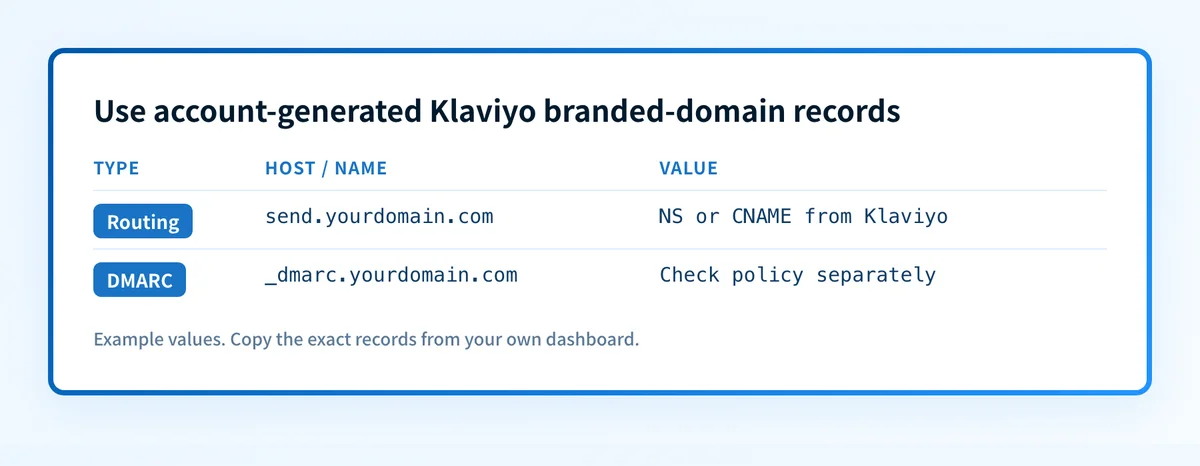
3. Copy the DNS records Klaviyo generates
Select Dynamic or Static routing according to the DNS provider's capabilities, then copy the records from the Klaviyo account. Dynamic routing generates NS records. Static routing generates CNAME records.
The following is a structural example only. It is not a Klaviyo record set and must not be published.
Record type: NS or CNAME
Host: account-generated branded sending subdomain
Value: account-generated Klaviyo target
send.yourdomain.com NS or CNAME <copy the exact target from Klaviyo>Do not publish this example. Generate and copy the real records from the Klaviyo account for the selected domain and routing method.
Some DNS providers automatically append the zone name to the host field. If the DNS zone is yourdomain.com, entering send.yourdomain.com into a provider that appends the zone can create send.yourdomain.com.yourdomain.com. Check the final fully qualified owner name before saving.
Do not add Klaviyo to the root-domain SPF record for this setup. Klaviyo's DMARC and SPF guidance states: "You do not need to add Klaviyo to your root domain’s SPF record." Keep one SPF TXT record at any DNS owner where SPF is configured. Multiple SPF records at the same owner can cause an SPF PermError.
4. Verify and activate the branded sending domain
Return to Klaviyo after the public DNS records resolve. Use the account's verification and activation controls for the selected branded sending domain.
A successful Klaviyo status confirms that the account accepted the current DNS configuration. It does not confirm the exact message route used by a future campaign, nor does it prove a receiving mailbox will report aligned authentication for every message.
If Klaviyo does not verify the domain, compare the public DNS answer with the generated record values character by character. Check the selected traffic type, routing method, final host name, and record type before replacing records.
5. Send a new production-path test message
Send a new message through the exact Klaviyo path you configured. Use a normal campaign, transactional message, or service message path that matches the traffic type selected during setup. Send it to a mailbox where you can inspect the complete raw headers.
Do not use an old received message as evidence. A message sent before verification, or through another Klaviyo traffic type, can show a different authentication result.
How does this setup affect DMARC?
A Klaviyo branded sending domain can support DMARC because Klaviyo states that its generated CNAME or NS records enable SPF authentication for the branded sending domain. Klaviyo also states that branded-domain mail is DKIM-signed by the customer's domain in addition to a shared Klaviyo domain.
DMARC passes when SPF or DKIM passes and the authenticated domain aligns with the visible From Address domain, as Klaviyo's DMARC documentation explains. A passing signature for an unrelated domain does not satisfy DMARC alignment.
Under relaxed alignment, Klaviyo documents that send.example.com can align with example.com. Under strict alignment, the authenticated SPF or DKIM domain must exactly match the From Address domain. Review the domain's DMARC alignment mode before deciding that a subdomain configuration will pass. What is DMARC? explains the distinction between authentication and alignment.
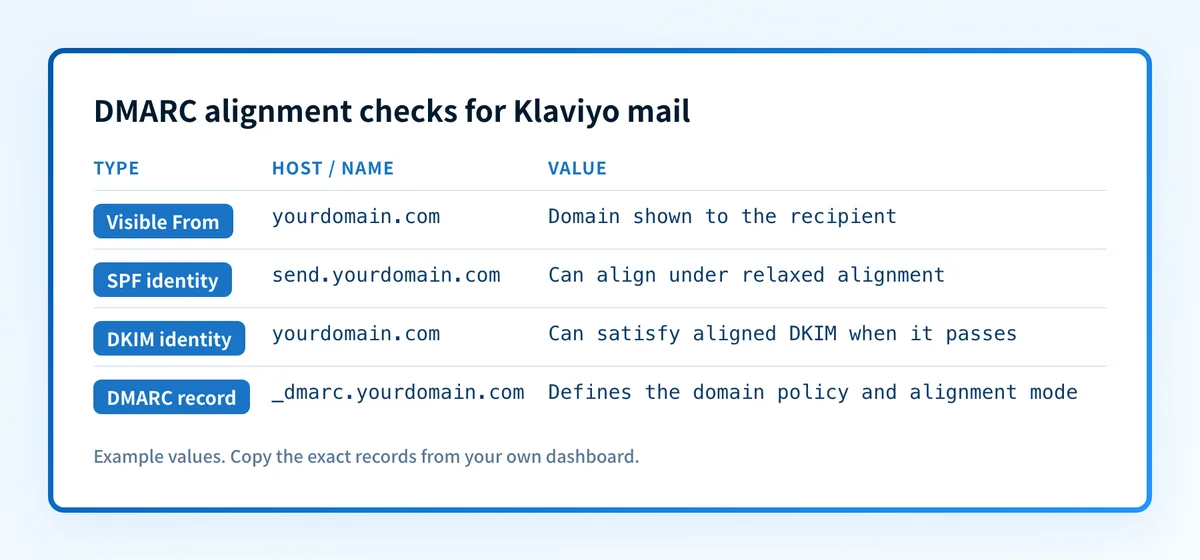
The branded sending domain must be validated against the actual From Address domain used in production.
How do I validate the setup?
Check public DNS
Query the exact owner that Klaviyo generated from the authoritative DNS server and at least one public resolver. Confirm that the record type, owner, and target match the account-generated values.
dig +short NS send.yourdomain.com
dig +short CNAME send.yourdomain.com
Use the command that matches the chosen routing type. A public lookup can show the currently published DNS response. It cannot prove that Klaviyo is using the expected sending path or that a receiver will place mail in the inbox.
Check the Klaviyo status
Return to the branded-domain configuration in Klaviyo and confirm the selected domain is verified and active for the intended traffic type. Record the selected root domain, subdomain, routing method, traffic type, and verification time with the DNS change.
A green vendor indicator is not a delivered-message check. It only shows that Klaviyo accepted the configuration it evaluated.
Inspect a delivered message
Inspect raw headers from a newly delivered message sent through the configured Klaviyo path. Find the receiver-added Authentication-Results field, then confirm the reported SPF and DKIM results and the domains used for authentication. RFC 8601 defines Authentication-Results and its trust boundary.
Compare the visible From Address domain with the passing SPF or DKIM domain. If the message uses strict DMARC alignment, verify the domains match exactly. Save only a redacted copy of headers in the change record.
Review DMARC reports
After aggregate reports arrive, review Klaviyo traffic separately from other senders using the same brand domain. Confirm that the source is passing DKIM or SPF and that the passing identity aligns with the From Address domain.
The DMARC setup guide covers the domain-level policy rollout. Do not raise the DMARC policy based only on a DNS lookup or one successful test message.
Troubleshooting
Klaviyo cannot verify the branded sending domain
Compare the published records with the values generated in the same Klaviyo account. Check that the DNS provider did not append the zone name twice and that Dynamic routing uses NS records while Static routing uses CNAME records.
Do not substitute records from another account. Generated targets are specific to the selected configuration.
The sending subdomain already has DNS records
Identify the current owner of the subdomain before changing anything. Another ESP, application, or previous Klaviyo setup may depend on those records.
Choose an unused subdomain or follow the documented migration process. Replacing records without mapping the existing sender can interrupt mail flow.
SPF passes but DMARC fails
Inspect the From Address domain and the SPF-authenticated domain in a delivered message. Under strict DMARC alignment, the domains must be identical. Under relaxed alignment, the relationship must still meet the domain's alignment rule.
A correct root-domain SPF record does not fix a branded-domain configuration. Klaviyo says its branded-domain records enable SPF authentication and that its service does not need to be added to the root-domain SPF record.
DKIM passes but DMARC fails
Compare the d= domain in the DKIM result with the visible From Address domain. A DKIM pass can be valid while still failing DMARC alignment if the domains do not align.
Confirm that the message came from the intended Klaviyo traffic type. Marketing, Transactional, and Service traffic can have separate branded-domain configurations.
A Static-to-Dynamic migration disrupts sending
Follow Klaviyo's current help article for moving from Static to Dynamic routing. Restore the prior known-good routing only if the records and account state are still available and understood.
Allow for the propagation period Klaviyo documents before repeating destructive changes.
Check the DMARC record behind the Klaviyo setup
Use the DMARC checker to inspect the published DMARC record for the visible From Address domain after Klaviyo's branded sending domain is active. Compare the policy and alignment mode with the delivered-message headers from the Klaviyo path.
A DNS check cannot prove that Klaviyo is signing every production message correctly, identify every sending source, or predict a receiver's placement decision. For ongoing DMARC aggregate-report analysis, sender inventory, and prioritized remediation work, Start with Palisade. Palisade analyzes DMARC aggregate-report data and proposes remediation priorities, while a human reviews the evidence and applies policy changes.
Evidence
Sources and further reading
Questions readers ask
Frequently asked questions
Does Klaviyo need to be added to my root domain SPF record?
No. Klaviyo states that branded sending domain customers do not need to add Klaviyo to the root domain's SPF record. Publish the account-generated branded-domain records instead, and keep only one SPF TXT record at any owner that uses SPF.
Can Klaviyo Marketing and Transactional mail use different branded domains?
Yes. Klaviyo documents separate branded sending domains for Marketing, Transactional, and Service traffic. Validate each traffic type with its own DNS records, vendor status, delivered message, and DMARC report data.
Does a verified Klaviyo branded domain prove DMARC passes?
No. Klaviyo verification shows that the vendor accepted the DNS configuration. DMARC also requires a passing SPF or DKIM result that aligns with the visible From Address domain, so inspect a newly delivered message and later review aggregate reports.
Should I use Dynamic routing or Static routing in Klaviyo?
Only use Dynamic routing when the DNS provider supports NS records. Dynamic routing uses delegation for the selected sending subdomain. Use Static routing only when the DNS provider cannot support the required NS records.
Can a Klaviyo branded sending subdomain use strict DMARC alignment?
Yes, if the passing SPF or DKIM identity exactly matches the visible From Address domain. Klaviyo documents that relaxed alignment can allow a branded subdomain to align with its root domain, while strict alignment requires an exact match.

Written by
Samuel ChenardCEO & Co-Founder, Palisade
Samuel Chenard is the CEO and co-founder of Palisade, agentic DMARC software for IT teams and MSPs, from one domain to thousands.
More from Samuel →