Report a Social Security phishing email
 ChatGPT
 Claude
 Gemini
 Perplexity
 Grok
GrokIn brief
Report a Social Security phishing email safely: do not reply, pay, or share information. Verify any reporting destination is an official government site.
If you receive a suspected Social Security phishing email, do not reply, send money, or share personal information. Keep the message available as evidence, then independently open an official government website before using any reporting option or sharing details. The Social Security Administration Office of the Inspector General, or SSA OIG, warns that impersonation attempts can arrive by email and that SSA and OIG will not demand payments or secrecy.
At a glance
Quick takeaways
- A Social Security phishing email may impersonate SSA or the SSA OIG.
- Do not transfer money, buy gift cards, send cryptocurrency, or share sensitive information in response to the email.
- A request to keep a payment or communication secret conflicts with SSA OIG guidance.
- Do not trust a reporting link or contact detail contained in the suspicious message.
- Verify that any destination for sensitive information is an official federal government site.
- Social Security impersonation is one type of email threat that can target individuals and organizations.
How Social Security phishing emails work
A Social Security phishing email is an impersonation message that tries to make the recipient believe it came from the Social Security Administration or its Office of the Inspector General. The SSA OIG scam warning tells the public: "Be on the lookout for fake calls, texts, emails, websites, messages on social media, or letters in the mail."
The important safety decision is based on what the message asks you to do, not on a logo, sender display name, or urgent wording. The SSA OIG states: "SSA and OIG will never ask you to transfer money to protect it, meet you in person to exchange cash, gift cards, crypto currency, gold bars, or require you to keep information secret or confidential."
Treat an email as untrusted when it asks for any of those actions. Do not use the reply button to challenge the sender or request confirmation. A reply can disclose that the mailbox is active, and the sender can continue the impersonation attempt.
Do not rely on a link in the message to decide where to report it either. The SSA OIG advises: "Before sharing sensitive information, make sure you're on a federal government site." Open your browser separately and type or select a government destination independently.
The same approach applies to other impersonation messages. Reporting email phishing scams can help distinguish the immediate evidence-preservation task from broader account or organizational follow-up.
When the reporting decision changes
The supplied official guidance supports a clear safety rule, but it does not establish a specific email-forwarding address, web form, or mail-provider reporting path for Social Security phishing emails. Do not guess at an address, copy one from a suspicious email, or assume that an old forwarding address is still active.
Use this decision rule:
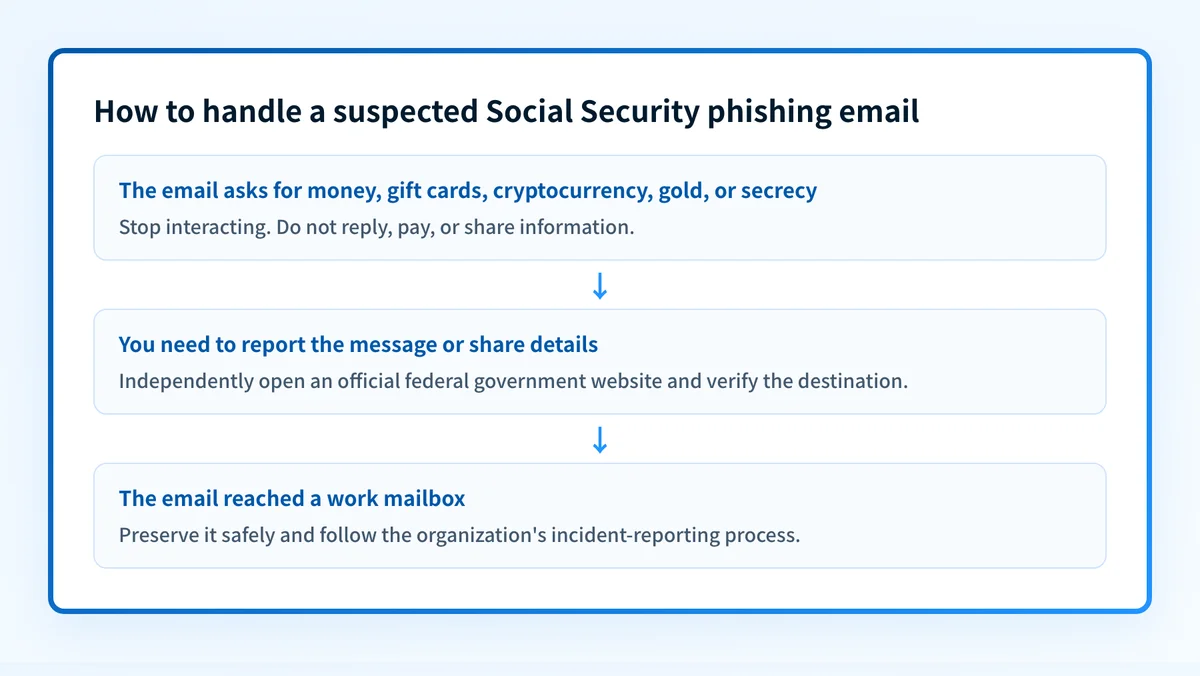
- If the email asks for money, gift cards, cryptocurrency, gold, cash exchange, or secrecy, stop interacting with it.
- If the email asks for sensitive information, do not provide it until you have independently confirmed that the destination is an official federal government site.
- If you need a government reporting channel, locate it directly from an official government site rather than from the email.
- If the message reached a work mailbox, follow your organization's incident-reporting process in addition to preserving the message.
Worked example: apply the SSA OIG warning
Suppose an email claims that your Social Security number is at risk and instructs you to buy gift cards or transfer cryptocurrency to protect your account. The stated payment method and request for secrecy match conduct the SSA OIG says SSA and OIG will never request.
Claimed sender: "Social Security Administration"
Message request:
"Transfer cryptocurrency immediately to protect your information.
Do not discuss this matter with anyone."
Decision:
Do not reply, pay, or share information.
Preserve the message.
Independently open an official federal government website before
using any reporting option or providing details.
This example is a decision rule, not a list of authentic Social Security email characteristics. The available official material confirms that scammers can use fake emails, but it does not establish when or how Social Security sends legitimate email. Do not approve a message because its sender name appears plausible.
If you inspect the message for internal incident response, preserve the original safely according to your organization's process. Do not forward sensitive content broadly or publish personal data from the email. For a similar consumer-facing reporting scenario, see how to report an Amazon phishing email.
Take the next safe step
Start with the evidence you have:
- If you only have the suspicious email, stop interacting with it and independently locate an official government destination before reporting or sharing details.
- If you have already replied, paid, or shared information, use independently located official channels and your organization's incident process. The cited guidance does not provide a specific remediation workflow.
- If this type of message reached a business mailbox, assess whether the organization has clear phishing-reporting guidance and technical controls. Email security guidance covers the broader practices that reduce exposure to malicious email.
- If you manage a domain and want to review its public email-security posture, use the Email security score tool. It can inspect public domain signals, but it cannot determine whether a specific Social Security email is fraudulent, report that message to a government agency, or prove how a recipient mailbox handled it.
Review your organization's email-security posture
A Social Security impersonation email is a reminder to check how staff identify and escalate suspicious messages. Review your email-security controls and reporting process alongside the evidence from the actual message.
An email-security guide cannot validate a particular reporting destination, recover money, or establish whether Social Security sent a specific email.
Evidence
Sources and further reading
Questions readers ask
Frequently asked questions
Where can I forward phishing emails to the government?
The SSA OIG warning does not identify a specific forwarding address or reporting form for phishing emails. Do not use an address provided in the suspicious message. Independently open an official government website and confirm the destination before sending any details.
How do I report an email as a phishing email?
The available official material does not document a mail-provider "Report phishing" control or a specific SSA OIG reporting procedure. Preserve the email, stop interacting with it, and find a current reporting option through an independently opened official government website.

Written by
Ian BussieresCTO & Co-Founder, Palisade
Ian Bussieres is the CTO and co-founder of Palisade, agentic DMARC software for IT teams and MSPs.
More from Ian →