Remove an SPF include and old DKIM records safely
 ChatGPT
 Claude
 Gemini
 Perplexity
 Grok
In brief
Remove an SPF include and old DKIM records only after DMARC reports show the retired sender has stopped. Check shared records, then delete and retest.
To remove an SPF include: or an old DKIM record after you retire a sender, first check your DMARC aggregate reports and confirm the sender has sent no mail as your domain for a full observation window. A DNS lookup only shows what is published; it cannot tell you whether a vendor still sends. Once the reports show the sender is silent, list every record it left behind, check that no active sender shares them, delete them at your DNS host, and retest.
At a glance
Quick takeaways
- DMARC aggregate reports are the evidence that a sender stopped. A DNS lookup is not.
- Pick an observation window that fits your business before you start. The DMARC standard sets no fixed length.
- Remove only the retired sender's
include:from your SPF record. Leave every other mechanism as it is. - Delete a DKIM selector record only when the sender that signs with that selector is gone.
- Microsoft 365 publishes two DKIM selector records and uses one at a time. Keep both while Microsoft 365 still sends for the domain.
- Save the old values first. If the sender shows up in reports again, put the record back and investigate.
What do you need before removing a retired sender's records?
Removing a retired sender's DNS records needs four things: report history, a record list, DNS access, and a way back. Gather them before you edit anything.
- DMARC aggregate reports covering your whole observation window. If you have report files, the DMARC report analyzer reads them for you.
- The sender's setup history: the SPF include, DKIM selectors and any sending or return-path subdomain the vendor asked you to publish.
- Access to the authoritative DNS zone, and the person who approves changes to it.
- A rollback note: each record's name, type, value and TTL, written down before you delete it.
Do not delete an SPF include or DKIM record because it looks old. A record that looks stale can still be in use by a sender nobody remembered, and removing it makes that sender's mail fail authentication.
How do you prove a sender has stopped sending?
DMARC aggregate reports prove a sender has stopped, because they record the mail receivers actually saw from your domain. RFC 9990 defines these reports: each one lists the sending source, the SPF and DKIM results, alignment, and a message count for the reporting period.
Search the reports across your full observation window for anything that ties back to the retired sender:
- its sending IP addresses,
- its SPF domain (the domain in the
include:), - its DKIM signing domain (
d=) and selector (s=).
If the sender appears even once, stop. Find out whether the mail came from a delayed job, an application someone forgot, or a service you did not know about. How long the window should be is your call; the RFC does not set one. Longer is safer for senders that only send monthly or quarterly mail, such as invoices or renewal notices.
How do you remove an SPF include and old DKIM records?
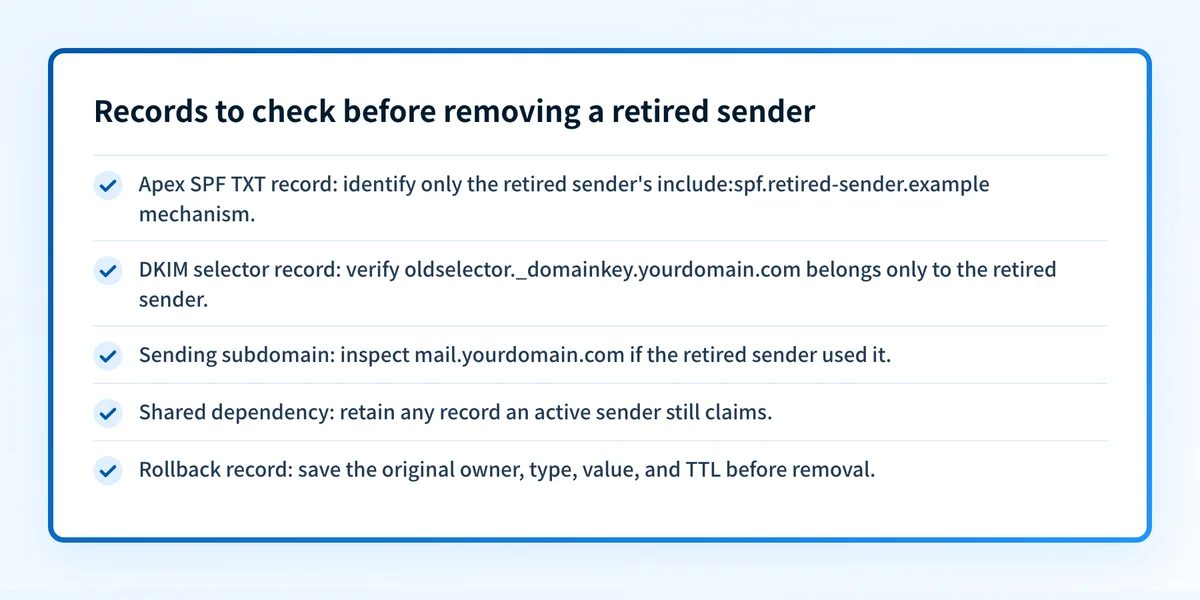
1. List every record the sender left behind
Write one line per record: the DNS name, type, full value, which sender it belongs to, and whether any active sender also uses it. The shapes below are examples only:
yourdomain.com TXT "v=spf1 include:spf.retired-sender.example include:spf.active-sender.example -all"

oldselector._domainkey.yourdomain.com CNAME oldselector.retired-sender.example

mail.yourdomain.com TXT "v=spf1 include:spf.retired-sender.example -all"
A sender usually leaves some mix of these:
- An SPF include in the record at the root of the domain, or at a subdomain.
- DKIM selector records, published as a CNAME or TXT at
<selector>._domainkey.yourdomain.com. The selector is thes=value in theDKIM-Signatureheader of mail the sender signed. See what a DKIM selector is. - A sending or return-path subdomain with its own SPF, DKIM or MX records. Not every sender uses one.
2. Check whether an active sender shares any record
Ask the owner of each active sending platform whether it uses the same SPF include, DKIM selector or subdomain. Some vendors run more than one product on the same include domain, so one include can authorize two services. A shared record is a stop sign until the active sender's setup is confirmed.
Microsoft 365 needs special care. Its DKIM setup documentation has you publish two selector CNAME records, selector1 and selector2. Only one signs at a time; the other is used after the next key rotation. Never delete the inactive one as a leftover while Microsoft 365 still sends mail for the domain.
If the retired sender used a subdomain, check that subdomain on its own. Google's SPF setup guidance says: "If you use subdomains, you must add an SPF record for each subdomain."
3. Save the old values
Copy each record's name, type, value and TTL into your change record, with the date and the reason for removal. Keep it for at least one more observation window. If something breaks, you can restore the exact record instead of guessing.
4. Delete only the retired sender's entries
Make the change at your DNS host, not in the Google Admin console or the Microsoft 365 admin center.
- SPF: edit the existing TXT record and remove only the retired sender's
include:term. Keep every other mechanism and the ending (-allor~all). Microsoft's SPF guidance describesinclude:as one of the ways an SPF record names a valid source. - DKIM: delete the retired sender's selector record.
- Subdomain: change its records only when no remaining mail uses that subdomain. If it should send no mail at all, replace its SPF record with
v=spf1 -allinstead of deleting it, so receivers know to reject mail that claims to come from it.
How do you check the removal worked?
Check the removal at four layers, because each one proves something different.
- DNS: query the authoritative server and at least one public resolver. The removed include should be gone and the active mechanisms intact. A deleted DKIM selector should no longer resolve. The SPF checker and DKIM checker show what is now public.
- The retired sender: confirm it is still switched off or disconnected on the vendor side.
- A real message: send a new message through each remaining sender and read its
Authentication-Resultsheader (RFC 8601 defines it). SPF and DKIM should still pass. - DMARC reports: keep reading them after the change. Active senders should keep passing, and the retired sender should stay absent.
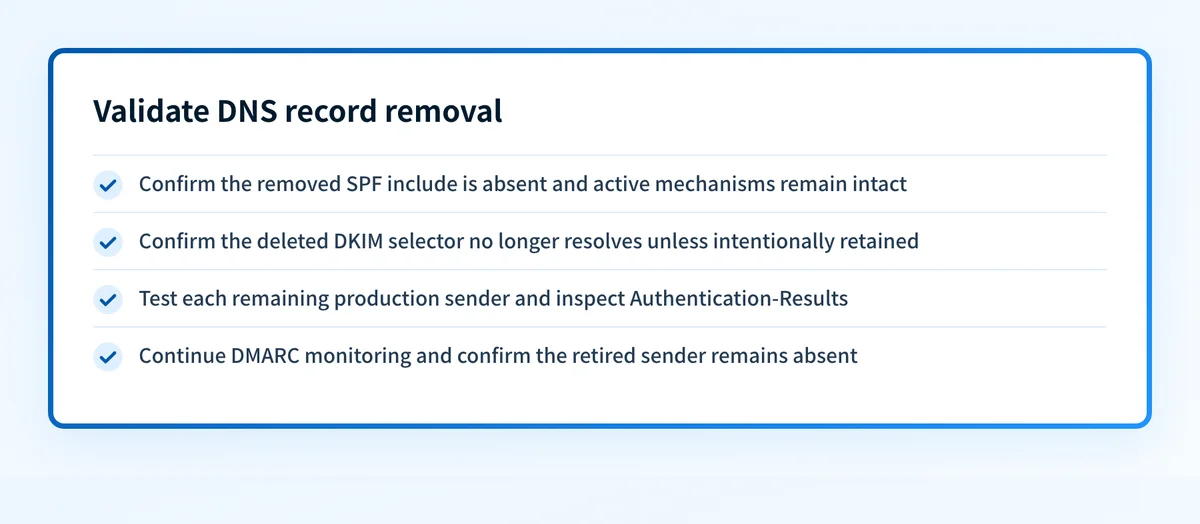
A DNS check proves what is published, nothing more. It cannot show which application sends through which path, or whether tomorrow's mail will pass. That is why the message test and the reports are part of the check.
What if something goes wrong?
The retired sender still appears in DMARC reports
Keep its records. Compare the report's source IP, SPF domain, DKIM d= domain and selector with the sender's old setup. The mail may come from a delayed job, a forgotten application, or a different service on similar infrastructure.
SPF fails after you removed an include
Restore the old SPF record from your rollback note, then find which active sender relied on that include. Do not paste in a replacement record copied from another provider's example. If the original problem was the 10-lookup limit, see how to fix SPF PermError: too many DNS lookups.
A DKIM selector looks unused
Check who signs with it before deleting it. For Microsoft 365, the unused selector is normal: it waits for the next key rotation. For other senders, compare the selector with recent message headers and the report history.
Two resolvers return different answers
Check the authoritative answer first. Public resolvers can serve the old record until the TTL it had runs out. Wait for that old TTL before treating a difference as a failed change.
How Palisade handles retired senders
Palisade reads your DMARC aggregate reports, names each sending source, and files prioritized tickets for authentication and alignment problems. When you mark a sender as retired or not yours and its records are still in DNS, Palisade opens a "Remove DNS records for a retired sender" ticket listing them, but only once the reports show the sender silent for the whole inactivity window. A record another sender also claims is marked as shared, and the ticket withdraws itself if the retired sender starts sending again.
Palisade never deletes these records. You review the list and remove them at your DNS host. Start with Palisade to have the report check done for every sender on every domain.
Evidence
Sources and further reading
Questions readers ask
Frequently asked questions
Can I remove an SPF include after cancelling a sender account?
You can remove an SPF include after cancelling a sender account once DMARC aggregate reports show the sender sent nothing as your domain for your full observation window. Cancelling the account alone does not prove that every connected application or scheduled job has stopped using it.
Should I delete an old DKIM record when its selector is inactive?
Delete an old DKIM record only when the sender that owns the selector is retired and no active sender uses it. For Microsoft 365, keep the inactive selector while Microsoft 365 still sends mail for the domain: Microsoft uses it at the next key rotation.
Does a DNS lookup prove that a sender is retired?
No. A DNS lookup shows which records are published, not who is sending. DMARC aggregate reports show the mail receivers actually saw from your domain, which is the evidence you need.
Can I remove one SPF include without changing the rest of the record?
Yes. Edit the existing SPF TXT record and delete only the retired sender's include: term. Keep the other mechanisms and the all ending exactly as they were.
What should I do if mail fails after I remove a record?
Put the exact old record back from your rollback note, then check DMARC reports and a new message from the affected sender. The failure tells you an active sender still depended on that record.

Written by
Samuel ChenardCEO & Co-Founder, Palisade
Samuel Chenard is the CEO and co-founder of Palisade, agentic DMARC software for IT teams and MSPs, from one domain to thousands.
More from Samuel →