Microsoft
Office 365 MX record and the new mx.microsoft hosts
 ChatGPT
 Claude
 Gemini
 Perplexity
 Grok
In brief
Your Office 365 MX record is a host Microsoft generates per domain. Where to copy it, the priority and TTL to use, the new mx.microsoft hosts, and checks.
Your Office 365 MX record is a mail host Microsoft 365 generates for each domain, so you copy it rather than type it from memory. Find it in the Microsoft 365 admin center under Settings > Domains, select the domain, open DNS records, and publish it at your DNS host with the priority and TTL Microsoft shows. It usually ends in mail.protection.outlook.com, but Microsoft plans to give some new domains a host ending in mx.microsoft, which cannot be worked out from the domain name.
At a glance
Quick takeaways
- Copy the MX value from the Microsoft 365 admin center. Never build it from your domain name.
- The long-standing shape is
<MX token>.mail.protection.outlook.com, and Microsoft says it keeps working. - Some newly added domains may get a host under
mx.microsoftinstead, such as Microsoft's examplecontoso-com.e-v1.mx.microsoft. - Microsoft's manual setup says: priority "the highest value available, typically 0", TTL
3600. - Changing the MX record sends all incoming mail for the domain to Microsoft 365, so create the mailboxes first.
- An MX record only controls incoming mail. It does not set up SPF, DKIM or DMARC.
What do you need before changing the Office 365 MX record?
Changing the Office 365 MX record needs a verified domain in Microsoft 365, admin access to the right tenant, and edit rights on the domain's authoritative DNS zone. Microsoft also says to add your users and set up their mailboxes first, because once the MX record changes, "ALL email sent to that domain starts coming to Microsoft 365" (Microsoft: External DNS records for Microsoft 365, checked 2026-11-23).
If another mail system receives mail for the domain today, decide what happens to its MX records. Microsoft gives two options: remove the records that point to the previous provider, or keep them with a lower priority (a higher number) than the Microsoft 365 record. For the general idea of MX records and priorities, see what an MX record is.
Where do you find your Office 365 MX record?
Find your Office 365 MX record in the Microsoft 365 admin center. Microsoft's manual DNS setup steps (checked 2026-11-23) go:
- Settings > Domains, then select the domain.
- DNS records, then Manage DNS, then Continue.
- On the Add DNS records page, expand MX Records and copy the value shown.
Teams that script their setup can read the same values from Microsoft Graph. The domain service configuration records endpoint returns the MX host as mailExchange, plus preference and ttl.
Why do some Office 365 MX records end in mx.microsoft?
Some Office 365 MX records end in mx.microsoft because Microsoft is moving new domains to a new mail host zone that supports DNSSEC and inbound DANE. Microsoft first said that from July 2026 "a portion of new A records" would be provisioned under mx.microsoft (Exchange Team blog, updated February 2026). Its April 23, 2026 update delayed that to the second half of calendar year 2026 and said the switch would be gradual (Exchange Team blog, April 2026). As of 2026-11-23, Microsoft has not posted a newer date.
What this means in practice:
- A domain you add now may get either shape, depending on how far the gradual switch has reached. Use whichever the admin center shows.
- Existing
mail.protection.outlook.comrecords keep working. Microsoft says that domain "will remain operational indefinitely" and has no plans to enable DNSSEC on it. - The label before
mx.microsoftis generated for you. There is no rule for working it out, so a host typed from your domain name will be wrong.
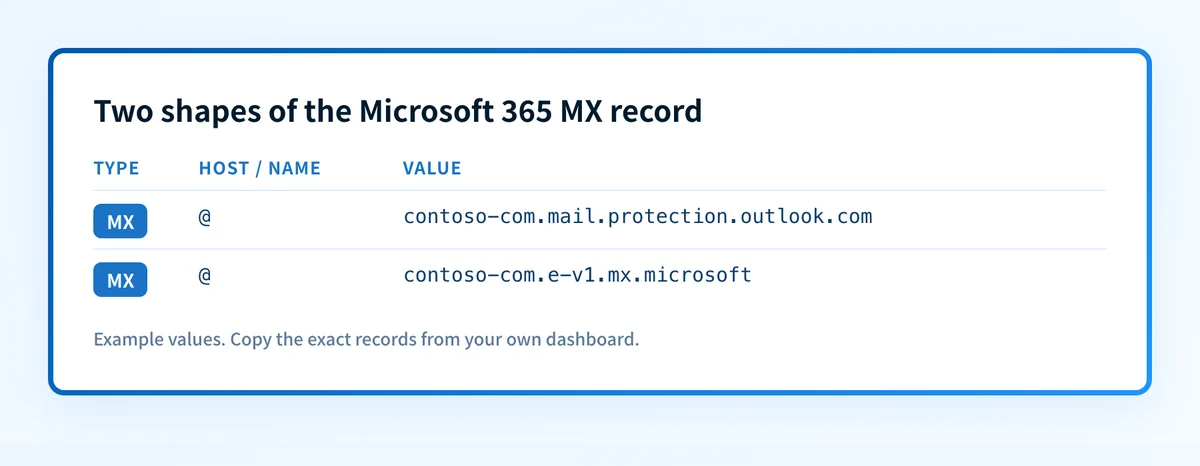
The two examples above come from Microsoft's own documentation: contoso-com.mail.protection.outlook.com from the Graph reference, and contoso-com.e-v1.mx.microsoft from the Get-DnssecStatusForVerifiedDomain reference. Neither is a value to publish.
How do you add the Office 365 MX record at your DNS host?
1. Create the MX record
At the authoritative DNS provider, create or edit the MX record at the root of the domain that should receive mail in Microsoft 365:
| Field | Enter |
|---|---|
| Type | MX |
| Host or name | @, or your provider's root-domain field |
| Points to | The value you copied from the admin center |
| Priority | The value Microsoft shows, usually 0 |
| TTL | 3600 |
Microsoft's manual steps say to set the priority to "the highest value available, typically 0" and the TTL to 3600. Exchange Online only supports TTL values under 6 hours (21,600 seconds). In MX records a lower number means a higher priority.
2. Watch for a doubled domain name
Some DNS hosts add your domain to every name you type. Typing yourdomain.com into such a host field creates yourdomain.com.yourdomain.com. Use @ or the empty root field, and check the saved record.
3. Deal with the old MX records
Remove the MX records that point to your previous provider, or give them a higher priority number than the Microsoft 365 record, as Microsoft describes. A leftover record with the same or a lower number keeps receiving mail.
4. Wait for DNS to update
Resolvers that cached the old answer keep it until its old TTL runs out. A TTL of 3600 on the new record controls how long the new answer is cached from now on.
How do you check the Office 365 MX record works?
Check the setup in four places, because each proves something different.
- The authoritative DNS server. Find your nameservers, then ask one of them directly. This shows the TTL too:
dig NS yourdomain.com +short
dig MX yourdomain.com @<one-of-those-nameservers> +noall +answer- A public resolver. Confirm the rest of the internet sees the same answer:
dig MX yourdomain.com @1.1.1.1 +noall +answerThe MX record checker shows the same public answer in your browser.
- The admin center. Return to Settings > Domains, select the domain and check its status.
- A real message. Send a new email from an outside account to a mailbox on the domain, confirm it arrives in Exchange Online, and look at the message headers to see the receiving path. A message sent before DNS updated proves nothing, so send a fresh one.
Does the Office 365 MX record affect DMARC?
The Office 365 MX record does not affect DMARC. MX controls where mail sent to your domain goes. DMARC checks mail sent from your domain, using SPF and DKIM results that must align with the visible From address. After incoming mail works, set up DKIM in Office 365 and DMARC for Microsoft 365, and check the published policy with the DMARC checker.
Troubleshooting the Office 365 MX record
Microsoft 365 shows a different host than a guide
Use the host Microsoft 365 shows for your domain. Guides, including this one, show example hosts. Yours may end in mail.protection.outlook.com or mx.microsoft, and both are valid.
The lookup still shows the old mail provider
Check that you edited the zone your nameservers point to, not a parked copy at another provider. If the authoritative server already shows the new record, wait for the old TTL to run out.
Domain status in the admin center has not updated
Compare the host, priority and TTL in public DNS with the values on the domain's page in Microsoft 365, character by character. If they match and the status still has not updated, use the admin center's domain troubleshooting for that domain.
Some mail still reaches the old system
Look for leftover MX records with the same or a lower priority number than the Microsoft 365 record. Also check whether the sender writes to a subdomain or alias with its own MX records. This is a routing problem, so leave SPF, DKIM and DMARC alone unless the bounce or headers point at authentication.
How Palisade helps with the Office 365 MX record
Run your domain through the MX record checker to compare what is published with the host in your admin center.
When a domain has no MX record yet, Palisade opens a Set up MX record ticket that asks for the host you copied from Microsoft 365, checks that it belongs to Microsoft and resolves, accepts both mail.protection.outlook.com and mx.microsoft hosts, and shows the proposed DNS change for approval. Palisade publishes it only after you approve, through a DNS account connection (Cloudflare, GoDaddy or Amazon Route 53) or a one-time sign-in to your DNS provider, and never changes DNS by itself (Palisade docs: DNS connections). See DNS deployment for how approved changes are published. Start with Palisade to track the MX record alongside the domain's DMARC work.
Evidence
Sources and further reading
- Microsoft: Add DNS records to connect your domain, checked 2026-11-23
- Microsoft: External DNS records for Microsoft 365, checked 2026-11-23
- Microsoft Graph: List domain service configuration records, checked 2026-11-23
- Microsoft: Get-DnssecStatusForVerifiedDomain, checked 2026-11-23
- Exchange Team blog: Modernizing DNS security for Exchange Online mail flow, checked 2026-11-23
- Palisade docs: DNS connections
Questions readers ask
Frequently asked questions
What is the MX record for Office 365?
The Office 365 MX record is a host Microsoft 365 generates for each domain. It usually looks like <MX token>.mail.protection.outlook.com, and some newer domains get a host ending in mx.microsoft. Copy yours from Settings > Domains in the Microsoft 365 admin center.
What priority should an Office 365 MX record use?
Use the priority Microsoft 365 shows for your domain. Microsoft's manual setup steps say "the highest value available, typically 0". In MX records a lower number means a higher priority.
Can I work out an mx.microsoft hostname from my domain name?
No. You cannot work out an mx.microsoft hostname from your domain name, because Microsoft documents no rule for building one. Copy the complete host from the Microsoft 365 admin center or the Microsoft Graph API.
Do I need to change an existing mail.protection.outlook.com MX record?
No. You do not need to change an existing mail.protection.outlook.com MX record: Microsoft says that domain "will remain operational indefinitely". Microsoft plans the mx.microsoft hosts for some newly added domains, not for existing ones.
Does the Office 365 MX record configure DMARC?
No. The Office 365 MX record routes incoming mail to Exchange Online. DMARC checks outgoing mail using SPF and DKIM, and needs its own DNS record.

Written by
Samuel ChenardCEO & Co-Founder, Palisade
Samuel Chenard is the CEO and co-founder of Palisade, agentic DMARC software for IT teams and MSPs, from one domain to thousands.
More from Samuel →