O365 phishing protection
 ChatGPT
 Claude
 Gemini
 Perplexity
 Grok
GrokIn brief
O365 phishing protection requires current Microsoft documentation for the tenant's licensed controls, policies, reporting options, and validation evidence.
O365 phishing protection cannot be defined reliably from the generic Microsoft Learn portal alone. A useful answer for a Microsoft 365 tenant requires current Microsoft documentation for the licensed protection service, the active policy controls, the Outlook reporting option, and the evidence used to validate the result. Without those sources, do not treat a tenant's current protection level, configuration path, or reporting-button availability as established.
At a glance
Quick takeaways
- O365 phishing protection is tenant-specific, so a generic portal page cannot establish the controls active in one organization.
- Microsoft 365 phishing, malware, and reporting features need current Microsoft product documentation before they can be described or configured.
- A policy name or a green administrative status does not prove how a real delivered message was handled.
- A reporting-button request needs documentation that identifies the exact Outlook experience and reporting option in scope.
- A phishing-control review needs evidence from the tenant, the message path, and the relevant Microsoft documentation.
- Email security is broader than one provider's phishing controls.
What a complete O365 phishing-protection answer needs
The phrase "O365 phishing protection" can refer to several different reader tasks. One administrator may be asking about a policy that evaluates suspicious mail. Another may need a way for users to report messages in Outlook. A security reviewer may need to confirm whether malware protection is included for a particular tenant. Those are separate questions and need separate current Microsoft documentation.
Microsoft Learn is Microsoft's documentation portal. Its generic landing page does not identify a Microsoft 365 phishing feature, a malware-protection entitlement, a policy setting, a reporting-button installation path, or a recommended configuration. Treat it as a starting point for locating the product-specific documentation, not as evidence that a particular control exists or is enabled.
The practical unit of review is the exact tenant and the exact question:
- Protection scope: which Microsoft service and license documentation applies to the tenant?
- Policy scope: which documented controls are available, and which are currently configured?
- Reporting scope: which Outlook reporting mechanism is documented for the users' client and deployment?
- Message scope: what does a real delivered or blocked message show about its route and outcome?
- Ongoing scope: what evidence shows whether the tenant continues to receive the expected protection after policy or service changes?
When the answer changes
The answer changes whenever the reader means a different Microsoft 365 task or has different evidence.
Use this decision rule:
- If the question is "What protection is included?", use the current Microsoft service-description and licensing documentation for the tenant's applicable service.
- If the question is "How do I block phishing emails?", use the current Microsoft policy-configuration documentation for the relevant protection policy.
- If the question is "How do users report a message?", use current Microsoft documentation that names the reporting option and supported Outlook experience.
- If the question is "Did the protection work for this message?", use the actual message outcome and its available mail evidence, then compare it with the documented policy behavior.
- If the question is "Is our domain broadly protected?", review the wider domain-security posture separately from Microsoft 365 tenant controls.
Do not change mail-protection policies from a generic article, a screenshot from another tenant, or an assumed default. A policy change can affect legitimate business mail.
A public diagnostic can contribute one narrow kind of evidence. For example, an email security score check may help assess publicly visible domain-security signals when its documentation supports the result being reviewed. It cannot establish the Microsoft 365 tenant's active policy, a specific recipient's outcome, or how a future message will be handled.
A worked evidence request for a Microsoft 365 review
A useful review starts by identifying the question before collecting screenshots or changing settings. The following is an intake format, not a Microsoft configuration procedure.
Review question: Can this Microsoft 365 tenant document its current phishing protection?
Tenant evidence:
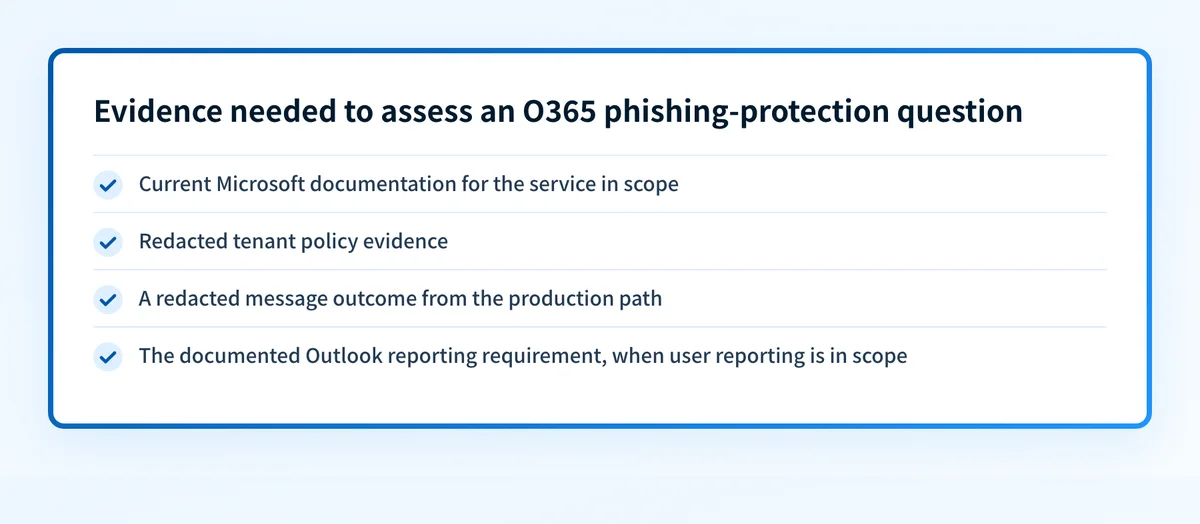
- Applicable Microsoft service and licensing documentation
- Current Microsoft policy documentation for the protection in scope
- Redacted policy status or configuration evidence from the tenant
- One redacted example of the relevant message outcome
- Outlook client and reporting requirement, if user reporting is in scope
Decision:
- Documented and verified for this tenant
- Documented, but tenant evidence is incomplete
- Tenant evidence exists, but the current Microsoft documentation is missing
- Do not make a configuration claim yet
The outcome should match the evidence. For example, a request to add a phish alert button is unresolved until the reviewer can identify the exact Outlook reporting feature or third-party product that the request names. The phrase "phish alert button" is not enough to infer an installation method, a supported client, or an administrator action.
The same distinction applies to malware protection. A current Microsoft service-description or anti-malware-policy page is needed before stating whether a tenant has a particular malware control, whether it is included, or how it is configured.
For a broader explanation of the threat itself, see what phishing is. That article can help frame the message-level risk, while a Microsoft 365 review needs provider-specific evidence before it can prescribe an action.
What to collect next
Start with the evidence that matches the reader's question.
For a licensing or included-protection question, locate the current Microsoft documentation for the relevant service and edition. Record the exact service name and publication date. Do not infer availability from a tenant screen, a search result, or a generic Microsoft documentation page.
For a policy question, use current official Microsoft documentation that names the policy and its supported controls. Then compare that documentation with redacted tenant evidence. A documented setting and a tenant setting answer different questions. Both matter.
For a reporting-button question, first establish whether the request concerns Microsoft's own reporting option or a third-party product. Then use the current documentation for that exact option and Outlook context. Do not deploy an add-in or change user reporting flows until the intended product is confirmed.
For a message-outcome question, retain redacted evidence from the exact production path. A public domain check, an administrative status indicator, and a message result each cover different parts of the problem. They should not be treated as substitutes.
Continue with the wider email-security review
If the immediate Microsoft 365 question is still being scoped, use the email security guide to place phishing protection alongside the other controls your organization reviews.
Review the wider email-security program
That guide cannot confirm the active Microsoft 365 policy, add an Outlook reporting button, or prove how a particular message was handled.
Evidence
Sources and further reading
Questions readers ask
Frequently asked questions
Does Microsoft 365 have malware protection?
Microsoft 365 has anti-malware policies, but what is actually active depends on your tenant's license and how those policies are configured. Check the anti-malware policy for your own tenant against Microsoft's current service documentation for that plan, rather than assuming the control is on or off.
How do I block phishing emails in Office 365?
Work in the anti-phishing policy for your own tenant, following Microsoft's current configuration documentation for the service your license covers. Read what a setting does before you turn it on, because a protection policy change can also affect legitimate business mail. Then check the result against a real delivered message, not the policy screen alone.
What are the best practices for anti-phishing in Office 365?
Two rules hold in any tenant. Base each setting on Microsoft's current configuration guidance for the service you license, and confirm the effect with a real delivered message rather than an administrative status indicator. The rest is tenant-specific, so a screenshot from another organization or a general phishing article cannot tell you what is safe to turn on in yours.
Can a public domain check prove that Microsoft 365 blocked a phishing message?
No, a public domain check cannot prove that, because it only inspects what a domain publishes openly. It cannot show the active Microsoft 365 policy, a receiver's private decision, or the outcome for one individual message.

Written by
Ian BussieresCTO & Co-Founder, Palisade
Ian Bussieres is the CTO and co-founder of Palisade, agentic DMARC software for IT teams and MSPs.
More from Ian →