NetSuite DKIM setup
 ChatGPT
 Claude
 Gemini
 Perplexity
 Grok
In brief
NetSuite DKIM setup: add a sending domain, publish NetSuite-generated CNAME records, verify its status, and confirm DKIM headers in outgoing mail.
NetSuite DKIM setup requires an Administrator or user with Full-level Set Up Company permission to add each production sending domain, then a DNS owner to publish the two CNAME records NetSuite generates for that domain. NetSuite uses those records to manage DKIM key rotation. After the domain reaches Ready, send a new message through NetSuite and inspect its authentication headers.
At a glance
Quick takeaways
- NetSuite generates the selector naming and two CNAME records required for each configured sending domain.
- Add one sending domain per row under
Setup > Company > Email > Email Preferences > Email Domains (DKIM). - A DNS-experienced owner must publish the account-generated CNAME records at the domain provider.
- NetSuite can show
Pending Verification,Ready, orRequires Actionafter a domain is saved. - Only one of NetSuite's two CNAME records having a DKIM key linked at a time is expected behavior.
- A public DNS result does not prove that a NetSuite production message has received a DKIM header.
Scope and prerequisites
This procedure applies to email sent from a NetSuite production account using a domain you control. It does not configure DKIM for a separate CRM, marketing platform, employee mailbox system, or email gateway that sends with the same visible From domain.
Oracle's NetSuite DKIM documentation describes DKIM as digitally signing email so receiving systems can authenticate it. If you need protocol background before making the change, review the DKIM learning hub and what DKIM is.
Assign the two parts of the change before opening NetSuite:
- A NetSuite Administrator, or a user with Full-level Set Up Company permission, adds the email domain in NetSuite.
- A person with authority over the authoritative DNS zone publishes the CNAME records NetSuite generates.
- An application owner sends a fresh test message through the production NetSuite path.
- A reviewer checks the delivered message headers and later reviews DMARC aggregate-report evidence.
The rollback condition is straightforward: if a new domain setup affects an established production sending path unexpectedly, stop expanding the change, preserve the existing DNS records, and return the NetSuite sending configuration to the last known-good state. Do not remove existing authentication records just because a new DKIM setup is incomplete.
Do not replace an existing DNS record set with a guessed NetSuite value. Publish only the two CNAME records generated for the affected account and domain.
NetSuite states that DKIM keys are not copied into non-production accounts. Setup in a non-production account is possible but not required, so production validation must still use the production account's generated records and a message sent through that account.
Choose the implementation approach
Use NetSuite's generated CNAME approach for a production domain configured in the account. Since NetSuite 2024.1, NetSuite generates the required setup information, including selector naming, for customers to add two DNS CNAME records at their domain provider. Oracle states that the two records allow NetSuite to manage DKIM key rotation.
This differs from a self-managed DKIM deployment, where an operator may publish a TXT public key. Do not convert NetSuite's CNAME instructions into a TXT record, and do not substitute a selector from another sender.
Choose the domain based on the mail path:
- Configure the domain that NetSuite uses for the messages you want to authenticate.
- Add each distinct sending domain as its own row, as instructed in Oracle's Email Domains (DKIM) setup documentation.
- Keep DKIM work for other senders separate. For example, a different platform may need its own provider-specific process, such as this Cloudflare DKIM setup guide.
- Coordinate the NetSuite domain with the wider SPF, DKIM, and DMARC plan described in email authentication, but do not change DMARC policy as part of this DKIM setup.
How to configure NetSuite DKIM
1. Confirm the production sending domain and owners
Identify the domain NetSuite will send from and confirm that you can edit its authoritative DNS zone. Confirm which NetSuite production account owns the sending path.
The NetSuite user who adds the domain needs Administrator access or Full-level Set Up Company permission. The DNS editor needs the ability to create CNAME records for the domain. These roles can be held by different people.
Do not proceed with a copied record set, an incomplete domain name, or a domain controlled by another team without a change owner. The CNAME values must come from the affected NetSuite account.
2. Add the domain in NetSuite
In NetSuite, use the path documented by Oracle:
Setup > Company > Email > Email Preferences
Email Domains (DKIM) subtab
On the Email Domains (DKIM) subtab, enter the sending domain as one row. Oracle documents that domains are entered one per row.
Save the domain using the available account controls. The exact save flow and any Details message depend on the current NetSuite interface. After the domain is saved, obtain the two CNAME record names and targets NetSuite generated for that specific domain.
3. Copy both NetSuite-generated CNAME records
Treat the generated values as one set. NetSuite says its two CNAME records let Oracle NetSuite manage DKIM key rotation.
Use the host and target exactly as shown in the affected account. DNS providers differ in how their interfaces handle the zone suffix. A provider editing yourdomain.com may expect only the relative host label, while another expects the fully qualified hostname.
The shape below is illustrative only. Do not publish these placeholder values. Copy the actual hostnames and targets generated in NetSuite.
<NetSuite-generated-selector-1>._domainkey.yourdomain.com CNAME <NetSuite-generated-target-1>
<NetSuite-generated-selector-2>._domainkey.yourdomain.com CNAME <NetSuite-generated-target-2>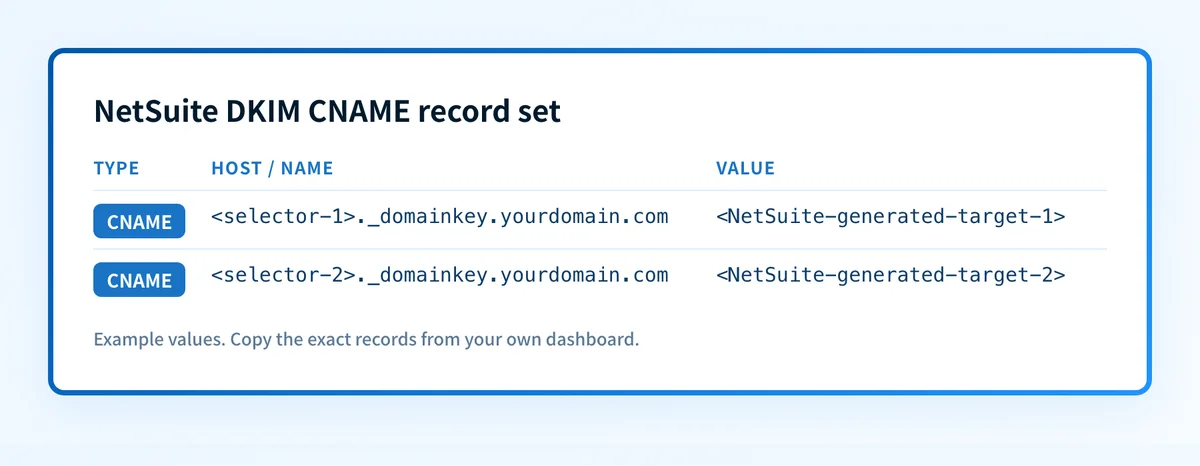
Keep the two records separate. A CNAME owner should not be combined with unrelated record types at the same hostname. If the DNS provider reports a conflict, inspect the existing record owner before deleting or replacing anything.
4. Publish the records in authoritative DNS
Create both CNAME records at the provider authoritative for the sending domain. Compare the hostname and target character for character with the values NetSuite generated.
Save the DNS changes, then query the full owner names through the authoritative DNS service and at least one public resolver. Public resolver results can lag behind an authoritative answer, and neither result proves that NetSuite has begun signing mail.
Oracle notes that only one CNAME record having a DKIM key linked at a time is expected behavior. Do not treat the other record lacking a linked key as a reason to remove it. Both published records support NetSuite-managed rotation.
5. Check the domain status in NetSuite
Return to the Email Domains (DKIM) subtab and inspect the saved domain's status. Oracle documents these possible status labels:
Pending VerificationReadyRequires Action
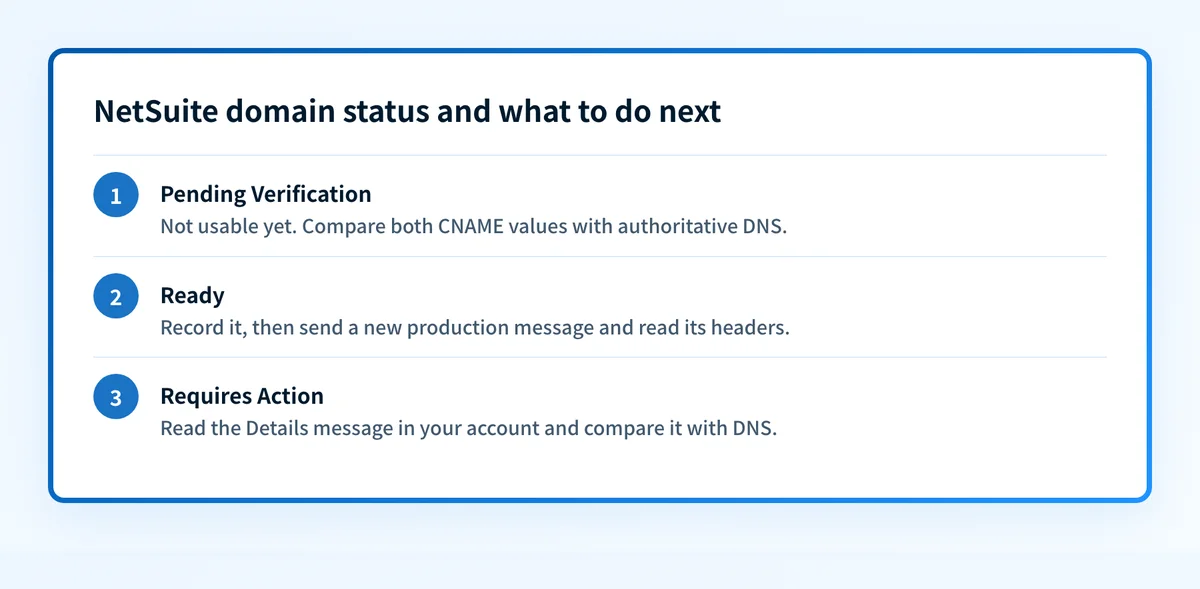
Pending Verification means the setup has not yet reached a usable status. Check the generated CNAME values against the authoritative DNS answers before changing any other email-authentication record.
Ready is the NetSuite status to record before moving to message testing. A ready status is useful vendor evidence, but it does not prove a receiving server evaluated a newly sent message successfully.
Requires Action means the setup needs further review. The specific condition and the required fix depend on the Details information in the affected account. Read that account-provided message, preserve the generated record set, and compare it with the DNS answer before making a change.
How to validate the setup
Validate NetSuite DKIM at four separate layers. A green DNS lookup or a NetSuite status alone is not complete validation.
- DNS: Query both generated CNAME owner names at the authoritative DNS service. Query a public resolver as a second view. Confirm that each CNAME target matches the NetSuite-generated value.
- NetSuite: Confirm the configured domain reaches
Readyin theEmail Domains (DKIM)subtab. - Message: Send a new message through the exact NetSuite production path. Inspect the delivered message's authentication headers. Oracle states that NetSuite applies DKIM headers to outgoing account email after domains are set up and that the headers do not add text to the message content.
- DMARC: After aggregate reports accumulate, review whether the actual NetSuite source has a DKIM result that aligns with the visible From domain where DKIM is intended to support DMARC.
Authentication-Results message header field, which receivers use to communicate authentication assessment results.
A useful validation record is:
sending_domain: yourdomain.com
netsuite_status: Ready
cname_1_authoritative: matches generated value
cname_2_public_resolver: matches generated value
test_message_path: NetSuite production account
authentication_results: observed from delivered message
dmarc_report_review: pending or reviewed
Use the DKIM checker to inspect public DKIM DNS after NetSuite reports readiness. The checker can inspect public DNS, but it cannot confirm that NetSuite is signing production messages, that the selected domain aligns for DMARC, or how a receiver will place future mail.
Troubleshooting
The domain remains Pending Verification
Start with the two CNAME records generated in the affected NetSuite account. Compare their owners and targets against authoritative DNS, then compare a public resolver response.
Check whether the DNS interface appended yourdomain.com automatically. A duplicated suffix can create a record under the wrong hostname. Also confirm both records are CNAMEs, not TXT records.
The available evidence does not establish an exact retry schedule. Avoid repeatedly replacing records while DNS answers are inconsistent.
NetSuite shows Requires Action
Open the Details information for the affected domain in NetSuite and use that account-specific message as the starting evidence. Oracle documents the status label but does not publish a universal cause or repair mapping for every Details message.
Confirm that the domain entered in NetSuite matches the DNS zone and that both account-generated CNAME records resolve as expected. Do not guess at an alternate selector or target.
DNS resolves, but the test message has no usable DKIM evidence
Confirm that the test message was sent after the domain reached Ready and that it followed the NetSuite production path being configured. A DNS lookup does not establish which application generated a particular message.
Inspect the receiving system's delivered-message headers. Compare the visible From domain, the DKIM result, and any available domain identifier. If the message came from another sender using the same From domain, diagnose that sender separately.
Only one NetSuite CNAME record appears linked to a DKIM key
This is expected behavior according to Oracle. Keep both generated CNAME records published. NetSuite uses the two-record arrangement for DKIM key rotation, and only one record has a DKIM key linked at a time.
Check the NetSuite DKIM DNS records
Check the configured sending domain with the DKIM checker after NetSuite reports Ready. Compare the public result with the two CNAME values generated in the affected NetSuite account, then inspect a fresh delivered message from that same account.
Check the NetSuite DKIM record
The checker cannot prove that NetSuite used the correct production path, that a private receiving system accepted the message, or that every future message will authenticate. For teams that need to follow NetSuite and other senders across domains, Palisade is agentic DMARC software that analyzes aggregate-report data, identifies authentication or alignment issues, and proposes prioritized remediation work. A person approves every DNS or DMARC change before it is published.
Evidence
Sources and further reading
Questions readers ask
Frequently asked questions
Does NetSuite DKIM use TXT records?
No. Oracle states that NetSuite generates information for customers to add two DNS CNAME records at their domain provider. Publish the CNAME records generated for the affected NetSuite account rather than converting them to TXT records.
Do I need to add both NetSuite DKIM CNAME records?
Yes. Oracle states that the two CNAME records let Oracle NetSuite manage DKIM key rotation. Publish both generated records even though only one record having a DKIM key linked at a time is expected.
Can I configure more than one NetSuite sending domain?
Yes. Oracle instructs users to enter the domain they want to send email from, one domain per row, on the Email Domains (DKIM) subtab. Validate each domain with its own generated CNAME records and a new message sent through its intended path.
Does a Ready status prove NetSuite messages pass DKIM?
No. A Ready status confirms the NetSuite domain setup reached that vendor status. Send a new production-path message and inspect its delivered authentication headers to verify message-level evidence.
Do NetSuite DKIM keys copy to a non-production account?
No. Oracle states that DKIM keys are not copied into NetSuite non-production accounts. Non-production setup is possible but not required, and production validation still requires the production account's generated records and a production-path test message.

Written by
Samuel ChenardCEO & Co-Founder, Palisade
Samuel Chenard is the CEO and co-founder of Palisade, agentic DMARC software for IT teams and MSPs, from one domain to thousands.
More from Samuel →