Valimail
How to migrate from Valimail without a reporting gap
 ChatGPT
 Claude
 Gemini
 Perplexity
 Grok
In brief
To migrate from Valimail, add a second rua address, compare both tools for 30 days, then replace the _dmarc and _domainkey NS records Valimail hosts.

To migrate from Valimail without losing reports, run the new tool beside it first. Add the new provider's reporting address so both tools receive the same aggregate reports, compare them for about 30 days, and only then replace the records Valimail hosts for you: usually an NS record that delegates _dmarc to ns.vali.email, a second one for _domainkey, and an SPF record that is a single Valimail macro include.
The order matters because Valimail Enforce answers for those names from its own servers. If you remove a delegation before you have copied what sits behind it, the DKIM keys it served stop resolving, and the senders its SPF macro authorized stop passing SPF.
At a glance
Quick takeaways
- A DMARC record can list more than one aggregate-report address, so Valimail and another tool can read the same reports at once.
- Valimail Enforce usually hosts DMARC and DKIM by NS delegation to
ns.vali.email, and SPF through the_spf.vali.emailmacro include. Free Monitor accounts usually keep a TXT record and only send reports todmarc_agg@vali.email. - Valimail's own offboarding guide asks you to copy every DKIM key and every enabled sender out of Valimail before you remove the NS records. Do that first.
- A name that is delegated by NS cannot also hold a CNAME or TXT record in your zone, so each swap is one change: remove the NS record and publish the replacement together.
- Keep the policy tags (
p,sp,np,adkim,aspf, plus anypct,foorrialready present) exactly as they are during the move. A provider change is not a policy change.
Step 1: Find out what Valimail hosts for the domain
Valimail's setup guide for Enforce asks for three changes: an NS record for _dmarc pointing to ns.vali.email, an NS record for _domainkey pointing to the same server, and an SPF record that reads v=spf1 include:%{i}._ip.%{h}._ehlo.%{d}._spf.vali.email ~all (Valimail help center, checked 13 November 2026). Where a DNS host cannot create NS records, Valimail uses a CNAME instead: _dmarc points to yourdomain.com._dmarca.vali.email (Valimail help center). Hosted MTA-STS and TLS reporting are three more CNAMEs, to yourdomain.com._mta-sts.vali.email, policy.mta-vali.email and yourdomain.com._smtptlsrpt.vali.email (Valimail help center).
Run these lookups for your own domain. Replace example.com with it.
dig +short NS _dmarc.example.com
dig +short CNAME _dmarc.example.com
dig +short TXT _dmarc.example.com
dig +short TXT example.com | grep spf1
dig +short NS _domainkey.example.com
dig +short CNAME _mta-sts.example.com
dig +short CNAME mta-sts.example.com
dig +short CNAME _smtp._tls.example.com
dig +short TXT default._bimi.example.com
Any answer that contains vali.email or valimail.com is a record Valimail hosts or reads. Write each one down with the record it replaces. Three patterns cover most domains:
- NS for
_dmarcand_domainkey. This is a full Enforce setup. Valimail serves the DMARC record and every DKIM selector, and you edit both in Enforce, not at your DNS provider. - A
_dmarcCNAME into_dmarca.vali.email. Valimail serves the DMARC record. DKIM may still be in your own zone. - A
_dmarcTXT record whoseruaincludesdmarc_agg@vali.email. This is the free Monitor setup, or an Enforce domain that Valimail lists as "Reporting Only" (Valimail help center). You manage the record yourself, and Step 2 is a one-line edit.
_spf.vali.email, the list of senders it authorizes lives in Valimail, not in DNS. A dig of the macro returns nothing useful on its own, because Valimail answers per sending IP.
Step 2: Add the second reporting address
The rua tag takes a comma-separated list of addresses (RFC 9989, section 4.7), so both tools can receive the same aggregate reports. In Palisade, the domain's Manage DMARC page generates the record to copy; take the rua address from it (Palisade docs).
When _dmarc is delegated to Valimail by NS or CNAME, the record is served from Valimail, so you cannot edit it at your DNS provider. Valimail's help center says the domain's configuration page in Enforce has a section for adding additional aggregate report (RUA) addresses (Valimail help center, checked 13 November 2026). Add Palisade's address there and leave everything else as it is.
When you manage the TXT record yourself, keep every tag and add the second address after the first:
_dmarc.example.com TXT "v=DMARC1; p=quarantine; rua=mailto:dmarc_agg@vali.email,mailto:your-palisade-address@reports.example"The Palisade address above is a placeholder. Copy the real one from the record Palisade generates.
Reports sent to an address on another domain need that domain's permission (RFC 9990, section 4). If no reports reach Palisade after two days, check the address was copied exactly, then contact Palisade support.
Step 3: Compare both tools for about 30 days
Aggregate reports usually arrive once a day from each mailbox provider, so a month gives you enough days to see every regular sender, including monthly billing and newsletter runs. During the overlap:
- Confirm both tools list the same sending sources and roughly the same message counts.
- Compare pass and fail rates for each sender. A large gap points to a sender that Valimail authorizes through its SPF macro and that your new SPF record will need to name.
- Export or screenshot what you need from Valimail. Its offboarding guide asks you to capture every enabled service and netblock, for every domain and subdomain (Valimail help center).
- Leave the policy alone. If a policy change is due, make it before or after the move, not during it.
Step 4: Copy out what Valimail holds, then swap the records
Valimail's own offboarding guide gives the order: capture the enabled services, recreate the DKIM keys, publish an SPF record, then stop pointing DKIM and DMARC to Valimail. It warns that these DNS steps "must be performed in a timely manner or you could run the risk of deliverability issues" (Valimail help center). Keep Valimail active until each replacement resolves.
- DKIM keys first. Copy every DKIM key you have configured in Valimail, for every domain and subdomain. If the new home is another provider's delegated zone, add each selector there first; Palisade's hosted DKIM is also a
_domainkeyNS delegation, so a move to Palisade works this way (Palisade hosted DKIM docs). Then switch the_domainkeyNS record in one change. If the new home is your own zone, remove the NS record and add every selector in the same change: while_domainkeyis delegated, selectors under it in your zone do not resolve, and some DNS hosts refuse to create them. No DNS query lists every selector, so check your list against the selectors in the aggregate reports you collected during the overlap. A missed selector fails DKIM for that sender. - SPF. Build a real SPF record from the services and netblocks you captured, or use the new provider's hosted SPF include, and check it stays under the 10-lookup limit. Then replace the Valimail macro record. Valimail notes that if the macro is removed and nothing else is in the record, SPF fails and DMARC can pass only on DKIM (Valimail help center). In Palisade, hosted SPF is a single include, and you copy every existing mechanism into it before you publish (Palisade hosted SPF docs).
- DMARC. Copy the current policy exactly from
dig +short TXT _dmarc.example.com. Then, in one change, remove the_dmarcNS record (or CNAME) and publish the new provider's hosted record or your own TXT record. A name delegated by NS cannot also hold records in your zone, so the two cannot overlap. Keep the same policy tags, including anypct: receivers that still honourpctwill apply the policy to all mail if you drop it. In Palisade, hosted DMARC is a CNAME, and a diff preview shows what changes before you apply it (Palisade hosted DMARC docs). - MTA-STS and TLS reporting. If Valimail hosts MTA-STS, repoint the
mta-stshost first and wait untilhttps://mta-sts.example.com/.well-known/mta-sts.txtserves the new policy with a valid certificate and the rightmxlines. Then repoint_mta-sts, which changes theid(RFC 8461, section 8.1). Replace the_smtp._tlsCNAME with the new provider'sv=TLSRPTv1; rua=...TXT record in the same change. With Palisade, TLS reporting is a TXT record in your own zone. - BIMI. If your BIMI record loads its logo or certificate from
amplify.valimail.com, as Valimail's owndefault._bimirecord did when checked withdigon 13 November 2026, host both files at the new provider before you changedefault._bimi. - Verify, then cancel. Run the lookups from Step 1 again. When no NS, CNAME or SPF record points to
vali.emailand only theruaaddress remains, remove Valimail's address fromruaandruf, tell Valimail support the steps are done, and cancel on your schedule. If you want to keep the free Monitor product, the offboarding guide says to skip removing the DMARC delegation. To move DMARC anyway and keep Monitor, leave Valimail'sruaaddress in the record you publish.
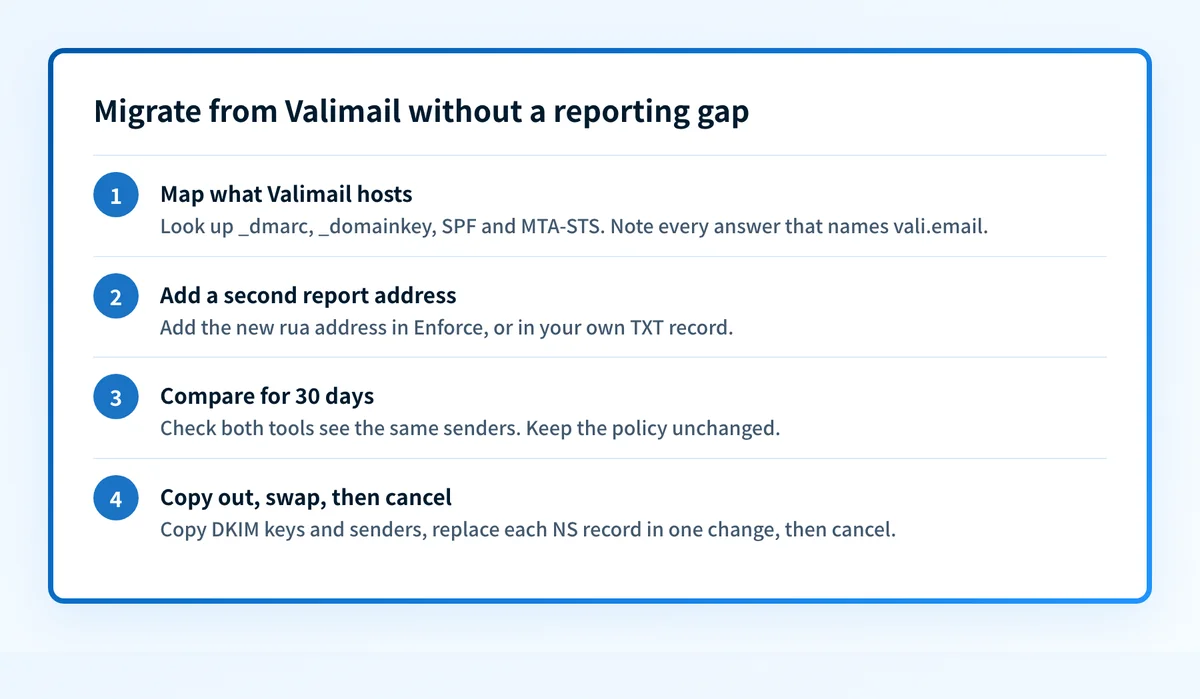
A switch from Valimail that stops halfway
One unfinished move is easy to miss: two addresses left in rua for months. Both tools keep receiving reports, the old contract renews, and nobody owns the last step because the new tool already looks like it works. If dig +short TXT _dmarc.example.com still shows vali.email next to your new provider long after the overlap, the switch did not finish. Either complete Step 4 or decide on purpose to keep Valimail as the second reader.
What changes for an MSP moving many client domains
The method is the same for every client domain, so an MSP can batch it. Group domains by what Valimail hosts: domains with a TXT record need only the rua edit, while domains with NS delegations need the DKIM and sender export first. Run the 30-day overlap for a whole group at once, and move the delegations group by group. Valimail's MSP products are sold per domain through Pax8 (Valimail MSP page), so check how each client's Pax8 subscription renews before you cancel.
For the general provider-change checklist, including rollback records and change approvals, see the DMARC provider migration guide, and for DMARC basics the DMARC learning hub. For how Valimail and Palisade compare on price and MSP terms, see the Valimail alternative comparison. For what Valimail publishes about price and product, see Valimail pricing and the Valimail review.
Evidence
Sources and further reading
- Valimail help center: set up your DNS records to use Valimail
- Valimail help center: pointing a DMARC record to Valimail
- Valimail help center: managing the DMARC record in Valimail
- Valimail help center: Enforce offboarding process
- Valimail help center: what happens if we stop pointing SPF to Valimail
- Valimail help center: MTA-STS hosting and TLS reporting
- RFC 9989: DMARC
- RFC 9990: DMARC aggregate reporting
- RFC 8461: SMTP MTA Strict Transport Security
- Palisade docs: hosted DKIM
- Palisade docs: hosted SPF
- Palisade docs: hosted DMARC
- Palisade docs: updating your DMARC record on your DNS provider
Questions readers ask
Frequently asked questions
Can I run Palisade and Valimail at the same time?
Yes. A DMARC record's rua tag can list both tools' reporting addresses, so Palisade and Valimail each receive the same aggregate reports. If Valimail hosts the record by NS or CNAME, add Palisade's address in the domain's configuration page in Valimail Enforce. If you manage a TXT record, add the address to the rua list yourself.
How do I know if Valimail hosts my DMARC record?
Run dig +short NS _dmarc.yourdomain.com and dig +short CNAME _dmarc.yourdomain.com. An answer of ns.vali.email, or a CNAME ending in _dmarca.vali.email, means Valimail serves the record and the policy is edited in Valimail. A TXT answer that only lists dmarc_agg@vali.email in rua means you manage the record and Valimail only receives reports.
What do I need to copy out of Valimail before leaving?
Copy every DKIM key and every enabled sending service and netblock, for every domain and subdomain. Valimail's offboarding guide lists both. The DKIM keys are served from Valimail while _domainkey is delegated to it, and the SPF macro authorizes senders from the list in Valimail, so neither survives the move unless you rebuild it.
How long should Valimail and the new tool run side by side?
Run Valimail and the new tool side by side for about 30 days. Aggregate reports usually arrive daily, and a month covers monthly senders such as billing and newsletter platforms, so both tools have seen the same full set of sources before you remove any delegation.
Will I lose my DMARC report history when I leave Valimail?
Valimail's report history does not move to a new tool on its own. Its offboarding guide does not say what happens to history after you cancel, so export or screenshot what you need from Valimail during the 30-day overlap, and ask the new provider whether it can import it.
Does moving off Valimail change my DMARC policy?
No. Moving off Valimail does not change your DMARC policy as long as you keep p, sp, np, adkim and aspf, plus any pct, fo or ri tags, exactly as they are when you replace the NS record. Changing provider and changing policy are separate changes, and doing both at once makes any delivery problem harder to trace.

Written by
Samuel ChenardCEO & Co-Founder, Palisade
Samuel Chenard is the CEO and co-founder of Palisade, agentic DMARC software for IT teams and MSPs, from one domain to thousands.
More from Samuel →