IONOS email rejected by Gmail
 ChatGPT
 Claude
 Gemini
 Perplexity
 Grok
In brief
IONOS email rejected by Gmail: match the SMTP code, restore IONOS SPF and DKIM DNS records, then validate a real delivered message and inspect DMARC.
IONOS email rejected by Gmail requires matching the exact Gmail SMTP response before changing DNS. For an IONOS-hosted domain, IONOS documents the SPF recovery path as DNS settings > Add Record > IONOS SPF (TXT) > Save, while DKIM can require restoring IONOS CNAME records if they were deleted. Those records can support authentication, but they do not explain every Gmail rejection.
At a glance
Quick takeaways
- Gmail SMTP codes distinguish unauthenticated mail from reputation, PTR, content, and rate-limit problems.
- IONOS states that SPF is enabled by default for IONOS-hosted domains.
- An external DNS provider needs the IONOS SPF include merged into the domain's existing SPF policy, not published as a second SPF record.
- IONOS states that DKIM is activated by default when a domain uses IONOS name servers.
- A successful DNS lookup does not prove that the production message path authenticated with Gmail.
- Validate public DNS, the IONOS configuration, a delivered message, and DMARC reports separately.
What should I check before configuring IONOS?
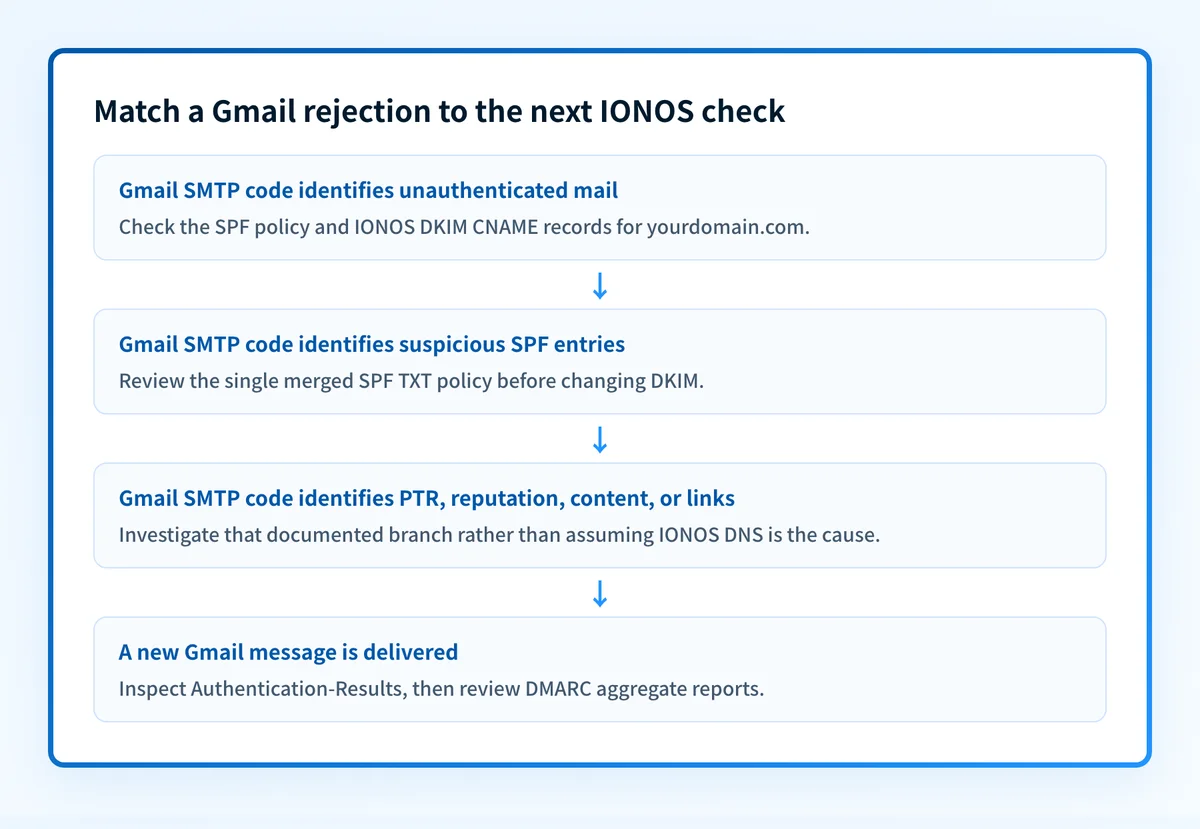
First, save the complete Gmail SMTP response from the rejected or deferred message. Gmail documents 421 4.7.26 for unauthenticated mail and states that "Gmail requires that all senders authenticate with SPF or DKIM." Other Gmail responses can point to suspicious SPF entries, missing or mismatched PTR records, IP or domain reputation, or message content and links.
Confirm that the mail in scope is sent through an IONOS email account. This guide covers outbound mail from an IONOS-hosted sending domain. It does not diagnose inbound delivery to an IONOS mailbox, Gmail client compatibility, or mail sent by another ESP using the same visible From domain.
You need access to the authoritative DNS zone and permission to change records. Review the ESP setup guides first if you need to separate SPF, DKIM, and DMARC responsibilities before changing DNS.
Copy DNS values from the account and domain you are configuring. Do not publish selectors, targets, tokens, or hostnames from another account or from an online example.
Which setup method should I use?
Use the IONOS DNS recovery path when IONOS hosts the domain's DNS and the SPF record is absent. IONOS documents DNS settings > Add Record > IONOS SPF (TXT) > Save for restoring its SPF configuration. Allow up to 48 hours for DNS propagation after the change.
If DNS is hosted elsewhere, use the IONOS SPF value only as one mechanism in the domain's existing SPF policy. A domain must not publish separate competing SPF TXT records. IONOS warns that editing or deleting an existing SPF record can affect email sending, so identify every authorized sender before merging values.
How do I configure SPF and DKIM for IONOS?
1. Identify the Gmail failure class
Read the complete SMTP code before changing IONOS DNS. 421 4.7.26 supports an authentication investigation. Gmail documents 451 4.7.24 for an SPF record with suspicious entries, while other temporary or blocked outcomes can relate to PTR, reputation, content, or links. Follow Gmail's SMTP error documentation for the exact code instead of assuming a missing SPF or DKIM record caused the rejection.
2. Open the IONOS DNS settings for the sending domain
Open the DNS settings for the exact domain in the visible From address. Use the documented IONOS SPF path: DNS settings > Add Record > IONOS SPF (TXT) > Save.
Check which DNS provider is authoritative before adding anything. If IONOS is not authoritative, make the change with the external DNS provider instead. DNS hosts often append the zone name to a host field, so entering a full name where a relative name is expected can create a duplicated domain name.
3. Restore or merge the SPF record
For an IONOS-hosted domain, choose IONOS SPF (TXT) in the documented DNS flow. For externally managed DNS, IONOS documents this SPF value for IONOS email accounts:
Record type: TXT
Host: @ or the zone apex, according to the DNS provider
Value, illustrative only:
v=spf1 include:_spf-us.ionos.com ~allDo not publish this value as a second SPF record or assume it covers every sender on the domain. Copy the current SPF policy, identify all authorized senders, and merge the IONOS mechanism into one valid record.
If the domain already uses another mail provider, retain its authorized mechanisms when rebuilding SPF. IONOS says its mail-server information is automatically supplemented when another service already has an SPF TXT record. Replacing the full policy with an IONOS-only example can break mail sent through another authorized system.
4. Restore the IONOS DKIM CNAME records when needed
IONOS states that DKIM is activated by default when the domain uses IONOS name servers. If the DKIM records were deleted, IONOS documents reactivating DKIM with three CNAME records, two of which are shown here. The documented TTL is one hour.
Record type: CNAME
Host: s1-ionos._domainkey
Value:
s1.dkim.ionos.comRecord type: CNAME
Host: s2-ionos._domainkey
Value:
s2.dkim.ionos.comIONOS lists a third CNAME selector record on its DKIM page. This guide does not reproduce it, because IONOS does not say whether that selector is the same for every customer. Copy it, with its target, from the IONOS DKIM page or your IONOS account for the domain in scope.
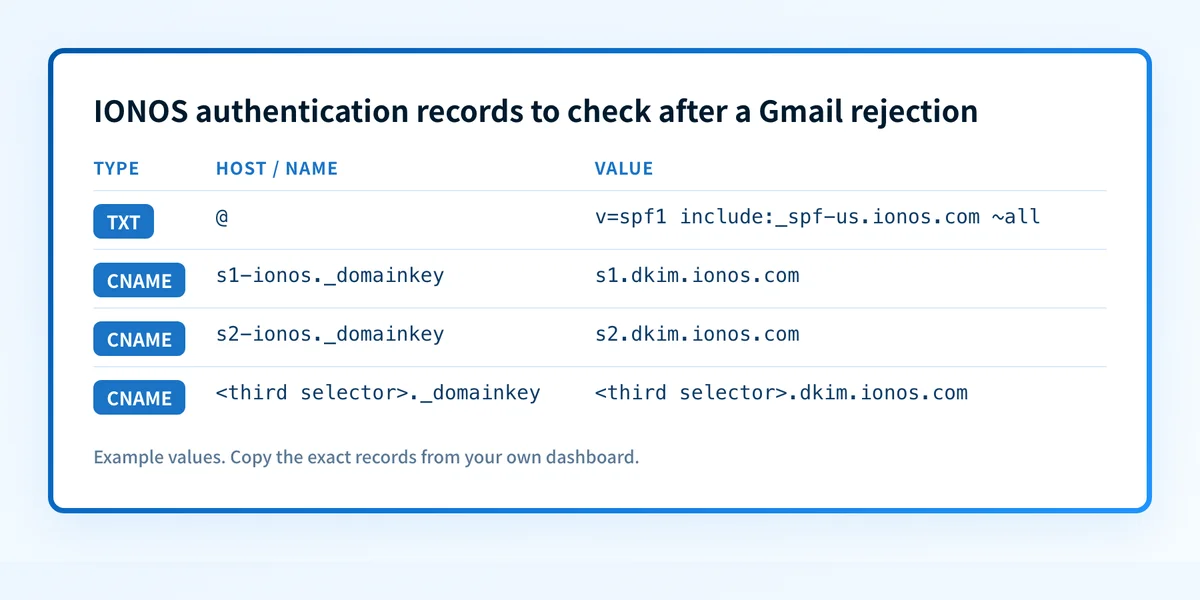
For a subdomain, IONOS instructs users to append the subdomain name to each hostname. Use the IONOS DKIM recovery instructions for the domain in scope. Do not put a CNAME beside another record type at the same DNS owner name.
5. Send a new message through the affected path
After DNS answers publicly, send a new message from the same IONOS mailbox and sending route that received the Gmail response. Send it to a Gmail mailbox where you can inspect the raw message source.
Do not use an old message as evidence. It may have been sent before the DNS change, through a different route, or before a DNS resolver refreshed its answer.
How does this setup affect DMARC?
SPF or DKIM must authenticate and align with the visible From domain for DMARC to pass through that mechanism. A passing SPF result for an unrelated return-path domain, or a DKIM signature with an unrelated d= domain, does not satisfy aligned DMARC authentication.
After repairing IONOS SPF or DKIM, use Palisade's DMARC checker to inspect the published DMARC record. A public record check cannot prove why Gmail rejected one message, confirm every IONOS route signs correctly, or predict future Gmail placement.
For broader Gmail requirements outside the IONOS DNS workflow, see how to authenticate email for Gmail.
How do I validate the setup?
Check public DNS
Query the authoritative DNS server and at least one public resolver after propagation. Confirm there is one SPF TXT policy at the apex and that each expected DKIM CNAME, including the third selector you copied from IONOS, resolves to the documented IONOS target.
dig +short TXT yourdomain.com
dig +short CNAME s1-ionos._domainkey.yourdomain.com
dig +short CNAME s2-ionos._domainkey.yourdomain.com
dig +short CNAME <third-selector>._domainkey.yourdomain.com
Public DNS answers show what resolvers can retrieve. They do not prove an IONOS mailbox used the intended path.
Check the IONOS vendor configuration
IONOS documentation confirms the DNS recovery paths but does not establish a current customer-visible SPF or DKIM status screen. Confirm the domain, DNS zone, and records you changed against the documented IONOS record values.
If an authenticated IONOS account shows a status indicator, treat it as account evidence only. A green vendor indicator does not prove a Gmail recipient received a message or that the message passed DMARC.
Inspect a delivered Gmail message
Open the raw source of a newly delivered Gmail message. Inspect the receiver-added Authentication-Results field. RFC 8601 defines Authentication-Results and its trust boundary: trust results added by the receiving system, not a copied header from an earlier hop.
Confirm the result for the new message, then compare the authenticated SPF or DKIM domain with the visible From domain. Keep a redacted copy with the DNS change record.
Review DMARC reports
After aggregate reports accumulate, inspect IONOS traffic separately from other sources using the domain. Confirm that legitimate IONOS mail passes an aligned SPF or DKIM path, and investigate any unexpected sources before changing DMARC enforcement.
Troubleshooting
Gmail returns 421 4.7.26
Gmail documents 421 4.7.26 for unauthenticated mail. Check the published SPF policy and DKIM CNAME records, then inspect a new delivered message when delivery resumes. Do not infer that one record alone caused the response without message evidence.
Gmail returns 451 4.7.24
Gmail documents 451 4.7.24 when an SPF record contains suspicious entries. Review the complete SPF policy for malformed or unexpected mechanisms. Preserve authorized services when correcting it, because removing a legitimate sender can create a different delivery failure.
The SPF record is missing after an IONOS DNS change
Confirm that IONOS is authoritative for the domain. If external DNS hosts the zone, the IONOS console cannot publish the active record. Check the final fully qualified owner name for a duplicated zone suffix and allow the propagation time IONOS documents.
DKIM records exist but Gmail still rejects mail
Existing DNS records show only that the public targets resolve. Send a new message through the affected IONOS path and inspect Gmail's trusted authentication result. If Gmail's exact response points to PTR, reputation, content, or links, the DKIM records do not establish that DNS is the relevant branch.
Gmail temporarily rate-limits the sending IP
Gmail documents temporary rate limiting when a sending IP lacks a matching PTR record. This is an IP and reverse-DNS investigation. Do not alter IONOS SPF or DKIM records unless the SMTP response or message evidence also supports an authentication issue.
Check the DMARC record after the IONOS repair
Once the Gmail SMTP response supports an authentication investigation and the IONOS SPF or DKIM records answer publicly, inspect the domain's published DMARC policy. Check the DMARC record before changing enforcement, then compare its output with the new Gmail message headers.
A DNS check does not prove why Gmail rejected an individual message, repair the IONOS configuration, monitor every sending path, or guarantee future inbox placement. For teams managing several providers or domains, Palisade is agentic DMARC software that analyzes aggregate-report data, identifies authentication and alignment issues, and proposes the next policy step for human review. It does not autonomously change the DMARC policy or control Gmail's private delivery decision. Start with Palisade.
Evidence
Sources and further reading
Questions readers ask
Frequently asked questions
Why is my email being rejected by Gmail?
Gmail can reject or defer email for several documented reasons, including unauthenticated mail, suspicious SPF entries, missing or mismatched PTR records, IP or domain reputation, and message content or links. Use the exact Gmail SMTP code to choose the supported next check rather than assuming IONOS DNS caused the result.
What does Gmail error 421 4.7.26 mean for IONOS mail?
Gmail documents 421 4.7.26 for unauthenticated mail and says it requires all senders to authenticate with SPF or DKIM. For an IONOS-hosted domain, check the published SPF policy and the IONOS DKIM CNAME records, then inspect a new delivered message.
What does Gmail error 451 4.7.24 mean?
Gmail documents 451 4.7.24 for an SPF record that contains suspicious entries. Review the complete SPF policy for malformed or unexpected mechanisms, and keep every authorized sender when you correct it.
Is there an issue with IONOS email?
Not established from a Gmail rejection alone. The documented material does not provide current IONOS service-status evidence. Match the Gmail SMTP response to its documented cause category and consult an official IONOS status source when one is available.
Can a valid IONOS SPF record guarantee Gmail delivery?
No. A valid IONOS SPF record supports authentication, but Gmail also documents decisions related to PTR configuration, reputation, content, links, and other message-specific conditions. A delivered test message and its trusted authentication results provide stronger evidence for the path you tested.

Written by
Samuel ChenardCEO & Co-Founder, Palisade
Samuel Chenard is the CEO and co-founder of Palisade, agentic DMARC software for IT teams and MSPs, from one domain to thousands.
More from Samuel →