Instantly email warmup
 ChatGPT
 Claude
 Gemini
 Perplexity
 Grok
GrokIn brief
Instantly email warmup uses pool-based message activity and a Health Score, but it does not prove campaign authentication or inbox placement.
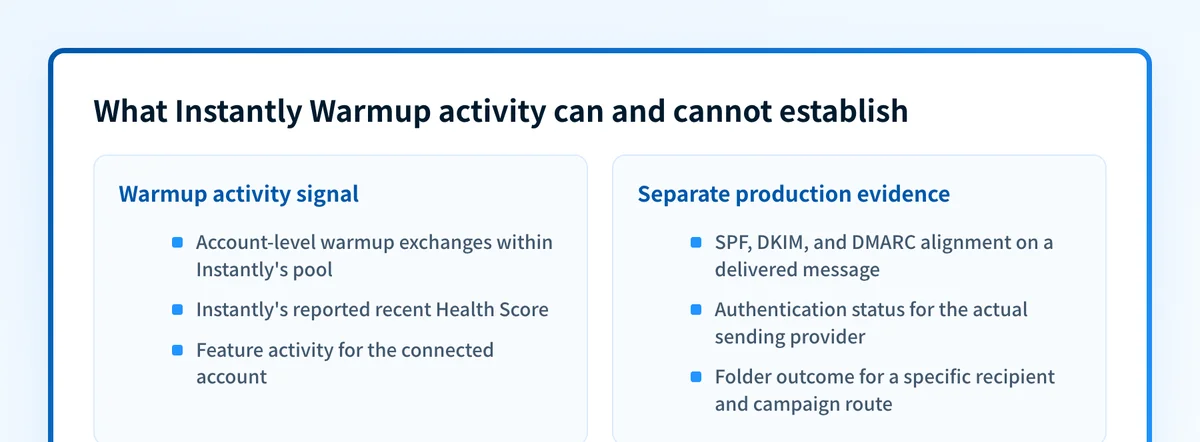
Instantly email warmup is an account-level feature that exchanges automated warmup messages within Instantly's pool and reports a Health Score. Instantly documents that score as a recent warmup inbox-versus-spam signal. It can show activity within the feature, but it does not prove that a real campaign is authenticated, reaches a particular recipient inbox, or will have the same result with a specific audience.
At a glance
Quick takeaways
- Instantly Warmup applies to an enabled email account, not every system that can send with the same visible From domain.
- Instantly says enabled accounts exchange warmup emails within its user pool, with automatic opens and replies.
- Instantly describes Health Score from warmup emails that reached inboxes versus spam folders during the prior seven days.
- A Health Score is not proof of SPF, DKIM, or DMARC alignment on a real campaign message.
- A vendor status or warmup signal does not reveal a receiver's private filtering decision for a future campaign.
- Validate public DNS, the sending provider, a delivered production-path message, and DMARC reports separately.
What should I check before configuring Instantly?
First, identify the exact sending path you are assessing. Instantly Warmup concerns the connected outreach account. Marketing outreach, transactional email, employee mail, and another ESP can all use the same visible From domain while having different authentication and reputation evidence.
You need access to the intended Instantly account and to a mailbox that can receive a real test message with raw headers available. If the sending domain needs authentication changes, you also need access to the authoritative DNS zone and the sending provider's account-specific setup values. Instantly's Warm-Up explanation describes pool activity, not DNS configuration for your domain.
Copy DNS values from the account and domain you are configuring. Do not publish selectors, targets, tokens, or hostnames from another account or from an online example.
Keep the question narrow. A warmup signal may help you understand activity for one connected account. It cannot establish list consent, campaign content quality, recipient engagement, a private receiver decision, or the behavior of another outbound route.
Which setup method should I use?
Use Instantly Warmup when you want to review the vendor's documented account-level warmup activity. Use a delivered message from the real campaign route when the question is whether that route authenticates correctly or reaches a test mailbox as expected.
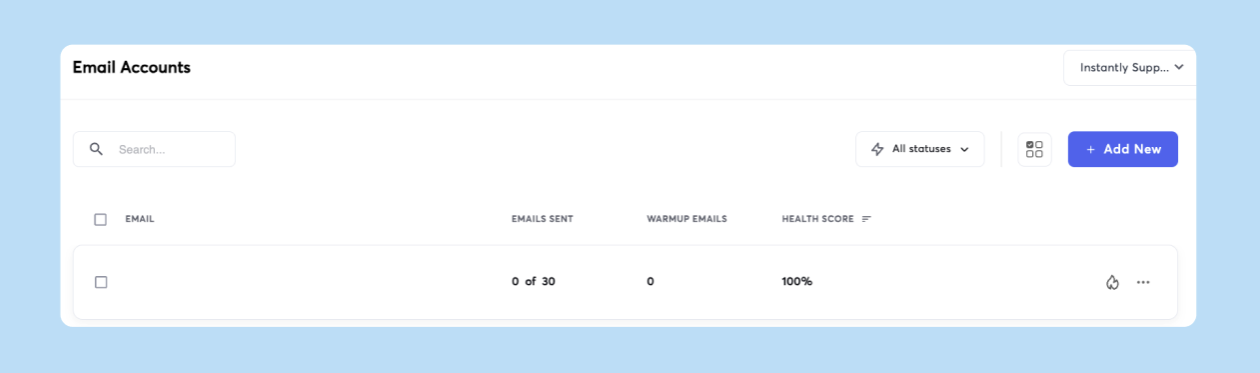
Instantly's Email Accounts dashboard documentation describes the account dashboard that exposes Warmup-related information. The screenshot is evidence of the vendor's account-level view. It is not evidence that a campaign reached an inbox.
Do not use a dedicated IP choice in another sending service as a substitute for authentication or message validation. That infrastructure choice and Instantly's Warmup feature answer different questions.
How do I configure SPF and DKIM for Instantly?
Instantly Warmup does not publish SPF or DKIM records for your domain. Configure authentication in the service that sends the campaign, then validate a newly delivered message from that same route. Instantly documents Warmup controls under Email Accounts > Settings, but those controls do not create a DKIM selector, publish DNS, or change a DMARC policy.
1. Identify the campaign's actual sending domain
Record the visible From domain, the connected Instantly account, the provider account, and the campaign or mailbox route in scope. A connected inbox might send through Google Workspace, Microsoft 365, or another SMTP service. The service that signs the message must provide the authentication instructions.
2. Review the connected account's Warmup settings
Open Email Accounts > Settings for the connected account, following Instantly's Warmup Settings documentation. Confirm the selected account before interpreting its Warmup activity or changing its settings.
The documented path was verified from Instantly's Help Center. Warmup settings affect feature activity for the selected account. They do not establish authentication for the campaign route.
3. Retrieve authentication values from the actual sending provider
Open the current documentation and account interface for the provider that sends the campaign. Copy its account-generated SPF and DKIM values into the approved DNS change.
The record shapes below are illustrative only. They show the records to identify, not records to publish.
Record type: TXT
Host (illustrative only):
yourdomain.comValue (illustrative only):
v=spf1 include:provider.example ~allRecord type: TXT
Host (illustrative only):
selector1._domainkey.yourdomain.comValue (illustrative only):
v=DKIM1; k=rsa; p=<provider-generated-public-key>Do not publish these examples. Copy the complete values generated by the service that sends your campaign. If an SPF record already exists, add authorized mechanisms to that single SPF record rather than publishing a second SPF record.
Some DNS providers append the zone name to the host field. Check the final fully qualified owner before saving. Entering a full domain in a host field that appends yourdomain.com can create a duplicated and invalid owner name.
4. Verify the records in the sending provider
Wait for the provider to accept the published records, then review its authentication status. A passing provider indicator shows that the provider accepted its current configuration. It does not prove that a campaign message used the expected return path or DKIM signature.
If the provider reports a DNS error, compare its complete account-generated values against the authoritative DNS response before editing anything.
5. Send a real test message through the campaign path
Send a new message through the same account, provider, and route intended for production. Deliver it to a mailbox where you can inspect raw source. Check the DKIM-Signature field and the receiver-added authentication assessment. RFC 8601 defines the Authentication-Results field and explains its trust boundary.
A header copied into a message by an untrusted sender is not equivalent to an assessment added by the receiving system. Retain only a redacted header copy in the change record.
How does this setup affect DMARC?
DMARC evaluates whether SPF or DKIM passes with an identifier aligned to the visible From domain, then applies the domain's published DMARC policy. RFC 9989 defines the relationship between the RFC5322.From domain, SPF, DKIM, alignment, and DMARC policy.
Instantly Warmup does not publish a DMARC record or establish DMARC alignment for a campaign. Use Palisade's DMARC checker to inspect the public DMARC record for the visible From domain before changing policy. A public DNS result cannot prove which identifier a particular campaign used, whether that message passed alignment, or which folder a recipient selected.
For the broader setup context, use the vendor email authentication learning hub. A warmup signal can coexist with a real-message authentication failure.
How do I validate the setup?
Check public DNS
Query the SPF, DKIM, and DMARC owners used by the campaign domain. Compare the authoritative DNS answer with at least one public resolver.
dig +short TXT yourdomain.com
dig +short TXT selector1._domainkey.yourdomain.com
dig +short TXT _dmarc.yourdomain.com
These checks show what public DNS returns at the time of the query. They do not show private routing, a recipient's filtering decision, or future campaign placement.
Check the vendor status
Review the sending provider's authentication status, then review the selected Instantly account's Warmup status. Instantly's campaign-readiness guidance includes its own recommendations for warmup duration and Health Score. Treat those as Instantly feature guidance, not a mailbox-provider guarantee.
A green status in either system is not a delivered-message check.
Inspect a delivered message
Inspect a new message from the exact production route. Confirm the visible From domain, the envelope or return-path identifier where available, the DKIM d= domain and selector, and the trusted Authentication-Results values.
For DMARC, the relevant result is whether an SPF or DKIM pass aligns with the visible From domain. A DKIM pass for an unrelated domain can be valid cryptographically but still fail DMARC alignment.
Review DMARC reports
After aggregate reports accumulate, review the sources that use the sending domain and their authentication and alignment results. This separates the selected Instantly-connected route from other legitimate or unknown sources using the same domain.
Warmup activity does not replace this inventory. It measures a different set of exchanges.
Record the evidence before deciding what changed
Use a short evidence record when reviewing a Health Score or an isolated delivery observation. It prevents a warmup signal from being treated as proof about a different account, domain, or campaign.
Sending domain: outreach.yourdomain.com
Visible From address: sender@outreach.yourdomain.com
Authenticated identifiers observed: SPF smtp.mailfrom=..., DKIM d=..., selector=...
Provider and campaign context: connected account and campaign name or ID
Observed volume and timing: message count, send window, and warmup period
Test evidence: redacted delivered headers and recipient-folder observation
Question to answer: Does this production route pass DMARC and reach this test mailbox?
This is an illustrative operational record, not an Instantly interface or a vendor-required format. Record the exact question before drawing a conclusion.
A Health Score can establish Instantly's reported warmup activity for its pool over the metric's stated period. It cannot establish the reputation of every sender using the domain, the treatment of a particular campaign, or the placement decision of a particular mailbox. One inbox observation can be useful evidence for that one route and test recipient. It is still not a receiver-wide result.
Troubleshooting
The Health Score is high but a campaign message fails DMARC
Inspect a newly delivered campaign message and compare the visible From domain with the SPF and DKIM identifiers. A warmup score does not create alignment or change DNS. Correct the authentication configuration in the service that actually sends the campaign, then retest the same path.
The sending domain changed after warmup began
Treat the new domain as a separate authentication and message-validation scope. Check its published SPF, DKIM, and DMARC records, verify the provider configuration for that domain, and send a new message from the new route. Do not use the previous account's warmup history as evidence for the new domain.
A test message went to spam in one mailbox
Keep the raw headers, send time, sender account, recipient mailbox, and campaign context. Confirm authentication first. Then determine whether the observation is isolated or repeats across controlled tests. For an evidence-led diagnosis of real-message filtering, see why emails go to spam and how to fix it.
Do not infer a universal reputation or placement result from one folder outcome.
DNS looks correct but the provider remains unverified
Check the authoritative record owner and the complete account-generated value. Look for a duplicated DNS suffix, a truncated TXT value, an existing conflicting record, or a change made in the wrong zone. If the record is correct publicly, follow the provider's documented verification process before replacing it.
Warmup activity does not answer the operational question
If the unresolved question is whether warmup is a useful service category, review does email warmup work? and email warmup service: compare the evidence before choosing. If the question is campaign authentication or a specific message result, continue with DNS, provider, and delivered-message evidence instead.
Evidence
Sources and further reading
Questions readers ask
Frequently asked questions
Does Instantly email warmup guarantee inbox placement?
No. Instantly's Health Score reports warmup-pool activity over its stated measurement period. It does not guarantee where a real campaign will land for a specific recipient, audience, provider, or future send.
Does a high Instantly Health Score prove SPF, DKIM, and DMARC pass?
No. SPF, DKIM, and DMARC need separate DNS and delivered-message evidence from the production campaign route. A warmup metric does not publish DNS records or prove identifier alignment.
Can I use one warmup result for every sender using my domain?
No. Each sending route can use different providers, envelope identifiers, DKIM selectors, content, and recipient patterns. Validate every materially different route that sends with the domain.
What should I check after changing a campaign sending domain?
Check the new domain's public SPF, DKIM, and DMARC records, the sending provider's verification state, and a newly delivered message from the exact route. Existing warmup history for another domain is not proof for the new one.
Does one message in spam prove the domain has a reputation problem?
No. It proves an observed folder result for that message and mailbox. Preserve the redacted headers and sending context, confirm authentication, then repeat controlled tests before making broader conclusions.

Written by
Johanie DupontBrand & Ecommerce Email
Johanie Dupont works on brand and ecommerce email at Palisade: BIMI and verified marks, sender requirements, and getting marketing mail into the inbox.
More from Johanie →