Inbox placement test: what it shows and what it cannot prove
 ChatGPT
 Claude
 Gemini
 Perplexity
 Grok
GrokIn brief
Inbox placement test results show how a sample email reached seed mailboxes at one time, plus the evidence needed before changing a campaign.

An inbox placement test sends a representative message to seed mailboxes and records whether those copies reach the inbox, spam folder, or go missing. It is useful provider-specific evidence for that message, test configuration, and time. It cannot forecast every recipient's outcome, reveal a mailbox provider's classifier logic, or guarantee where a later campaign will land.
At a glance
Quick takeaways
- An inbox placement test records folder outcomes for seed addresses, not every subscriber.
- Use a message and sending path that match the campaign or incident under investigation.
- Record the exact message version, authenticated identifiers, send time, and seed group before interpreting a result.
- A passing SPF, DKIM, or DMARC result does not determine inbox versus spam placement.
- Compare seed-list observations with real-recipient complaint, bounce, and delivery evidence.
- Retest after one evidence-supported change so the result remains comparable.
What this tool checks
An inbox placement test checks how a sample message is handled at a testing service's seed mailboxes. Amazon Pinpoint's inbox placement test documentation describes sending a sample message to special addresses at major email domains and reporting inbox, spam, missing, SPF, and DKIM outcomes by provider.
This is narrower than the broader subject of email deliverability. SMTP acceptance, delivery, and inbox placement are related observations, but an inbox placement test focuses on the folder result recorded for test copies.
A seed-list result does not expose every recipient's engagement history, mailbox rules, complaint behavior, or a provider's private filtering decision. Kit's guidance for analyzing inbox placement tests notes that seed addresses do not have real subscriber engagement, so seed-test data does not always correlate with actual deliverability.
If you already have a received copy of the message, Palisade's email spam checker can inspect message-level SPF, DKIM, DMARC, sending-IP blocklist, and content signals. It does not operate a seed list, report Gmail or Outlook folder placement, continuously monitor the sending path, or guarantee inbox placement.
How to run the check
1. Define the exact message and sending path
Use a message that matches the campaign or incident you need to investigate. Keep the visible From address, envelope sender where available, DKIM signing domain, sending application, message content, links, and sending infrastructure consistent with the production path.
Do not substitute a stripped-down test email for a campaign message. Different headers, links, or sending infrastructure make the result less useful.
You can independently inspect the public DMARC record for the visible From domain:
# Illustrative only. This confirms a public DNS answer, not inbox placement.
dig +short TXT _dmarc.yourdomain.com
A public DNS lookup does not prove that the production sender used the expected return path, signed the message, or reached a particular folder.
2. Send the representative message to the supplied seed addresses
Use the placement-testing service's supplied seed addresses and documented method. The provider's own seed list is necessary when you need its reported provider and folder outcomes.
Send the message through the same application and route you intend to assess. If you must use a test path, label it as a test path rather than treating it as evidence of the production campaign.
3. Record the test evidence before changing anything
Keep one record for every run. This makes later comparisons possible and prevents an overall placement percentage from hiding a changed sender, message, or audience.
INBOX PLACEMENT TEST EVIDENCE
Message or campaign ID: campaign-2026-08-12-rev-b
Visible From domain: yourdomain.com
Envelope sender domain: mail.yourdomain.com
DKIM d= domain and selector: yourdomain.com / selector1
Seed or test recipient group: provider seed group A
Send time: 2026-08-12T14:30:00Z
Observed result by receiver: inbox / spam / missing
SMTP or bounce evidence: redacted delivery event or bounce category
Authentication evidence: SPF, DKIM, and DMARC results from a delivered copy
Change before retest: one documented variable
Retest date: 2026-08-13
Use redacted identifiers only when sharing this record outside the team. Do not include recipient addresses, authentication tokens, private headers, or customer data.
An illustrative redacted result fragment might look like this:
Message ID: campaign-2026-08-12-rev-b
Provider group: test-provider-a
Observed folder: spam
SPF / DKIM / DMARC: pass / pass / pass
SMTP evidence: accepted by receiving system
Retest condition: no change recorded
This fragment is an observation for one message, test configuration, and time. It is not a forecast for all recipients or an explanation of the receiving provider's classifier.

How to interpret the results
Inbox at the observed seed addresses
An inbox result means the tested copy reached the inbox at the seed mailboxes reported for that run. It is evidence that the message and path worked under those conditions.
Do not treat the result as a campaign-wide placement guarantee. Real subscribers have different engagement, complaint, and mailbox histories than seed addresses.
Spam at one or more observed seed addresses
A spam result identifies a provider, message version, and sending path that need more evidence. It does not identify one universal cause.
First compare the tested message with the intended production path. Then inspect the delivered copy's authentication results, check whether public blocklists name the sending domain, and review sender-quality evidence for the same program, such as complaint and bounce trends. If real recipients also see spam placement, use the evidence-led workflow in why outbound email goes to spam.
Missing at the observed seed addresses
A missing result means the testing service did not report the expected copy in inbox or spam according to its method. Confirm the service's own definition, then inspect sent-message logs, delivery events, SMTP responses, and any bounce evidence.
A missing seed observation does not prove that all mail was rejected or that a particular receiver policy caused the result. The provider's own dashboard or delivery logs may be the only source that can explain an account-specific decision.
Passing authentication beside poor placement
SPF, DKIM, and DMARC results are authentication evidence. They do not dictate a receiving provider's folder decision.
For Gmail senders, Google's sender guidelines direct senders to keep the Postmaster Tools spam rate below 0.3% and recommend staying below 0.10%. This is Gmail-specific guidance. It does not convert a seed-list outcome into a prediction of real-recipient placement.
How to act on the result
Authentication mismatch
If the delivered copy does not match the intended visible From domain, envelope sender, or DKIM signing domain, stop treating the seed result as a clean campaign test. Correct the demonstrated configuration mismatch, then send a new representative message through the same path.
Validate DNS through the authoritative server and at least one public resolver. Next, confirm the sender's current status in its own interface, inspect a delivered message's authentication results, and review DMARC aggregate reports after data accumulates. A green DNS or vendor result alone does not prove the production message used that configuration.
A single-provider observation
If only one provider group reports spam or missing placement, preserve the result and avoid broad DNS or content changes. Compare the provider observation with the same message's SMTP evidence, authentication results, complaint trend, and bounce pattern.
Escalate to the provider's own dashboard or support path if you need an account-specific explanation. A public checker cannot inspect a receiver's private policy decision.
A repeatable pattern
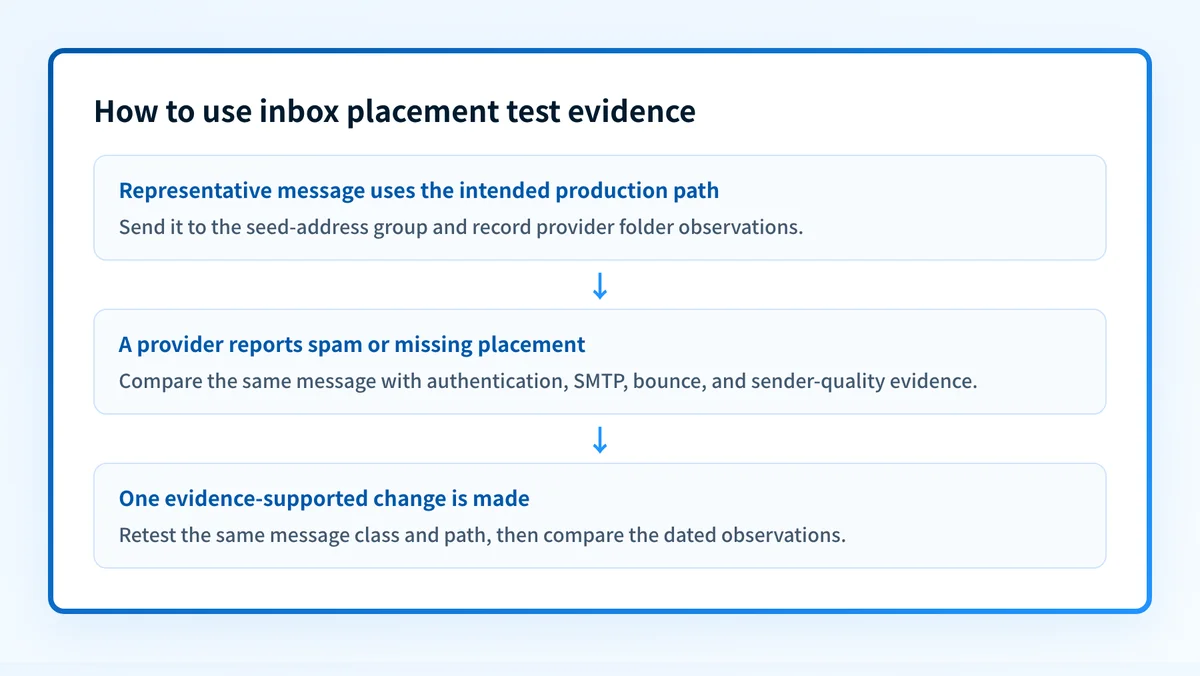
If comparable tests repeatedly show the same provider and folder outcome, review the real-recipient program data for the same sender and message class. Check list source, recent volume changes, complaint behavior, bounce patterns, and whether the production path actually matches the tested path.
Make one change supported by the evidence, document it in the test record, and retest. Readers evaluating whether a placement-monitoring category fits their program can use the email deliverability service guide to distinguish placement monitoring from message authentication diagnostics and related services.
How to retest
Repeat the same seed-list method after the documented change. Keep the same representative sender, message class, and sending path where possible. Compare provider and folder outcomes with the earlier evidence record rather than relying on one summary percentage.
Then inspect a newly delivered copy of that same message. Confirm SPF, DKIM, and DMARC results from the actual sending path. Review real-recipient complaint and bounce data separately. These are distinct evidence layers, and disagreement between them is useful evidence.
Check the message-level signals behind the placement snapshot
After recording the seed-list result, inspect a received copy of the same representative message for the controllable technical signals Palisade can assess.
Check the message-level signals Palisade can inspect
Palisade's test can inspect SPF, DKIM, DMARC, blocklist, and content signals from a received message. It does not operate a seed list, determine a receiving provider's folder, explain a provider classifier, or guarantee inbox placement.
Evidence
Sources and further reading
Questions readers ask
Frequently asked questions
Does an inbox placement test guarantee campaign inbox placement?
No. It records how a specific message reached the service's seed mailboxes at a particular time. Recipient engagement, mailbox history, sending conditions, and provider decisions can differ for a live campaign.
Does a passing SPF, DKIM, and DMARC result mean the message will reach the inbox?
No. Passing authentication shows that the message met those authentication checks. Receiving providers can use other signals when deciding placement.
Should I change DNS after one spam result?
Only when the evidence shows an authentication or configuration problem. A single spam observation without a demonstrated DNS mismatch does not establish that a DNS change is the right repair.
What should I collect with a seed-list result?
Record the exact message or campaign ID, sender domains, authenticated identifiers, seed group, send time, provider and folder observation, SMTP or bounce evidence, authentication results, and planned retest date.
Can Palisade test Gmail or Outlook inbox placement?
No. Palisade's email deliverability test inspects message-level authentication, blocklist, and content signals from a received message. It does not report Gmail or Outlook folder placement.

Written by
Johanie DupontBrand & Ecommerce Email
Johanie Dupont works on brand and ecommerce email at Palisade: BIMI and verified marks, sender requirements, and getting marketing mail into the inbox.
More from Johanie →