What is a DNS changer? Speed, privacy and security
 ChatGPT
 Claude
 Gemini
 Perplexity
 Grok
GrokIn brief
What is a DNS changer? It switches the DNS resolver your device uses, which can affect lookup speed, query privacy, and DNS filtering in practice.
A DNS changer is a setting or app that changes the DNS resolver your device asks to translate domain names into IP addresses. It can affect DNS lookup speed, who receives your DNS queries, and whether the resolver applies domain filtering. It does not increase internet bandwidth, encrypt all internet traffic, or change your public IP address. Those are separate network functions.
At a glance
Quick takeaways
- A DNS changer switches the resolver used for domain-name lookups.
- Faster DNS can shorten some initial lookups, but it cannot increase download bandwidth.
- Changing resolvers moves DNS-query handling from the default resolver to the chosen provider.
- DNS-over-TLS and DNS-over-HTTPS can encrypt DNS traffic between a device and its resolver.
- Router-level DNS settings can affect many devices, while device-level settings affect only that device.
- A DNS change needs a same-device test and a documented rollback path.
How a DNS changer works
DNS is the protocol that maps computer names to IP addresses, so a device can find the server behind a name such as www.example.com. Microsoft's DNS overview describes DNS as the name-resolution service that maps computer names to IP addresses.
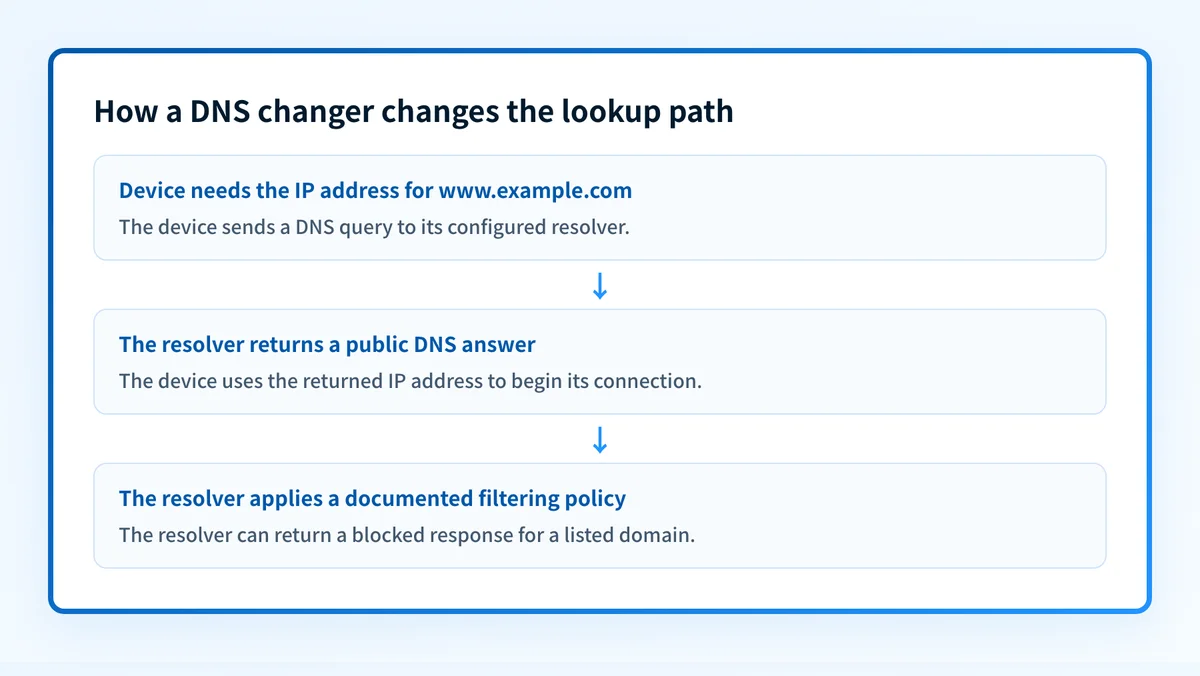
A device normally has one or more DNS resolvers configured through its network connection. A DNS changer replaces those configured resolver addresses or configures an encrypted DNS endpoint. The next time the device needs an answer that is not already cached, its DNS client sends the query to the new resolver.
The resolver's answer can affect what happens before a connection begins:
- A nearby or well-performing resolver may return an answer faster than the current resolver for a particular query.
- A resolver with a filtering policy may return a blocked response for domains in that policy.
- A resolver with a different privacy policy receives the query instead of the default resolver.
- An encrypted DNS connection can protect the query between the device and the selected resolver.
When a DNS change affects speed, privacy, or security
A DNS changer may improve perceived speed when DNS lookup delay is part of the delay a person notices. That result varies by network, resolver location, caching, the domain queried, and the application's connection behavior. A cached DNS answer may mean there is no new resolver query to compare. A faster resolver answer also cannot make a slow web server, congested Wi-Fi connection, or large download faster.
Privacy changes because the chosen resolver processes DNS queries. Cloudflare's public-resolver documentation notes that most devices use an ISP-provided resolver by default and that some ISPs and third-party DNS providers log queries, sell activity data, or use it for advertising. That is a provider-specific policy question, so review the selected resolver's current privacy documentation before deployment.
A DNS change can protect queries in transit only if the device and resolver use an encrypted DNS protocol. Cloudflare's DNS-over-TLS documentation explains that DNS-over-TLS wraps DNS traffic in a TLS-encrypted TCP connection, which prevents parties between the device and resolver from reading or modifying those DNS queries. Encryption of DNS queries does not encrypt the rest of the web connection or conceal the destination from every other party involved in the connection.
Security changes only when the selected resolver offers and applies a relevant control. For example, Cloudflare documents that its standard 1.1.1.1 resolver does not filter content, while its 1.1.1.1 for Families service blocks malware and adult content according to the selected service policy. A filtered DNS response can stop a device from resolving a listed domain, but it cannot clean an infected endpoint, inspect every threat, or replace endpoint security controls.
Use this decision rule:
- Choose a device-level DNS change when testing one device or when only that device needs a different resolver.
- Choose a router-level DNS change only when the network owner intends the resolver choice to apply to connected devices and has tested a rollback.
- Use encrypted DNS when the operating system, browser, or managed-device policy supports it and the chosen resolver documents the endpoint.
- Do not treat a DNS change as a substitute for a VPN when the requirement is encrypted traffic routing or a different public IP address.
Worked example: verify what changed
The useful evidence is the resolver answer from the same device after the change. On systems with nslookup, query a known domain against the intended resolver address.
nslookup example.com 1.1.1.1This is an illustrative query. Replace 1.1.1.1 only with the resolver address published by the provider you have approved.
A successful response shows that the command received an answer from the resolver address specified in the command. It does not prove that every application on the device uses that resolver. Browsers, operating systems, VPN clients, security software, and managed-device profiles can have separate DNS settings.
Check these details after changing DNS:
- Confirm the configured resolver address in the device or router settings.
- Run a lookup from the device that will use the setting.
- Test the business applications and internal names that matter on that network.
- Record the old setting before rollout, then keep a tested rollback procedure.
- If the resolver blocks a domain unexpectedly, confirm the provider's filtering policy before bypassing or removing the control.
A router DNS change can break internal-name resolution, captive portals, or services that depend on a managed resolver. Test a single device first when the network also uses private DNS zones.
A public lookup can also help inspect the DNS record a domain publishes. Use the Palisade DNS lookup tool when you have a domain name and need to inspect its public DNS response. That result is useful for a public record check, but it does not prove which resolver a device actually used, whether a private DNS zone overrides the answer, or whether an application received the same response.
What to do next with the evidence you have
If you have only a domain name, inspect its public DNS response and compare it with the expected record. If you are changing a local resolver, first test the new setting on one device, then retest the exact applications and internal hostnames used on that network.
If your concern is suspicious email that appears to use your domain, a device's DNS changer is not the control to investigate. Start with whether DMARC is an email security game-changer and examine the domain's published authentication records and message evidence separately.
Check the public DNS response for a domain
Use a DNS lookup when you need to inspect the public record that a domain publishes before comparing it with the expected DNS change.
A public DNS lookup cannot prove which resolver a specific device used, reveal private split-horizon DNS, or show the security and privacy policy applied by that resolver.
Evidence
Sources and further reading
Questions readers ask
Frequently asked questions
Does changing DNS make the internet faster?
Yes, sometimes. A different resolver may answer uncached DNS queries faster, which can reduce the delay before a connection starts. It does not increase the internet connection's bandwidth or make every website respond faster.
Does a DNS changer hide my IP address?
No. A DNS changer changes the resolver used for name lookups. It does not route all traffic through another network or replace the public IP address visible to a destination service.
Does encrypted DNS encrypt website traffic?
No. DNS-over-TLS or DNS-over-HTTPS encrypts DNS queries between the device and the resolver. Website traffic needs its own transport protection, such as HTTPS, and other network metadata can still remain visible to relevant parties.
Can changing router DNS affect every device?
Yes. Devices that receive DNS settings from that router may use the configured resolver. A device can still use a separate DNS configuration, encrypted-DNS setting, VPN client, or managed profile, so test representative devices.
Can a DNS filter stop malware?
Only partly. A DNS filter can block resolution of domains included in its policy. It cannot remove malware already on a device, detect every threat, or replace endpoint security and incident-response work.

Written by
Samuel ChenardCEO & Co-Founder, Palisade
Samuel Chenard is the CEO and co-founder of Palisade, agentic DMARC software for IT teams and MSPs, from one domain to thousands.
More from Samuel →