How can DNS poisoning redirect traffic and what stops it?
 ChatGPT
 Claude
 Gemini
 Perplexity
 Grok
GrokIn brief
DNS poisoning redirects traffic by causing a resolver to return a false DNS answer. Learn how DNSSEC, resolver controls, and validation reduce the risk.
DNS poisoning can redirect traffic when an attacker causes a DNS resolver to cache and return a false answer for a legitimate domain. A client that trusts that resolver may then connect to an attacker-controlled IP address instead of the intended service. DNSSEC validation, patched and restricted recursive resolvers, and comparison with authoritative DNS answers reduce this risk, while TLS certificate checks limit what a false DNS answer can successfully impersonate.
At a glance
Quick takeaways
- DNS cache poisoning affects a resolver's stored answer, so later users of that resolver can receive the same false address.
- A forged DNS response must be accepted and cached before it can redirect future traffic through that resolver.
- RFC 5452 guidance for DNS resilience recommends stronger query matching and other resolver defenses against forged responses.
- DNSSEC lets validating resolvers authenticate signed DNS data through a chain of trust.
- A public DNS lookup can reveal the answer returned at one moment, but it cannot prove the behavior of every resolver, client, or future request.
- DNS integrity also matters for email-authentication records, because SPF, DKIM, and DMARC policies are published through DNS.
How DNS poisoning redirects traffic
A recursive DNS resolver asks authoritative name servers for the records needed to answer a client's query, then caches answers according to their DNS data. Cache poisoning occurs when the resolver stores incorrect data and later gives that data to clients. RFC 5452 describes cache poisoning as an attack in which forged responses try to match an outstanding DNS query before the legitimate response arrives.
For a web destination, a poisoned A or AAAA record can send a browser to the wrong IP address. For email, false TXT or MX answers can interfere with the DNS information receivers use to evaluate mail. That does not mean every DNS problem is poisoning. A compromised registrar account, an unauthorized authoritative-zone edit, and a local hosts-file change can all redirect traffic through different paths.
The distinction matters during response. A cache-poisoning event is centered on a recursive resolver and its cached data. An authoritative-zone compromise requires investigation of the DNS provider, registrar, or zone-management path. For the broader threat model, see how DNS poisoning works and how teams can defend against it.
DNSSEC addresses the authenticity problem for signed DNS data. RFC 4033 defines DNSSEC's security goal as allowing resolvers to authenticate DNS data and identify modifications. A resolver must validate DNSSEC for that protection to apply. A signed zone alone does not make a non-validating resolver reject forged unsigned or invalid data.
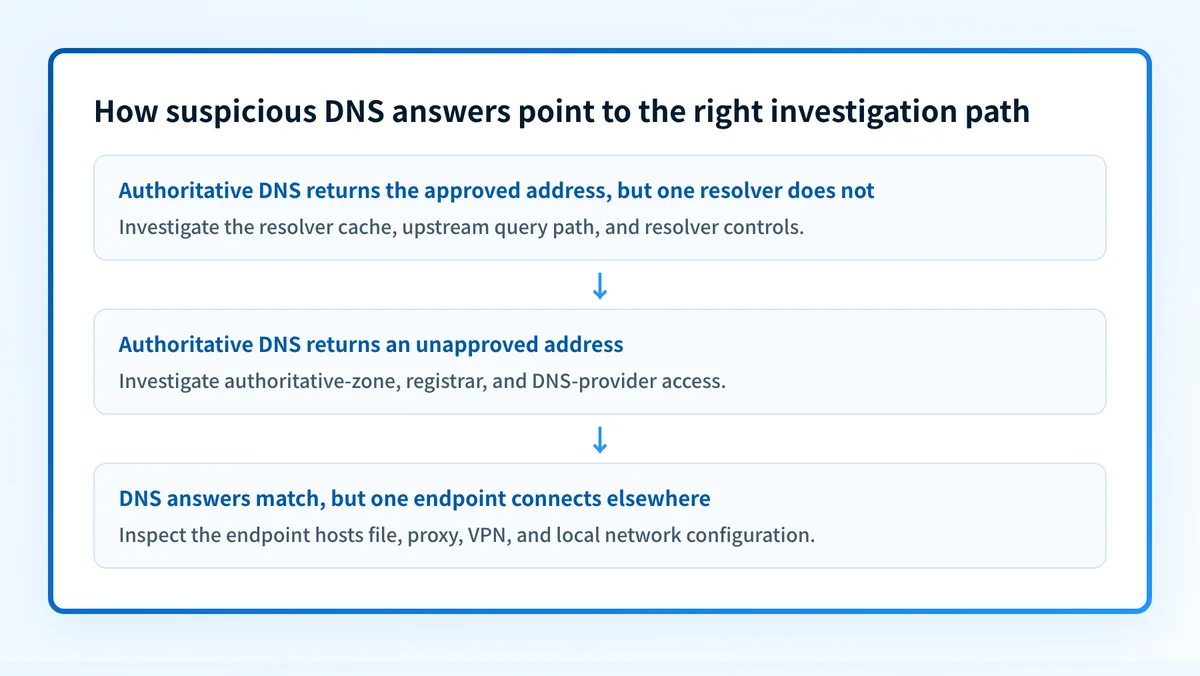
When DNS poisoning is the likely explanation
Unexpected redirects and certificate warnings are signals to investigate, but they do not prove cache poisoning by themselves. A certificate warning can result from an expired certificate, a proxy, a captive portal, a misconfigured application, or an attacker-controlled destination.
Use this decision rule:
- If the authoritative name server returns the approved address but one recursive resolver returns another address, suspect the resolver path or an intermediary cache.
- If authoritative name servers return an unapproved address, treat the event as an authoritative DNS or DNS-management incident until evidence shows otherwise.
- If DNS answers match across authoritative and recursive checks but one endpoint still connects elsewhere, inspect the endpoint's hosts file, proxy settings, VPN, security software, and local network path.
- If a DNSSEC-validating resolver reports validation failure for a signed name, do not bypass that failure without determining whether the zone, delegation, or resolver configuration is broken.
Do not clear a resolver cache and assume the incident is resolved. If the resolver can still accept forged data, or an upstream source remains compromised, the false answer can return.
Restricting recursion is another direct control. RFC 5358's resolver-operation guidance recommends limiting recursive service to intended clients because open recursive resolvers create operational and security risks. Keep resolver software patched, restrict administrative access, log resolver behavior, and use DNSSEC validation where the environment supports it.
For a wider set of practical controls around domains and mail infrastructure, use the email security learning hub.
Worked DNS comparison
Compare an authoritative answer with the answer returned by the resolver used by the affected client. The following commands are illustrative only. Replace yourdomain.com, ns1.example-dns.net, and the resolver address with values from your own DNS delegation and incident evidence.
# Illustrative only: query an authoritative name server directly
dig @ns1.example-dns.net yourdomain.com A +noall +answer
# Illustrative only: query the resolver used by the affected network
dig @192.0.2.53 yourdomain.com A +noall +answer +comments
A meaningful comparison records the queried name, record type, resolver or authoritative server, timestamp, answer, TTL, and DNSSEC status where available. If the answers differ, preserve the outputs and resolver logs before flushing caches or changing DNS records.
For example, if the authoritative server returns the approved address but an affected resolver returns an unapproved address, the evidence supports investigation of that resolver's cache and upstream query path. It does not identify the attacker, prove the first point of compromise, or establish that every client received the false answer.
DNS checks are also useful after a suspected incident affects email records. A domain's published DMARC, SPF, and DKIM records can be inspected with an email security score check. That check reads public DNS data. It cannot inspect an internal resolver's cache, prove a production message path, or determine why a recipient made a delivery decision.
What to do with the evidence you have
If you have a browser warning or a user report, collect the exact domain, time, network, resolver address, and displayed certificate details. Compare the resolver answer with authoritative DNS before making a broad DNS change.
If you have inconsistent DNS answers, isolate the affected resolver or network segment, preserve logs, and clear affected caches only after recording evidence. Confirm recursive service is restricted to approved clients, review recent resolver and DNS-management changes, and verify that resolver software and DNSSEC-validation settings follow your approved configuration.
If authoritative records are wrong, treat the situation as a zone or account incident. Review registrar and DNS-provider access, recent changes, delegation records, and DNSSEC delegation data. Restore only a known approved record set, then validate through the authoritative server and at least one independent public resolver.
If email authentication may have been affected, send a message through the exact production system and inspect its delivered headers. RFC 8601 defines the Authentication-Results header field, which can show the authentication results applied by the receiving system. After reports accumulate, use DMARC aggregate-report data to identify sources and alignment issues. A correct public record is not proof that the production application signs mail correctly or uses the expected return path.
Keep DMARC evidence after a DNS incident
A public record check can confirm the DMARC, SPF, and DKIM data currently visible to the resolver you query. The remaining operational question is which real sending sources still authenticate and align after the incident.
Palisade is agentic DMARC software that analyzes DMARC aggregate-report data, identifies sending sources and authentication or alignment issues, and creates prioritized remediation tickets. It can propose the next policy step when evidence supports it, while a human reviews the evidence and applies the change.
Palisade does not stop DNS poisoning, change a DMARC policy on its own, or prove that every future message will authenticate.
Evidence
Sources and further reading
Questions readers ask
Frequently asked questions
Can DNS poisoning redirect HTTPS traffic?
Yes. A poisoned DNS answer can direct a browser to a different IP address. HTTPS certificate validation should warn or fail when the destination cannot present a certificate valid for the requested domain, but users should treat unexpected certificate warnings as an incident signal rather than bypassing them.
Does DNSSEC stop every form of DNS redirection?
No. DNSSEC helps validating resolvers detect unauthenticated modifications to signed DNS data. It does not protect against every endpoint compromise, malicious local configuration, compromised credentials, or an authorized but malicious DNS-zone change.
Is an unexpected DNS answer proof of cache poisoning?
No. It may indicate a stale record, split-horizon DNS, a local hosts-file override, a proxy, an authoritative-zone error, or a poisoned resolver cache. Compare the affected resolver with authoritative answers and preserve the results before remediation.
Should an organization flush all DNS caches after a suspected attack?
Only after preserving evidence and identifying the affected scope. Cache flushing removes stored answers, but it does not repair a vulnerable resolver, compromised authoritative zone, or unsafe DNS-management account.
Can DNS poisoning affect DMARC?
Yes. DMARC relies on DNS-published policy records, and SPF and DKIM also rely on DNS data. A public lookup can check the records visible to that lookup, while delivered-message headers and DMARC aggregate reports provide separate evidence about real mail flows.

Written by
Ian BussieresCTO & Co-Founder, Palisade
Ian Bussieres is the CTO and co-founder of Palisade, agentic DMARC software for IT teams and MSPs.
More from Ian →