How does DNS poisoning work and how can teams defend against it?
 ChatGPT
 Claude
 Gemini
 Perplexity
 Grok
GrokIn brief
DNS poisoning works when a resolver caches a forged DNS answer. Learn how cache poisoning redirects users and how to validate and defend DNS.
DNS poisoning, also called DNS cache poisoning, works when an attacker causes a recursive DNS resolver to cache a forged answer for a domain. Users of that resolver can then be sent to an attacker-controlled IP address until the cached data expires or is removed. Teams defend against it with DNSSEC validation, hardened resolvers, encrypted resolver connections, and checks that compare resolver answers with authoritative DNS.
At a glance
Quick takeaways
- DNS cache poisoning puts forged DNS data in a recursive resolver's cache.
- A forged response must arrive before the legitimate response and match values the resolver expects.
- Source-port randomization and transaction-ID randomness make forged responses harder to guess, but they do not authenticate DNS data.
- DNSSEC lets validating resolvers reject unsigned or incorrectly signed answers for signed zones.
- DNS over HTTPS and DNS over TLS protect the client-to-resolver path, not a compromised resolver or authoritative DNS account.
- A public lookup can reveal a current DNS difference, but it cannot prove the production resolver path or future DNS state.
How DNS poisoning works
A recursive resolver receives a DNS question, obtains an answer from authoritative DNS infrastructure, and caches that answer for its time to live, or TTL. The cache lets the resolver answer later requests without querying the authoritative server again.
Cache poisoning occurs when the resolver accepts fabricated DNS data as though it came from an authoritative server. RFC 5452's guidance for resisting forged DNS answers explains that a forged response must match the pending query's question, transaction ID, destination address, and source port. An attacker tries to send enough plausible responses before the legitimate answer arrives.
If the forged answer is cached, the impact can extend beyond one device. Every client using that resolver can receive the false answer until the resolver discards it. The false record might point a web name at a phishing host, redirect an API endpoint, or return a fraudulent MX record for mail routing.
DNS poisoning is different from a registrar or DNS-provider account takeover. In an account takeover, the attacker changes authoritative records or delegation. In cache poisoning, the authoritative record can remain correct while a resolver distributes false cached data. Both incidents can produce a mismatch between what users receive and what the domain owner intended.
DNS security guidance from NIST treats DNSSEC, encrypted DNS, protective DNS services, and logging as separate defensive layers. That separation matters because each control addresses a different part of the DNS path.
When the answer changes
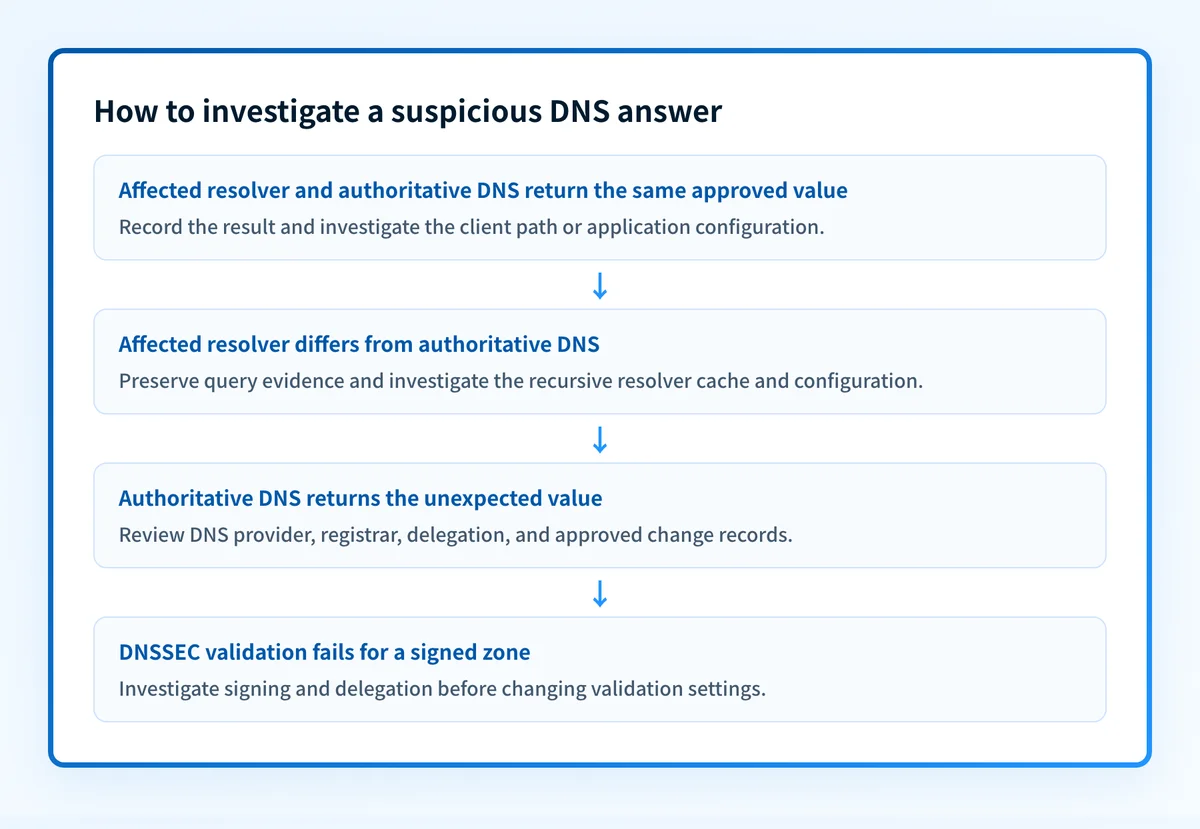
The right response depends on where the suspicious answer appears.
- If one workstation receives an unexpected answer while authoritative DNS and independent resolvers agree, inspect that workstation's configured resolver, local hosts file, VPN, router, and endpoint security evidence. This may be a local configuration problem or an on-path issue rather than resolver cache poisoning.
- If one recursive resolver returns an answer that differs from authoritative DNS, preserve the resolver response, TTL, query time, resolver address, and authoritative answer. Treat the resolver as potentially poisoned or misconfigured until its operator investigates.
- If authoritative DNS returns the unexpected answer, cache flushing will not fix the incident. Review DNS-provider access, registrar access, delegation records, DNS change history, and recovery procedures.
- If the zone is DNSSEC-signed and a validating resolver reports validation failure, do not bypass the failure by disabling validation. A signature or delegation problem can interrupt resolution, but accepting unvalidated data removes the integrity protection DNSSEC provides. RFC 4033 defines the DNSSEC security model.
A worked DNS comparison
Use a domain you administer or have permission to test. First, query the recursive resolver that produced the suspicious result. Then query an authoritative nameserver for the same record.
# Illustrative only. Replace the names and resolver with authorized values.
# Query the resolver used by the affected client.
dig www.yourdomain.com A @resolver.example.net
# Query an authoritative nameserver without recursion.
dig www.yourdomain.com A @ns1.yourdomain.com +norecurse
# Check DNSSEC-related response information.
dig yourdomain.com SOA @resolver.example.net +dnssec
Do not publish internal resolver names, customer domains, tokens, or full incident logs when sharing results.
Compare these evidence points:
- The fully qualified name and record type, such as
www.yourdomain.com A. - The returned values and TTLs.
- The responding server and query timestamp.
- The
adflag, which indicates that a security-aware resolver authenticated data when DNSSEC validation succeeds. RFC 4035 defines the authenticated-data flag and validator behavior. - The authoritative response and any approved DNS change record.
What to do next
Start with the evidence you have.
- With a suspicious browser or application result, capture the domain, record type, time, resolver address, returned answer, and any certificate warning. Query the same name through the affected resolver and an authoritative nameserver.
- With control of a recursive resolver, apply current vendor updates and verify that the resolver uses unpredictable source ports and transaction IDs. Google Public DNS documents source-port randomization, DNS Cookies, and response checks among its resolver protections. Restrict recursion to authorized clients if you operate an internal resolver.
- With control of the authoritative zone, evaluate DNSSEC signing and maintain the DS, DNSKEY, and signing process carefully. DNSSEC protects signed DNS data only when the chain of trust is correctly deployed and validation is enabled.
- For endpoints, use an encrypted connection to a trusted resolver where your platform and policy support it. RFC 7858 specifies DNS over TLS, while RFC 8484 specifies DNS over HTTPS. These protocols reduce exposure between the client and resolver. They do not validate an answer from a poisoned or compromised resolver.
Check the DNS answer from public resolvers
Use Palisade's DNS lookup tool to inspect the current public DNS response for the affected name and record type. Compare it with an authoritative query and the response seen by the affected client before changing DNS.
Palisade can analyze DMARC aggregate-report data, identify sending sources and authentication or alignment issues, and propose a next DMARC policy step for human review. It does not prove that a DNS poisoning incident occurred, control a resolver's cache, or guarantee future DNS integrity.
Evidence
Sources and further reading
Questions readers ask
Frequently asked questions
Can DNS poisoning affect only one computer?
Yes. A local DNS setting change, malicious hosts-file entry, compromised router, or on-path interference can affect one computer or network. Cache poisoning at a shared recursive resolver can affect every client that uses that resolver.
Does DNSSEC stop every DNS attack?
No. DNSSEC helps validating resolvers detect forged DNS data for correctly signed zones with an intact chain of trust. It does not prevent DNS-provider account compromise, registrar compromise, endpoint malware, or an attacker changing legitimate authoritative records.
Does DNS over HTTPS prevent cache poisoning?
No. DNS over HTTPS encrypts DNS traffic between a client and its resolver. It does not make a compromised or poisoned resolver trustworthy, and it does not replace DNSSEC validation.
Should a team flush DNS caches after finding a mismatch?
Only after preserving evidence and determining the likely source of the mismatch. Flushing a cache can remove malicious cached data, but it cannot correct an authoritative record that was changed or fix a compromised client or router.
Can DNS poisoning redirect email?
Yes. A poisoned answer for an MX record can redirect where a sending system attempts delivery. DNS integrity also matters for SPF, DKIM, and DMARC record lookups, although a public lookup alone does not prove the exact production mail path.

Written by
Ian BussieresCTO & Co-Founder, Palisade
Ian Bussieres is the CTO and co-founder of Palisade, agentic DMARC software for IT teams and MSPs.
More from Ian →