How can retail brands use BIMI to boost email open rates?
 ChatGPT
 Claude
 Gemini
 Perplexity
 Grok
GrokIn brief
BIMI can help retail brands make authenticated email easier to recognize. Learn the requirements, rollout checks, and how to measure open-rate impact.
Retail brands can use BIMI to make authenticated marketing and transactional email more recognizable in supporting inboxes by publishing a validated brand logo for the sending domain. BIMI does not increase open rates by itself, and logo display depends on each mailbox provider's requirements and rendering decisions. Treat it as a controlled brand-recognition test built on DMARC enforcement, then measure whether it changes results for your own audience.
At a glance
Quick takeaways
- BIMI associates a domain's published brand indicator with email that passes the required authentication checks.
- A retailer needs DMARC enforcement before pursuing BIMI, not only a
p=nonemonitoring record. - A logo appearing in one mailbox provider does not guarantee that every provider or client will display it.
- A BIMI record points to a logo file and can also reference a Verified Mark Certificate when required by a provider.
- Retail teams should compare a stable pre-launch period with a stable post-launch period before attributing any open-rate change to BIMI.
- Public DNS checks confirm published records, not the authentication result or placement of every production message.
How BIMI can affect recognition before an open
BIMI is an email specification that allows participating mailbox providers to display a brand-controlled logo beside an authenticated message. For a retailer, that can make a familiar sender easier to distinguish among promotions, receipts, delivery notices, and impersonation attempts.
The mechanism is narrower than an open-rate promise. BIMI gives providers information they may use to display a logo after they apply their own requirements. The recipient, mail client, and mailbox provider still determine what appears in the inbox and whether the recipient opens the message.
DMARC is the trust boundary underneath this process. The BIMI Group's implementation guidance says senders need a DMARC policy of quarantine or reject for BIMI eligibility. DMARC passes only when SPF or DKIM passes with alignment to the visible From domain. A retail domain with a logo file but unresolved alignment failures is not ready to treat BIMI as a production branding change.
For industry context before a retail BIMI rollout, see Palisade’s email-authentication benchmark of the top 1,000 ecommerce websites. The study’s traffic-ranked cohort contains 999 unique domains, of which 998 returned usable public-DNS observations. It does not measure logo display, inbox placement, or open-rate uplift.
For the underlying controls, start with the email authentication learning center. It covers the SPF, DKIM, and DMARC components that determine whether a message can satisfy DMARC.
When BIMI is appropriate for a retail sender
BIMI is most useful when a retail brand has a stable sending domain, a recognizable mark, and evidence that its legitimate email sources pass DMARC. It is less suitable as a shortcut around unfinished sender inventory or inconsistent authentication.
Use this decision rule:
- Proceed with a BIMI pilot when the retail domain publishes
p=quarantineorp=reject, important production messages pass DMARC, and the team can keep the logo asset and DNS record under change control. - Pause when major systems such as ecommerce, customer support, shipping, loyalty, or marketing platforms still produce DMARC failures. Fix the authenticated sending path first.
- Separate each customer-facing brand domain. BIMI, DMARC, SPF, and DKIM are evaluated against domains and message identifiers, so a parent company should not assume one brand's status proves another brand is ready.
- Confirm the target mailbox providers' certificate requirements before purchasing a certificate. Google's Gmail BIMI guidance accepts a Verified Mark Certificate (VMC) or Common Mark Certificate (CMC) for BIMI. Gmail’s verified checkmark requires a VMC; a certificate does not guarantee logo display for every message.
A retail BIMI rollout measurement plan
A BIMI record is a DNS TXT record at default._bimi.. Its l tag identifies the logo location. The a tag can identify the certificate location when your intended mailbox provider requires one.
Illustrative only. Do not publish this example unchanged.
default._bimi.yourdomain.com TXT "v=BIMI1; l=https://assets.yourdomain.com/logo.svg; a=https://assets.yourdomain.com/vmc.pem"
Generate the real logo and certificate URLs from your approved asset and certificate process. The BIMI Group specifies requirements for the SVG logo profile and BIMI record construction in its implementation guide.
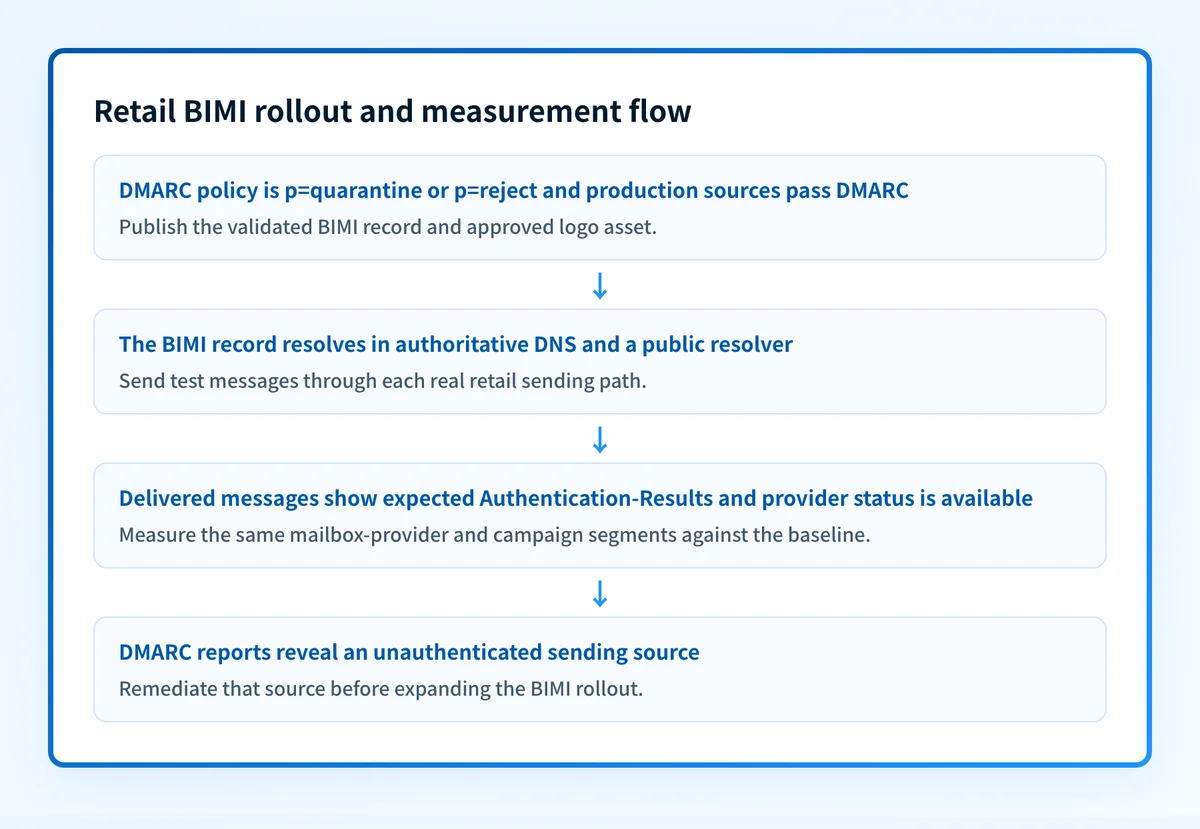
Use a deterministic measurement plan:
- Record a baseline for the same sending domain, mailbox-provider segment, audience type, and campaign type before the BIMI change.
- Keep subject-line approach, send timing, audience selection, and other major campaign changes documented during the comparison period.
- Publish the BIMI record only after validating its DNS response and the logo asset URL.
- Send test mail through each real production path, including promotional and transactional systems. Inspect the delivered message's
Authentication-Resultsheader. RFC 8601 defines this header field for reporting authentication status. - Compare the post-launch period with the baseline by mailbox provider. Report the observed difference as a result of the test, not as proof that BIMI will produce the same outcome in future campaigns.
Check the domain and record before launch
If you have the retail domain and want to inspect its public BIMI and DMARC publication, use the Palisade BIMI checker. Compare the result with the exact domain used in the visible From address, then repeat the check for any distinct retail-brand domain.
For an ongoing program, a public lookup leaves an important gap: it cannot inventory every production sender, show which real mail paths fail alignment, or monitor later changes in aggregate-report data. Palisade is agentic DMARC software that analyzes DMARC aggregate reports, identifies sending sources and authentication or alignment issues, and creates prioritized remediation tickets. It can propose the next DMARC policy stage, while your team reviews the evidence and applies any DNS change.
A public BIMI check and Palisade's DMARC analysis do not guarantee logo display, inbox placement, or future message authentication.
For a separate discussion of reported BIMI engagement claims, read the open-rate evidence in our BIMI guide. Any retail rollout should still use its own controlled measurement period.
For a provider-specific implementation of these authentication checks, see What is BIMI? Brand Indicators for Message Identification.
Evidence
Sources and further reading
Questions readers ask
Frequently asked questions
Does BIMI guarantee that retail email open rates will rise?
No. BIMI can make a recognized sender easier to identify where a mailbox provider displays the logo, but recipients and providers make the final open and presentation decisions. Measure a controlled before-and-after period for the retail domain.
Does a retail brand need DMARC enforcement for BIMI?
Yes. The BIMI Group's implementation guidance requires a DMARC policy of quarantine or reject for BIMI eligibility. A p=none record supports monitoring but is not sufficient for BIMI.
Does a BIMI logo prove that every email from the retailer is legitimate?
No. BIMI display is tied to the evaluated message and provider requirements. It does not prove every future message will authenticate, and it does not replace review of production Authentication-Results headers and DMARC aggregate reports.
Can one company use the same BIMI setup for several retail brands?
Only when those brands use the same authenticated sending domain and approved logo arrangement. Separate customer-facing domains need their own DNS and DMARC validation, and may need separate BIMI records and certificate decisions.
Do retailers need a Verified Mark Certificate for BIMI?
Retailers should check their intended mailbox providers’ certificate requirements. Gmail accepts a Verified Mark Certificate (VMC) or Common Mark Certificate (CMC) for BIMI, while its verified checkmark requires a VMC. A certificate does not guarantee logo display for every message.

Written by
Johanie DupontBrand & Ecommerce Email
Johanie Dupont works on brand and ecommerce email at Palisade: BIMI and verified marks, sender requirements, and getting marketing mail into the inbox.
More from Johanie →