Google Forms spam: stop it and spot it
 ChatGPT
 Claude
 Gemini
 Perplexity
 Grok
GrokIn brief
Google Forms spam comes two ways: junk submissions to your own form, and deceptive forms sent to you. How to stop both, and how to judge a forms.gle link.

"Google Forms spam" covers two different problems. If your own form is collecting junk submissions, the fix is in the form's own settings. If a form arrived in your inbox, the problem is that a real Google-hosted form or response message can carry content supplied by an attacker. A forms.gle link can be a legitimate Google Forms link, but that says nothing about who created the form or whether its request is safe. Judge the form's request, destination links, and business context. Do not enter passwords, payment details, recovery codes, or other sensitive information into an unexpected form.
At a glance
Quick takeaways
- Google Forms is a publishing tool, so a real Google host can display untrusted user-supplied content.
- A
forms.gleURL identifies a Google Forms link, not a trusted form owner. - Response receipts can carry a form's questions and submitted answers into email.
- Authentication for a Google sending domain does not validate claims inside a form.
- Preserve the form URL, message headers, timestamps, and screenshots before reporting abuse.
- Verify the request through a contact route you already trust.
How Google Forms spam works
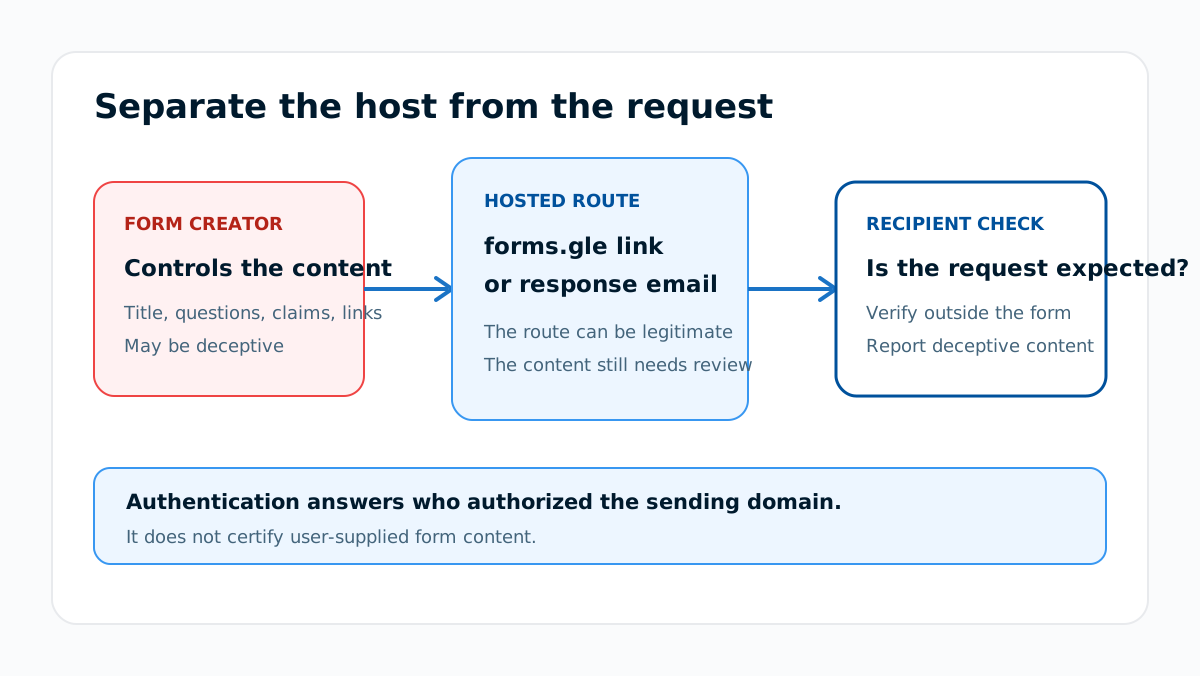
Google's Forms sharing guidance explains that a form creator can publish and distribute a form, including through a shortened URL. The creator controls the title, description, questions, and links that a respondent sees. A malicious creator can therefore place a deceptive invoice, support notice, prize, job offer, or account warning inside a real hosted form.
Google's response-management guidance is what makes the email version work. A form owner can set Collect email addresses to Responder input, and set Send responders a copy of their response to Always. An attacker then submits their own form with the victim's address typed in, and Google mails the attacker's text to that victim from a Google address. Nothing is spoofed: the mail genuinely comes from Google, which is exactly why authentication checks on it pass. The message can be technically authentic for the service that sent it while the user-supplied form content remains deceptive.
This is the useful distinction: infrastructure authenticity and content safety answer different questions. DMARC is designed to prevent unauthorized use of the domain in the visible From field. RFC 9989 puts evaluation of anything other than that field out of scope, so it does not certify the truth of a form title, linked site, payment request, or support claim.
If your own Google Form is getting spam submissions
This is the other half of the query, and the fix is entirely in the form's settings rather than in email authentication.
- Require a sign-in. In Settings, next to Responses, turn on Limit to 1 response. Google notes that responders "must sign in to their Google Account" for this, which removes anonymous bulk submission.
- Verify the address you collect. Under Collect email addresses, choose Verified rather than Responder input. Responder input accepts whatever is typed, which is the setting the email abuse above depends on.
- Close the form when it is done. Google lets you stop accepting responses, with a custom message, so an old form cannot keep collecting indefinitely.
When a forms.gle link is legitimate but unsafe
A forms.gle link can point to a genuine Google Forms page. That establishes the hosting route. It does not establish the identity, authority, or intentions of the person who created the form.
Use the request as the decision point:
- An expected event registration shared by a known organizer can still deserve a quick domain and context check.
- An unexpected password, recovery-code, banking, gift-card, cryptocurrency, or payment request should be treated as suspicious.
- A form that sends you to another site needs a separate review of that destination.
- A request that copies a familiar brand without a matching business process should be verified outside the form.
What evidence to collect
Preserve enough evidence for a security team or provider abuse review without continuing through the suspicious workflow.
Observed form URL: https://forms.gle/<redacted-id>
How it arrived: email, chat, text message, QR code, or website
Timestamp: <UTC time>
Claimed organization: <name shown in the form>
Requested action: <what the form asks the recipient to do>
Linked destinations: <redacted list of domains>
Email evidence: <sender, subject, Message-ID, and redacted headers>
User action: not opened, opened, submitted, or credentials entered
Do not store passwords, recovery codes, payment-card data, or complete personal records in the incident ticket. Record that sensitive information was requested or entered, then follow the organization's incident process.
When the link arrived by email, save the original message and use the email header analysis guide to distinguish message routing from the form content. A header can show which system sent that message. It cannot prove that the person named inside the form authorized the request.
How to respond to Google Forms spam
1. Stop before submitting information
Close the form if the request is unexpected or asks for sensitive data. Do not test a suspicious form with real or invented credentials because submission can confirm that the recipient engaged.
2. Verify the request outside the form
Use a phone number, ticket, account portal, or conversation you already trust. Do not use contact details or login links supplied only by the suspicious form.
3. Check any linked destination separately
Copy only the destination domain when that can be done safely. The URL reputation checker can inspect public reputation signals for a link, but a clean result does not prove ownership, content safety, or future behavior.
4. Report the hosted form
Use Google's process for reporting abusive content and provide the preserved form URL and context. An organization can also report the message through its normal security workflow.
5. Contain any exposed account
If someone entered a password, recovery code, payment data, or other sensitive information, follow the relevant account or payment incident process. Use a known-good route to change credentials and notify the responsible security team. Do not revisit the form to confirm what was entered.
Google Forms spam belongs in the wider email threats model because it uses a trusted hosting surface to deliver an untrusted request. Sender authentication can help with direct domain spoofing, but it cannot make third-party hosted content truthful.
Evidence
Sources and further reading
Questions readers ask
Frequently asked questions
Is forms.gle a legitimate domain?
Yes. Google Forms uses forms.gle for shortened form links, but a legitimate host does not establish that the form creator or request is trustworthy.
Is every forms.gle link safe?
No. Any form owner can supply the form's title, questions, descriptions, and destination links. Verify an unexpected request outside the form before providing information.
Does a Google-authenticated message make the form content safe?
No. Authentication can show that the sending domain authorized the message. It does not validate the identity claim, link, payment request, or instructions written inside user-supplied form content.
Should I enter fake credentials to test a suspicious form?
No. Do not submit credentials or interact further. Preserve the URL and context, report the form, and use an approved incident process if real information was already entered.
Can DMARC stop Google Forms spam?
No. DMARC can address unauthorized use of a protected visible From domain. It does not block deceptive content hosted on another organization's legitimate domain.

Written by
Samuel ChenardCEO & Co-Founder, Palisade
Samuel Chenard is the CEO and co-founder of Palisade, agentic DMARC software for IT teams and MSPs, from one domain to thousands.
More from Samuel →