GoHighLevel email warmup: how the fixed-stage model works
 ChatGPT
 Claude
 Gemini
 Perplexity
 Grok
GrokIn brief
GoHighLevel email warmup uses fixed sending stages for eligible LC Email dedicated domains. Learn what it controls and how to validate mail.
GoHighLevel email warmup is HighLevel's fixed-stage sending model for eligible verified dedicated domains using LC Email. It controls the documented daily sending capacity as a domain progresses through warmup stages. It does not authenticate mail, prove that a message reaches the inbox, or override a receiving provider's filtering decisions. Use it alongside a dedicated, authenticated sending domain and evidence from real delivered messages.
At a glance
Quick takeaways
- GoHighLevel's domain warmup feature applies to eligible dedicated domains configured for LC Email.
- Newly created and verified eligible domains can begin the documented warmup process automatically.
- Existing eligible domains can be started through HighLevel's documented agency or sub-account settings paths.
- A warmup stage is a sending-capacity control, not an inbox-placement guarantee.
- Authentication, consent, recipient engagement, and receiver policy still affect delivery.
- A real production message and its authentication results provide evidence that DNS alone cannot.
How GoHighLevel email warmup works
HighLevel's Domain Warmup fixed-stage documentation describes a model that increases an eligible domain's daily sending limits through fixed stages. HighLevel documents the feature for LC Email dedicated domains, rather than for every possible sending connection in an account.
The practical purpose is controlled volume growth for a new sending domain. A domain should still send wanted mail to recipients who opted in and engage with it. HighLevel's Email Sending Guide identifies consent, audience quality, authentication, and consistent sending practices as part of responsible sending.
A warmup stage does not change the evidence receivers use to assess an individual message. Google, for example, separately requires applicable senders to meet its email sender guidelines, including authentication requirements for higher-volume senders. Receiving providers can also apply their own spam filtering and local policy.
For the broader protocol and operational context, see what email deliverability is and whether email warmup works.
When GoHighLevel email warmup applies
The answer changes based on the mail connection and domain type.
- If the account sends through LC Email using an eligible verified dedicated domain, HighLevel documents fixed-stage domain warmup and paths to start it.
- If the account uses a Custom SMTP provider, HighLevel's sending guide says the LC Email warmup model does not govern that provider's sending behavior. Check the SMTP provider's own controls and requirements instead.
- If the domain is not yet verified or is not a dedicated domain, resolve that configuration first. A warmup setting cannot substitute for a working domain setup.
- If the issue is a specific delivered message, inspect its headers. A domain's warmup state does not show whether SPF, DKIM, or DMARC passed for that message.
Do not raise sending volume beyond the documented stage because a domain has a green configuration state. A platform setting does not prove that recipients expect the mail or that a receiving provider will place it in the inbox.
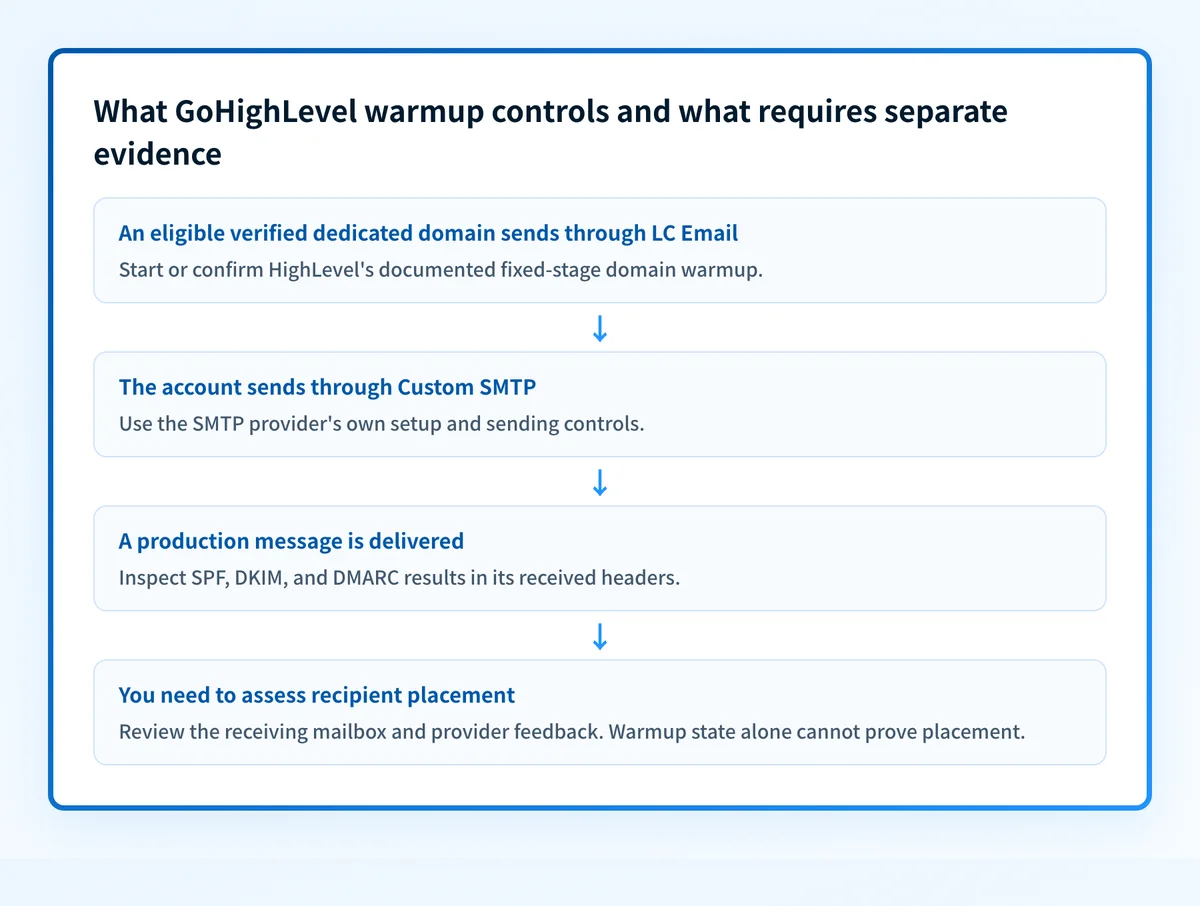
A worked GoHighLevel email warmup example
Assume yourdomain.com is a newly verified dedicated domain used only for LC Email. HighLevel's documented model can place that eligible domain into its fixed warmup stages. The operational evidence should remain separate:
Sending path: LC Email
Dedicated domain: yourdomain.com
Domain state: verified and eligible for HighLevel domain warmup
Warmup action: start or confirm the documented fixed-stage state
Message evidence: send a normal production message to a controlled recipient
Header evidence: inspect SPF, DKIM, and DMARC results for yourdomain.com
Recipient outcome: review the receiving mailbox and any provider feedback separately
The first four lines describe the platform configuration. They do not establish that a recipient received the message, that the visible From domain aligned with SPF or DKIM, or that the message avoided spam filtering.
For a delivered test message, open the raw headers and find the receiving system's Authentication-Results field. RFC 8601 defines this header field for recording a message authentication assessment. An SPF or DKIM pass is useful for DMARC only when the authenticated domain aligns with the visible From domain.
If you have a raw message, use the email header analyzer to inspect the authentication evidence. It can help read a supplied header, but it cannot enable HighLevel warmup, prove ongoing domain state, or explain every recipient's placement decision.
What to do next with the evidence you have
If you are setting up a new LC Email dedicated domain, verify the domain first and follow HighLevel's current documented settings path for the account type:
- At the agency level, HighLevel documents the path through Agency Settings, Email Services, SMTP Service, Dedicated Domain and IP, then the selected domain and
Start Warmup. - At the sub-account level, use the current sub-account path described in HighLevel's fixed-stage warmup guide. Interface labels can change, so follow the guide's current labels rather than relying on an older walkthrough.
- If the domain sends through Custom SMTP, confirm the provider and domain configuration with that provider. Do not assume HighLevel's LC Email stages apply.
For broader security posture on the published domain, run the email security score. It can inspect public DNS signals such as authentication records. A public score cannot verify the HighLevel sending path, monitor warmup stages, or predict a receiver's future inbox decision.
Evidence
Sources and further reading
Questions readers ask
Frequently asked questions
Does GoHighLevel have email warmup?
Yes, HighLevel documents a fixed-stage domain warmup model for eligible verified dedicated domains that send through LC Email. It raises the domain's daily sending limits in set stages. It does not cover Custom SMTP connections, so check that provider's own controls if your account sends that way.
What is the best email warm up tool?
The best warm-up control is the one built into the platform that actually sends your mail, because it is the only one that governs your real sending limits. For LC Email on an eligible dedicated domain, that is HighLevel's own fixed-stage warmup. Whichever you use, validate a real production message, its authentication results, your consent practices, and recipient response separately.
How do I set up email on GoHighLevel?
Set up the sending connection that matches your account, then configure and verify a dedicated domain when using LC Email. Follow HighLevel's Email Sending Guide for the current configuration requirements. If the domain is eligible for LC Email warmup, use the documented domain settings path to confirm or start it.
Does warmup make GoHighLevel emails land in the inbox?
No, warmup does not decide where your mail lands, because it only controls how much an eligible domain may send at each stage. Inbox placement also depends on authentication, sender reputation, recipient engagement, message content, complaint signals, and each receiver's own filtering. Warmup keeps volume sensible while those other signals build.

Written by
Johanie DupontBrand & Ecommerce Email
Johanie Dupont works on brand and ecommerce email at Palisade: BIMI and verified marks, sender requirements, and getting marketing mail into the inbox.
More from Johanie →