Why is Microsoft 365 rejecting my email with a 550 5.7.x error?
 ChatGPT
 Claude
 Gemini
 Perplexity
 Grok
GrokIn brief
Microsoft 365 returns 550 5.7.x when your mail fails a policy or authentication check. Fix SPF, DKIM, and DMARC alignment to clear the access-denied bounce.

Microsoft 365 rejects your email with a 550 5.7.x error when the message trips a policy, authentication, reputation, recipient, or forwarding rule. The exact digits and diagnostic text tell you which branch fired: 5.7.23 is an SPF failure, 5.7.509 is a DMARC-reject failure, 5.7.511 is a banned-sender condition, and 5.7.520 blocks external forwarding. 5.7.515 is a separate Outlook.com consumer high-volume authentication rule. Match the full NDR before changing DNS or policy.
At a glance
Quick Takeaways
550 5.7.xis Microsoft's "access denied" family. The message reached the server but was refused on policy or authentication grounds, per Microsoft's NDR reference.550 5.7.23means your sending IP is not authorized by your SPF record;550 5.7.509means your From domain failed DMARC and you publishp=reject.550 5.7.515 Access denied, sending domain does not meet the required authentication levelis an Outlook.com consumer rule with its own exact-code diagnosis and repair guide.550 5.7.511 Access denied, banned sendermeans your sending IP is banned, request removal by emailingdelist@microsoft.comwith the full NDR.- Alignment is the detail most admins miss: a passing SPF or DKIM check only satisfies DMARC when its domain matches your From domain.
- Read the "Diagnostics for administrators" block in the bounce first. It contains the literal error string that decides your next move.
Which 550 5.7.x code did you get, and what does it mean?
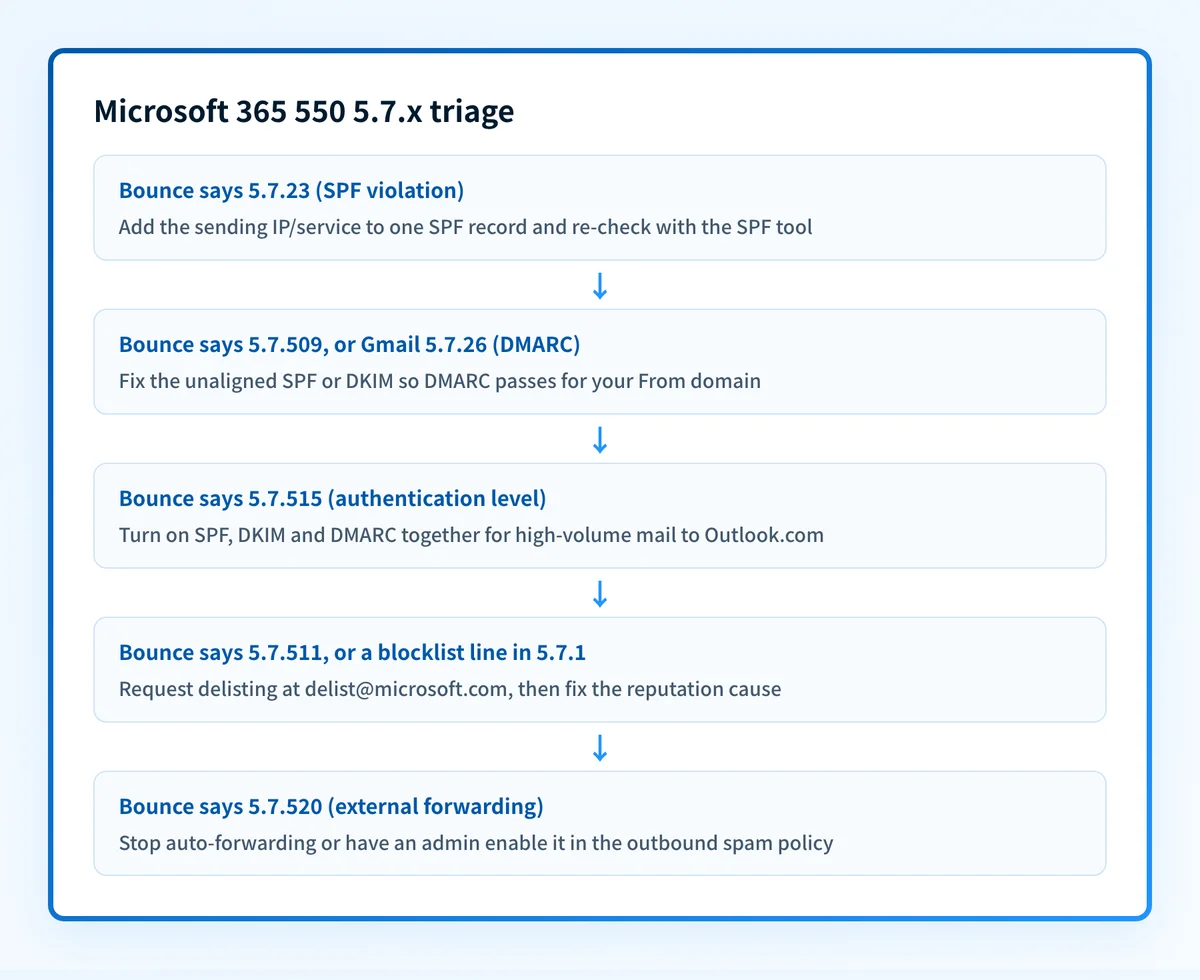
Every 5.7.x variant is a different rejection reason, so match your bounce to the row below before you change any DNS. Pull the full string from the Diagnostics for administrators section of the non-delivery report (NDR), not just the three digits, because the wording is what pins down the cause.
| Bounce / signal | What it means | First action |
|---|---|---|
550 5.7.1 Delivery not authorized | General access-denied: a recipient restriction, transport rule, or "Client host blocked using Blocklist 1" is refusing your mail. | Read the diagnostics text; if it names a blocklist, request delisting, otherwise ask the recipient's admin to allow you. |
550 5.7.23 ... Sender Policy Framework violation | The recipient validated SPF and your sending IP is not authorized by your SPF record (or SPF is missing or broken). | Add every sending service to one SPF record and re-check it. |
550 5.7.26 Unauthenticated email ... DMARC policy | Google/Gmail's rejection when your mail is unauthenticated and your domain publishes DMARC quarantine or reject (Microsoft's equivalent is 5.7.509). | Authenticate with SPF and DKIM and align both to your From domain. |
550 5.7.509 ... does not pass DMARC verification | Microsoft's DMARC-reject bounce: your 5322.From domain failed DMARC and your policy is p=reject. | Fix the failing or unaligned SPF/DKIM so DMARC passes for your From domain. |
550 5.7.511 Access denied, banned sender | The IP you send from is banned on Microsoft's side. | Email delist@microsoft.com with the full NDR and IP, then fix the reputation cause. |
550 5.7.515 ... does not meet the required authentication level | High-volume mail (5,000+/day) to Outlook.com/Hotmail/Live that does not meet Microsoft's SPF, DKIM, and DMARC requirements. | Use the exact 550 5.7.515 guide; SPF and DKIM must both pass, while DMARC needs at least one aligned pass. |
550 5.7.520 ... does not allow external forwarding | Your tenant's outbound anti-spam policy is blocking automatic external forwarding. | Stop the auto-forward, or have an admin enable forwarding in the outbound spam policy. |
What does 550 5.7.1 mean on Microsoft 365?
550 5.7.1 is Microsoft's broadest "access denied" verdict: the receiving system accepted the connection but a policy stopped delivery. Per Microsoft's guidance for error 5.7.1 (which also covers everything from 5.7.0 to 5.7.999) it "typically indicates a security setting in your organization or the recipient's organization is preventing your message from reaching the recipient."
In practice it lands in one of a few buckets:
- A recipient or group restriction. The mailbox or distribution group only accepts mail from authenticated or internal senders, so an external message is refused. Only the recipient's admin can loosen that.
- A transport (mail flow) rule. A rule on either side matched your message and rejected it.
- Your IP is on Microsoft's blocklist. The diagnostics read
Client host [x.x.x.x] blocked using Blocklist 1; To request removal from this list please forward this message to delist@microsoft.com. That is a reputation problem, not a rule problem, so start with a public blocklist check on the domain and see the delisting steps below. - A broken SPF or MX record on your domain, which Microsoft explicitly lists as a cause on the 5.7.1 page.
RESOLVER.RST.AuthRequired line means the recipient requires authentication you cannot provide as an outsider.
Why does Microsoft return 5.7.23 or 5.7.509 for authentication failures?
Because Microsoft maps each authentication protocol to its own code, and knowing which one fired tells you exactly which record to fix. 5.7.23 and 5.7.509 are the two you will meet most.
550 5.7.23 The message was rejected because of Sender Policy Framework violation means the recipient checked SPF and your sending server was not on your domain's authorized list. Microsoft's NDR reference describes it as "the destination email system uses SPF to validate inbound mail, and an issue affects your SPF configuration." The usual cause is a new sending service (a CRM, ticketing tool, or marketing platform) that you never added to your SPF TXT record.
550 5.7.509 Access denied, sending domain does not pass DMARC verification and has a DMARC policy of reject is a DMARC rejection. Your 5322.From domain failed DMARC and, because your own published policy is p=reject, Microsoft honors that instruction and refuses the message. It is your policy doing exactly what you told it to. The problem is that a legitimate stream is not authenticating. This is the Microsoft counterpart to the code Gmail returns (550 5.7.26), and the same failure mode we cover for Gmail's 550 rejections.
The order of operations is the same for both: confirm which protocol is failing, fix the record, then confirm the passing domain aligns with your From domain. If you are new to how the three protocols interlock, our overview of email authentication sets the foundation before you touch DNS.
How do you fix a 550 5.7.x authentication rejection?
Work through the three protocols in order, then verify alignment. This sequence resolves the large majority of 5.7.23 and 5.7.509 bounces. For 5.7.515, use the exact Outlook.com high-volume procedure, which separately requires both SPF and DKIM to pass.
- Publish a complete SPF record. Put every service that sends as your domain into a single SPF TXT record. One record only, since Microsoft rejects domains with multiple SPF records. Confirm it resolves and stays under the 10-lookup limit with Palisade's SPF checker. If you send through Google Workspace as well, our Google Workspace SPF guide shows how to merge senders into one record.
- Enable DKIM signing. Turn on DKIM in each sending platform and publish the public key it gives you. Validate the signature with the DKIM checker. DKIM is the more resilient of the two because, unlike SPF, it survives most forwarding.
- Publish a DMARC policy. Add a record at
_dmarc.yourdomain.com, starting atv=DMARC1; p=none; rua=mailto:reports@yourdomain.comso you can watch reports before enforcing. Check syntax with the DMARC checker. - Confirm alignment. Make sure the domain that passes SPF or DKIM matches your visible From domain. This is where "everything is configured but Microsoft still bounces me" almost always resolves. See the next section.
- Re-send and read the headers. Send a test to an Outlook.com or Microsoft 365 recipient, open the message source, and confirm
spf=pass,dkim=pass, anddmarc=passfor your own domain.
When should you use the exact 550 5.7.515 guide?
Use the exact guide when the NDR says 550 5.7.515 Access denied, sending domain [domain] does not meet the required authentication level and the recipient is on Outlook.com, Hotmail, Live.com, MSN, or another Microsoft consumer service. This is not a generic Microsoft 365 tenant error.
Microsoft requires SPF and DKIM to both pass, a valid DMARC policy (p=none, p=quarantine, or p=reject) to exist, and DMARC to pass because SPF or DKIM aligns with the visible 5322.From domain. The 550 5.7.515 guide contains the message-header evidence template, alignment examples, and same-stream retest procedure; keep this page for classifying other 5.7.x codes.
Why does alignment decide whether your fix works?
Alignment is the rule that a passing SPF or DKIM check must belong to the same domain that appears in your From header. Without it, a spammer could pass SPF for a throwaway domain while forging your name, technically authenticated, completely fraudulent, so DMARC refuses to count an unaligned pass.
Two failure modes cause almost every "authenticated but still rejected" case:
- SPF authenticates the wrong domain. SPF validates the hidden Return-Path, which many platforms set to their domain, not yours. SPF passes for the platform but does not align with your From domain, so DMARC sees no aligned pass.
- DKIM signs with a mismatched domain. If the
d=tag in the signature is your provider's domain rather than yours, the signature is valid but unaligned, the exact trap covered in why your DKIM signature fails alignment.
5.7.509; 5.7.515 additionally requires separate SPF and DKIM passes, so follow the exact-code test rather than assuming the two errors clear together.
Common issues with Microsoft 365 550 5.7.x rejections
The bounce says my IP is banned (5.7.511 or a blocklist line)
550 5.7.511 Access denied, banned sender (and the Blocklist 1 variant of 5.7.1) mean Microsoft has banned your sending IP, usually after spam complaints or a compromised account. Authentication alone will not clear it. Email delist@microsoft.com with the full NDR and IP address to request removal, as Microsoft's NDR reference directs. Then fix the underlying cause, because a delisting will not hold if the behavior repeats. The 550 5.7.511 page covers what to put in that email and why the self-service portal does not apply. Enrolling the IP in Microsoft's Smart Network Data Services shows you the complaint and trap data driving the reputation, and our guide to checking and improving domain reputation covers the recovery work.
Only mail through one service bounces
If your main platform delivers but one stream throws 5.7.23, that service is missing from your SPF record or is not DKIM-signing as your domain. Your DMARC aggregate reports name every source sending as you. Read them, then add the legitimate senders. This is the single most common reason a fix "works" for most mail but leaves one system bouncing.
550 5.7.520 blocks a forwarded message
550 5.7.520 Access denied, Your organization does not allow external forwarding is not an authentication problem at all. Microsoft's outbound anti-spam policy blocks automatic external forwarding by default as an exfiltration safeguard. Either stop the auto-forward rule, or have an admin enable external forwarding in the outbound spam policy, knowing that turning it on organization-wide weakens a real security control. Prefer a scoped policy over a blanket allow.
Everything authenticates but delivery is still slow
Passing authentication clears the block, not your reputation. If Microsoft throttled you during the outage or your complaint rate climbed, expect deferrals to ease over days of clean sending rather than instantly. If mail is queuing rather than bouncing outright, our guide to why email gets queued explains the difference.
For a provider-specific implementation of these authentication checks, see How do you enable DMARC for Microsoft 365?.
Related reading
Questions readers ask
Frequently asked questions
Is 550 5.7.x a permanent or temporary failure?
The 5 prefix marks a permanent failure, so the message will not retry on its own. You must fix the cause and resend. Temporary deferrals use a 4.x.x prefix. A 550 bounce means the receiver made a final decision to refuse this message.
Does 5.7.509 mean my DMARC is wrong?
No: it usually means your DMARC is working correctly and catching a stream that fails to authenticate. Your p=reject policy told receivers to refuse unauthenticated mail, and Microsoft obeyed. The fix is to make the legitimate stream pass and align, not to weaken the policy.
Do these rules apply to me if I send under 5,000 messages a day?
The 5.7.515 high-volume enforcement targets bulk senders to Microsoft consumer services, but unauthenticated mail can be junked or refused at any volume. If your NDR contains that exact code, use the 550 5.7.515 guide; otherwise classify the diagnostic text in the table above.
How do I read the authentication result on a Microsoft bounce?
Open the original message source and find the Authentication-Results header. It lists spf=, dkim=, and dmarc= with a pass or fail and the domain each applied to. If DMARC shows fail, compare the SPF and DKIM domains against your From domain to spot the misalignment.
Palisade automates this whole loop for every domain you manage: it publishes correct SPF, DKIM, and DMARC records, reads your DMARC reports to surface unaligned or unauthorized senders before they cause a bounce, and warns you when a change would break delivery to Microsoft 365 or Outlook.com. Run your domain through the free Email Security Score tool to see exactly where you stand against Microsoft's requirements.

Written by
Dominic LandryDeliverability & DNS
Dominic Landry works on email deliverability and DNS configuration at Palisade, from SPF and DKIM records through to DMARC enforcement.
More from Dominic →