Email bounce rate: how to calculate and investigate it
 ChatGPT
 Claude
 Gemini
 Perplexity
 Grok
GrokIn brief
Email bounce rate is bounced messages divided by your ESP's stated denominator. Separate hard and soft bounces, inspect reasons, and retest.
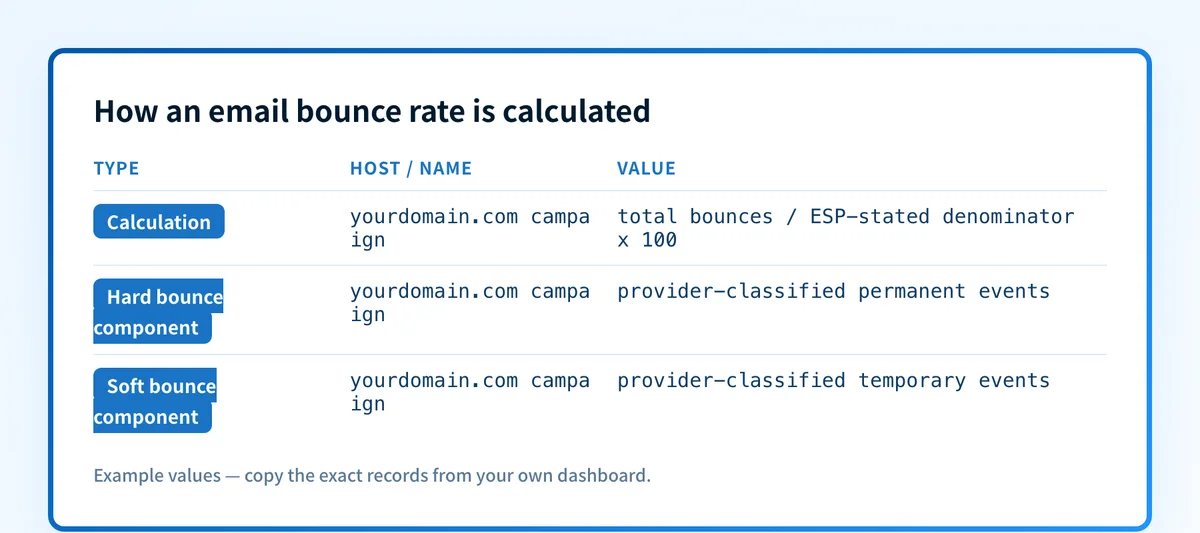
Email bounce rate is the percentage of messages your email service provider classifies as bounced during a stated send or time window. Calculate it from the provider's reported bounce count and denominator, then split the result into hard and soft bounces before changing list, sending, or authentication settings. The percentage identifies a trend. The underlying SMTP or provider reason identifies the repair.
At a glance
Quick takeaways
- Email bounce rate is
bounces / the ESP's stated denominator × 100. - Your ESP defines the denominator, event classifications, and suppression treatment used in its reporting.
- A hard bounce and a soft bounce can produce the same total rate while requiring different next steps.
- SMTP enhanced status codes separate permanent and persistent failure conditions from temporary conditions.
- A bounce rate does not prove inbox placement, recipient engagement, or the cause of an individual rejection.
- Export the underlying bounce events before changing DNS, retry settings, or suppression rules.
What does the failure mean?
A high email bounce rate means a larger share of the messages in the provider's reported cohort did not complete delivery as the provider expected. It is an aggregate symptom, not one SMTP failure. The first diagnostic task is to preserve the reported numerator, denominator, hard-bounce count, soft-bounce count, time window, list source, and top reason categories.
Use this evidence shape in the incident record. Replace each bracketed value with the numbers from the campaign or sending-period export.
Campaign or sending window: <provider-reported period>
Reported denominator: <sent, attempted, or provider-defined total>
Total bounces: <count>
Hard bounces: <count>
Soft bounces: <count>
List source: <import, signup form, CRM sync, or other source>
Top provider or SMTP reason categories: <exact reported strings>
The calculation is:
email bounce rate = total bounces / provider-stated denominator × 100Mailchimp distinguishes hard bounces from soft bounces in its own reporting and handles addresses based on the event type. Twilio SendGrid documents bounce and block classifications separately. Do not assume those labels, denominators, or account actions map identically across providers.
SMTP evidence can narrow the cause when it is available. RFC 3463 defines enhanced mail-system status-code classes: class 4 indicates persistent transient failure conditions, while class 5 indicates permanent failure conditions. A provider's dashboard label may summarize those codes, but preserve the exact response or delivery-status notification before treating a label as a root cause.
What usually causes it?
Invalid or unavailable recipient addresses
A permanent recipient-side failure can increase the hard-bounce component. The exact evidence may identify a nonexistent mailbox, an invalid domain, or another permanent destination condition. RFC 3463 classifies permanent failures in the 5.X.X class, but the specific subcode and provider interpretation matter.
If invalid addresses rise after an import, CRM synchronization, or list-source change, that timing is evidence worth investigating. It is an inference about list quality until the event export and source records confirm it.
Temporary recipient or mailbox conditions
A temporary condition can increase the soft-bounce component without proving that the address is unusable. RFC 3463 uses class 4.X.X for persistent transient failures. Mailbox capacity, temporary server conditions, or provider throttling can appear in this category, depending on the provider and receiving system.
Do not remove recipients based only on a single transient event. First confirm how the ESP retries, classifies, and suppresses that event type.
Sender-side rejection or deferred traffic
A rate increase can reflect a sender-side problem rather than recipient validity. Gmail's sender guidelines for messages that bounce or defer direct senders to identify and fix the issue that caused the response. Preserve the exact Gmail response, affected sending domain, IP, and route.
A percentage alone cannot show whether the cause is authentication, message content, sending behavior, recipient policy, or another factor. Use raw SMTP or delivery-status evidence for that branch. The bounce-back email guide explains how to read an individual delivery failure.
A provider reporting or classification change
A changed denominator, campaign filter, suppression rule, or dashboard classification can alter the displayed rate without a comparable change in SMTP outcomes. This is an inference until the provider's export definitions or release documentation explain the difference.
Compare like with like: the same provider-defined denominator, audience segment, sending path, and time window. A campaign sent to a newly imported list is not a useful comparison with a transactional stream sent to established recipients.
How do I diagnose the failure?
1. Capture the reported numerator and denominator
Export the campaign or sending-period report before rerunning, deleting, suppressing, or changing recipients. Record whether the provider uses attempted messages, accepted messages, sent messages, or another value as the denominator.
Calculate total, hard, and soft rates separately when the provider exposes those counts. This stops one total percentage from concealing a concentrated permanent-failure or temporary-failure problem. The email bounce rate calculator does that split for you from the counts in the export, and marks which of the resulting rates a provider publishes a threshold for.
2. Group bounce events by their exact reason
Export the provider's exact SMTP responses, delivery-status notifications, or named reason categories. Group identical strings and count them. Keep raw evidence access-controlled because delivery records can contain recipient or message metadata.
Start with the largest group. A single recurring response can explain most of the rate, while a long tail of unrelated events may require separate investigations. For an individual SMTP response, use the common email bounce messages guide to identify the evidence that matters.
3. Separate permanent and transient evidence
Classify events according to the provider's documented treatment and the available SMTP status evidence. RFC 3463 class 5 events are permanent failure conditions, and class 4 events are persistent transient failure conditions. Do not overwrite the ESP's classifications with a generic hard-versus-soft rule if its documentation says otherwise.
Record whether the provider retried each event, suppressed the address, or blocked the send before it reached the recipient. A provider block is not necessarily a remote mailbox rejection.
4. Compare the affected cohort with a stable cohort
Compare the same metric definition across two cohorts. Useful dimensions include list source, acquisition date, sending domain, message type, ESP subaccount, recipient domain, and time window.
A rise limited to a new import points toward a list-source investigation. A rise limited to one recipient provider or one sending route points toward that branch's raw SMTP evidence. These are diagnostic hypotheses, not documented receiver conclusions.
5. Check the exact production sending path
For a sender-side response, capture a newly sent test through the same application, ESP account, sending domain, authentication path, and recipient-provider route. A test from a different mailbox or a different vendor path does not validate the failing route.
If the event includes a DMARC-related rejection, diagnose the message authentication evidence separately with email rejected per DMARC policy. Do not change the DMARC policy merely to reduce a percentage. That changes requested enforcement, not the failed message's authentication result.
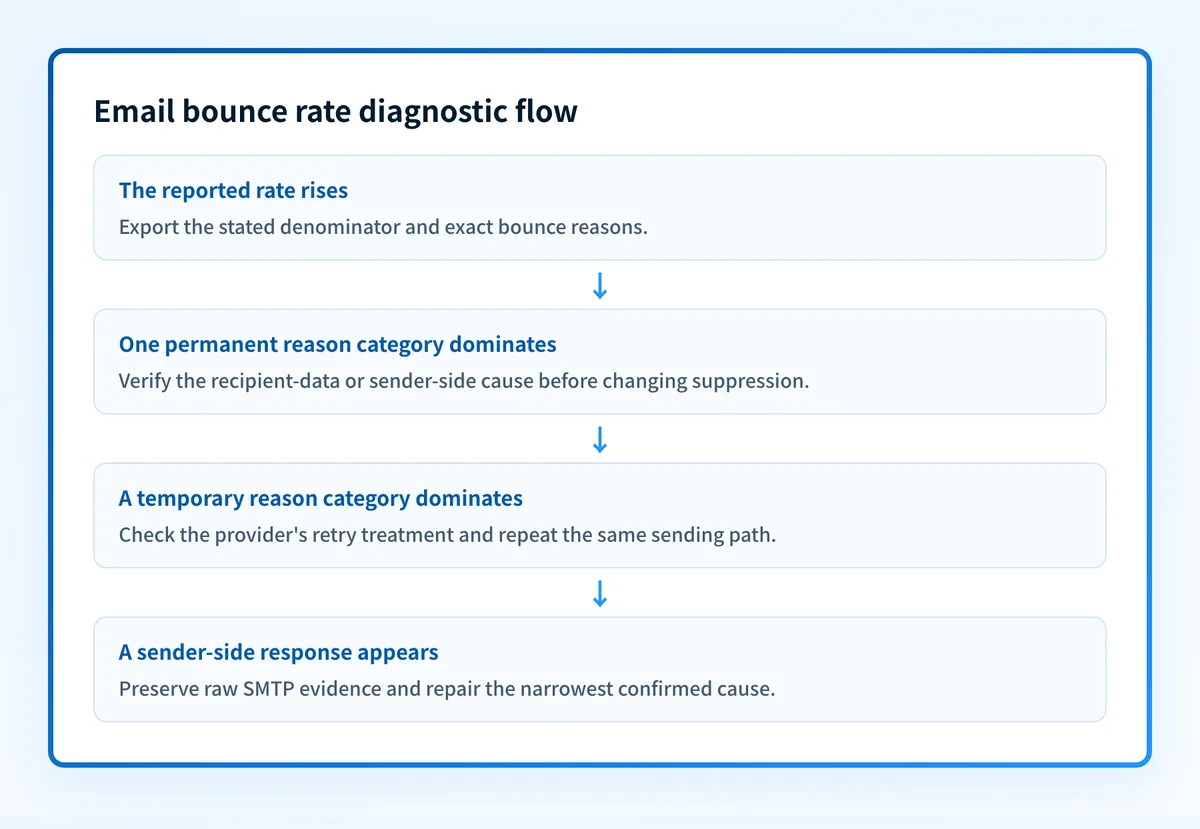
How do I fix it?
Remove or correct confirmed invalid addresses
When the exact evidence and provider documentation support a permanent recipient-address failure, correct the address at its source or stop sending to it according to the provider's suppression process. Preserve the original event record so the change remains auditable.
Do not bulk-remove recipients from an aggregate rate alone. A total percentage cannot distinguish confirmed invalid addresses from temporary or sender-side failures.
This repair changes list quality and recipient eligibility. It does not repair sender authentication or guarantee future delivery.
Correct the list acquisition or synchronization process
If a concentrated increase follows one import, form, or CRM synchronization, inspect that source's validation, mapping, consent, and update process. Test a corrected sample before applying a broad cleanup.
Keep the original import and a reversible record of any correction. A list-source repair does not prove that every historic address is valid.
Repair the specific sender-side failure
When exact SMTP evidence identifies a sender-side issue, repair the narrowest confirmed cause. That may involve the sending application's configuration, a provider setting, an authentication failure, or a route-specific policy. Follow the receiving provider's published guidance where it exists.
Do not present a domain setting as a universal repair for every bounce. A public domain check may show a current DNS record, but it cannot prove the production application used that record or explain a receiver's private decision.
Preserve transient recipients for the documented retry path
For temporary events, use the ESP's documented retry and suppression behavior. Do not convert transient failures into permanent removals without evidence that the provider's rules and repeated event history support that action.
This repair affects retry handling or audience treatment. It does not change the receiving provider's capacity, filtering, or future policy.
How do I validate the repair?
Repeat the same sending path with a controlled cohort that matches the failed campaign's application, ESP account, sending domain, message type, and recipient-provider mix. Confirm the provider's current event classification, then inspect the received message or delivery-status evidence for the exact branch that failed.
Validate at four layers where each applies:
- Check DNS through the authoritative provider and a public resolver if the repair changed a sending-domain record.
- Check the ESP's current authentication or delivery status if the provider exposes it.
- Check a real message or delivery-status notification from the exact production path.
- Review DMARC aggregate reports after data accumulates when the repair involved DMARC authentication or alignment.
Export the evidence behind the bounce rate
Before using a domain-level assessment, export the campaign's denominator and exact bounce reasons. A rising email bounce rate can come from recipient data, temporary conditions, sender-side responses, or a reporting-definition change.
The email security score can inspect public domain security signals after your evidence points to a domain-control question. It cannot accept a campaign export, verify recipient validity, explain an ESP's suppression behavior, or prove why a receiver rejected one message.
For broader context on delivery signals beyond bounces, see the email deliverability learning hub.
Evidence
Sources and further reading
Questions readers ask
Frequently asked questions
What is a good email bounce rate?
A good email bounce rate is one that is measured against your ESP's stated denominator and has no unexplained increase in permanent or sender-side failures. There is no SMTP standard that defines one universal acceptable percentage. Compare similar campaigns, then investigate the exact reasons behind a material change.
Is a 20% bounce rate good?
No. A 20% email bounce rate warrants immediate investigation of the denominator, list source, and exact provider or SMTP reason categories. The percentage alone does not prove the cause, but it is too large to treat as routine variation without evidence.
Is 48% bounce rate good?
No. A 48% email bounce rate is a severe delivery symptom. Pause broad expansion of the affected cohort until you preserve the event export, identify the dominant reason category, and test the narrowest supported repair through the same sending path.
Is 35% a good email open rate?
Only as a comparison within the same measurement method, audience, message type, and time window. An open rate measures a different event from email bounce rate, and open tracking can be affected by recipient privacy and image-loading behavior. A 35% open rate does not explain why messages bounced.
Can a bounce rate prove poor inbox placement?
No. Bounce rate measures provider-reported delivery failures or classifications within a stated cohort. A message can avoid a bounce and still be filtered, delayed, or ignored. Review delivery evidence and recipient-provider data separately before drawing an inbox-placement conclusion.

Written by
Dominic LandryDeliverability & DNS
Dominic Landry works on email deliverability and DNS configuration at Palisade, from SPF and DKIM records through to DMARC enforcement.
More from Dominic →