Domain key and DKIM: what the phrase means
 ChatGPT
 Claude
 Gemini
 Perplexity
 Grok
GrokIn brief
Domain key DKIM means DomainKeys Identified Mail, while legacy DomainKeys is obsolete. Learn how DKIM signatures and selector records work today.
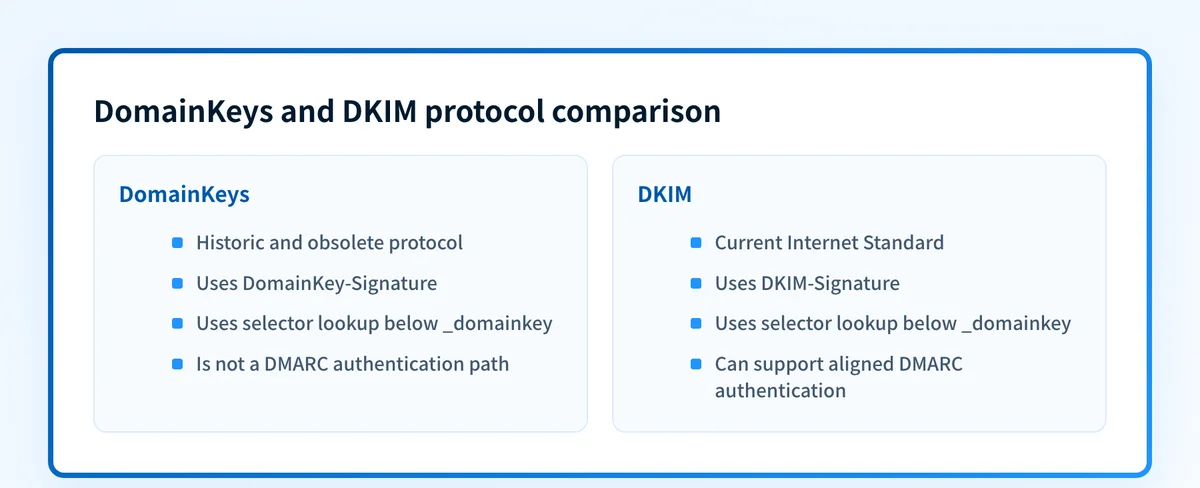
The "domain key" in DKIM refers to DomainKeys Identified Mail, the current standard for signing email with a domain-controlled key. It does not mean that legacy DomainKeys and DKIM are interchangeable. DomainKeys in RFC 4870 is Historic and obsolete, while DKIM in RFC 6376 is the current Internet Standard. Both use DNS below _domainkey, but their headers and verification rules differ.
At a glance
Quick takeaways
- DomainKeys uses the
DomainKey-Signatureheader and is Historic. - DKIM uses the
DKIM-Signatureheader and is Internet Standard STD 76. - A shared
_domainkeyDNS namespace does not make a DomainKeys key valid for DKIM. - RFC 8301 says
rsa-sha1MUST NOT be used for DKIM signing or verification. - DMARC can use an aligned passing DKIM identifier, but it does not define DomainKeys as an authentication path.
- Retire DomainKeys only after checking every active and infrequent production sending route.
Who is affected?
This distinction matters to domain administrators, migration teams, and MSP technicians who find old selectors, legacy DNS records, archived headers, or outdated provider instructions. A new sender should configure DKIM through its current sending platform or signing service. An existing sender should identify the active protocol before removing anything.
The shared _domainkey label can be misleading. A receiving system determines which protocol applies from the message header, then follows that protocol's own key lookup and signature-verification rules. A DNS record that looks related to DomainKeys cannot replace a DKIM public key solely because both use a selector.
Keep the authentication layers separate:
- DKIM signs selected message content and identifies a signing domain.
- SPF authorizes an SMTP sender identity.
- DMARC evaluates whether a passing DKIM or SPF identifier aligns with the visible RFC 5322
Fromdomain, as defined by RFC 9989.
What does "domain key" mean in DKIM?
DKIM expands to DomainKeys Identified Mail. The name reflects the mechanism: a sending system signs selected message content with a private key, and the domain publishes the matching public key in DNS. A receiver uses the signature's d= domain and s= selector to find that key below _domainkey and verify the signature.
The phrase can also cause confusion because DomainKeys was the name of an earlier protocol. A header named DomainKey-Signature belongs to that legacy protocol. A header named DKIM-Signature belongs to DKIM. The shared word and DNS label show the protocols' relationship, but they do not make an old signature or record valid under DKIM.
For a DKIM signature with d=yourdomain.com and s=selector1, the public-key lookup name has this structure:
selector1._domainkey.yourdomain.comThe selector and key value come from the sending system. Do not invent a selector or copy another domain's public key.
What are the requirements?
DomainKeys uses a legacy signature header
RFC 4870 specifies DomainKeys and its DomainKey-Signature header. The RFC Editor marks RFC 4870 Historic and obsolete. RFC 6376 did not directly obsolete RFC 4870. DomainKeys was superseded through earlier DKIM specification work, so the accurate operational description is that DKIM succeeded DomainKeys.
The header name is the clearest first sign that an active route still uses the older protocol:
DomainKey-Signature: a=rsa-sha1; c=nofws; d=yourdomain.com;
 s=legacy; b=illustrative-signature-data
This is illustrative only. Do not copy a signature header, selector, or key value from another sender.
DKIM has its own signing and verification model
RFC 6376 defines DKIM as Internet Standard STD 76. A signer adds DKIM-Signature with the signing domain in d=, the selector in s=, signed header fields in h=, a body hash in bh=, and the signature in b=. The optional c= tag specifies canonicalization.
DKIM-Signature: v=1; a=rsa-sha256; d=yourdomain.com;
 s=selector1; h=from:to:subject:date; bh=illustrative-body-hash;
 b=illustrative-signature-data
The verifier combines s= and d= to find the public key in DNS. A typical structural record shape is:
selector1._domainkey.yourdomain.com. IN TXT "v=DKIM1; k=rsa; p=illustrative-public-key"Do not publish another tenant's selector, public-key value, CNAME target, or provider-generated record. Obtain the live DNS value from the sender that owns the signing configuration.
A public DNS lookup proves that a record can be reached. It does not prove that the production application uses that selector, has the matching private key, or signs delivered mail.
Current DKIM algorithm requirements replace old guidance
RFC 8301 updates RFC 6376's cryptographic requirements. It says rsa-sha1 MUST NOT be used for DKIM signing or verification. It also requires signers to use rsa-sha256 and verifiers to support it as specified in the RFC.
RFC 8463 adds ed25519-sha256 as a DKIM signature method. That protocol update does not establish support in every sending platform. Use the algorithm supported by the platform's current configuration and confirm the algorithm on a delivered message.
DMARC evaluates aligned DKIM, not DomainKeys
RFC 9989 defines the DKIM authentication path for DMARC. A message can pass that path when it has a passing DKIM authenticated identifier aligned with the RFC 5322 From domain. DomainKeys is not a DMARC pass path.
A passing signature and DMARC alignment are separate checks. A third-party platform might produce a valid DKIM signature for its own d= domain, but that result can remain unaligned with your visible From domain. Inspect both values in the delivered message rather than treating a provider's signing status as proof of DMARC compliance.
When does the requirement take effect?
RFC 4870 was published in May 2007. The RFC Editor record for RFC 4870 identifies it as Historic and obsolete.
RFC 6376 was published in September 2011 and is Internet Standard STD 76. RFC 8301 updated DKIM cryptographic requirements in January 2018. RFC 8463 added Ed25519 support in September 2018. RFC 9989, the current DMARC specification, was published in May 2026.
There is no universal deletion date for DomainKeys records. The retirement date depends on evidence from each sending route, including scheduled jobs and low-volume systems that might not appear in a short test window.
How do I implement the requirement?
1. Collect headers from every sending route
Send or collect a complete delivered message from transactional applications, marketing platforms, support systems, appliances, and scheduled jobs. Search the raw headers separately for DomainKey-Signature and DKIM-Signature.
For each message, record the visible From domain, the DKIM d= domain, selector, sending-system owner, and message type. A provider dashboard can help identify a configuration, but it does not prove that the same production route signed a delivered message.
2. Map observed selectors to their DNS records
For each DKIM-Signature, look up the observed selector under _domainkey and identify who controls the DNS record and private key. The DKIM checker can inspect a public selector record when you already know the selector from a message header.
Use the exact selector found in the header. A guessed selector can return a valid record for a different sender. If the DNS lookup itself fails, the A record vs AAAA record guide can help separate an address-record question from a DKIM TXT-record question.
3. Configure current DKIM before retiring DomainKeys
Use the sending platform's current DKIM setup process, publish the record it generates, and keep the private key only with the authorized signer. Use a current supported DKIM algorithm.
Do not remove the DomainKeys configuration during this step. First capture a message from the same production path that contains DKIM-Signature and verifies successfully. Retaining the old route temporarily prevents an untested migration from interrupting mail authentication.
4. Check DMARC alignment on the delivered message
Review the message's Authentication-Results header and compare the passing DKIM domain with the visible From domain. Then review DMARC aggregate-report data after traffic accumulates. Aggregate reports can reveal authentication outcomes and sources that a single test message misses.
The distinction between spot checks and recurring evidence matters after a migration. A working DNS record today does not identify later DNS drift or a newly introduced sender. The active vs passive monitoring guide explains why evidence collected over time answers a different question than a one-time check.
5. Retire DomainKeys only after the evidence window closes
Keep an inventory of every sending route and the delivered-message evidence for its DKIM state. Include low-volume routes that may only send monthly, quarterly, or after an operational event.
Remove a legacy DomainKeys record or signing configuration only when no current production message uses DomainKey-Signature and each active route has a verified DKIM replacement. Preserve a rollback record that identifies the retired selector, DNS owner, sending system, and last verification date.
How do I validate compliance?
Validate the migration at four layers:
- DNS: Query the observed selector at the authoritative DNS service and at a public resolver. Confirm the published record matches the sender's generated configuration.
- Vendor: Check the sending platform's current DKIM status for the exact domain and route. This confirms its configuration view, not message delivery.
- Message: Send a real message through each production route and inspect the complete headers. Confirm
DKIM-Signatureis present and reviewAuthentication-Resultsfor DKIM and DMARC results. - DMARC: Review aggregate-report evidence after sufficient traffic has accumulated. Look for sources that still lack aligned DKIM or use an unexpected selector.
Inspect the DKIM selector, then investigate the ongoing gap
Start with the selector visible in a delivered message and use the DKIM checker to inspect its public DNS record. Compare the result with the signing domain and Authentication-Results in that same message before changing a record.
A passing public record does not show every production sender that uses the domain or reveal which sources later fail alignment. For an ongoing migration across multiple senders, Palisade's authentication-issue guidance describes how the DMARC Agent analyzes aggregate-report data and identifies authentication and alignment issues. The agent drafts fixes and proposes policy steps. You approve before anything ships. When a DNS change is approved, Smart DNS Deployment writes the record into your own zone at your own provider.
Palisade does not change the DMARC policy without approval or control a receiver's delivery decision. A public DKIM lookup also cannot prove that private decision.
Evidence
Sources and further reading
- RFC 4870: Domain-Based Email Authentication Using Public Keys Advertised in the DNS
- RFC 6376: DomainKeys Identified Mail Signatures
- RFC 8301: Cryptographic Algorithm and Key Usage Update to DKIM
- RFC 8463: A New Cryptographic Signature Method for DKIM
- RFC 9989: Domain-based Message Authentication, Reporting, and Conformance
- Palisade guide to fixing authentication issues
Questions readers ask
Frequently asked questions
Is DomainKeys the same as DKIM?
No. DomainKeys is a Historic and obsolete protocol defined in RFC 4870. DKIM is the current Internet Standard defined in RFC 6376, with later cryptographic updates.
Can a DomainKeys record work as a DKIM record?
No. Both protocols use selector-based DNS names below _domainkey, but their record formats and verification rules differ. Configure the DKIM record generated for the specific sender and selector.
Does a passing DKIM signature mean DMARC passes?
No. DMARC requires a passing DKIM authenticated identifier that aligns with the visible From domain, unless the message passes through the aligned SPF path instead.
Should I delete an old DomainKeys record immediately?
No. First collect delivered-message evidence from every active and infrequent sending route. Remove DomainKeys only after each route has a verified DKIM replacement and no current message carries DomainKey-Signature.
Must every DKIM sender use Ed25519?
No. RFC 8463 adds ed25519-sha256, but platform support differs. Use a current supported algorithm and confirm it on a delivered message.

Written by
Samuel ChenardCEO & Co-Founder, Palisade
Samuel Chenard is the CEO and co-founder of Palisade, agentic DMARC software for IT teams and MSPs, from one domain to thousands.
More from Samuel →