DMARC reporting service: EasyDMARC vs PowerDMARC
 ChatGPT
 Claude
 Gemini
 Perplexity
 Grok
GrokIn brief
DMARC reporting service comparison: assess EasyDMARC and PowerDMARC by reporting, support, tenant model, DNS controls, and key open questions.

Choose EasyDMARC if managed DMARC, SPF, and DKIM configuration support is central to the buying decision. Choose PowerDMARC if a partner needs a documented white-label, multi-tenant reporting model. Neither vendor should be selected on marketing position alone: verify the reporting scope, retention, pricing, support terms, tenancy, and who can make DNS changes before committing.
At a glance
Quick takeaways
- EasyDMARC describes readable DMARC dashboards and managed SPF, DKIM, DMARC, BIMI and MTA-STS records.
- EasyDMARC’s MSP materials publish a dedicated engineer and optional managed deployment; confirm the contracted service work.
- PowerDMARC documents analyzer setup that includes a DMARC policy and aggregate reporting, followed by one to two weeks of visibility and analysis.
- PowerDMARC documents a white-label, multi-tenant partner model for reselling services under a partner's branding.
- The presented pricing and API/MCP entitlement were refreshed on 13 October 2026. Confirm the selected volume, domain allowances, exports, data region and support SLA in the quote.
- A public DMARC record check can inspect published DNS, but it cannot replace ongoing aggregate-report analysis or prove a production sender's behavior.
Who this comparison is for
This comparison is for an IT team or MSP choosing a DMARC reporting service for one or more domains. The buyer may already publish a DMARC record and need help turning aggregate-report data into an operational view of sending sources, authentication status, and policy progress.
A reporting service has more than one job. It may collect and display DMARC reporting data, support a policy rollout, provide managed assistance, or provide a tenant model for an MSP. Those jobs affect the right choice.
Read what DMARC is before comparing services if the DMARC policy and reporting purpose are still unclear. A buyer who already has a record should also separate a DNS question from a reporting question. A public record lookup can show what is published today. It cannot show every sender that used the domain, prove a message passed DMARC, or establish future receiver placement.
How the options were evaluated
The original criteria and product positioning were checked against first-party pages on 30 July 2026. Published pricing, plan entitlements and API/MCP access were refreshed on 13 October 2026. Individual evidence dates below distinguish those checks; they do not imply a new review of every vendor claim.
- Reporting position: What each vendor publicly says about DMARC reporting or analysis.
- Operating model: Whether the documented offer emphasizes a managed service, a platform workflow, or a multi-tenant partner use case.
- DNS and authentication scope: Whether the vendor publicly describes DMARC alone or related SPF, DKIM, MTA-STS, TLS-RPT, or BIMI services.
- Support model: Whether the vendor publicly documents a named support resource.
- Buyer controls: Whether pricing, retention, integrations, exports, data residency, APIs, and DNS-change authority are documented in the evidence reviewed.
The decision rule is an editorial inference from the documented positioning: choose only after the buyer verifies required reporting scope, tenancy model, support model, report retention, pricing, and DNS-change controls. A service can display useful reporting data and still be the wrong operating fit.
EasyDMARC
EasyDMARC publicly describes a platform with smart dashboards and simplified reporting, alongside managed services for DMARC, SPF, and DKIM configuration through enforcement. That position fits a buyer who wants reporting and configuration support discussed together, rather than treating aggregate reports as a separate data feed.
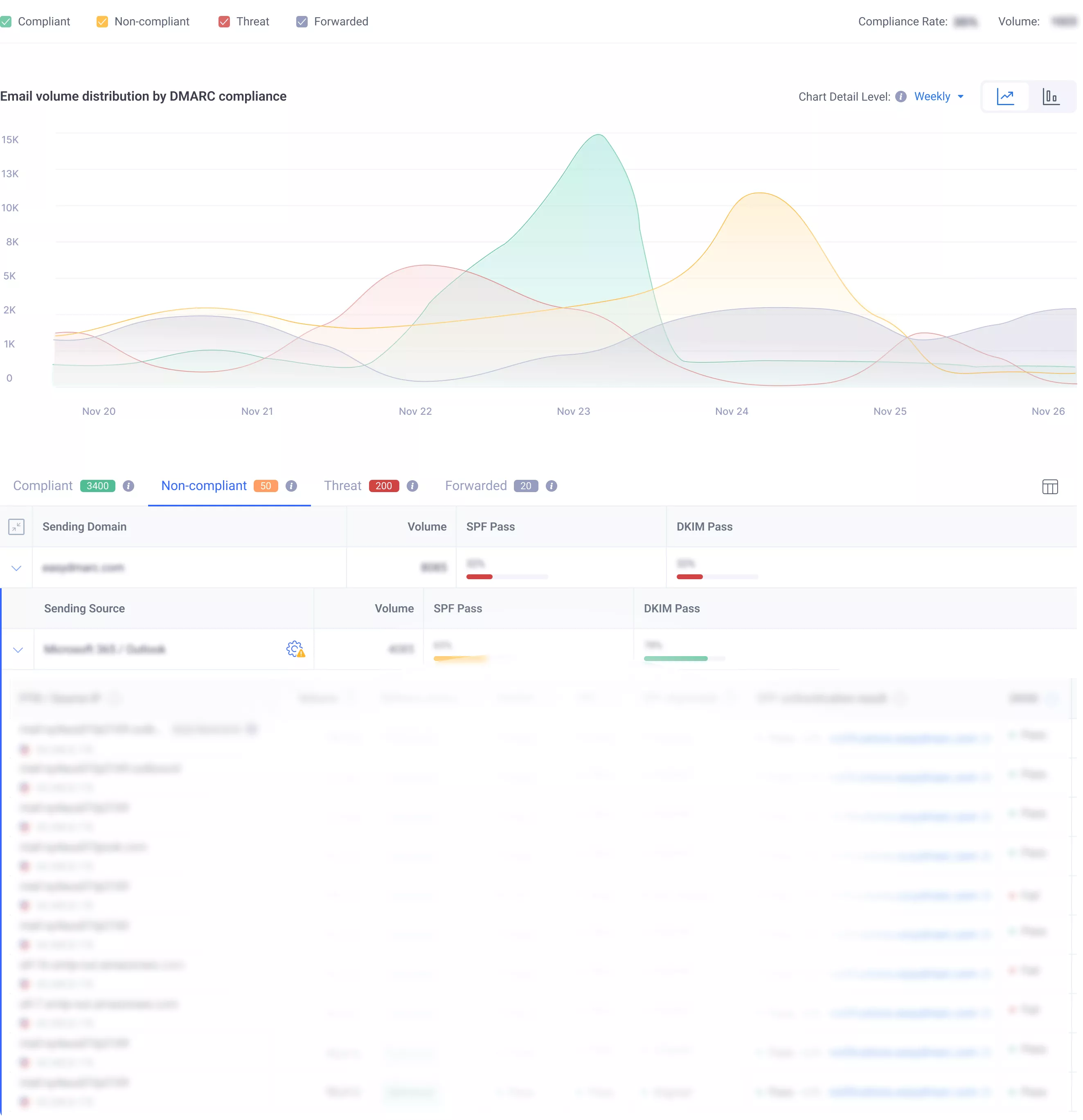
EasyDMARC’s MSP page advertises a dedicated DMARC engineer for partners on the MSP plan and optional managed deployment for complex setups. Its business pricing lists a dedicated engineer as an add-on on Deliverability and included on Enterprise: Email Trust. Confirm the actual service work and SLA in the contract. See EasyDMARC MSP services and business-plan entitlements.
EasyDMARC’s MSP page says SPF flattening is included, with real-time DNS lookup monitoring and SPF Macro management to stay under the 10-lookup limit when clients add third-party senders. That capability is relevant to SPF authentication work; review its entitlement and resulting DNS configuration separately from a DMARC dashboard summary.
- Best fit: Teams evaluating managed authentication records and MSP reporting workflows.
- Relevant evidence: EasyDMARC’s MSP page describes multi-tenant reporting, managed records, optional deployment and a dedicated engineer for MSP partners.
- Tradeoff: Business pricing publishes plan allowances, but the exact managed work and SLA still require contract confirmation.
PowerDMARC
PowerDMARC publicly describes an analyzer workflow that starts with configuring a domain, DMARC policy, and aggregate reporting. Its published process says: "Configure your domain, DMARC policy, and aggregate reporting" and then, "Over 1-2 weeks, you will get full visibility and analysis." That makes PowerDMARC relevant to a buyer whose evaluation starts with an analyzer workflow and an expected period for report data to accumulate.
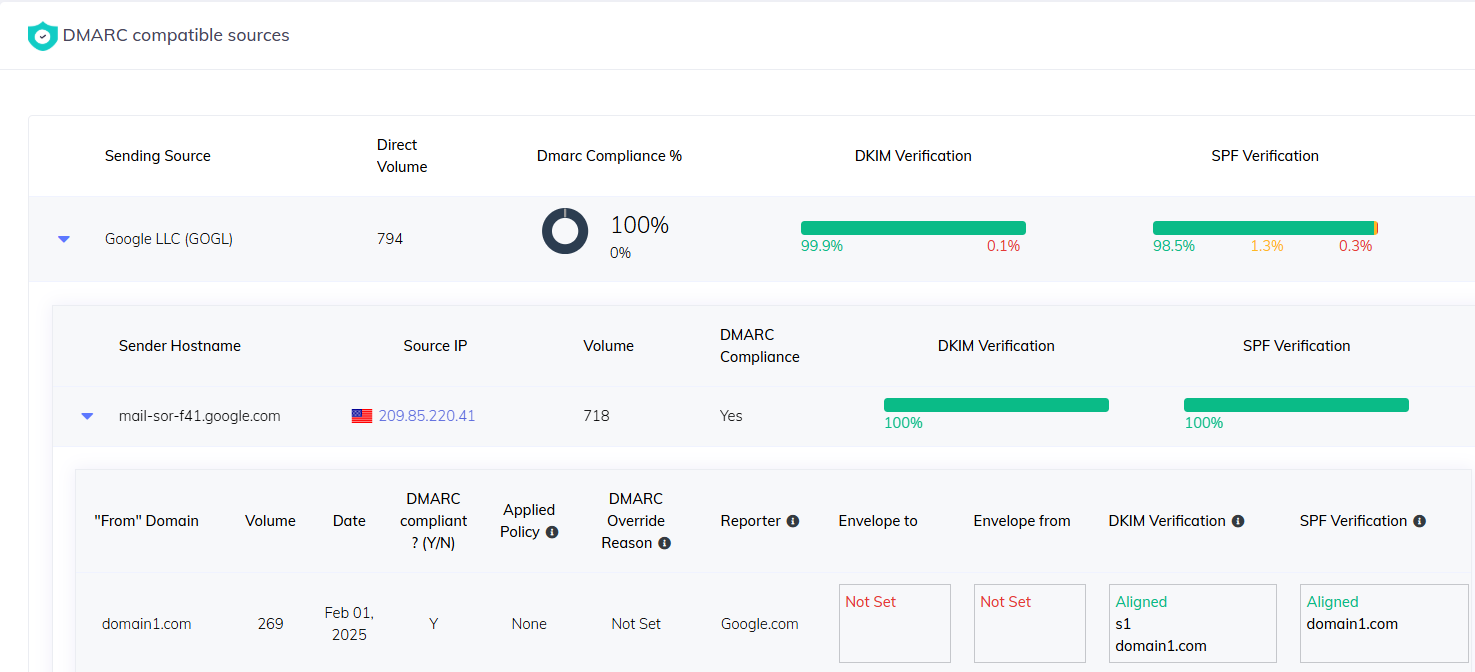
PowerDMARC also lists "DMARC Aggregate and Forensic Reporting" and describes monitoring DMARC data in its analyzer dashboard. This is vendor-specific product positioning. It does not establish report retention, the report formats available to each plan, or how a particular receiving provider supplies failure-report data.
For MSPs, PowerDMARC publicly describes a white-label, multi-tenant platform with a partnership model that can resell services under the partner's branding. It also lists hosted DMARC analysis with hosted SPF, DKIM, MTA-STS, TLS-RPT, and BIMI services. The reviewed material does not establish that every hosted service is included in every plan. For a side-by-side comparison with Palisade, see PowerDMARC vs Palisade.
- Best fit: MSPs or partners that need a vendor-documented white-label, multi-tenant model for DMARC reporting services.
- Relevant evidence: PowerDMARC documents analyzer setup, aggregate and forensic reporting, dashboard monitoring, and hosted authentication services. Its Basic pricing displays $15 monthly or $12 per month billed annually at the recommended 100,000 DMARC-compliant emails setting. MCP access requires an API key available on paid enterprise plans and the multi-tenant MSP tier.
- Tradeoff: Confirm the selected volume, partner quote, export permissions, data residency and contractual support SLA before purchasing.
Palisade
Palisade’s Domain Overview documentation describes aggregate-report analysis, named sending sources and detection/remediation tickets. Its agent investigates authentication issues and proposes fixes and policy steps for human approval. Current product and pricing information provides the relevant plan terms. Compare that operating workflow with the reporting views, managed services and partner entitlements you need; none of these descriptions substitutes for a controlled evaluation.
- Best fit: Teams that need aggregate-report investigation and human-approved remediation.
- Relevant evidence: Palisade’s Domain Overview documentation describes report analysis, source views and remediation tickets.
- Tradeoff: Confirm the required plan, integrations, DNS approval controls and operational support.
How to choose
Use the reporting service decision after establishing what problem the service must solve. If the team needs managed help for DMARC, SPF, and DKIM configuration through enforcement, EasyDMARC's documented managed-service position is the closer fit. If the buyer is an MSP that needs a documented white-label, multi-tenant partner model, PowerDMARC is the closer fit.
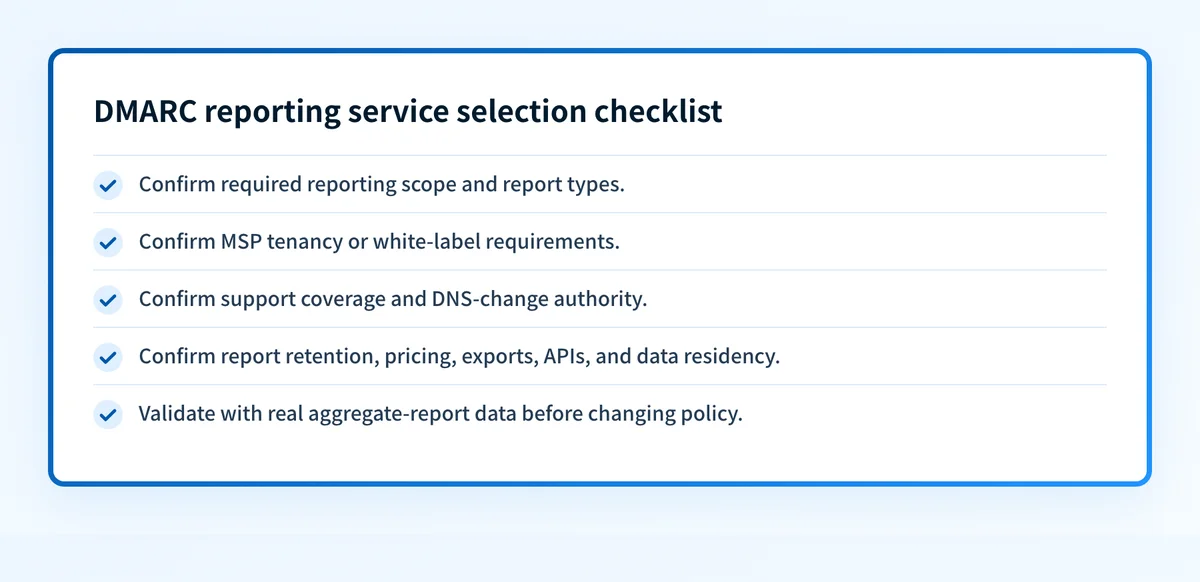
Before purchasing, require written answers for each item below.
- Confirm whether the service receives and displays the report types the team needs.
- Confirm report retention, data residency, exports, APIs, and access controls.
- Confirm which users or vendor personnel can request, prepare, or apply DNS changes.
- Confirm support coverage, onboarding work, escalation terms, and service-level commitments.
- Confirm pricing, domain limits, tenant limits, and any paid add-ons.
- Confirm the reporting view with real aggregate-report data from a controlled production domain.
Do not move a DMARC policy to enforcement based only on a dashboard status. Validate the published DNS record, vendor status, a delivered message from each production path, and aggregate-report data after it accumulates.
option: EasyDMARC
original_checked_on: 2026-07-30
pricing_and_entitlement_refresh: 2026-10-13
best_fit: Managed DMARC, SPF, and DKIM configuration support with simplified reporting
verified_evidence:
  - Smart dashboards and simplified reporting are publicly described
  - Managed services through enforcement are publicly described
  - Dedicated DMARC Engineer support is publicly described
open_question:
- Contract-specific domain and volume allowances, exports, data region, overages, and support SLAoption: PowerDMARC
original_checked_on: 2026-07-30
pricing_and_entitlement_refresh: 2026-10-13
best_fit: Analyzer-led reporting with a documented white-label multi-tenant partner model
verified_evidence:
- Analyzer setup includes DMARC policy and aggregate reporting
- Aggregate and forensic reporting are publicly listed
- White-label multi-tenant partner positioning is publicly described
open_question:
- Contract-specific domain and volume allowances, exports, data region, overages, and support SLAoption: Palisade
original_checked_on: 2026-07-30
pricing_and_entitlement_refresh: 2026-10-13
best_fit: Agent-led aggregate-report investigation and human-approved remediation
verified_evidence:
- Domain Overview documentation describes report analysis, source views and remediation tickets
open_question:
- Confirm the required plan, tenant scope, integration permissions, DNS approval controls and operational supportCheck the DMARC record before selecting a reporting service
Inspect the current DMARC record before comparing reporting workflows. The result shows the public policy and reporting addresses that DNS publishes today, which helps frame the vendor questions around collection and rollout.
A record check cannot prove which production sources fail DMARC, show a service's retained report history, or control later DNS changes. Use DMARC aggregate report format guidance and the vendor's current documentation to evaluate the reporting workflow after the record check.
If the buyer needs ongoing DMARC analysis across active sending sources, Palisade is positioned as DMARC software that analyzes DMARC aggregate-report data, identifies authentication or alignment issues, and creates prioritized remediation tickets. The Agent drafts fixes and proposes policy steps for human review and approval before changes are applied. Start with Palisade
Evidence
Sources and further reading
Questions readers ask
Frequently asked questions
What is the best DMARC reporting service?
No single service is best for every buyer. EasyDMARC fits teams that prioritize its documented managed-service position for DMARC, SPF, and DKIM configuration. PowerDMARC fits partners that need its documented white-label, multi-tenant model. Verify retention, pricing, support, and DNS controls before selecting either service.
Does EasyDMARC provide managed DMARC support?
Yes. EasyDMARC’s MSP page advertises managed SPF, DKIM, DMARC, BIMI and MTA-STS, optional managed deployment, and a dedicated DMARC engineer for MSP partners. Business-plan engineer entitlements differ; confirm the included work and SLA for the package you buy. See EasyDMARC MSP services and business-plan entitlements.
Does PowerDMARC support MSPs?
Yes. PowerDMARC publicly describes a white-label, multi-tenant partnership model that allows partners to resell services with their own branding. Confirm current partner terms, tenant limits, support coverage, and pricing directly with PowerDMARC before making an MSP purchasing decision.
Can a DMARC checker replace a DMARC reporting service?
No. A DMARC checker can inspect the public DNS record at the time of the lookup. It cannot collect and analyze aggregate reports over time, identify every production sending source, or prove how a vendor's reporting workflow handles data.
Should a team enforce DMARC after a dashboard shows a healthy status?
No. A dashboard indicator alone does not prove every production message path authenticates correctly. Validate the DNS record, the vendor's status, a real delivered message from each production path, and DMARC aggregate-report data before changing the DMARC policy.

Written by
Johanie DupontBrand & Ecommerce Email
Johanie Dupont works on brand and ecommerce email at Palisade: BIMI and verified marks, sender requirements, and getting marketing mail into the inbox.
More from Johanie →