DMARC for Microsoft 365 and Google Workspace client tenants
 ChatGPT
 Claude
 Gemini
 Perplexity
 Grok
In brief
DMARC for client tenants in Microsoft 365 and Google Workspace requires separate DKIM, DNS, sender-inventory, approval, and validation workflows.
DMARC for Microsoft 365 and Google Workspace client tenants is an MSP operations problem, not one shared configuration task. Each client domain needs its own sender inventory, tenant-generated DKIM values, DNS owner, approval path, and delivered-message evidence before the MSP recommends a DMARC policy change.
At a glance
Quick takeaways
- Microsoft 365 custom domains do not DKIM-sign outbound mail until DKIM is configured for that domain.
- Microsoft 365 DKIM CNAME values are tenant-specific and must be generated from the client tenant.
- Google Workspace requires SPF and/or DKIM before DMARC, and Google recommends waiting 48 hours before adding DMARC.
- Google Workspace generates a unique DKIM key for each domain, even when several domains belong to one client.
- DMARC TXT records are published at the client's DNS host, not in Microsoft 365 or Google Workspace.
- A public DNS result does not prove that a production message used the expected authentication path.
Operating context and ownership
An MSP managing Microsoft 365 and Google Workspace tenants needs a per-domain service record. A client can use one productivity platform across several domains, while a single domain can also send through marketing, billing, support, CRM, and application providers outside that platform.
The MSP can run intake, collect evidence, coordinate sender owners, prepare change requests, and report exceptions. The client retains approval for business-impacting changes unless its agreement delegates that authority. The DNS host publishes TXT and CNAME records. Microsoft 365 and Google Workspace generate or enable platform-specific authentication settings. Each third-party sender controls its own sending configuration. Receiving mailbox providers make the final disposition decision.
This is a Palisade operating framework for multi-client work, not a protocol requirement. For broader portfolio operations, use the MSP learning hub. For a client stakeholder who needs a plain-language starting point, email security for small business explains the early priorities without replacing this tenant workflow.
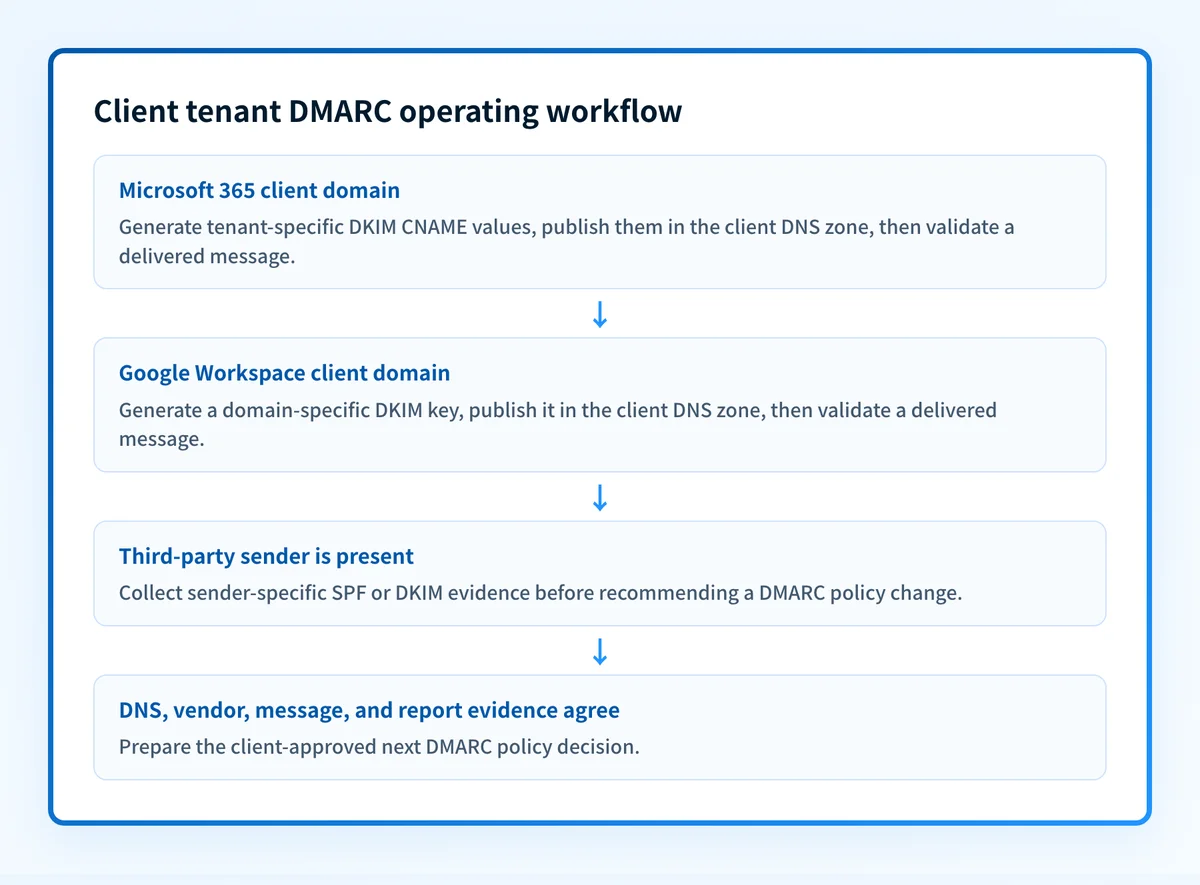
Set the authority boundary at onboarding. Record who can access the tenant, who can publish DNS, who approves policy changes, and who owns each non-platform sender. A missing DNS owner or client approver is an operational blocker, not a detail to resolve after a DMARC policy change is queued.
Evidence to collect
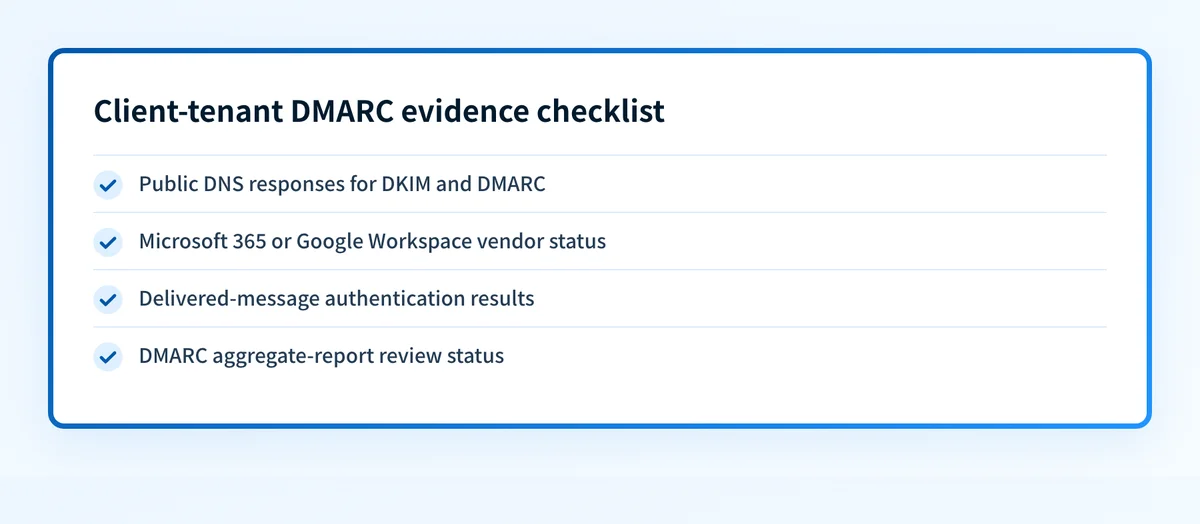
Create one working record for every client domain. Do not use a tenant-level status alone, because the DKIM selector, DNS zone, sender inventory, and policy readiness can differ by domain.
client: example-client
domain: yourdomain.com
evidence:
  dns: "DKIM and DMARC public DNS responses recorded"
  vendor: "Microsoft 365 or Google Workspace status recorded"
  message: "Redacted Authentication-Results from a delivered test message"
  dmarc: "Aggregate-report review status recorded"
owner: "client DNS administrator"
next_action: "Publish tenant-generated DKIM records"
review_on: "2026-11-19"
Collect these fields before recommending enforcement:
- Client technical approver and business approver.
- Domain, subdomain, DNS host, and DNS change owner.
- Productivity platform for the domain: Microsoft 365 or Google Workspace.
- Tenant-generated DKIM record values, their source, and publication status.
- Known first-party and third-party sending services.
- A real delivered message from each important sending path, with redacted authentication results.
- Current DMARC policy, report destination, exception owner, and next review date.
How to run the workflow
1. Assign the client-domain owner
The MSP service owner takes the client domain list, tenant details, DNS host, and client contacts as input. The output is one accountable owner for tenant access, DNS publishing, and approval.
Ask whether the client sends mail only from Microsoft 365 or Google Workspace. Then ask which systems send invoices, marketing campaigns, support notifications, forms, or application mail. Treat an unknown sender as an open intake item, not as evidence that the platform is the only source.
2. Prepare Microsoft 365 custom domains
The Microsoft 365 administrator takes the custom domain and access to the client tenant as input. The output is the tenant-specific DKIM CNAME information and a recorded enablement status.
Microsoft's DKIM configuration guidance states that no DKIM signing occurs for outbound mail from custom domains until it is configured. Microsoft also says its documented CNAME values are illustrative only. Obtain the actual values from the client's Defender portal or Exchange Online PowerShell process. Do not copy example targets from documentation or another client tenant.
Microsoft's DMARC guidance states that its custom-domain DMARC TXT record is managed at the registrar or DNS host, not through Microsoft 365 admin portals or PowerShell cmdlets. Microsoft's DMARC configuration documentation also explains that DMARC passes when aligned SPF or aligned DKIM passes, and fails when both fail.
3. Prepare Google Workspace domains
The Google Workspace super administrator takes the domain, Admin console access, and DNS-change authority as input. The output is a domain-specific DKIM key ready for publication.
Google documents the Admin console path as Menu Apps Google Workspace Gmail, then Authenticate email. Google Workspace DKIM guidance requires a super administrator and the Gmail Settings administrator privilege. After Gmail is enabled, Google says to wait 24 to 72 hours before obtaining the DKIM key. Google generates a unique key for each domain. The default selector is google, but it can differ when that prefix is already in use.
Select a 2048-bit key where the DNS provider supports it. Google recommends that key length and says authentication can take up to 48 hours to begin working after the key is added. Record the generated selector and DNS publication result per client domain.
4. Publish and verify the DNS records
The DNS owner takes the tenant-generated DKIM values and approved DMARC record as input. The output is an authoritative DNS response and a public-resolver response retained with the client record.
For Google Workspace, Google's DMARC setup guidance says the DMARC record is a DNS TXT record and no Google Admin console action is required specifically to configure DMARC. Google directs administrators to enable SPF and/or DKIM before DMARC and recommends allowing 48 hours after that authentication setup before adding DMARC.
Start each client with an approved monitoring policy and a report destination that the client or MSP can review. Google recommends p=none first, then movement to quarantine or reject after authentication is understood. Google also recommends a dedicated mailbox, group, or specialist service for DMARC reports because report volume can be high.
Do not advance a client domain based only on a published record. A DNS check does not show whether every production sender uses aligned SPF or DKIM.
Use the DMARC checker to inspect the client domain's public DMARC record after publication. The check cannot prove the production sending path, continuous DNS state, a receiver's private decision, or future inbox placement.
5. Validate each sending path
The MSP analyst takes public DNS results, tenant status, and a real delivered message from each material sender as input. The output is a sender inventory marked as verified, pending, unknown, or exception.
For Microsoft 365, confirm that a message from the custom domain carries the expected DKIM and DMARC results. For Google Workspace, verify the generated domain key is used after the documented activation period. Review third-party senders independently. Google specifically directs administrators to authenticate third-party services and ensure their envelope-sender domain matches the client domain where required for the intended alignment outcome.
Microsoft notes that DMARC policy can cover subdomains without their own DMARC record, but each sending subdomain still needs its own SPF and DKIM records for DMARC. Record subdomain senders separately. A parent-domain policy does not make a subdomain sender authenticate correctly.
6. Review reports and approve the next policy decision
The MSP service owner takes aggregate-report findings, message evidence, outstanding exceptions, and client approval as input. The output is either a documented next policy proposal or a dated exception.
Google allows staged rollout with pct, which must be a whole number from 1 through 100. Use that option only when it fits the client-approved rollout approach. Do not assume Microsoft 365 and Google Workspace share the same operational timing, because tenant setup and third-party sender evidence remain domain-specific.
Exceptions and escalation
Use an exception register when the evidence does not support a safe policy recommendation.
- A client has no confirmed DNS owner: escalate to the client technical approver.
- Microsoft 365 DKIM values were copied from another tenant: discard them and generate values in the correct tenant.
- Google Workspace DKIM cannot be generated because the required administrator role is unavailable: escalate for access or delegated authorization.
- A third-party sender cannot produce aligned SPF or DKIM evidence: assign remediation to that sender owner before enforcement.
- A business-critical path has no test message or safe validation window: keep the domain in monitoring and set a review date.
- A provider returns an SMTP rejection: retain the full response and check the SPF, DKIM and DMARC results it reports.
Reporting and success measures
Report monthly by client and domain, with a separate portfolio view for service management.
- Domains with confirmed tenant access, DNS ownership, and client approval.
- Microsoft 365 and Google Workspace domains with tenant-generated DKIM values published.
- Material sending paths with delivered-message evidence.
- Domains in monitoring, remediation, approved change, or exception status.
- Exceptions by owner and review date.
- Aggregate-report availability and unresolved sources.
Standardize the client-tenant record
A repeatable client record prevents an MSP from treating Microsoft 365 and Google Workspace as interchangeable while still using one operating cadence for evidence, approvals, and exceptions.
Review Palisade for managed service providers to see the MSP-focused service approach. This route does not validate a client's DNS, enable tenant DKIM, authorize a policy change, or control how a receiving mailbox provider handles mail.
Evidence
Sources and further reading
Questions readers ask
Frequently asked questions
How do I enable DKIM for a client's Microsoft 365 tenant?
Obtain the tenant-specific DKIM CNAME values through the client's Defender portal or Exchange Online PowerShell process, publish those values at the client's DNS host, then complete Microsoft's enablement procedure. Microsoft states that documentation values are illustrative only, so an MSP must not reuse CNAME targets from another tenant. Microsoft's DKIM documentation is the current provider reference.
Does Google Workspace need DMARC?
Yes. Google Workspace DMARC tells receiving servers how to handle mail that fails SPF or DKIM authentication, and Google requires SPF and/or DKIM to be set up before DMARC. Google recommends allowing 48 hours after SPF or DKIM setup before configuring DMARC. Google Workspace DMARC setup guidance documents the DNS-based process.
Can an MSP publish one Microsoft 365 DKIM record for every client?
No. Microsoft 365 DKIM values for custom domains are tenant-specific. Generate the values in each client tenant and publish them only in that client's DNS zone. Microsoft's configuration guidance warns that its published examples are illustrative.
Does one Google Workspace DKIM key cover every client domain?
No. Google Workspace generates a unique DKIM key for each domain. Record the generated selector and published DNS result for each client domain, even when multiple domains are administered in one Google Workspace environment. Google Workspace DKIM documentation describes the domain-specific generation process.
Check your domain against Microsoft’s sender requirements
Enter your domain.

Written by
Samuel ChenardCEO & Co-Founder, Palisade
Samuel Chenard is the CEO and co-founder of Palisade, agentic DMARC software for IT teams and MSPs, from one domain to thousands.
More from Samuel →