Barracuda email security
 ChatGPT
 Claude
 Gemini
 Perplexity
 Grok
GrokIn brief
Barracuda email security: compare Barracuda Email Protection with Palisade by deployment scope, DMARC workflow, buyer fit, and DMARC evidence.

Choose Barracuda Email Protection if your evaluation centers on protecting Microsoft 365 or Google Workspace mailboxes with Barracuda's published threat, account, data, and domain-fraud capabilities. Choose Palisade if the operating problem is DMARC adoption and enforcement across one or many domains, with an AI agent that analyzes aggregate-report data and prepares remediation work for human review. These products can address related email-security work, but they do not have the same primary job.
At a glance
Quick takeaways
- Barracuda positions Email Protection as a suite that supplements Microsoft 365 and Google Workspace.
- Barracuda lists Domain Fraud Protection as a feature for DMARC reporting and analysis, separate from inbound threat protection.
- DMARC evaluates aligned SPF or DKIM results and communicates a domain owner's requested disposition to receivers.
- A public DNS check can establish what a domain publishes today. It cannot inspect a Barracuda tenant, a licensed plan, a message verdict, or a receiver's private filtering decision.
- Palisade is for teams that want an AI agent to do DMARC analysis and propose prioritized remediation work, while humans review evidence and apply changes.
Who this comparison is for
This comparison is for an IT administrator, security owner, or MSP deciding whether the immediate need is email-security protection around a mailbox environment or an operating workflow for sender-domain authentication.
The distinction matters when both products appear in the same evaluation. A secure email platform can help protect users from malicious or unwanted inbound mail. DMARC is concerned with mail that claims to use a sender domain and whether aligned SPF or DKIM authentication supports the domain's published policy. Read AI powered email security: what the label actually covers if the evaluation is using a broad "AI email security" label without a defined operating task.
Use a product comparison only after writing down the evidence the team needs. For example, a Microsoft 365 tenant may need to test deployment and response workflows. A domain owner may instead need to inventory all sources sending as yourdomain.com, resolve authentication or alignment failures, and decide when report evidence supports a stricter DMARC policy.
How the options were evaluated
The criteria below were checked against vendor-published material on August 13, 2026. They are intended to keep product scope separate from a promised tenant outcome.
- Buyer fit: the operating problem the documented product scope addresses.
- Deployment scope: the mail environment or domain workflow described by the vendor.
- Workflow: the evidence and follow-up work the product is described as supporting.
- DMARC boundary: what the product can contribute to a sender-domain program, and what still requires protocol evidence and human approval.
- Open questions: tenant-specific details that documentation cannot establish, including plan entitlement, configuration, message handling, and response results.
Barracuda Email Protection
Barracuda's Email Protection overview describes a product suite intended to supplement Microsoft 365 and Google Workspace. The same overview describes API-first deployment without MX-record changes for those environments. Barracuda's features page lists threat protection, account-takeover protection, encryption and data-loss prevention, incident response, training, backup, archiving, and Domain Fraud Protection.
- Best fit: Teams evaluating a Barracuda product suite around a Microsoft 365 or Google Workspace mailbox environment.
- Relevant evidence: Barracuda documents published feature categories, post-delivery capabilities, and API-first positioning for Microsoft 365 and Google Workspace in its Email Protection materials, checked August 13, 2026.
- Tradeoff: A product page cannot establish which controls are licensed, enabled, or effective in one tenant. The buyer still needs plan-specific deployment documentation and test evidence from the intended mail path.
DMARC itself has a narrower protocol role. RFC 9989 defines DMARC as an evaluation of aligned SPF or DKIM authentication, with a requested disposition that a receiver can apply. Inbound threat filtering and sender-domain authentication may support the same security program, but one does not replace the other.
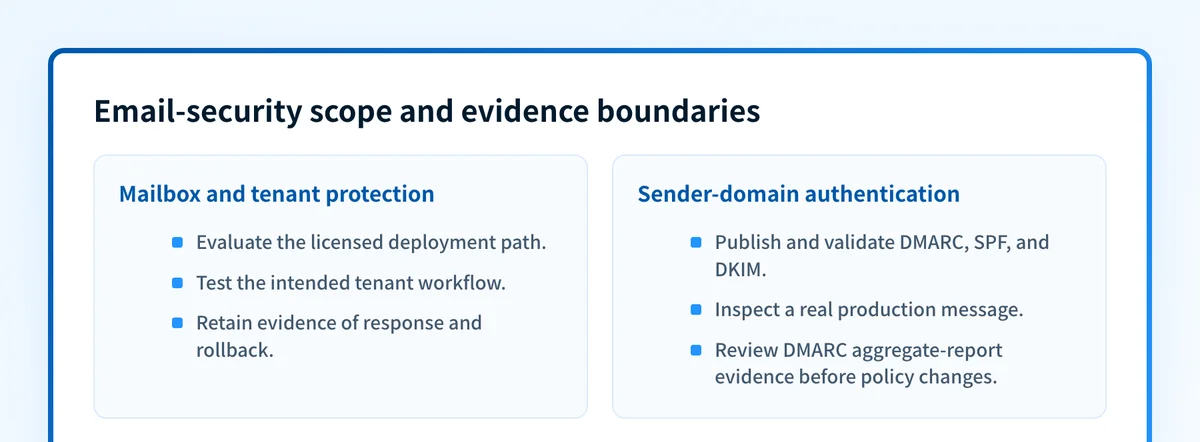
The deployment model also needs confirmation. Barracuda's Email Protection plans page describes API, inline, and traditional MX-record deployment options for eligible plans. Confirm the route offered by the plan under review. Do not assume that an API-connected deployment, an inline configuration, and an MX-routed configuration produce the same evidence or operational responsibilities.
For background on the broader category, what an email security gateway is explains the gateway model. That model is useful for inbound protection, but it does not prove that every source using a domain in the visible From field is authorized and aligned.
Palisade for DMARC operations
Palisade is agentic DMARC software for IT teams and MSPs. It fits teams whose main problem is moving a domain, or a portfolio of domains, toward DMARC enforcement with evidence from aggregate reports. Palisade autonomously analyzes DMARC aggregate-report data, identifies sending sources and authentication or alignment issues, and creates prioritized remediation tickets. It can propose the next policy step when a domain appears ready, while a human reviews the evidence and applies the DNS change. See Palisade's comparison hub for the broader operating-platform context.
- Best fit: IT teams and MSPs that need a repeatable process for finding legitimate senders, resolving DMARC issues, and deciding when evidence supports a policy-stage change.
- Relevant evidence: Palisade focuses on DMARC aggregate-report analysis, source identification, remediation prioritization, and human-reviewed policy progression.
- Tradeoff: Palisade is not an email gateway and does not replace a mailbox-security product's tenant-level threat controls, quarantine workflow, or response actions.
A team comparing these options may use both categories. Barracuda can be evaluated for mailbox and tenant protection needs. Palisade can be evaluated for the recurring sender-domain work that remains after public records, message authentication results, and aggregate reports show which sources need attention. For another vendor-oriented scope explanation, see Abnormal email security.
How to choose
Choose Barracuda Email Protection when the purchase decision begins with protection and response around Microsoft 365 or Google Workspace mailboxes, then validate the licensed deployment and tested tenant workflow.
Choose Palisade when the operational gap is DMARC evidence across domains: discovering sources in aggregate reports, identifying authentication or alignment failures, assigning remediation work, and judging whether a human-reviewed policy step is ready.
Use the same validation layers for either evaluation where they apply:
- DNS: Query the authoritative DNS service and at least one public resolver for the relevant DMARC, SPF, and DKIM records.
- Vendor: Confirm the actual plan, deployment route, and status within the vendor environment.
- Message: Send a real message through the exact production path and inspect its
Authentication-Resultsor raw headers. - DMARC: Review aggregate reports after data accumulates. A passing DNS record or a green vendor status is not evidence that the production path is authenticating and aligning as intended.
option: Barracuda Email Protection
checked_on: 2026-08-13
best_fit: Microsoft 365 or Google Workspace teams evaluating Barracuda's published email-security suite
verified_evidence: Barracuda documents Email Protection, API-first deployment positioning, Domain Fraud Protection, and plan-qualified deployment options
open_question: Which features, deployment path, policies, response actions, and results apply to this tenant and plan
---
option: Palisade
checked_on: 2026-08-13
best_fit: IT teams and MSPs operating DMARC remediation and policy progression across domains
verified_evidence: Palisade analyzes DMARC aggregate reports, identifies sources and authentication issues, and proposes prioritized human-reviewed remediation work
open_question: Which sender sources and policy blockers appear after the organization's own report data accumulates
Check the public sender-domain baseline
If the immediate question is whether a sending domain publishes the main public email-authentication controls, use the Email Security Score to inspect the domain before comparing it with message and DMARC-report evidence.
A public baseline is useful when a buyer needs to separate a visible DNS issue from a tenant-configuration question. It cannot inspect a Barracuda tenant, its licenses or policies, a message verdict, continuous state, or a mailbox provider's private decision. It also cannot prove inbox placement or replace a delivered message from the production sending path.
Evidence
Sources and further reading
Questions readers ask
Frequently asked questions
Is Barracuda Email Protection the same as DMARC?
No. Barracuda Email Protection is a broader email-security offering. Barracuda lists Domain Fraud Protection for DMARC reporting and analysis, while DMARC is a sender-domain authentication and requested-disposition protocol defined by RFC 9989.
Does Barracuda Email Protection replace Microsoft 365 or Google Workspace?
No. Barracuda's Email Protection overview says the offering supplements Microsoft 365 and Google Workspace. The practical fit depends on the plan, deployment method, policies, and evidence from the tenant's own test workflow.
Can Barracuda help with DMARC reporting?
Yes. Barracuda's Email Protection features page describes Domain Fraud Protection as providing DMARC reporting and analysis, visibility into sending systems, and passing or failing DMARC information. Confirm the licensed scope and configuration in the tenant before relying on it operationally.
Is Palisade an email gateway?
No. Palisade is DMARC software for analyzing aggregate reports, identifying sending sources and authentication issues, and preparing prioritized remediation work. It does not replace an email gateway's mailbox-protection or tenant-response functions.
Does a public email-security scan evaluate Barracuda settings?
No. A public scan can inspect publicly resolvable sender-domain signals. It cannot access Barracuda policies, licensing, deployment settings, message verdicts, or response actions in a tenant.

Written by
Taylor TabusaCo-Founder & Head of Business Development, Palisade
Taylor Tabusa is the co-founder and Head of Business Development at Palisade, helping managed service providers turn email security into a practical, valuable service.
More from Taylor →