Amazon fraud email: how to spot it and what to do
 ChatGPT
 Claude
 Gemini
 Perplexity
 Grok
In brief
Amazon fraud emails impersonate Amazon to steal credentials or payment details. Learn how to identify them, check email headers, and report them to Amazon.
An Amazon fraud email is a fake message that uses Amazon's name or branding to steal login credentials, payment details, or personal information. The fastest first check: open amazon.com directly in a fresh browser tab, sign in, and look for the same message in your account activity. If it does not appear in your account, treat the email as fraudulent, do not click any links, and report it using the steps at Amazon report phishing email.
At a glance
Quick takeaways
- Amazon fraud emails use display-name spoofing or lookalike domains to appear legitimate at a quick glance
- Always verify a suspicious Amazon email by logging into amazon.com in a new tab, never through a link in the message
- An email's Authentication-Results header records whether SPF, DKIM, and DMARC passed or failed for that specific message
- Legitimate Amazon messages appear in your account; fraudulent ones do not
- If you clicked a link and entered credentials, change your Amazon password immediately and check for unauthorized account changes
- For domain owners: a DMARC
p=rejectpolicy instructs receiving servers to reject unauthenticated mail that claims to come from your domain
How Amazon fraud emails work
Amazon fraud emails exploit two overlapping weaknesses in how email is displayed and delivered.
Display-name spoofing changes only the visible label in your inbox. The "From" field shows "Amazon" or "Amazon.com" while the actual sender address belongs to a completely different domain. Email clients that display the friendly name rather than the full address make this easy to miss. Clicking or tapping the sender name in most clients reveals the underlying address.
Domain impersonation goes further. Attackers register domains that visually resemble Amazon's real sending domains by inserting hyphens, adding words, or using a different top-level domain. The goal is an address that passes a quick read.
Both techniques exploit a fundamental gap: SMTP, the protocol that carries email, does not require the From address to be validated before delivery. Verification happens downstream through SPF, DKIM, and DMARC checks, and the final handling decision rests with the receiving mail system. A message that reaches your inbox has cleared the spam filter, but it has not been confirmed as genuine.
When a suspected Amazon email is harder to identify
Some fraudulent Amazon emails include accurate personal details such as your name, a real order number, or a shipping address. Attackers purchase this data from brokers or acquire it through previous breaches. Correct personal information does not confirm an email is legitimate.
An email that passes your spam filter is also not automatically genuine. Spam filters score on many signals; a message can clear them while still carrying a fraudulent link. Beyond the account-verification step, the most direct additional evidence is the email's Authentication-Results header.
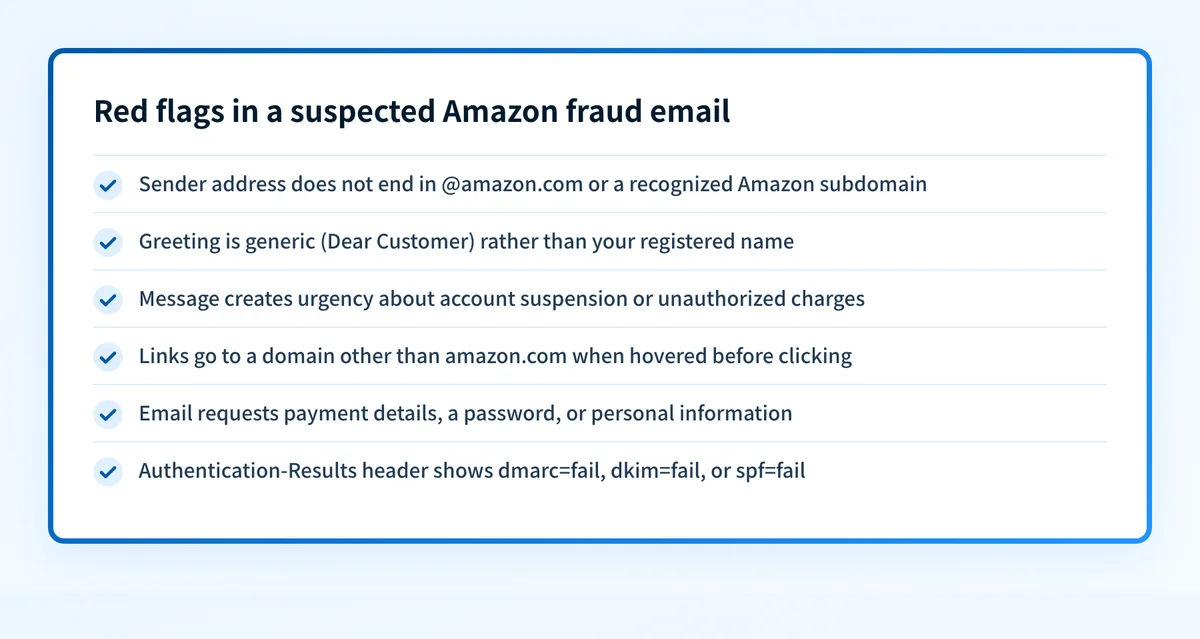
Reading the Authentication-Results header
Every delivered message carries authentication metadata in its headers. The Authentication-Results field, defined in RFC 8601, records the outcome of SPF, DKIM, and DMARC checks performed by the receiving mail server for that specific message.
A message from a legitimate sending path will generally produce results like this illustrative example:
Authentication-Results: mx.example.com;
  dkim=pass header.d=yourdomain.com header.s=selector1 header.b=Abc12345;
  spf=pass smtp.mailfrom=noreply@yourdomain.com;
  dmarc=pass header.from=yourdomain.com
A fraudulent message spoofing a trusted domain will typically show one or more failures:
Authentication-Results: mx.example.com;
  dkim=fail header.d=yourdomain.com;
  spf=fail smtp.mailfrom=noreply@lookalike-yourdomain.example;
  dmarc=fail (dis=QUARANTINE) header.from=yourdomain.com
These are illustrative examples only. Exact field values follow RFC 8601 and vary by sending path and receiving server. A dmarc=fail result is strong evidence that the message did not originate from an authorized sending path for that domain. A dmarc=pass result means the message passed alignment checks for that domain, though it does not rule out social-engineering content within the message body.
To inspect the full headers of a suspicious email, copy the raw header block and run it through the email header analyzer.
What to do with a suspected Amazon fraud email
Do not click any link or download any attachment
Do not click links, tap buttons, download attachments, or scan QR codes from the email. If you need to reach Amazon, type amazon.com directly into your browser address bar.
Verify by logging into your account
Go to amazon.com in a fresh browser tab and sign in. Check your order history and account notifications for the same message. Amazon records legitimate communications in your account. If the message does not appear anywhere in your account, it is fraudulent.
Report it
The exact steps for reporting an Amazon phishing email to Amazon and to federal authorities are at Amazon report phishing email. Reporting helps Amazon's security team identify active campaigns and take action against the domains being used.
Act immediately if you already clicked
If you clicked a link and entered your Amazon password, change it immediately at amazon.com. Check whether any orders were placed, any payment methods were added, or any account details were changed. Enable two-factor authentication if it is not already active.
If your domain is being impersonated the same way
The technique used in Amazon fraud emails works against any domain that has not published a DMARC enforcement policy. Attackers can forge the From header to show your domain as the sender. Without p=quarantine or p=reject in your DMARC record, receiving servers have no DMARC-based reason to reject those messages.
If your domain is being impersonated, the DMARC learning hub covers how to inventory your legitimate sending sources, validate SPF and DKIM alignment for each, and move safely toward an enforcement policy. The authentication setup for senders using Amazon SES specifically is covered in why are Amazon SES emails going to spam.
Palisade analyzes DMARC aggregate report data to identify which sending sources pass alignment and which fail, then creates prioritized remediation tickets so your team knows what to fix before tightening policy. Start with Palisade to monitor aggregate report data for your domain.
Inspect a suspicious email's authentication results
Paste the full header block from the suspected Amazon fraud email into the email header analyzer to see the SPF, DKIM, and DMARC outcome recorded by the receiving server. Compare the authentication results with the illustrative patterns above.
Header analysis shows what the receiving server recorded about one message. It cannot confirm whether a future message is genuine, whether the sending domain has been blocklisted, or what action Amazon's security team will take on the report.
Evidence
Sources and further reading
Questions readers ask
Frequently asked questions
Where do I report a scamming email?
For Amazon-specific phishing, report directly to Amazon. The exact reporting address and process are documented at Amazon report phishing email, which covers both Amazon's own channel and federal reporting options. For scams involving financial loss, the FTC and the FBI's Internet Crime Complaint Center are the primary federal reporting channels in the United States. Use those agencies' official government websites to file a report rather than a third-party listing.
Is there a 24/7 Amazon customer service phone number?
Not confirmed without checking Amazon's current Contact Us page. Amazon's support options and channel availability change over time, and third-party phone listings are frequently outdated. Go to amazon.com, navigate to Help, and use the Contact Us path to see what channels are currently available. Do not call a number found in a suspicious email; those numbers frequently connect to the attacker rather than Amazon.
What email address do I use to report fraud emails to Amazon?
The specific address Amazon uses to receive phishing reports is published on Amazon's official help pages and covered in full at Amazon report phishing email. Use the address exactly as Amazon publishes it on their current help pages rather than a string found on a third-party site, which may be outdated.
How do I contact Amazon customer service about a fraudulent email?
Go to amazon.com and use the official Help or Contact Us section to reach Amazon's support team. Amazon offers several contact channels depending on the issue type. If you are reporting a phishing email, use the reporting channel documented at Amazon report phishing email rather than the standard customer service queue. Do not use contact information found in the suspicious email itself.

Written by
Samuel ChenardCEO & Co-Founder, Palisade
Samuel Chenard is the CEO and co-founder of Palisade, agentic DMARC software for IT teams and MSPs, from one domain to thousands.
More from Samuel →