Mailchimp SPF record: when do you need one?
 ChatGPT
 Claude
 Gemini
 Perplexity
 Grok
GrokIn brief
Mailchimp DMARC alignment can pass through aligned DKIM without Mailchimp in SPF. Inspect headers, verify DNS, and validate the sending path.
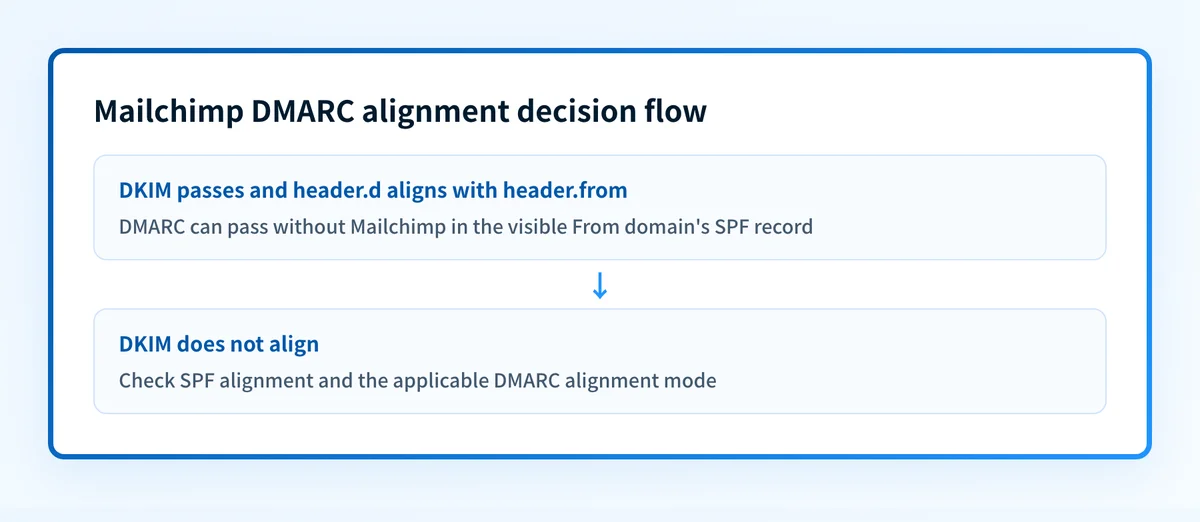
Mailchimp DMARC alignment does not require adding Mailchimp to the visible From domain's SPF record when the delivered message has a passing DKIM signature aligned with that From domain. DMARC can pass through either aligned SPF or aligned DKIM. Mailchimp may use a separate envelope domain for SPF, while its authenticated sending domain supplies the aligned DKIM result.
At a glance
Quick takeaways
- DMARC needs one passing aligned identifier, either DKIM or SPF.
- SPF checks the SMTP envelope domain, commonly shown as
smtp.mailfrom, rather than the visible From domain. - A passing SPF result can be unaligned and still coexist with a DMARC pass through aligned DKIM.
- Mailchimp's manual email-domain authentication flow provides DKIM CNAME records and a DMARC TXT record.
- Adding Mailchimp to an SPF record does not change a campaign's SPF result when the campaign uses a separate Mailchimp-controlled envelope domain.
- A DMARC pass for one delivered message does not prove future inbox placement or another receiver's private delivery decision.
What does the failure mean?
The apparent failure is the assumption that Mailchimp must appear in the SPF record for yourdomain.com before a Mailchimp campaign can pass DMARC. That combines two separate identities. DMARC evaluates alignment against the visible From domain, while SPF evaluates the SMTP envelope domain.
RFC 9989 defines DMARC evaluation using the RFC5322.From domain and aligned SPF or DKIM results. A passing DKIM signature whose d= domain aligns with the visible From domain can satisfy DMARC even when SPF passes for a different envelope domain.
Use a receiver-added Authentication-Results field as the starting evidence. RFC 8601 defines this header field and its authentication-method properties.
Authentication-Results: receiver.example;
  spf=pass smtp.mailfrom=mailchimp.example;
  dkim=pass header.d=yourdomain.com;
  dmarc=pass header.from=yourdomain.com
This fragment is illustrative and redacted. It shows SPF passing for mailchimp.example, which does not align with yourdomain.com, and DKIM passing for yourdomain.com, which does align. The aligned DKIM result supplies the DMARC pass.
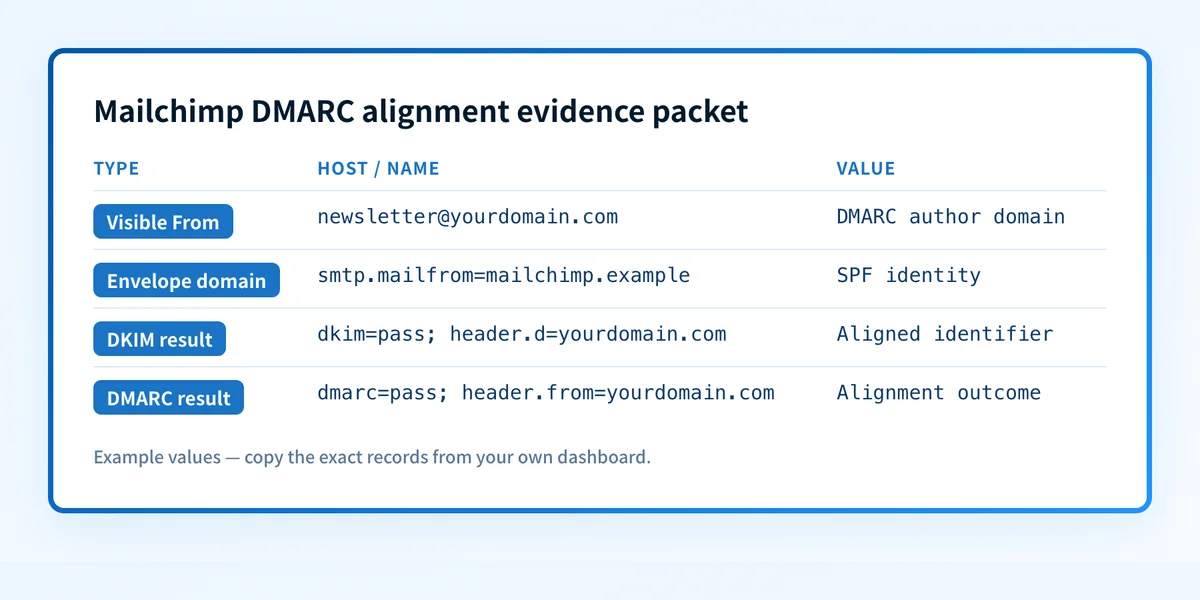
Create a sender-path evidence packet before changing DNS:
- Visible From domain: Record the domain after
@in the message's visible From address, such asyourdomain.com. - Mailchimp sending-domain context: Record whether that private domain is authenticated in the relevant Mailchimp account and product.
- Envelope-domain evidence: Record
smtp.mailfrom=or the Return-Path value when the receiver exposes it. - DKIM evidence: Record every
dkim=result and itsheader.d=domain. - SPF evidence: Record the
spf=result and the domain it evaluated. - DMARC outcome: Record
dmarc=passordmarc=fail, plusheader.from=. - Message identity: Keep the Message-ID, delivery time, recipient provider, and campaign or sending route in an access-controlled record.
- Mailchimp setup status: Record the current official Mailchimp domain-authentication status for the sending domain.
What usually causes it?
SPF is being compared with the visible From domain
SPF evaluates the RFC5321.MailFrom identity when it is available. The visible From address is a message-header identity, so it does not become the SPF identity because it is the address recipients see.
If a Mailchimp campaign uses a Mailchimp-managed envelope domain, editing the SPF record at yourdomain.com does not change the SPF evaluation for that envelope domain. The received headers determine whether that is the path in use.
An unaligned SPF pass is being treated as a DMARC failure
An SPF pass can be valid without aligning with the visible From domain. It cannot supply DMARC alignment in that case, but DMARC permits an aligned DKIM pass to satisfy evaluation.
Under relaxed alignment, related domains can align when they share an organizational domain. Under strict alignment, the authenticated domain must exactly match the visible From domain. The active DMARC record determines which alignment mode applies.
Mailchimp domain authentication is incomplete or unverified
Mailchimp's email-domain authentication instructions describe an automated Microsoft Entra ID option and a manual setup path. The manual path provides two DKIM CNAME records and one DMARC TXT record.
Those instructions establish the setup method, but they do not prove the header.d= domain on a specific campaign. Confirm that from a newly delivered message sent through the same Mailchimp route.
A second SPF or DMARC TXT record was added
SPF specifies that multiple SPF records at one domain produce permerror. Adding a second DMARC policy record can also create an invalid or ambiguous setup instead of repairing alignment.
Do not publish a second SPF TXT record or a second DMARC TXT record. Find the existing record first and change it only when the sending path and documented configuration require it.
A valid SPF result is being mistaken for a DMARC pass
A message can show spf=pass and dmarc=fail when the SPF domain does not align and DKIM does not provide an aligned pass. This is a protocol result, not evidence that Mailchimp must always be added to the visible domain's SPF record.
The repair depends on the delivered identities. Treat a conclusion about a different Mailchimp product, account, or sending route as an inference until its message headers confirm it.
When this answer does not apply
This answer does not apply when the delivered message has no aligned DKIM pass and must rely on SPF alignment. If dkim=fail or the passing header.d= domain is unaligned, inspect smtp.mailfrom and the Mailchimp account's current domain-authentication state. If the received headers show that SPF passes for an aligned envelope domain, that SPF result can supply the DMARC pass.
It also does not apply to another sending platform just because that platform uses a provider-owned return path. Each service can choose different DKIM and envelope-domain behavior. Preserve a message from the exact product and account route before changing DNS.
This is also not an inbox-placement repair. A message can pass DMARC through aligned Mailchimp DKIM and still be filtered for reputation, content, complaint, or receiver-policy reasons. In that case, adding Mailchimp to SPF does not address the observed result.
How do I diagnose the failure?
1. Preserve a message from the exact Mailchimp sending path
Send a new test campaign through the same Mailchimp product, authenticated From domain, audience type, and configuration used in production. Open the raw source in the receiving mailbox, then save the complete headers in an access-controlled incident record.
Record the From, Return-Path when present, Authentication-Results, Message-ID, delivery time, and recipient provider. A rendered mailbox view hides the header fields needed to distinguish SPF from DKIM alignment.
2. Identify the aligned passing identifier
Compare the domains in the received message with the visible From domain.
Visible From: newsletter@yourdomain.com
SPF identity: smtp.mailfrom=mailchimp.example
DKIM identity: header.d=yourdomain.com
DMARC result: dmarc=pass header.from=yourdomain.com
This is illustrative only. If header.d=yourdomain.com passes and aligns with the visible From domain, Mailchimp does not need SPF alignment for that message's DMARC pass. RFC 6376 defines how a receiver verifies a DKIM signature using the signing domain and selector.
If DKIM passes but header.d= does not align, inspect the active DMARC record for relaxed or strict alignment before changing anything.
3. Verify Mailchimp's published authentication records
In the Mailchimp account that sent the campaign, open the official email-domain authentication setup and compare its account-generated DNS values with authoritative DNS. Mailchimp's documented manual flow uses DKIM CNAME records and a DMARC TXT record. Copy names and targets only from the account that owns yourdomain.com.
Use the DMARC checker to inspect the published DMARC policy. Use the SPF checker to inspect the public SPF record before adding or removing an authorization.
Public DNS checks show what resolvers can retrieve. They do not prove that Mailchimp signed a particular campaign, used a particular envelope domain, or that a receiver will make the same decision for future mail.
4. Take the safe branch for the observed evidence
If the domain is unverified or unauthenticated in Mailchimp, complete Mailchimp's documented domain-authentication setup and wait for the vendor's status to confirm it. Then send a fresh test through the same path. Do not copy DKIM values from another Mailchimp account or domain.
If DKIM does not align, compare header.d= with the visible From domain and the applicable DMARC alignment mode. Repair the domain-authentication configuration that Mailchimp generated for the actual From domain. Do not change p= to hide the result. A DMARC policy change affects requested enforcement, not the message's DKIM alignment.
If DMARC fails while SPF is valid, determine whether smtp.mailfrom aligns with the visible From domain. If it does not, valid SPF alone cannot supply DMARC alignment. Check whether a DKIM signature passes and aligns, then correct the verified authentication path rather than forcing an unrelated SPF include into the visible domain's record.
5. Check SPF only when the actual sending path needs it
Do not add a hosted SPF mechanism for Mailchimp merely because a campaign needs DMARC alignment. Add or change SPF only when the actual envelope-domain setup and Mailchimp documentation require it.
If the SPF record has an actual DNS-lookup-limit condition, investigate that condition separately. RFC 7208 limits SPF evaluation to ten DNS-querying terms. A lookup-limit repair does not establish Mailchimp DKIM alignment and should not be treated as one.
For a comparison of a provider path that does not supply SPF alignment by default, see why Brevo does not provide SPF alignment by default.
How do I fix it?
Complete Mailchimp authentication for the actual From domain
When the Mailchimp domain-authentication status is incomplete, use the records generated in that Mailchimp account for the private domain used in the campaign. Publish the provided DKIM CNAME records exactly, then confirm the vendor's current status.
Do not replace an existing DMARC policy with a Mailchimp example value without reviewing the current policy and its reporting addresses. A DMARC record controls requested receiver handling and reporting.
This repair changes DNS authentication configuration. It does not guarantee that every future message will authenticate or that a recipient will place mail in the inbox.
Correct the DKIM alignment path
When the receiver's headers show a passing but unaligned header.d=, make the Mailchimp authenticated sending domain match the intended visible From domain according to the applicable alignment mode. Validate with a new message, not only a green vendor status.
Do not relax strict alignment as a first response. That changes the DMARC policy's alignment requirement. It does not correct an unverified or incorrect Mailchimp domain-authentication setup.
Remove duplicate records, not needed authorizations
When the public DNS evidence shows duplicate SPF or DMARC TXT records at the same owner name, consolidate records only after identifying their owners and sending systems. Preserve any authorization used by another approved sender.
This repair changes published DNS. Retest every known sender that depends on the changed record.
How do I validate the repair?
Send a fresh Mailchimp campaign through the same authenticated From domain and product route. Confirm the following four layers:
- DNS: Check the authoritative DNS response and at least one public resolver for the Mailchimp-generated DKIM records and the single intended DMARC record.
- Vendor: Confirm Mailchimp's domain-authentication status for the exact sending domain.
- Message: Inspect the receiver-added
Authentication-Resultsfield. Confirmdkim=pass, recordheader.d=, and confirm that it aligns withheader.from=. - DMARC: Confirm the delivered message reports
dmarc=pass, then review DMARC aggregate reports after data accumulates to see whether the same source continues to authenticate as expected.
Check the DMARC record behind the Mailchimp result
After comparing the delivered headers, inspect the published DMARC policy for the visible From domain. This confirms the alignment mode and policy currently visible in DNS before you change Mailchimp authentication or SPF.
A public DMARC record check cannot inspect a Mailchimp campaign's envelope domain, prove which DKIM signature reached a recipient, monitor the sending path, or explain a recipient's private placement decision.
If Mailchimp is one of several sending sources for the domain, Palisade's agent investigates sources observed in aggregate DMARC reports, drafts fixes, and proposes each policy step. You approve before anything ships. When you approve a DNS change, Smart DNS Deployment writes the record into your own zone at your own provider.
Palisade does not ship a DMARC policy change without approval, repair every sender, or prove that a future Mailchimp campaign will authenticate or reach the inbox.
For broader DMARC policy and alignment context, visit the DMARC learning hub.
Evidence
Sources and further reading
Questions readers ask
Frequently asked questions
Does Mailchimp need to be in my SPF record for DMARC to pass?
No. DMARC can pass when Mailchimp produces a passing DKIM signature aligned with the visible From domain, even if SPF passes for a separate envelope domain.
Can SPF pass while DMARC fails for a Mailchimp campaign?
Yes. SPF can pass for an envelope domain that does not align with the visible From domain. If DKIM also fails or does not align, DMARC can fail.
Does a green Mailchimp authentication status prove DMARC passes?
No. Mailchimp's status confirms its setup state, but the delivered message's receiver-added authentication results show whether DKIM, SPF, and DMARC passed on that sending path.
Should I add another SPF TXT record for Mailchimp?
No. Publishing multiple SPF records at the same domain can cause an SPF permerror. Inspect the existing SPF record and the delivered campaign headers before making a supported change.
Will an aligned Mailchimp DKIM signature guarantee inbox placement?
No. An aligned DKIM pass can satisfy DMARC, but mailbox providers make separate reputation and delivery decisions.

Written by
Johanie DupontBrand & Ecommerce Email
Johanie Dupont works on brand and ecommerce email at Palisade: BIMI and verified marks, sender requirements, and getting marketing mail into the inbox.
More from Johanie →