What does SMTP error 421 mean and how do I fix it?
 ChatGPT
 Claude
 Gemini
 Perplexity
 Grok
GrokIn brief
SMTP error 421 is a temporary deferral, not a bounce. Fix it by slowing your send rate and authenticating mail with SPF, DKIM, and DMARC before retrying.
SMTP error 421 is a temporary deferral, not a permanent bounce: the receiving mail server is telling your server it cannot accept the message right now and to try again later. Because the code starts with a 4, a well-behaved sending server should automatically queue the message and retry with backoff, and most 421s clear on their own within minutes to hours. When 421 keeps coming back on every send, it is no longer a blip: it is a signal that your sending rate, reputation, or authentication (SPF, DKIM, DMARC) needs fixing, because the receiver is deliberately throttling you.
At a glance
Quick Takeaways
421is a transient reply: RFC 5321 defines the whole4yzclass as "the error condition is temporary, and the action may be requested again," so the message has not been rejected.- The canonical text is
421 Service not available, closing transmission channel; providers attach an enhanced code such as421 4.7.0,421 4.7.28, or421 4.3.2to say why. - The single most common cause is rate limiting: you sent faster than the receiver trusts your IP or domain to send, so it deferred you to slow you down.
- A properly configured mail server (Postfix, Exim, Exchange, or your ESP) retries automatically. You usually do not resend by hand.
- The real fix for a persistent 421 is upstream: authenticate with SPF, DKIM, and DMARC, lower your volume, and repair sending reputation.
- 421 differs from a
5xxbounce:4xxmeans "try again,"5xxmeans "give up." Retrying a5xxjust wastes attempts.
421 signal → meaning → action
Read the enhanced status code and the text after the 421. That string tells you which lever to pull.
| Bounce / signal | What it means | First action |
|---|---|---|
421 4.7.0 ... temporarily rate limited / low IP reputation | Provider is throttling your IP on a reputation or security policy | Reduce send rate; check IP/domain reputation and confirm SPF, DKIM, and DMARC pass |
421 4.7.28 ... unusual rate of email (Gmail) | Gmail rate-limited the IP address, netblock, DKIM domain, SPF domain, or URL domain named in the text | Pause and cut volume to Gmail, then ramp back up; see the 421 4.7.28 guide |
421 4.3.2 System not accepting network messages / 421 4.3.0 Temporary System Problem | Receiver is overloaded, in maintenance, or applying back-pressure | Let your MTA retry with backoff; no change needed if it is isolated |
421 4.4.5 Server busy, try again later | The receiving server is at capacity in that moment | Retry automatically; reduce simultaneous connections |
421 ... from a greylisting filter (unknown sender) | A first-contact deferral that tests whether you retry like a real sender | Do nothing. A compliant MTA retries shortly and gets through |
What does SMTP error 421 actually mean?
It means the receiving server accepted your connection but is closing the SMTP session without taking the message, and it wants you to come back later. RFC 5321, the standard that defines SMTP, lists 421 as "Service not available, closing transmission channel," and notes the server can return it "after detecting the need to shut down the SMTP service", either in response to a command or asynchronously mid-conversation.
The important part is the leading digit. RFC 5321 sorts every reply into three severity classes, and a 4yz reply is a Transient Negative Completion reply: "the command was not accepted, and the requested action did not occur. However, the error condition is temporary, and the action may be requested again." In plain terms, nothing was lost. The receiver is not saying your message is bad. It is saying "not now."
The three-number enhanced status code that usually follows (defined in RFC 3463) narrows the reason: 4.7.0 is a generic security/policy deferral, 4.7.28 is Gmail's spam-rate signal, 4.3.2 means "system not accepting network messages." All share the 4, so all are temporary.
Is a 421 error temporary or permanent?
Temporary: that is the whole point of the 4 prefix, and it is the difference that decides how you should react. A 4xx code means retry; a 5xx code means stop. If you treat a 421 like a hard bounce and remove the recipient, you throw away deliverable mail. If you treat a 5xx like a 421 and keep hammering the server, you damage your reputation for no reason.
Here is the contrast that trips people up:
- 421 / 4xx (transient): "Service not available, try again." The message stays in your queue. Example neighbors:
450(mailbox temporarily unavailable) and451(local error in processing, often greylisting). - 550 / 5xx (permanent): "This will never work as sent." The message bounces. A
550 5.7.1policy rejection or a550 5.7.9authentication failure (like the ones behind Gmail's 550 rejections) needs a real change before you resend.
What do the 421 4.7.0, 4.7.28, and 4.3.2 variants mean?
Each variant points at a different root cause, so read the enhanced code before you change anything.
421 4.7.0is a security or policy throttle. On Google's SMTP error code list,4.7.0covers messages deferred because "the very low reputation of the sending IP address," a missing PTR (reverse DNS) record, a required TLS connection, or an IP that is not allow-listed for the recipient domain. It is the catch-all "we don't trust this connection enough right now" code.421 4.7.28is Gmail's rate-limit code. Google's Gmail SMTP errors and codes reference lists several wordings. The IP one reads "Gmail has detected an unusual rate of email originating from your IP address", and others name your IP netblock, DKIM domain, SPF domain, or a URL domain in the message. Each points you at Google's Email sender guidelines. Gmail defers the mail rather than accepting it. Our 421 4.7.28 page lists every wording and the recovery steps.421 4.3.2is "System not accepting network messages" per RFC 3463: the receiving system is overloaded, shutting down, or applying back-pressure. Its cousins are421 4.3.0("Temporary System Problem. Try again later.") and421 4.4.5("Server busy, try again later."). These usually reflect the receiver's state, not yours, and clear on retry.
4.7.x codes are about you (reputation, policy, authentication), while 4.3.x and 4.4.x codes are more often about the receiver's capacity in the moment.
How do you fix a 421 deferral?
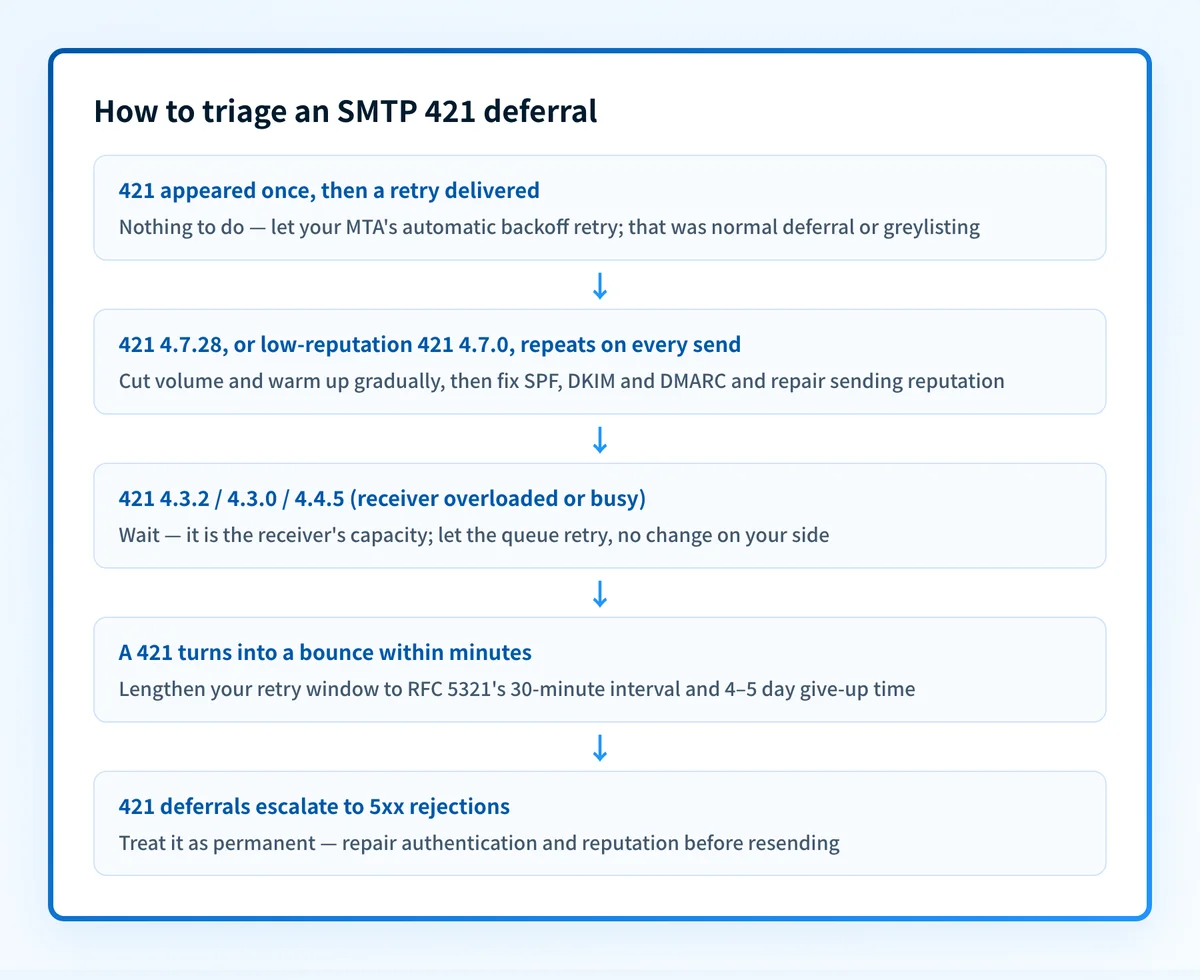
Work from "is this even my problem" outward. Most isolated 421s need no action at all; the steps below matter when the deferral is persistent.
- Confirm it is repeating, not a single blip. Check your mail logs. If one 421 was followed by a successful retry an hour later, you are done. That was normal backoff or greylisting doing its job.
- Read the enhanced code and text.
4.7.28and low-reputation4.7.0mean slow down and clean up;4.3.2/4.4.5usually mean wait. Match the message to the table above. - Slow your send rate and warm up. If a spike triggered it, cut volume to the affected provider and ramp back up gradually over days rather than sending a large burst. New IPs and domains especially need a gentle warm-up curve before receivers extend trust.
- Authenticate and align. Publish or repair the three records and confirm they align with your visible From domain. Verify each with Palisade's SPF, DKIM, and DMARC checkers, and confirm the underlying DNS resolves with the DNS lookup tool. Our overview of email authentication explains how the three fit together.
- Check reverse DNS and IP reputation. A missing PTR record or an IP on a blocklist is a classic
4.7.0trigger. Make sure your sending IP has valid reverse DNS pointing back to your hostname. - Repair sending reputation. If Gmail or another mailbox has throttled you for spam-like behavior, the block eases as you send clean, wanted mail with low complaints. Our guide to checking and improving domain reputation covers the recovery work.
- Let the queue do its job. After the upstream fix, do not manually blast the backlog. Your MTA will retry on its own; forcing everything at once can re-trigger the exact rate limit you just cleared.
Why does 421 keep happening even after retries?
Because the retry solves the symptom, not the cause. Each successful retry delivers that message, but if the underlying reason is a rate limit or a reputation problem, the very next batch hits the same wall. The receiver is not glitching. It is consistently deciding your stream should move slower than you are trying to push it.
This is the concept most senders miss: a transient code can describe a persistent condition. 421 4.7.28 keeps firing as long as Gmail sees an unusual rate of mail it considers unsolicited; 421 4.7.0 for low IP reputation keeps firing until that reputation recovers. The 4 promises the message can succeed on retry, not that the pattern will change on its own.
That is why the durable fix lives upstream of the retry loop, in authentication, volume shaping, and reputation, and why a 421 you see every day is a warning rather than noise. Left alone, a receiver that keeps deferring you can escalate to outright 5xx rejections. If your messages are piling up rather than delivering, why your email is queued walks through the same throttling dynamics from the sender's side.
What should a well-behaved sending server do about 421?
It should queue the message and retry on a backoff schedule, not bounce it and not retry aggressively. RFC 5321's retry-strategy guidance is specific: "the retry interval SHOULD be at least 30 minutes," and retries should continue "until the message is transmitted or the sender gives up," where "the give-up time generally needs to be at least 4-5 days."
In practice a compliant MTA:
- Waits before retrying. It holds, then tries again after a growing delay (exponential backoff), rather than re-sending the same second.
- Keeps the message queued for days. Most production servers retry for roughly 24–72 hours or longer before generating a delayed-delivery warning, and only bounce after the give-up window.
- Passes greylisting naturally. Greylisting defers unknown senders (identified by sending IP, envelope-from, and recipient) with a temporary
4xxcode, betting that spam software will not retry. A real MTA retries minutes later and is accepted.
Common issues with 421 deferrals
The 421 clears on retry but comes back every send
This is the textbook "persistent transient" case. Delivery succeeds eventually, so it looks fine, but every new batch gets deferred first. It almost always means you are bumping a rate limit or a reputation ceiling. Reduce volume to that provider, warm up more slowly, and confirm authentication passes. Do not just rely on the retries to carry you.
Only Gmail (or only one provider) returns 421
A 421 from a single mailbox provider points at your standing with that provider, not a broken record. Gmail throttling you with 4.7.28 while Outlook and Yahoo accept your mail usually means your Gmail-specific reputation or volume is the issue. Check Google Postmaster Tools for your domain and IP reputation, and pace your Gmail sending separately.
A brand-new domain or IP gets 421 immediately
New senders have no reputation, so receivers extend trust cautiously and defer early bursts. This is expected. Warm up: start with small, engaged, low-volume sends and increase gradually over one to several weeks. Trying to push production volume through a cold IP on day one is the fastest way to earn a 4.7.0 or 4.7.28 deferral.
Your MTA gives up and bounces before the message ever delivers
If a 421 turns into a hard bounce within minutes, your own retry settings are too aggressive or your give-up window is too short. RFC 5321 expects at least a 30-minute interval and a multi-day give-up time, so lengthen the queue lifetime and backoff to give transient deferrals the retries they are designed to receive.
Related reading
Questions readers ask
Frequently asked questions
Does a 421 error mean my email bounced?
No. A 421 is a temporary deferral, so the message stays in your outbound queue for another attempt. It only becomes a bounce if your server keeps getting deferred past its give-up window (typically several days) and finally stops trying. A true bounce carries a 5xx code.
How long should my server retry a 421 before giving up?
Follow RFC 5321: retry no sooner than every 30 minutes, and keep the message queued for at least 4–5 days before abandoning it, using a backoff that spaces attempts out over time. Most MTAs ship sensible defaults; the mistake is shortening them, not lengthening them.
Can I just resend the email manually?
You can, but it rarely helps and can hurt. If the cause is a rate limit, a manual resend adds to the volume the receiver is already throttling. Let the automatic retry run, and spend your effort on the upstream fix: authentication, rate, and reputation.
Will fixing SPF, DKIM, and DMARC stop 421 deferrals?
It stops the ones caused by weak authentication and low trust, which covers many persistent 4.7.0 cases. A 4.7.28 deferral is about sending rate and unwanted mail, so authentication helps Gmail attribute your mail correctly but will not lift the limit on its own. It will not stop deferrals caused purely by the receiver's own load (4.3.2, 4.4.5). Those are theirs to resolve, and your MTA simply retries. Authentication is the foundation, not a magic switch.
Is 421 the same as greylisting?
Greylisting is one reason you might see a transient deferral, but it more often uses 450 or 451 than 421. Whatever the exact code, the handling is identical: a compliant server retries and gets through on the next attempt. For a broader map of provider-specific deferrals and bounces, see resolving Yahoo and Gmail error codes.
Palisade takes the guesswork out of the upstream fixes that make 421s go away. It publishes and monitors your SPF, DKIM, and DMARC records, reads your DMARC reports to surface unauthorized or unaligned senders inflating your volume, and flags reputation and authentication problems before receivers start throttling you. Run your domain through the free Email Security Score tool to see, in one pass, whether your authentication is the reason mailbox providers are deferring your mail.

Written by
Dominic LandryDeliverability & DNS
Dominic Landry works on email deliverability and DNS configuration at Palisade, from SPF and DKIM records through to DMARC enforcement.
More from Dominic →