Phishing protection for Office 365
 ChatGPT
 Claude
 Gemini
 Perplexity
 Grok
GrokIn brief
Phishing protection Office 365 requires tenant-specific controls, user reporting, and evidence from real messages. Learn what to verify for your tenant.
Phishing protection for Office 365 is not established by one setting or one successful test. A useful assessment needs evidence from the Microsoft 365 tenant, the mail client that users actually use, and real messages received through the production path. Confirm what protection is enabled, how users can report suspicious messages, and whether delivered mail shows the expected authentication and filtering results before treating the tenant as protected.
At a glance
Quick takeaways
- Office 365 phishing protection is tenant-specific, so a general description cannot confirm your organization’s active controls.
- A phishing-reporting button can depend on the Outlook client, tenant configuration, and available Microsoft features.
- A public DNS result cannot prove how Microsoft 365 evaluated or handled an individual message.
- DKIM and other sender-authentication signals support identity checks, but DKIM alone does not block phishing.
- The strongest evidence comes from a real message delivered through the same route your users receive.
- Broader phishing and impersonation risk also includes messages that use lookalike domains or compromised legitimate accounts.
How phishing protection for Office 365 works
Phishing protection for Office 365 should be assessed as a chain of controls and evidence, rather than as a label on a license or a single mail rule. The relevant questions are operational:
- What Microsoft 365 or Defender protections are enabled for the tenant?
- Which Outlook clients do employees use to read and report suspicious mail?
- What happens when a suspicious message reaches the tenant?
- Which messages are quarantined, delivered, blocked, or reported?
- What evidence is available to the administrator after a user reports a message?
For broader context on phishing, impersonation, and related email threats, see Palisade’s email-threats learning hub. A broader email security guide can help place phishing controls alongside authentication, access controls, and operational response.
Authentication is one useful input, but it is not a complete phishing decision. A domain can use DKIM to sign legitimate mail, while a phishing message can come from an unrelated domain, a lookalike domain, or an account that has been compromised. If your Microsoft 365 tenant sends mail through Office 365, review DKIM for Office 365 as part of the sending-domain assessment. That review does not establish that inbound phishing protections are enabled.
When the answer changes
The practical answer changes with the evidence available and the kind of message involved.
Use this decision rule:
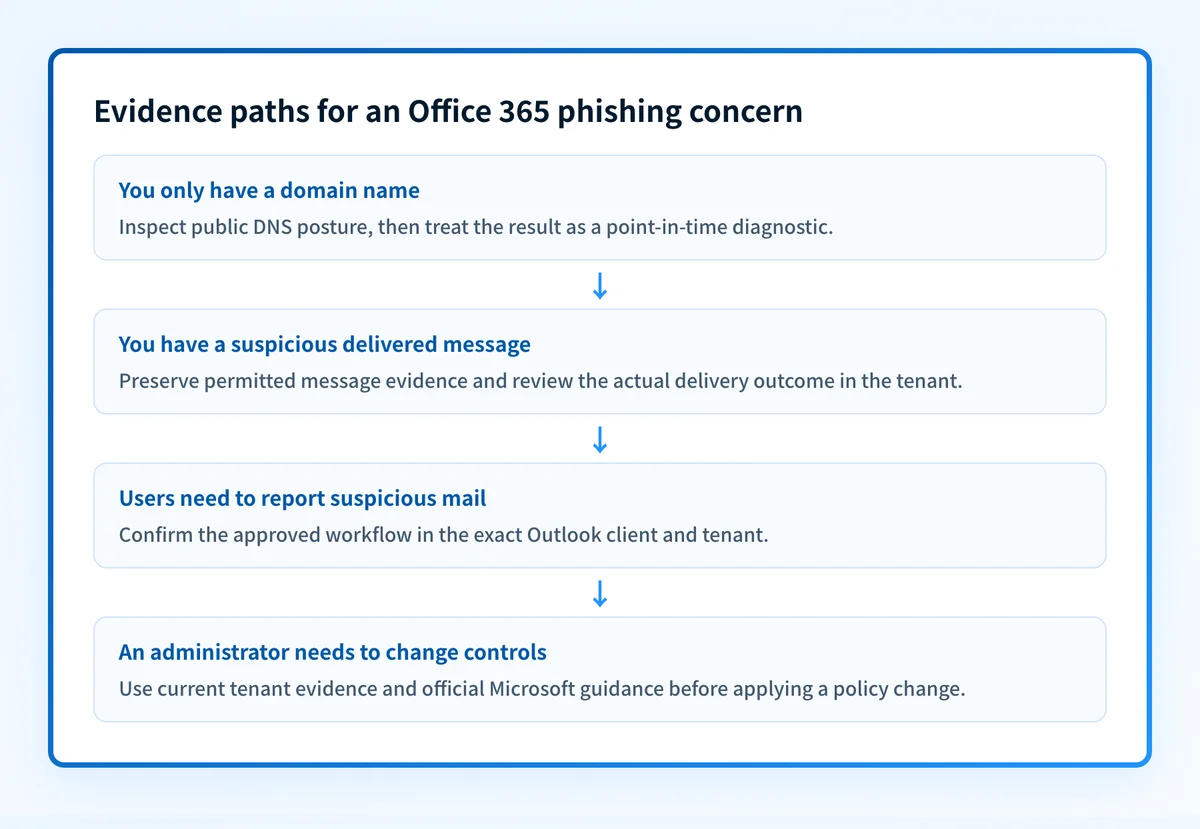
- If you only have a domain name, inspect its public email-security posture. This can identify published DNS records, but it cannot show the tenant’s active Microsoft 365 policies or a recipient’s mailbox experience.
- If you have a suspicious message, preserve the message and collect the available headers and delivery context. That evidence is closer to the event than a DNS lookup.
- If a user cannot find a reporting action, check the exact Outlook client and the tenant’s approved reporting guidance. Do not assume a button exists in every client or has the same label everywhere.
- If an administrator needs to change blocking behavior, use the tenant’s current Microsoft documentation and administrative interface. A third-party article cannot safely substitute for the controls visible in that tenant.
- If the concern is ongoing exposure across domains or sending sources, track authenticated sending and DMARC aggregate-report evidence after it accumulates.
Do not change mail-filtering or authentication policies solely because a public checker reports a weakness. A DNS result is one layer of evidence. It does not show whether Microsoft 365 has applied a tenant policy, whether a message was delivered, or whether a business-critical sender will continue to work.
A message that appears to be phishing can also have different causes. It may impersonate a trusted brand from an unrelated domain. It may use a legitimate but newly compromised sender. It may be an expected message that lacks a familiar authentication signal. Those situations need different evidence and different response paths.
Worked evidence example
A safe phishing-protection review separates what each artifact can show. The following is an illustrative evidence checklist, not a Microsoft 365 configuration or a message-header example.
Illustrative phishing review
Domain evidence:
- Public DNS records for yourdomain.com
- Published SPF, DKIM, and DMARC information where applicable
Message evidence:
- Redacted full message headers
- Visible From address
- Recipient mailbox and delivery time
- Whether the message was delivered, quarantined, or reported
Tenant evidence:
- Current Microsoft 365 protection status shown to the administrator
- Current user-reporting guidance for the affected Outlook client
- Approved incident or remediation record
This checklist gives each layer a separate purpose:
- Domain evidence helps identify what a sending domain publishes publicly. Use Palisade’s email security score tool when the starting point is a domain. It is a diagnostic check, not proof that Microsoft 365 is configured correctly, that an individual message is malicious, or that future messages will be blocked.
- Message evidence helps connect a suspicious email to the actual mail path. Preserve only the information your incident process permits. Do not paste credentials, private keys, tokens, or customer data into a public tool.
- Tenant evidence shows what the organization’s current Microsoft 365 environment exposes to administrators and users. This is where current feature availability, policy labels, and reporting workflows must be confirmed.
- DMARC evidence becomes useful after aggregate reports accumulate. It can help identify sources using a domain and authentication or alignment issues. It does not prove that every inbound phishing message will be stopped.
What to check next
Start with the evidence already available.
If the concern begins with a domain, run the domain through the email security score tool. Record the date and the published results, then compare them with the DNS records your team intended to publish. Public checks cannot inspect internal Microsoft 365 policy, continuous tenant state, or a receiver’s private filtering decision.
If the concern begins with a delivered message, preserve the message according to your incident process and review it in the Microsoft 365 tenant using the current approved workflow. Confirm the exact user client, recipient mailbox, delivery time, and any available report or quarantine outcome. Do not infer those facts from a domain lookup.
If employees need reporting instructions, use the organization’s current Microsoft-approved guidance for the Outlook client in use. The available reporting action, its location, and any prerequisite configuration must be confirmed for the tenant before it becomes internal documentation.
For a wider operating model, follow the email security guide. It helps connect phishing protection with sender authentication and response practices without treating a public domain check as proof of a Microsoft 365 configuration.
Build evidence for the Office 365 phishing question
The next useful action is to review your broader email security controls alongside the suspicious message or tenant evidence you already have. That creates a clearer path for separating published domain posture, real-message evidence, and Microsoft 365 tenant controls.
Review email security controls
An email-security guide cannot identify the current phishing button in a specific Outlook client, prove that your tenant has a particular Microsoft feature enabled, or guarantee how Microsoft 365 will handle a future message.
Evidence
Sources and further reading
Questions readers ask
Frequently asked questions
How do I block phishing emails in Office 365?
Change the blocking behavior in your own tenant, using Microsoft's current guidance for the features your organization licenses. A public domain check can tell you what your domain publishes, but it cannot change a Microsoft 365 policy or explain why one message was delivered. Confirm the change against a real message that arrived through the same route your users receive.
What is phishing protection with Microsoft Defender for Office 365?
Microsoft Defender for Office 365 is the tenant-side layer Microsoft offers for evaluating mail that arrives in a Microsoft 365 tenant. Which policies, actions, and feature names you get depends on the subscription, so treat the phrase as a licensing and configuration question rather than proof that a particular control is active. Confirm the specifics in Microsoft's current documentation and in the tenant itself.
How do I report phishing to Microsoft 365?
Follow your organization’s approved reporting process for the Outlook client in use, then preserve the relevant message evidence according to the incident process. The supported reporting workflow can depend on the tenant and client, so confirm it before directing users to a particular button or add-in.
Can DKIM stop phishing emails in Office 365?
No, DKIM cannot stop phishing on its own, because it only signals whether signed mail really came from the domain it claims. A phishing message can still arrive from an unrelated domain, a lookalike domain, or a real account that has been compromised. Read DKIM alongside your other authentication and tenant-control evidence.
Does a passing email-security score prove Office 365 phishing protection works?
No, a passing score only reflects a point-in-time view of public domain data. It cannot show which Microsoft 365 policy settings are active, how a particular message was handled, what the tenant looks like tomorrow, or where future mail will land.

Written by
Ian BussieresCTO & Co-Founder, Palisade
Ian Bussieres is the CTO and co-founder of Palisade, agentic DMARC software for IT teams and MSPs.
More from Ian →