Multi-tenant DMARC remediation: an MSP client workflow
 ChatGPT
 Claude
 Gemini
 Perplexity
 Grok
GrokIn brief
Run a client DMARC remediation workflow across tenants: collect evidence, assign sender fixes, approve DNS changes, verify results, and track exceptions.
Multi-tenant DMARC remediation is a client-by-client workflow for turning report findings into approved sender fixes, verified results, and documented exceptions. An MSP should separate what a DMARC aggregate report observed from what a client has authorized, assign each gap to the party that controls it, and move each domain through repair and policy gates with documented approval. One portfolio view is useful, but each client domain still needs its own evidence, owner, exception status, and rollback condition.
At a glance
Quick takeaways
- A reported sending stream is evidence, not proof that the client authorizes that sender.
- Keep client approval, DNS publication, sender configuration, and receiving-provider handling as separate responsibilities.
- Use one remediation record per client domain and one exception record per unresolved stream.
- Require DNS, sender, delivered-message, and aggregate-report evidence before closing material remediation work.
- Advance DMARC policy only after the client accepts the supporting evidence and remaining risk.
- Report portfolio progress as open decisions and verified work, not as a universal protection score.
Operating context and ownership
Multi-tenant remediation differs from a single-domain DMARC project because the MSP must keep evidence and authority separate across client organizations. A report consumer may identify a stream that fails alignment, but the report cannot establish whether that stream belongs to a marketing platform, a retired application, an attacker, or another tenant. RFC 9989 defines DMARC alignment and policy evaluation, while RFC 9990 defines aggregate-report data and handling.
Treat the following responsibilities as distinct:
- The client confirms business ownership, accepts delivery risk, and approves policy changes.
- The MSP collects evidence, maintains the remediation queue, coordinates handoffs, and proposes an evidence-based next step.
- The DNS host publishes approved DMARC, SPF, DKIM, and related DNS changes.
- The sending-platform owner enables or repairs the platform's authentication configuration.
- The receiving mailbox provider makes its own delivery and enforcement decisions.
Use Palisade's MSP page as the service-level reference point for organizing a recurring portfolio workflow. A public DMARC checker can confirm the currently published record for one domain, but it cannot prove which production systems send mail, whether a client authorizes them, or how a mailbox provider will handle future messages. For foundational protocol guidance, see Palisade's DMARC learning resources.
Evidence to collect
Create a working record for every in-scope domain. Record source and date for each finding so an onboarding statement, a DNS response, a delivered message, and a report observation do not become indistinguishable.
# Illustrative register: replace placeholders with the approved client record.
client: example-client
domain: yourdomain.com
sender: client-marketing-platform
evidence:
  aggregate_report: observed-unaligned-stream
  dns: current-public-record
  message_path: redacted-delivered-message-result
  client_confirmation: pending
owner: client-marketing-owner
next_action: confirm-sender-and-request-authentication-settings
approval:
  approver: client-technical-owner
  reference: pending-client-decision
  status: not-approved
change:
  before_value: record-current-value-before-change
  proposed_value: pending-investigation
  window: pending-approval
  rollback_trigger: agreed-production-path-test-fails
  rollback_owner: authorized-dns-owner
verification_result: not-yet-tested
exception_owner: client-technical-owner
review_on: agreed-review-date
The working record should include:
- Client name, technical approver, business owner, and incident contact.
- Domain and subdomain scope.
- DNS provider, DNS change owner, and required approval path.
- Known sender inventory, including marketing, CRM, finance, support, transactional, and low-frequency systems.
- The current DMARC policy and aggregate-report destination.
- Evidence state for each stream:
client-confirmed,report-observed,message-verified,unknown,retired, orabusive. - The affected authentication result, alignment result, owner, next action, review date, and rollback trigger.
- Any business freeze period, high-risk sending window, or provider dependency.
Use a four-layer completion check for material fixes:
- DNS: query the authoritative DNS server and at least one public resolver after publication.
- Vendor: check the sender's current authentication or verification status where the vendor provides one.
- Message: inspect a real delivered message from the exact production path and its
Authentication-Resultsfields. - DMARC: review aggregate reports after enough report periods have accumulated.
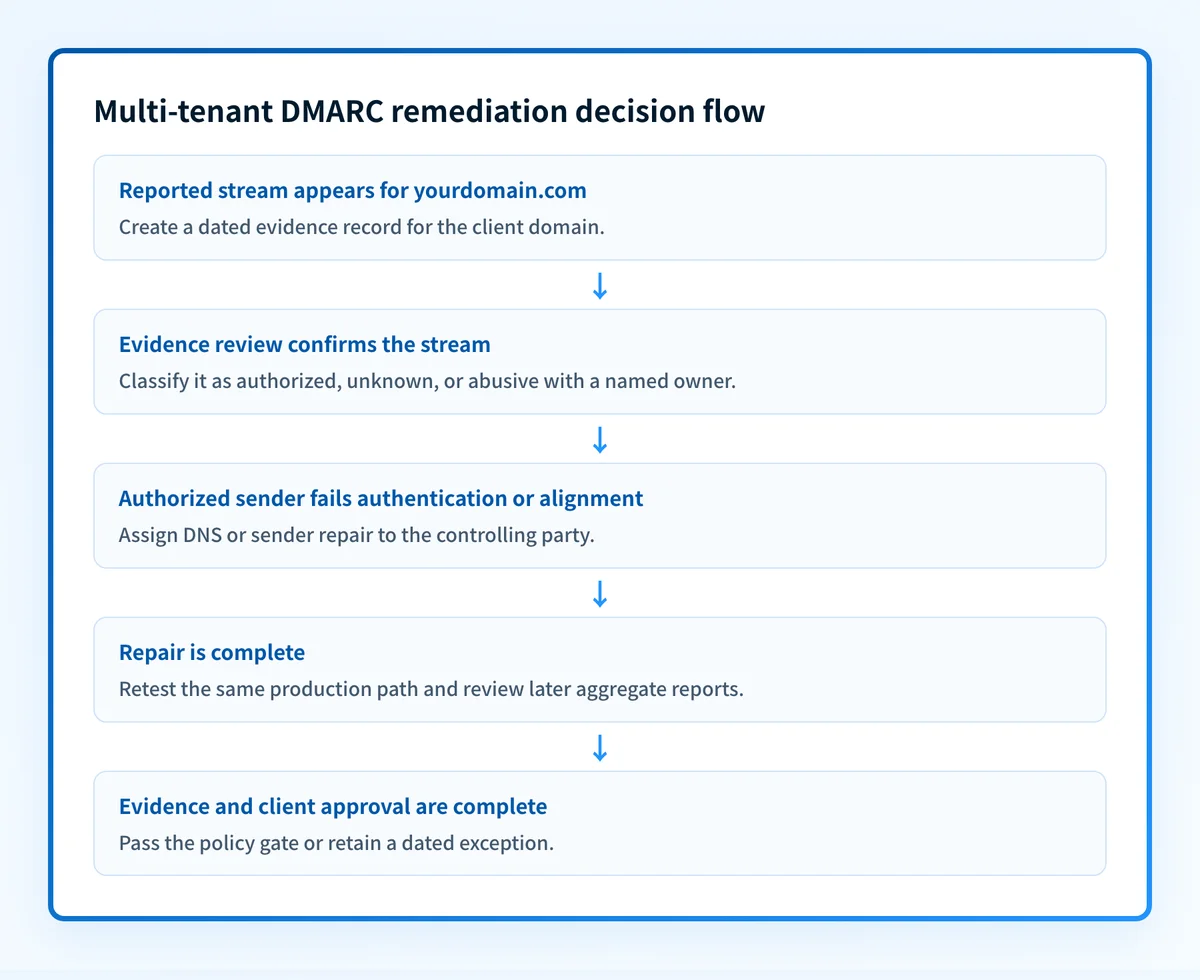
How to run the workflow
1. Triage the reported stream
Confirm the client-domain scope before triage. Use the MSP sender inventory to separate marketing, billing, support, application, and seasonal sending paths. Record excluded domains and the reason for each exclusion.
Owner: MSP remediation operator. Input: aggregate-report finding and current domain record. Output: an evidence record with a provisional classification.
Record the reporting period, source identity available in the report, authentication result, alignment result, volume, and affected domain. Do not mark the source authorized because it has a familiar provider name or appears at high volume. Assign it unknown until the client or a delegated owner confirms its business purpose.
2. Confirm authority and business impact
Owner: client technical or business owner. Input: the provisional evidence record. Output: an authorized, retired, abusive, or unresolved classification.
Ask the client to identify the sending system, business function, system owner, and required sending window. If the client cannot confirm the source, leave the record open. A sender that appears once may be a legitimate low-frequency workflow, but it may also be unrelated to the client's approved systems.
For an authorized sender, document who can change its configuration. For an abusive or unknown sender, document the client decision and retain the evidence that led to the classification.
3. Assign the repair to the controlling party
Owner: MSP service owner. Input: confirmed sender classification and evidence gap. Output: an owner-specific remediation ticket.
The ticket should name the observed condition and the completion test. For example, an authorized marketing sender with an unaligned DKIM identifier needs a sender-platform owner to configure the provider-generated authentication values, then provide a delivered-message sample for review.
Do not use a ticket title such as "fix DMARC." The DMARC policy evaluates SPF and DKIM alignment, so remediation must identify the actual failed path. RFC 9989 describes how aligned SPF or DKIM contributes to DMARC pass.
Do not publish a stricter DMARC policy to compensate for an unverified sender inventory. A policy change can affect legitimate mail that has not yet been identified and repaired.
4. Approve and make the controlled change
Owner: client approver or explicitly delegated decision owner, with the authorized DNS or sender-platform operator. Input: proposed repair and supporting evidence. Output: an approved change record or a documented hold.
Give the approver a concrete package:
- The client, domain, sender, and business-critical path affected.
- The observed problem and evidence supporting the proposed repair.
- Exact before and proposed after values or settings.
- The actor authorized to make the change and the agreed change window.
- The same-path test, expected result, rollback trigger, and rollback owner.
- The recorded decision: approve, defer, reject, or request more evidence.
5. Validate the same production path
Owner: sender owner with MSP verification. Input: approved and completed sender or DNS change. Output: four-layer validation evidence.
First, confirm the published DNS record through the authoritative server and a public resolver. Next, check the sender platform's available verification status. Then send a real message through the exact production path and inspect its raw headers.
Authentication-Results is the message-level evidence that shows how the receiving system evaluated authentication. RFC 8601 defines the Authentication-Results header field. Retain only redacted header evidence in the client record. Do not store credentials, private keys, tokens, or unredacted customer content in a shared portfolio queue.
After report data arrives, compare the repaired path with the aggregate-report outcome. If the report still shows an unexpected result, reopen the work item rather than relying on a single test message.
6. Apply the policy gate with client approval
Owner: client approver, supported by the MSP. Input: completed remediation record, open exceptions, and rollback condition. Output: an approved policy decision or a documented hold.
A domain is ready for a policy-stage recommendation only when legitimate sources have been reviewed, material failures have an owner or accepted exception, and the client has approved the proposed change. The MSP may recommend the next policy stage from the evidence, but the client must approve the decision and the authorized party must apply the DNS change.
Record the complete before and after DMARC TXT values, the effective time, the client approver, and the rollback trigger. Do not describe enforcement as a percentage rollout with pct. RFC 9989 removes the former pct tag and defines the current policy and testing-tag behavior.
For sequencing approved changes across a portfolio, use DMARC policy rollout across client domains. A client’s evidence and approval never authorize another client’s policy change.
7. Close, defer, or escalate the record
Owner: MSP service owner. Input: post-change evidence and client response. Output: closed work, a dated exception, or an escalation.
Close a remediation item only when the defined evidence supports the requested result. Defer it only with a named owner and review date. If an authorized sender cannot support aligned SPF or DKIM, the client must decide whether to retain the risk, change the sending path, or delay a policy change.
Investigate this with your coding agent
Use this when the MSP already has redacted inventory, ticket, and runbook artifacts but needs a consistent remediation-register schema. Prepare only redacted examples and confirm that no active incident or client authorization decision is being delegated.
Agent handoff
Copy the prepared prompt
Give this to a coding agent that can inspect the relevant repository or configuration source of truth.
Problem: Build a proposed remediation register for a multi-client DMARC service where evidence, ownership, approval, validation, and exceptions are currently inconsistent.
Evidence: Redacted domain inventory, existing ticket fields, remediation runbook, DNS change templates, and example aggregate-report or delivered-message evidence with private data removed.
Repository scope: Inspect the approved MSP operations repository, read-only inventory exports, and remediation ticket schema.
Constraints: Inspect before editing. Do not apply changes until I approve the proposed diff. Do not access credentials, private keys, tokens, unredacted headers, customer data, DNS systems, PSA systems, or production incidents. Propose CSV or JSON fields for client/domain, sender, owner, authentication evidence, proposed change, approval status, verification result, exception owner, and review date.
Requested output: Diagnosis of current field gaps, a minimal proposed schema, mappings to existing artifacts, validation rules, rollback considerations, and unknowns.
Verification: Validate the proposed schema against redacted sample records and confirm that each record requires an owner, approval state, verification result, exception owner when blocked, and review date.
Stop if: Credentials, private data, client authorization, production mutation, an active incident, or missing redacted evidence is required.
Human approval required: Review the proposed diff and verification plan before allowing changes. Do not paste secrets, private keys, API tokens, unredacted headers, or customer data.
Exceptions and escalation
Use the following decision model for every unresolved stream:
- Reported stream with no client confirmation: keep it
unknown, request an owner, and set a review date. - Client-confirmed sender with a repair path: assign the task to the sender or DNS owner and require same-path retesting.
- Client-confirmed sender with no safe repair path: document the delivery risk, required business approval, and policy hold.
- Source identified as abusive or unrelated: preserve the evidence and follow the client incident process. Do not treat a DMARC report as a complete incident investigation.
- Missing DNS authority or sender access: escalate to the client sponsor with the blocked action and required access.
- Post-change failure on a business-critical path: use the agreed rollback condition and incident contact.
Reporting and success measures
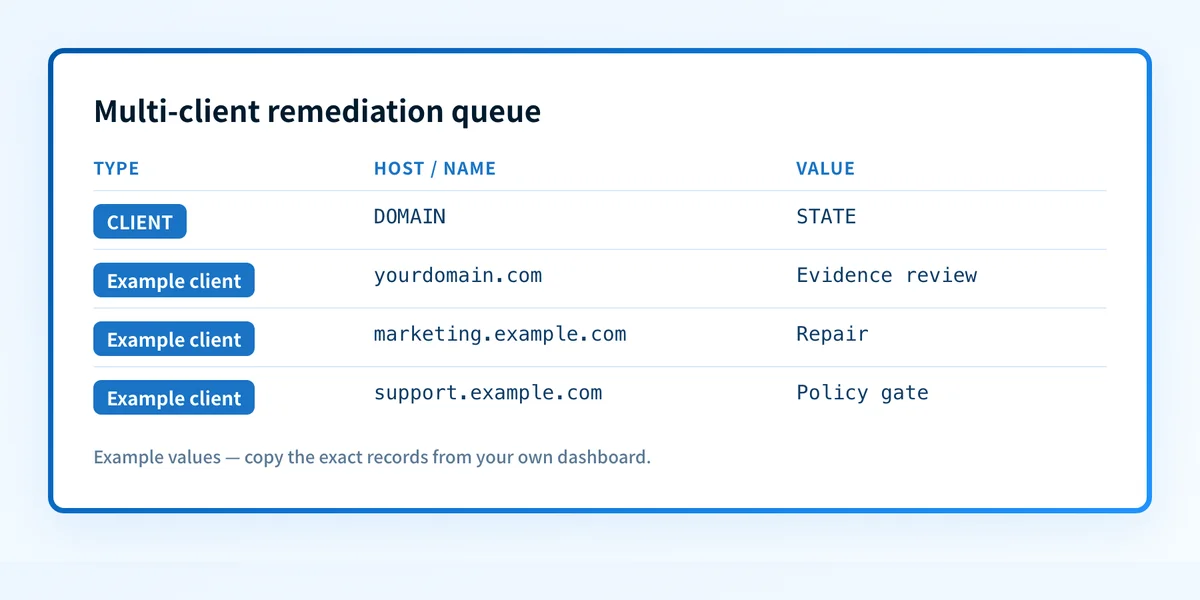
Run a monthly portfolio review and a client-specific operational summary. The report should distinguish work completed from decisions that remain open.
Include these artifacts:
- Domains grouped by remediation state: intake, evidence review, repair, validation, policy gate, or steady state.
- Confirmed, unknown, retired, and abusive-source classifications.
- Open work by controlling owner and review date.
- Exceptions with client approval status, risk statement, and next review.
- Policy changes with before value, approval, post-change evidence, and rollback result.
- Report-delivery gaps that could hide a change in the domain's sending activity.
Palisade is agentic DMARC software that can analyze DMARC aggregate-report data, identify sending sources and authentication or alignment issues, and create prioritized remediation tickets. It can propose the next policy step when the evidence indicates readiness. The MSP and client still review the evidence, authorize senders, and apply approved changes.
Use DMARC QBR reporting to turn the operational register into a quarterly client decision agenda. Keep technical evidence in the service record and summarize outstanding risk, ownership, and decisions for the client.
Turn multi-client findings into an owned remediation queue
After building the evidence record, use a recurring portfolio workflow to keep unknown streams, overdue repairs, and policy decisions visible across clients. Start with Palisade to organize DMARC report findings into prioritized remediation work and review domain readiness for the next policy stage.
Palisade does not authorize a client's sender, change DNS or DMARC policy without human review and approved access, prove every production message will authenticate, or guarantee a receiving provider's delivery decision.
Evidence
Sources and further reading
Questions readers ask
Frequently asked questions
What should an MSP collect before starting client DMARC remediation?
A client DMARC remediation record needs the domain and sender scope, a named client approver, DNS and sender owners, dated authentication evidence, proposed action, verification result, and an exception review date. Keep client-confirmed authorization separate from observed report or DNS results.
Can an MSP treat every DMARC report source as an approved sender?
No. A DMARC aggregate report shows observed authentication and alignment outcomes, but it does not establish business authorization. A client owner or delegated sender owner must confirm whether the source is legitimate.
Does a passing DMARC record check prove the sending path works?
No. A public record check confirms the published DNS response at that point in time. It does not prove that a production application signs with the expected domain, uses the intended return path, or will receive a particular mailbox-provider decision.
Who should approve a DMARC policy change for a client domain?
The client should approve the policy change because the client accepts the delivery risk and owns the business impact. An MSP can prepare evidence and recommend a policy step, while an authorized DNS owner applies the approved change.
What evidence should close a multi-tenant remediation ticket?
A material remediation ticket should include DNS confirmation, sender-platform status where available, a delivered-message header from the repaired path, and later aggregate-report evidence. The exact record should also identify the client, domain, owner, next action, and review date.
Can Palisade automatically move a client to DMARC enforcement?
No. Palisade can analyze aggregate-report data, identify authentication or alignment issues, create prioritized remediation tickets, and propose the next policy step. A human reviews the evidence and applies an approved policy change.

Written by
Taylor TabusaCo-Founder & Head of Business Development, Palisade
Taylor Tabusa is the co-founder and Head of Business Development at Palisade, helping managed service providers turn email security into a practical, valuable service.
More from Taylor →