How to roll back a DNS change that broke a client's email
 ChatGPT
 Claude
 Gemini
 Perplexity
 Grok
In brief
Roll back a DNS change that broke client email by identifying the changed record, restoring the known-good value, checking live DNS, and documenting.
To roll back a DNS change that broke a client's email, identify the exact record change, restore the last known-good value through the DNS provider, then verify the currently published record before declaring recovery. For an MSP, the rollback must also preserve evidence, approval, ownership, and a clear handoff because the client, DNS host, sender platform, and mailbox provider each control different parts of the incident.
At a glance
Quick takeaways
- Restore only the record value tied to the observed regression, not every recent DNS change.
- Preserve the current value, earlier value, timestamp, approver, and rollback reason in the incident record.
- A changed SPF authorization can contribute to delivery failure, but it does not prove SPF caused every post-change email incident.
- DNS history can identify a change, while the DNS provider performs the actual restore.
- A public DNS check confirms a visible record value, not a sender's production behavior or a receiver's delivery decision.
- Keep a client approver involved before a production DNS mutation unless the service agreement explicitly delegates that authority.
Operating context and ownership
A client-email DNS rollback is an incident workflow for an MSP managing several domains, providers, and client contacts. The MSP coordinates evidence, identifies the suspected change, prepares a rollback candidate, and verifies the published result. The client retains business-risk approval unless delegated in writing. The DNS host controls the zone mutation, the sender platform controls its sending configuration, and receiving mailbox providers make their own message-handling decisions.
SPF in RFC 7208 lets a domain authorize hosts that use its domain name, and receivers can check that authorization. An incorrect SPF change can therefore contribute to an email-delivery regression. That is an inference from SPF's authorization model, not proof that an SPF record caused a particular incident.
Treat this as one component of a broader MSP email-authentication workflow. The operating framework below is Palisade guidance, not an external DNS or mailbox-provider requirement.
Set these responsibility boundaries before an incident:
- The MSP incident owner collects the incident evidence, compares record history, proposes the minimum rollback, and records validation.
- The client technical approver confirms business impact and authorizes the production change when required.
- The DNS host administrator restores the approved record value in the authoritative zone.
- The sender owner provides a fresh message sample or vendor status when DNS alone cannot establish recovery.
- The mailbox provider remains responsible for its own delivery and filtering decision.
Do not restore a broad DNS backup because one client mail path failed. An unrelated MX, DKIM, DMARC, MTA-STS, or nameserver change can create a second outage.
Evidence to collect
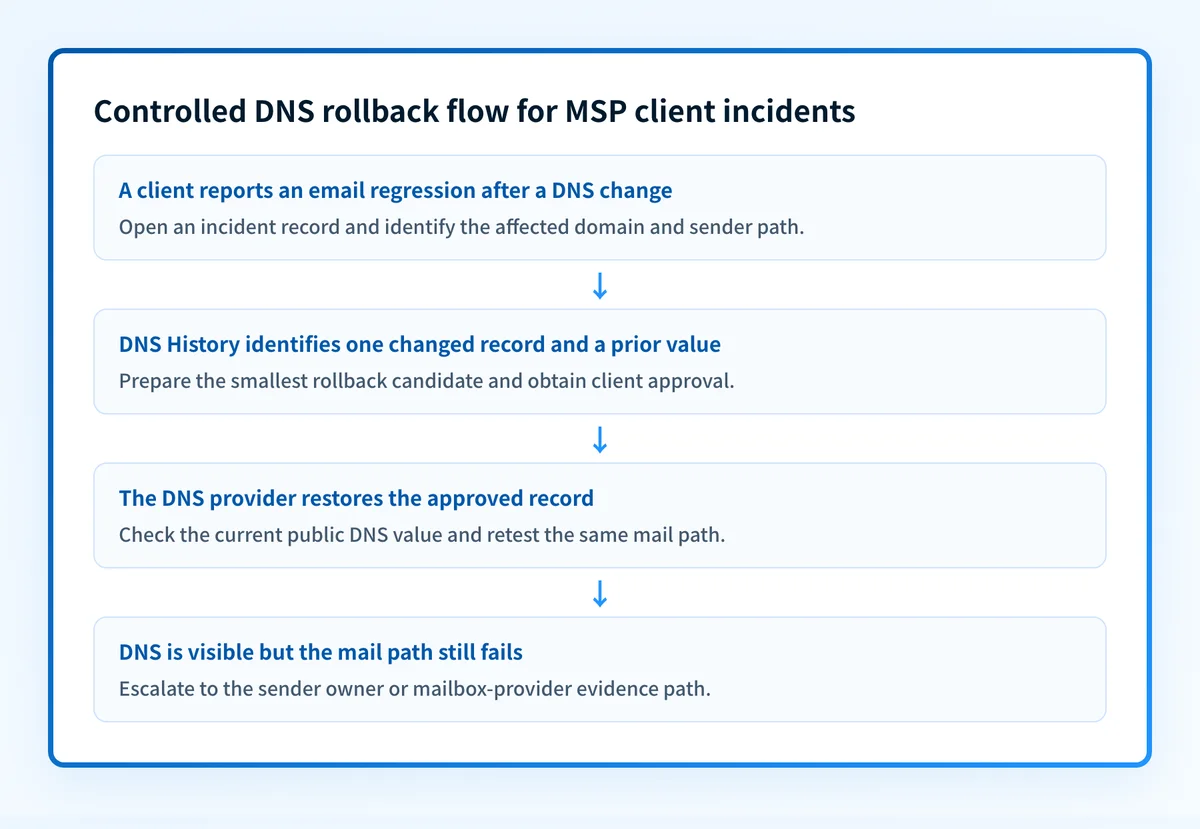
Open one incident record per affected client domain. Keep the observed failure separate from the suspected DNS cause. A user report that mail stopped arriving identifies impact, but it does not identify the responsible record.
Palisade DNS History is available from the Domain Overview gear menu. It shows a timeline of DNS-record snapshots and supports filters for SPF, DMARC, BIMI, MX, DKIM, and NS records, with date windows from 14 to 60 days. Consecutive snapshots can be compared in a diff view to identify the changed record type, value, and snapshot time.
Use this portable record in a ticket, PSA, or client incident log:
client: example-client
domain: yourdomain.com
evidence: "DNS History diff and redacted delivered-message result"
owner: "MSP incident lead"
next_action: "Client approves restoration of prior SPF TXT value"
review_on: "2026-11-06"
Also retain:
- The full current record value and the prior known-good value.
- The record name and type.
- The time the change appeared and the time the email symptom began.
- The affected sender, recipient, and business process, without copying private message content into a shared portfolio record.
- The DNS-provider account owner and client approval status.
- The rollback trigger and the same-path retest required after restoration.
How to run the workflow
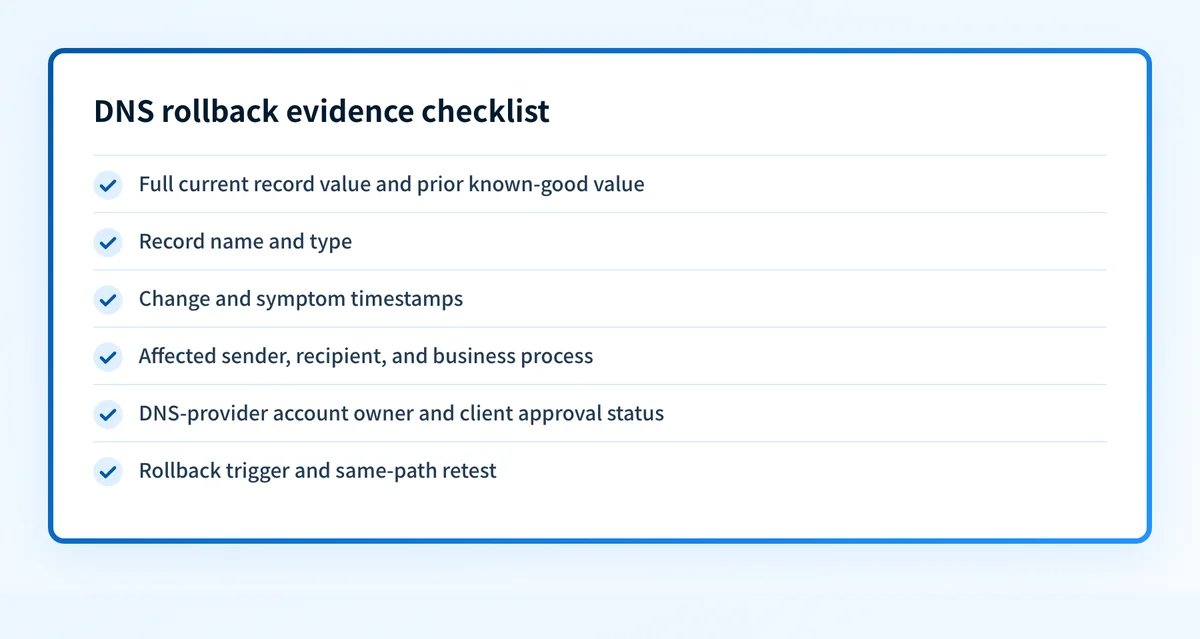
1. Contain and classify the incident
Owner: MSP incident lead. Input: client report, ticket, or observed message symptom. Output: a scoped incident record.
Record the affected domain, sender path, first-known failure time, and business impact. Ask whether a DNS change was made near that time, but do not call it causal yet. If the issue is limited to one sender, retain that sender's ownership and request a redacted delivered-message result after the DNS record is checked.
2. Compare the DNS history
Owner: MSP incident lead. Input: affected domain and incident time window. Output: a specific rollback candidate or an unresolved DNS hypothesis.
In Palisade DNS History, filter to the relevant record type and compare consecutive snapshots. The documented view shows the snapshot date and time, record type, record value, and diff. Identify the smallest change that could reasonably be reversed.
For example, an SPF rollback candidate is a complete prior TXT value, not a manually reconstructed subset:
Illustrative only. Do not publish this as a production record.

yourdomain.com. IN TXT "v=spf1 include:spf.example.net -all"
DNS History identifies an earlier value. It does not document a one-click restoration of that value, so perform the actual mutation through the DNS provider's approved process.
3. Obtain client authorization and prepare the change
Owner: client approver and DNS administrator. Input: rollback candidate, impact record, and validation plan. Output: approved provider-side change.
Present the current and proposed values, exact record name, reason for restoration, expected test, rollback owner, and time of approval. If the domain has an active DNS connection, Palisade DNS Connections shows current and proposed values side by side before publishing an email-authentication record.
Do not merge records to make a rollback fit. Palisade stops on conflicts such as “Two SPF records at a name, or a CNAME sitting beside a TXT, is a conflict. Palisade reports it and stops.” A publish requiring removal displays “Will delete N records” and starts unticked, so record deletion needs explicit review.
4. Restore the last known-good value
Owner: authorized DNS administrator. Input: approved prior record value. Output: provider-side confirmation that the record was changed.
Restore only the approved record at the affected name. Save the provider confirmation and the prior value in the incident ticket. Do not claim the client is recovered at this stage. The available documentation does not establish a universal propagation duration or provider-specific restore procedure.
5. Verify the live DNS answer
Owner: MSP incident lead. Input: restored value and provider confirmation. Output: recorded live-DNS verification.
Use Palisade DNS Records to inspect the raw DMARC, SPF, DKIM, MX, BIMI, MTA-STS, and NS values Palisade currently sees. It is accessed from the Domain Overview gear menu and supports a post-change propagation check. Independently, use the DNS lookup tool to inspect the public result.
A public DNS result does not prove that the production sender uses the expected configuration, that every resolver has updated, or that a mailbox provider will deliver future mail.
6. Retest the affected mail path and close deliberately
Owner: sender owner with MSP incident lead. Input: a new message sent through the same production path. Output: recovery evidence or escalation.
Send a new test through the sender and recipient path that exposed the incident. Compare the new result with the original symptom where available. If the original issue involved a changed SPF authorization, verify the sender path rather than treating a visible TXT record as a complete delivery test.
Close the rollback only when the record is visible, the affected path has been retested, the client has received the result, and any remaining uncertainty is recorded.
Investigate this with your coding agent
Use this when the client's DNS records or infrastructure-as-code definitions are version controlled and you need a read-only comparison before proposing a rollback. Prepare redacted record names, record values, commit references, and approved verification queries.
Agent handoff
Copy the prepared prompt
Give this to a coding agent that can inspect the relevant repository or configuration source of truth.
Problem: A DNS change may have broken email for one client domain, and the MSP needs a minimal rollback candidate.
Evidence: Redacted current and known-good record values, affected domain, record type, incident timestamp, version-control references, and approved DNS lookup queries.
Repository scope: Inspect only the client's approved DNS or infrastructure-as-code repository paths.
Constraints: Inspect before editing. Do not apply changes until I approve the proposed diff. Do not cross tenant boundaries, expose secrets, alter production files, or broaden the rollback beyond the identified record.
Requested output: Diagnosis, minimal proposed change, rollback, and unknowns.
Verification: Compare the proposed record with the known-good value, then retest the same DNS lookup and affected production sending path after human-approved publication.
Stop if: Credentials, private data, production mutation, client authorization, affected-zone scope, or live-verification evidence is required.
Human approval required: Review the proposed diff and verification plan before allowing changes. Do not paste secrets, private keys, API tokens, unredacted headers, or customer data.
Exceptions and escalation
Escalate instead of restoring a record when the evidence does not isolate one safe candidate.
- No known-good value: ask the DNS owner for change records or provider history. Do not reconstruct a record from memory.
- Multiple records changed: prepare separate candidates and require client approval for each mutation.
- DNS is correct but the same message path still fails: hand off to the sender owner or mailbox-provider evidence path. DNS evidence alone has reached its limit.
- A record conflict appears: stop and investigate. Do not remove TXT or CNAME records merely to make a proposed value publish.
- Client approval is unavailable during a business-critical incident: follow the contracted incident authority. If no delegated authority exists, preserve evidence and escalate to the client approver.
- The incident affects several tenants: keep evidence, approvals, and proposed changes isolated by client domain.
Reporting and success measures
Report rollbacks in the monthly service review as controlled incidents, not as proof of universal email health. Include the client domain, suspected record type, time discovered, approved change, evidence used, validation status, and any unresolved sender or receiver dependency.
Useful portfolio measures include:
- Incidents with a complete before-and-after DNS record.
- Rollbacks that had documented client approval.
- Incidents with a same-path message retest after DNS verification.
- Open incidents where ownership or a known-good value is missing.
- Repeated changes to the same record name.
Standardize DNS rollback control across clients
A DNS-history view and a consistent incident record help an MSP identify changes without mixing client evidence or granting blanket change authority. Explore Palisade for managed service providers to assess whether its domain monitoring, DNS history, and DNS connection workflow fit your portfolio process.
Palisade can show DNS history and current records, and it can present proposed values before an approved publish. It does not restore arbitrary historical snapshots automatically, authorize client changes, prove every sending path, or control a receiving mailbox provider's final decision.
Evidence
Sources and further reading
Questions readers ask
Frequently asked questions
How do I undo a DNS change?
Identify the earlier record value and timestamp, obtain the required approval, then restore that value through the DNS provider. Palisade DNS History can identify earlier snapshots and diffs, but the supplied DNS History documentation does not describe direct restoration of a historical snapshot.
Why did email stop working after a DNS change?
A changed SPF record can contribute to email-delivery trouble because SPF publishes which hosts are authorized to use a domain and receiving hosts can check that authorization under RFC 7208. The DNS change alone does not prove SPF, DNS, or any other record caused the incident.
How long does a DNS rollback take to work?
A DNS rollback does not have a universal duration guarantee in the available primary sources. Check the current raw DNS values in Palisade DNS Records, then retest the same affected sending path before declaring recovery.
Can an MSP roll back a DNS change without client approval?
Only when the MSP has explicit delegated authority for that client and zone. Otherwise, the MSP should prepare the rollback candidate, explain the impact and validation plan, and obtain the client's approval before a production DNS change.
Does a passing DNS lookup prove client email is fixed?
No. A DNS lookup can show a publicly visible record value. It cannot prove the production sender is using the expected configuration, that all resolvers have updated, or that a mailbox provider will accept a future message.

Written by
Samuel ChenardCEO & Co-Founder, Palisade
Samuel Chenard is the CEO and co-founder of Palisade, agentic DMARC software for IT teams and MSPs, from one domain to thousands.
More from Samuel →